Outdated Drivers Are Slowing You Down
Outbyte Driver Updater · freeOne free scan finds every outdated or missing driver and matches the right update for your exact hardware.
Scan My Drivers Free →ThatPainter is reader-supported. When you buy through links on our site, we may earn an affiliate commission. Learn More
The strongest home office decor ideas for him start with the way he works, not with a fixed idea of what a “man’s office” should look like. Give the room a reliable desk, comfortable seating, useful storage and controllable light; then add colors, art, plants and textures that reflect his actual interests.
The ten ideas below work for a dedicated study, a bedroom corner or a shared room. Treat “for him” as personal tailoring: warm wood, earthy color, clean minimalism, industrial details or collected objects are all valid when they suit the person and the home.
As an Amazon Associate I earn from qualifying purchases.
Recommended Free Tools
Begin with the work, not the stereotype
Before choosing paint, accessories or a statement chair, list what the room must support. A writer needs clear space for a keyboard and notes; someone on video calls needs a calm camera background; a person who handles paper needs somewhere to file it; and a hobbyist may need display or project space. The IKEA home workspace guide treats storage, ergonomics and lighting as foundations rather than finishing touches.
Measure the available wall, the door swing, windows, outlets and the clearance needed to pull out a chair. Check where daylight falls at the hours the room is used, and note whether the office must convert back into a guest room or living area. Multifunctional furniture and compact layouts can make a limited room workable; larger rooms benefit from zones instead of one oversized desk. Examples from Herman Miller’s home-office design guide show how a workspace can share a room without taking over every activity.
#1 Best Overall

- Dimension of keyboard wrist rest: 17.32 x 3.15 inch, that of circle curved mousepad wrist support: 9.65 x 8.66 inch, dimension of coaster: 3.9 inch (diameter). Fits all mouse/keyboard. Compatible with MacBook / Notebook / Chromebook / Ultrabook / Desktop / PC, also compatible with iMac.
- This mouse pad with wrist rest is ergonomically designed with breathable neoprene cloth and silicone lining. It's soft with a slow rebound, offering exceptional comfort and support. The silicone-lined mouse pad is its superior non-slip grip, ensuring stable tracking on any desk surface during intense use. The keyboard wrist rest features a memory foam lining that offers plush support to alleviate wrist pressure and pain, keeping your wrists in a natural and comfortable position.
- Non-slip base can firmly grasp the desk to prevent sliding or any unintentional movement. This mouse pad with wrist rest and keyboard pad will provide stable operation for your mouse and keyboard. The unique design is not only easy for you to use, but also to decorate your desktop and show your personal style.
- The filled cushion part will slowly rebound when leave it, not easy to deform. The curved shaped design of the mousepad can be well fitted to your wrist, providing comfortable support during prolonged use.
- This mouse pad and keyboard wrist rest is suitable for OL gamer and programmer used in home / office. Suitable for friend, family member and yourself.
| Room condition | Useful starting layout | Decision to make |
|---|---|---|
| Small alcove or corner | Compact desk with vertical storage or a wall shelf | Prioritize the surface needed for daily work and keep walkways clear. |
| Shared bedroom or living room | Desk that can visually recede, with closed storage | Choose finishes that relate to nearby furniture so the office can disappear when not in use. |
| Dedicated spare room | Desk plus a separate reading, filing or project zone | Use the extra floor area for function rather than filling it with ornaments. |
| Desk visible on video calls | Work surface angled toward a composed wall or shelving | Check the camera view, glare and background clutter from the seated position. |
| Work that changes from day to day | Flexible desk, mobile cart or multifunctional table | Allow the room to switch between focused work, meetings and storage. |
Use the rest of the room as the style filter. A new office should feel connected to the home rather than like a showroom assembled from unrelated “masculine” cues. NORD Architecture’s men’s office inspiration is useful for seeing varied directions, but it is inspiration, not a rulebook.
1. Choose a palette that feels like him
Start with one dependable base color, one supporting neutral and a smaller accent. A warm white with walnut and muted green feels different from charcoal with pale oak, while sand, rust and deep blue create another mood. These are taste options, not guaranteed productivity formulas; choose the combination he will still enjoy after the novelty fades.
Free tools Windows power users keep installed
One-click scans. No signup required.
Sample paint and large finishes in the actual room. Daylight, evening lamps and nearby flooring can shift how a color reads. If the office shares a wall with a living room, borrow one hue from that space so the transition feels deliberate. Keep high-contrast accents for a chair, pinboard or art rather than scattering many competing colors across the desk.
2. Make the desk fit the room and the work
A desk is the room’s main tool. Match its footprint to the work: allow room for the computer, the input devices used every day and whatever must remain open, such as a notebook, drawing tablet or reference book. If the surface is tight, a monitor riser, wall shelf or rolling cart can move occasional items off the main plane without forcing a larger desk into the room.
Rank #2

- 【Adjustable & Ergonomic】:This laptop stand can be adjusted to a comfortable height and angle according to your actual needs, letting you fix posture and reduce your neck fatigue, back pain and eye strain. Very comfortable for working in home, office and outdoor.
- 【Sturdy & Protective】 :Made of sturdy metal, it can support up to 17.6 lbs (8kg) weight on top; With 2 rubber mats on the hook and anti-skid silicone pads on top & bottom, it can secure your laptop in place and maximum protect your device from scratches and sliding. Moreover, smooth edges will never hurt your hands.
- 【Heat Dissipation】 :The top of the laptop stand is designed with multiple ventilation holes. The open design offers greater ventilation and more airflow to cool your laptop during operation other than it just lays flat on the table.
- 【Portable & Foldable】:The foldable design allows you to easily slip it in your backpack. Ideal for people who travel for business a lot.
- 【Broad Compatibility】:Our desktop book stand is compatible with all laptops from 10-15.6 inches, such as MacBook Air/ Pro, Google Pixelbook, Dell XPS, HP, ASUS, Lenovo ThinkPad, Acer, Chromebook and Microsoft Surface, etc.Be your ideal companion in Home, Office & Outdoor.
Built-in drawers help when supplies must be close; a clean trestle or simple slab works when storage is handled elsewhere. In a compact office, consider a narrow console, folding surface or desk that doubles as a dressing or craft table. In a large room, place the desk so the chair does not block a door or radiator and so daylight comes from the side rather than directly behind a screen. Sit in the actual chair before finalizing the position: comfort and reach matter more than a symmetrical photograph.
3. Layer natural and task lighting
Use daylight where it is practical, then add controllable light for reading, writing and detailed work. Homebuilding’s home-office lighting advice recommends combining natural light with focused task lighting rather than relying on one ceiling fixture. A directional home office desk lamp or adjustable desk lamp lets him aim light at a page or work area and move it when the desk changes.
Place a screen so a window is beside it when possible; a window directly in front or behind the monitor can create distracting reflections. Use a shade or curtain to control strong daylight, and position the lamp so the writing hand does not cast a shadow across the page. Keep the lamp’s controls easy to reach, and leave enough desk space that the lighting solution does not become another obstacle.
4. Hide everyday clutter with useful storage
Storage protects the surface that makes work possible. Give recurring items a specific home: drawers for stationery, a cabinet for files and equipment, and a small organizer for items used several times a day. Closed doors are valuable for visual calm, especially when the office is in a shared room, while open bins make frequently used supplies faster to grab.
Rank #3

- 【Ergonomic Design】:OPNICE newly releases the monitor stand for desk organizer! This computer stand elevates your monitor or laptop to a comfortable viewing height, relieving pressure on your neck, shoulders. Ideal for strengthening office organization and increasing comfort levels
- 【Save Space】:This 2-Tier monitor stand with drawer and 2 hanging pen holders provides ample storage space to keep your office supplies and office desk accessories neatly organized and easily accessible, keeping your workspace tidy and improving your sense of well-being
- 【Durable and Stable】:The metal computer stand is made of high quality material with sturdy construction, it can easily carry the weight of the display and computer accessories, to ensure stable and non-shaking for a long time, ideal for use in the office, dorm room or home
- 【Sleek and Aesthetic】:This desktop organizer features a modern minimalist design that blends seamlessly with any office decor. It not only enhances functionality but also adds a touch of style and aesthetic to your workspace, making it an essential piece for your office organization efforts
- 【Hassle-free Shopping】:OPNICE is committed to providing excellent after-sales service and offers a 100-day unconditional return policy for desk organizers and accessories. Comes with four non-slip pads that are height-adjustable to protect your table from scratches(U.S. Patent Pending)
Store heavy items low and keep a clear route to anything that needs regular access. Label only what helps; an over-complicated filing system will be abandoned. Before buying containers, group the actual supplies and measure them. This prevents a collection of mismatched boxes that consumes more room than the things it is supposed to hold.
5. Use shelves as a small display, not a dumping ground
Shelves can combine reference material with personality. Place the books he reaches for where they are easy to remove, then add a few meaningful objects or framed pieces rather than filling every inch. Leave intentional gaps so each item can be seen and dusted.
Quick wins for a faster PC:
Fix the driver behind crashes, sound loss and screen glitchesFind Drivers →Clear out junk files and repair common Windows errorsFree Scan →Vary height and orientation, but keep the visual weight balanced from one shelf to the next. If the desk is on camera, put the most personal items within the camera’s frame and reserve less attractive equipment for closed storage. A single shelf or picture ledge may be enough in a small room; a full wall of open shelving requires a maintenance routine and a plan for future additions.
6. Put personal art where it can be enjoyed
Art is a direct way to make the office feel owned rather than staged. A map, photograph, print, drawing or piece connected to a hobby can all work because the choice is personal, not because one subject is universally appropriate. The practical styling guidance in Homes & Gardens’ home-office ideas and Ideal Home’s workspace planning advice both support using personal objects to give a room character.
Rank #4

- [MULTIFUNCTIONAL]You'll get 2 pieces computer monitor memo boards that you can stick on the left and right edges of your monitor, and they're the perfect office desk organizers and accessories. Computer monitor side panels desktop organizer are suitable for home work or office,bringing convenience. Desktop memo is used to organize meeting memos, important messages, business cards, planning notes.Paste on the message board to keep track of important things and to-do items to prevent forgetting.
- [🌟HIGHLY QUALITY] The material of computer screen side note holder is transparent acrylic. Durable, simple, stylish, light weight, easy to use, not easy to fall off or break. This cute office supplies for women desk can be used for a long time. This computer desk accessories is waterproof and dirt resistance, and look simple and stylish. The transparent acrylic sticky note holder as cubicle accessories is easy to notice the context of your sticky notes.
- [📋Easy to use] Office must haves cool office gadgets for desk ready to tear, easy to install and remove, not easy to leave traces. You only need to peel off the protective film on the surface of the computer side board memo, wipe off the dust on the edge of the computer monitor, and then stick the desk essentials for women office on the right or left side of the tape, and you're done. A perfect gift for your colleagues, friends or classmates and family members or relatives
- [🏢MULTI-SCENE USE] This desk supplies computer memo board can be applied to home and office, clear your office decor for women, suitable for most computer monitors, screens and cabinets, you can put it where you think, this cute office decor serve as a reminder. Stick on the computer side. It’s a good office gadgets can remind work improve office productivity. Pasted cabinets, dressers, refrigerators, walls, etc as cubicle accessories. To make life more orderly.
- [💌NOTE] The adhesive force of the computer sticky note holder is very strong. It can not be directly pasted on the computer screen. It should pasted on the black edge of the screen. Narrow edge not recommended!!! If you are not satisfied with your purchase, or if the product is damaged or broken in transit, please let us know immediately. We will promptly solve your problem.
Hang art at a comfortable seated sightline and check it from the doorway as well as the chair. Group smaller pieces with consistent spacing, or let one larger work act as the anchor. Keep valuable or delicate pieces away from direct sun and from areas where a chair or equipment could strike them.
Independent reader supportYour contribution helps us test, update, and keep practical guides available for everyone.7. Bring in one natural element
A plant, visible wood grain, stone, woven fiber or another nature-inspired detail can soften a workspace visually. A plant is a good choice when the room provides suitable light and he is willing to water it; a low-maintenance variety or a quality artificial option is better than a neglected living one. The IKEA biophilic office gallery shows how plants can be integrated with furniture and display rather than treated as an afterthought.
Crashes, No Sound, or Screen Glitches?
Random freezes, missing sound and display glitches usually trace back to one bad driver. Find and replace yours safely.Free scan · under a minuteWindows Errors? Fix Them Before They Spread
Repair common Windows errors and clear accumulated junk for a smoother, more stable PC - no reinstall needed.Free scan · no reinstallKeep leaves clear of screens, vents and walking paths, and use a saucer that protects the desk or floor. If maintenance is limited, choose one intentional natural feature instead of many small pots that compete for attention.
8. Add a soft surface for color and texture
A rug, runner, curtain, upholstered pinboard or other textile can make a hard-surfaced office feel connected to the rest of the home. Use it to introduce an accent color or a subtle pattern that repeats elsewhere in the room. In a small space, a flat, easy-to-clean rug is simpler to live with than a thick pile beneath a rolling chair.
Best Value
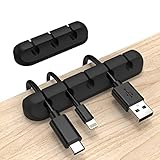
- Cable Holder for Car: Our cord organizer are super useful for organizing cables. It will prevent your Phone charging cables, USB cables, network cables, TV power cords from excessive bending tangling and fray, keep your room tidy and neat.
- Adhesive Cable Clips: This phone cord holder for desk comes with a strong 3M adhesive pad that can adhere to any smooth and clean surfaces at home or office, such as glass, plastic, metal or wood tables, desks and walls. Easy to install no need to hammer holes or attach screws.
- Silicone Cable Organizer: These wire management are made of high quality eco-friendly and flexible silicone material that bends easily and insert the cables smoothly.
- Suitable for Daily Use: Our cord clips suitable for the wire diameter within 0.26 inch(6mm). You can not only use it as a wire clip, but also as a pen holder, a toothbrush, or floss holders. Perfect size to meet your daily use requirements.
- Little Tips: For better use of our wire organizers, please make sure the desk surface is clean smooth, oil-free, dust-free, and water-free before stick it. And keep it for at least several hours after fixation, 24 hours is better.
Check that the rug does not catch casters or prevent a door from opening. Choose washable or replaceable textiles if drinks, pets or frequent projects are part of the room’s reality. The purpose here is visual warmth and a finished feeling, not an unsupported promise about acoustics or health.
9. Keep equipment and cables orderly
Treat cable management as part of the layout, not as a final cosmetic fix. Create one charging zone, route cords along the rear edge of the desk, and use a tray or clips to keep slack off the floor. Put the power strip where it can be reached without crawling behind furniture, while keeping ventilation openings on computers and other equipment unobstructed.
What’s actually slowing this PC down?
Pick the symptom - the matching free tool is one click away.
Store headphones, adapters and spare peripherals in one labeled drawer or box. If a device is used only occasionally, move it off the desk between sessions. The result should be a clear working surface that can be reset quickly, not a tangle hidden just outside the camera frame.
10. Style the background and the rest of the room together
When the desk appears in video calls, compose the nearby wall deliberately. A calm paint color, a few shelves, one framed piece and a plant can provide depth without turning the background into a display of everything he owns. Sit in the chair, open the camera preview and remove anything distracting, confidential or brightly backlit.
Then step outside the camera view. The office still needs to work from the doorway, at night and when another person uses the room. Repeat one finish, color or material from the adjacent home so the workspace belongs to the same interior. A cohesive background is useful, but it should never force the desk into an awkward position or reduce the usable surface.
A practical order for putting the room together
- Audit the work. List the daily tasks, equipment, papers and occasional activities the room must support.
- Measure and mark. Record walls, windows, outlets, door swings and chair clearance with tape on the floor.
- Place the desk and seat. Test reach, screen position, daylight and the view from the doorway before unpacking accessories.
- Solve light. Add a controllable task lamp and adjust window coverings so the screen and work surface remain usable at different times.
- Assign storage. Put high-frequency items within reach, infrequent items behind doors or in a cabinet, and leave the main surface open.
- Layer the identity. Add the chosen palette, one or two natural materials, art, a plant if practical, and a textile that relates to the home.
- Test real use. Work for a full session, make a call, retrieve stored items and reset the room. Move or remove anything that interrupts those actions.
The finished office does not need to look traditionally masculine. It needs to make his work easier to start, his belongings easier to manage and his surroundings recognizably his. Function establishes the room; carefully chosen color, art and natural details give it personality without taking over.
Do these 3 things before closing this tab:
1Fix the driver behind crashes, sound loss and screen glitches2Repair Windows errors before they cause bigger problems3Scan for outdated or missing drivers - takes under a minuteQuick Recap

Product prices and availability are accurate as of the date/time indicated and are subject to change. Any price and availability information displayed on Amazon at the time of purchase will apply.

