ThatPainter is reader-supported. When you buy through links on our site, we may earn an affiliate commission. Learn More
Leonardo.Ai is worth trying, but it is more than an AI image generator. It is a broad visual-creation platform with text-to-image, image-to-image, editing, upscaling, Realtime Canvas, video, custom model training, team workflows, and an API. Its breadth is a major advantage for creators who want to move from idea to usable asset in one ecosystem; its learning curve, variable token costs, and free-tier privacy limits are the main reasons to proceed carefully.
Verdict
Leonardo.Ai is worth trying if you want more than a prompt box. It combines text-to-image generation with image-to-image work, reference controls, editing, upscaling, sketch-to-image creation, video, custom model training, team features, and an API. That breadth makes it a credible all-in-one workspace for illustrators, concept artists, marketers, and developers.
The tradeoff is complexity. Leonardo has more controls and model choices than a minimalist image generator, so the learning curve is steeper. Token costs vary by model and operation, free creations are public, third-party models may consume tokens even on plans with relaxed generation, and neither the platform nor its terms guarantee perfect prompt adherence, consistent identities, unique outputs, or copyright protection.
The Tool Desk
Outbyte Driver Updater FREEScan for outdated or missing drivers - takes under a minuteDriver Scan →Outbyte PC Repair FREEClear out junk files and repair common Windows errorsFree Scan →#1 Best Overall

- Wacom Intuos Small Graphics Drawing Tablet: Enjoy industry leading tablet performance in superior control and precision with Wacom's EMR, battery free technology that feels like pen on paper
- Works With All Software: Wacom Intuos tablet can be used in any software program to explore new facets of digital creativity; draw, paint, edit photos/videos, create designs, and mark up documents
- What the Professionals Use: Wacom's industry leading pen technology and pen to paper feeling makes it the preferred drawing tablet of professional graphic designers
- Software and Training Included: Only Wacom gives you software with every purchase. Register your Intuos tablet and gain access to some of the best creative software and Wacom's online training
- Wacom is the Global Leader in Drawing Tablet and Displays: For over 40 years in pen display and tablet market, you can trust that Wacom to help you bring your vision, ideas and creativity to life
Bottom line: Leonardo.Ai is one of the more complete AI visual-creation platforms for users who value control and workflow breadth. Start with the free plan for experimentation, but use a paid plan for confidential work and budget according to the models and features you actually intend to use.
This review is based on Leonardo.Ai’s published pricing, help documentation, terms, API material, and reported independent-review experience. It does not claim personal hands-on testing or a controlled benchmark.
Leonardo.Ai at a glance
| Category | What Leonardo offers | Main consideration |
|---|---|---|
| Image creation | Text-to-image, image-to-image, reference images, model selection, styles, dimensions, and guidance controls | Results and token costs vary with the chosen model and settings |
| Editing | Inpainting-style edits, background removal, image refinement, and upscaling | Editing fidelity is not uniform; reported reviews note that some workflows can feel unintuitive |
| Realtime tools | Realtime Gen and Realtime Canvas for prompt-driven or sketch-driven iteration | Excellent for ideation, but the quality of the sketch or source image still matters |
| Video | Text-to-video and image-to-video workflows, including models listed by Leonardo such as Veo 3 and Kling Video 3.0 in its February 2026 documentation | Availability, cost, duration, sound, and usage limits can change by model and plan |
| Consistency | Personal model training and Elements for recurring styles, aesthetics, or asset types | Training does not guarantee perfect character identity or exact style replication |
| Collaboration | Teams, collections, shared assets, and private generations on paid plans | Team pricing and capabilities should be checked separately from individual plans |
| Automation | Visual-first API with image, video, training, presets, upscaling, and blueprint-style workflows | API credits are separate from web-app tokens |
What is Leonardo.Ai?
Leonardo Interactive Pty Ltd, trading as Leonardo.Ai, operates a cloud-based generative platform for making images and videos, training user models, organizing creative assets, and delivering generation through the web, mobile apps, teams, and an API. Leonardo’s privacy material identifies the company as a Canva brand.
The platform serves two different audiences at once. A beginner can enter a prompt and generate an image from the home page. An experienced creator can select models, upload references, adjust guidance and seeds, edit an existing image, train a personal model, organize results into collections, or export a workflow as API code.
That range is the central point of this review. Leonardo is best understood as a visual-generation workspace rather than a single image-generation model.
Image generation: more control than a basic prompt box
The standard workflow is straightforward: write a prompt, choose the relevant generation settings, and create an image. The expanded workflow adds control over dimensions, styles, model selection, and reference-image uploads. Image-to-image workflows let you start from an existing picture rather than describing everything from scratch.
Leonardo’s model selection is also broader than a platform built around one proprietary model. Its current paid-plan material lists both Leonardo-developed and third-party models. That is useful when a particular model has a better visual style or workflow for a subject, but it complicates pricing: the token cost is not determined by the fact that you are using Leonardo’s interface alone.
Reference images and guidance controls are especially useful for painters, illustrators, and art directors who need to communicate composition, color, pose, or visual direction. They can reduce the amount of information that has to be expressed in text. They do not turn a generative result into a fully deterministic reproduction of the reference.
Recommended Free Tools
Prompt adherence and output quality
Independent reviews generally describe Leonardo as capable, fast, and feature-rich, with enough control for professional-oriented workflows. They also report occasional prompt-adherence problems, interface complexity, and editing workflows that are not always intuitive. These are reported user-experience observations, not universal benchmark results.
In practical terms, Leonardo is likely to work best when you treat the first generation as a draft. Iterate on the prompt, change the reference or guidance settings, select a different model when appropriate, and use editing tools for local corrections rather than expecting one prompt to produce a finished illustration.
Realtime Gen and Realtime Canvas
Realtime Gen produces visual feedback as you type, allowing you to explore prompt variations quickly. Leonardo’s help documentation says that the image generation itself does not consume tokens in Realtime Gen. That makes it particularly useful for rough ideation before committing resources to a more deliberate generation workflow.
Realtime Canvas takes a more visual approach. You can sketch, upload an image, transform brushstrokes into generated artwork, add elements through Realtime Gen, remove backgrounds, apply style presets, use fixed seeds, and refine or upscale the result. For a concept artist or painter, this can be more natural than trying to describe a composition entirely in words.
Crashes, No Sound, or Screen Glitches?
Random freezes, missing sound and display glitches usually trace back to one bad driver. Find and replace yours safely.Free scan · under a minuteWindows Errors? Fix Them Before They Spread
Repair common Windows errors and clear accumulated junk for a smoother, more stable PC - no reinstall needed.Free scan · no reinstallRank #2

- Battery-Free Pen: StarG640 drawing tablet is the perfect replacement for a traditional mouse! The XPPen advanced Battery-free PN01 stylus does not require charging, allowing for constant uninterrupted Draw and Play, making lines flow quicker and smoother, enhancing overall performance
- Ideal for Online Education: XPPen G640 graphics tablet is designed for digital drawing, painting, sketching, E-signatures, online teaching, remote work, photo editing, it's compatible with Microsoft Office apps like Word, PowerPoint, OneNote, Zoom, Xsplit etc. Works perfect than a mouse, visually present your handwritten notes, signatures precisely
- Compact and Portable: The G640 art tablet is only 2 mm thick, it's as slim as all primary level graphic tablets, allowing you to carry it with you on the go
- Chromebook Supported: XPPen G640 digital drawing tablet is ready to work seamlessly with Chromebook devices now, so you can create information-rich content and collaborate with teachers and classmates on Google Jamboard’s whiteboard; Take notes quickly and conveniently with Google Keep, and effortlessly sketch diagrams with the Google Canvas
- Multipurpose Use: Designed for playing OSU! Game, digital drawing, painting, sketch, sign documents digitally, this writing tablet also compatible with Microsoft Office programs like Word, PowerPoint, OneNote and more. Create mind-maps, draw diagrams or take notes as replacement for mouse
Canvas is not a replacement for drawing software or a guarantee that a rough sketch will be preserved exactly. Leonardo notes that results can vary and that the quality of the starting sketch or input affects the output. A clear silhouette, readable composition, and deliberate placement of major forms will generally give the system more useful guidance than an unintelligible scribble.
A drawing tablet for AI art can make sketch input more comfortable for illustrators who plan to use Realtime Canvas regularly, but it is entirely optional. Leonardo works with a mouse, trackpad, or uploaded image; buying a tablet should follow a genuine drawing need, not be treated as a requirement for the software.
Editing, image guidance, and upscaling
Leonardo’s broader toolset includes image guidance, image-to-image generation, inpainting-style editing, background removal, refinement, and upscaling. This lets you move from rough concept to a more usable asset without immediately switching to another application.
The integrated workflow is one of Leonardo’s strongest advantages. You can generate a composition, adjust a troublesome area, remove the background, and improve the resolution within the same ecosystem. That is valuable for product mockups, campaign concepts, storyboards, social assets, and early production art.
Free tools Windows power users keep installed
One-click scans. No signup required.
There are limits. An edit may change more of the image than intended, and generative inpainting is not equivalent to pixel-perfect retouching. If exact typography, precise geometry, or strict identity consistency is essential, plan on manual cleanup in a conventional graphics application.
Video generation: useful extension, not a full production suite
Leonardo supports both text-to-video and image-to-video workflows. Its February 2026 help documentation describes video as a motion tool for creators, filmmakers, storyboard artists, and pre-production teams, and lists models including Veo 3 and Kling Video 3.0 at the time of publication.
This is a sensible extension of Leonardo’s image workflow. A still image can become a motion reference, a storyboard concept can be explored as a clip, and a marketing team can test visual directions before investing in a conventional production.
Do not interpret the video feature as a replacement for a professional editing, compositing, or production suite. Model availability, output duration, sound capability, queue behavior, token consumption, and free-user access are all subject to change. Leonardo’s documentation also warns that some models are unavailable to free users and that paid-user limits may apply because of third-party model costs.
Quick wins for a faster PC:
Clear out junk files and repair common Windows errorsFree Scan →Fix the driver behind crashes, sound loss and screen glitchesFind Drivers →For a serious video workflow, check the selected model’s current requirements and token cost immediately before generating. A plan that looks generous for still images may be less generous when used for repeated video experiments.
Custom models and Elements
Paid users can train personal AI models. Leonardo’s current pricing information lists monthly personal-model training limits of 10 for Essential, 20 for Premium, and 50 for Ultimate. Leonardo describes custom models as useful for capturing a particular style, aesthetic, or asset type, with the option to keep them private or share them.
This feature is potentially important for creators producing recurring visual material. It can help establish a more consistent direction for a brand, game-art pipeline, product family, or illustration series than switching among unrelated general-purpose models.
However, custom training should not be sold as guaranteed character consistency or perfect style duplication. Results depend on the subject, dataset, image quality, range of examples, and intended use. The documentation establishes that the feature exists and has plan limits; it does not establish one universal quality level for every training set.
Do these 3 things before closing this tab:
1Repair Windows errors before they cause bigger problems2Scan for outdated or missing drivers - takes under a minute3Clear out junk files and repair common Windows errorsRank #3
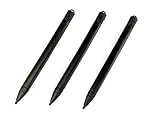
- Enhanced Replacement Set: Elevate your tablet experience with the 3-Pack Replacement Stylus Pen Set (4.7" long each) designed specifically for LCD Writing Tablets (does NOT come with a drawing pad).
- These do NOT work on iPads, tablets, or regular electronic drawing pads. These only work for the cheaper LCD drawing pads--see description below to find out if it will work for yours
- Seamless Writing and Drawing: Enjoy smooth, precise input for both writing and drawing, making note-taking and creative endeavors effortless.
- Premium Build Quality: Crafted with high-quality materials, these stylus pens provide durability and a comfortable grip for extended usage sessions.
- Will not fit into the storage slots on all digital drawing pads, but will fit into some--depends on the drawing pad brand
Teams, collections, and production workflows
Leonardo’s ecosystem also includes collections and team-oriented workflows. These features matter when generated images are not disposable experiments but part of a shared creative process. A team may need to organize concepts, compare variations, keep assets private, or pass visual material between marketing, design, and production roles.
Paid privacy controls are particularly relevant to client work and unreleased projects. A team should decide in advance which assets may be public, who can access private generations, how inputs are approved, and where final assets are archived. Leonardo can support the generation stage, but it does not remove the need for a broader asset-management and review process.
Leonardo.Ai API: a bridge from experimentation to software
The API is designed for developers, product teams, and businesses that want to embed visual generation into their own tools. Its visual-first approach is notable: users can design a workflow in the interface, inspect the outputs, and export runnable API code with parameters already configured.
Leonardo’s API material lists support for image generation, video generation, text-to-image, image-to-image, image-to-video, LoRA training, custom presets, upscaling, and blueprint-style workflows. This can shorten the distance between a creative prototype and an automated application.
API access is separate from a web-app subscription. The API quick-start documentation says developers must purchase API credits and create an API key. Leonardo’s API marketing material describes pay-as-you-go and custom plans for higher concurrency, volume discounts, or dedicated support. Do not assume that web-app tokens can be transferred to an API account, or that an individual subscription includes the API budget your application needs.
For occasional creators, the API is unnecessary overhead. For a product team generating catalog imagery, a marketing system producing variations, or a developer building a visual tool, it is one of Leonardo’s more compelling differentiators.
Pricing and token economics
The individual prices below are the public monthly figures documented for this review, before tax. Leonardo changes prices, models, limits, and feature availability, so check the current pricing page before subscribing.
| Plan | Monthly price | Published token allowance | Best suited to | Important limitation |
|---|---|---|---|---|
| Free | $0 | 150 fast tokens per day | Learning the interface and casual experimentation | Creations are public; unused daily tokens do not accumulate |
| Essential | $12/month | 8,500 monthly tokens | Daily hobbyists and new paid users | Limited concurrency and up to 10 personal-model trainings per month |
| Premium | $30/month | 25,000 monthly tokens | Active creators with frequent generation needs | Third-party models still consume tokens; usage varies by operation |
| Ultimate | $60/month | 60,000 monthly tokens | Heavy image-and-video workflows and higher concurrency | The largest allowance still does not create a fixed number of finished assets |
Why token numbers can mislead
A token allowance is not the same as a guaranteed image count. Leonardo says that costs vary according to the feature, model, complexity, reference-image count, settings, image size, number of outputs, and other generation parameters.
Free tools Windows power users keep installed
One-click scans. No signup required.
For example, a creator making small exploratory images with an economical Leonardo model may get far more iterations from a plan than someone repeatedly generating high-resolution images, using several references, training models, or producing video with a third-party model. Compare plans by your actual workflow, not by dividing the token total by an assumed image price.
Premium and Ultimate users may receive relaxed image or video generation on selected Leonardo models after their token balances are exhausted. This is not a universal unlimited-use promise. Selected third-party image and video models remain token-based, so a model choice can materially change the cost of a workflow.
Rollover and top-up tokens
Paid users can retain unused monthly value in a rollover bank up to the plan’s stated capacity. Current rollover documentation lists maximum bank capacities of 25,500 tokens for Essential, 75,000 for Premium, and 180,000 for Ultimate. Rollover tokens are available only while the paid subscription remains active.
Paid subscribers can also buy top-up tokens. These tokens do not expire and can be purchased repeatedly, but they are unavailable on the free plan. If a user cancels, purchased top-up tokens become locked until the subscription is restored.
PC Slower Than It Used to Be?
A free scan shows the junk files, broken settings and background clutter dragging Windows down - then fixes them in one click.Free scan · Windows 10 & 11Crashes, No Sound, or Screen Glitches?
Random freezes, missing sound and display glitches usually trace back to one bad driver. Find and replace yours safely.Free scan · under a minuteRank #4

- Word-first 16K Pressure Levels: The upgraded stylus features 16,384 levels of pressure sensitivity and supports up to 60 degrees of tilt, delivering smoother lines and shading for a natural drawing experience. With no battery or charging needed, it operates like a real pen, making it easy for beginners to create effortlessly. This functionality helps novice artists develop their skills and explore their creativity without the intimidation of complex tools
- Designed for Beginners: This drawing pad desinged with 8 customizable shortcuts for both right and left-hand users, express keys create a highly ergonomic and convenient work platform
- Perfectly Adapted for Android: The XPPen Deco 01 V3 art tablet supports connections with Android devices running version 10.0 and above. It is recommended to download the XPPen Tools Android application, which adapts to your smartphone's screen aspect ratio, ensuring accurate mapping. It also supports mapping on Android screens with different aspect ratios in portrait mode
- Large Drawing Space, Bigger Bold Inspiration: This expansive drawing pad has10 x 6.25-inch helps you break through the limit between shortcut keys and drawing area
- Easy Connectivity for Beginners: The Deco 01 V3 offers USB-C to USB-C connectivity, plus adapters for USB C. This ensures easy connection to various devices, allowing beginner artists to set up quickly and focus on their creativity without compatibility concerns. Whether using a laptop, tablet, or desktop, the Deco 01 V3 provides a seamless experience, making it an ideal choice for those just starting their digital art journey
This makes Leonardo more flexible for uneven workloads, but it also means a subscriber should monitor two different constraints: the type of tokens or generation access available under the plan, and the model-specific cost of the work being performed.
Privacy, ownership, and commercial use
Leonardo’s terms distinguish among free, paid, private, and public use. For paid subscribers, the terms state that intellectual-property rights in content created through the platform vest in the subscriber, subject to the terms and applicable law. Paid users can choose private or public content.
For free subscribers, the terms state that ownership of intellectual-property rights in outputs vests in Leonardo.Ai to the extent permitted by law. Leonardo’s commercial-use guidance says that free users may use generations commercially, but those generations remain public and may be visible, copied, remixed, or reused through platform features.
That combination is the most important free-tier warning. Commercial permission does not mean confidentiality. A public free-tier concept for a product launch, client pitch, unreleased character, or proprietary brand system may be visible to other users and exposed to reuse.
Recommended Free Tools
What the public-content license means
Leonardo’s terms grant a broad, perpetual, worldwide, royalty-free license for public content. The stated purposes include providing and operating the service, promotion, improvement, training AI models, new offerings, and commercial uses.
The terms treat private content more narrowly, limiting use to performing obligations or exercising rights, and state that private content will not be used for training or new products without express written consent. Anyone handling confidential work should nevertheless review the current terms, account settings, and organizational policies before uploading sensitive material.
Ownership language is not the same as a guarantee of copyright protection, exclusivity, or non-infringement. Leonardo warns that outputs may not be unique and that similar results may be generated for other users. Users remain responsible for having the necessary rights and permissions for their inputs and for ensuring that their use does not infringe third-party rights.
Pros and cons
Advantages
- Broad creative workflow: Image generation, editing, realtime canvas, upscaling, video, custom models, collaboration, and API access sit within one ecosystem.
- Useful free entry point: The daily allowance is enough to evaluate the interface before paying.
- More control than a prompt-only tool: Reference images, models, guidance settings, seeds, styles, and custom models support more deliberate iteration.
- Clear upgrade path: Individual plans, team workflows, and API plans cover a range from hobby experimentation to production integration.
- Good fit for visual ideation: Realtime Gen and Realtime Canvas let users explore ideas while typing or sketching.
Disadvantages
- Learning curve: The number of models, tools, and controls can make the interface feel busy.
- Variable prompt and editing fidelity: Reported independent reviews identify occasional adherence problems and unintuitive editing behavior.
- Unpredictable asset economics: Token cost changes with the model, feature, resolution, references, and output settings.
- Public free-tier creations: Free use is not appropriate for confidential concepts.
- Third-party model exclusions: Selected third-party models do not qualify for relaxed generation.
- No universal legal guarantee: Contractual ownership terms do not guarantee copyright protection, exclusivity, or freedom from third-party claims.
A practical Leonardo.Ai workflow for painters and illustrators
- Use the free plan to learn the interface. Begin with non-confidential subjects and treat the daily 150-token allowance as an evaluation period, not as a private production environment.
- Start with visual direction, not just a long prompt. Define the subject, composition, lighting, medium, palette, and intended use. If you already have a rough image or reference, test an image-to-image or reference-guided workflow.
- Explore cheaply in Realtime Gen or Realtime Canvas. Use realtime feedback to decide whether the composition and visual language are promising before spending tokens on more demanding generations.
- Choose the model for the job. Compare Leonardo and third-party models based on the result you need and the current token rules. Do not assume that a model available in the interface qualifies for relaxed generation.
- Refine selectively. Use inpainting-style edits, background removal, refinement, and upscaling after the overall composition works. Expect to make manual corrections when exact text, anatomy, geometry, or identity matters.
- Move confidential or client work to an appropriate paid privacy setting. Confirm that the generation is private before uploading proprietary references or creating unreleased assets.
- Track the real cost. Note the model, resolution, reference count, output count, and feature used. This gives you a more useful estimate than the plan’s headline token total.
- Train a custom model only when consistency justifies the effort. Prepare a coherent, rights-cleared dataset and evaluate the results against the actual recurring asset need.
For beginners who want help structuring prompts, an AI art prompt book can be an optional learning companion. It is not required to use Leonardo.Ai, and a general prompt book should not be treated as Leonardo-specific unless the individual title has been independently verified.
Who should use Leonardo.Ai?
Good fit
- Illustrators and concept artists who benefit from reference images, sketch-to-image workflows, and rapid visual iteration.
- Marketers producing campaign concepts, product mockups, social assets, and storyboards.
- Creators who need image generation, editing, and upscaling without switching between several services.
- Teams that need private generations, shared collections, and an organized visual workflow.
- Developers and product teams that want to prototype visually and then export API code.
- Creators who need recurring visual direction and are willing to invest in custom-model training.
Weaker fit
- Users who want the simplest possible interface with almost no settings.
- Anyone requiring strict identity consistency across many scenes without manual review or a controlled production pipeline.
- Projects requiring deterministic, flawless typography inside generated images.
- Casual users who dislike token accounting or cannot predict which models they will use.
- Confidential projects that must remain private while staying on the free tier.
Which plan should you choose?
Free is the right starting point if you are learning, experimenting, or generating material that can safely be public. It is not the right choice for confidential client concepts or unreleased commercial assets.
Essential is the sensible first paid tier for a daily hobbyist or an individual who needs private generations and more capacity without committing to the highest price. Its allowance of up to 10 personal-model trainings per month may be enough for limited experimentation.
Premium makes more sense for an active creator who generates frequently, needs more concurrency, or can benefit from selected relaxed image generation. The 25,000-token allowance is larger, but it should not be read as a fixed number of finished images.
Ultimate is aimed at heavier image-and-video work, higher concurrency, larger rollover capacity, and selected relaxed video generation. It is easiest to justify when Leonardo is part of a regular production workflow rather than an occasional source of inspiration.
Best Value

- Customize Your Workflow: The 6 customizable press keys on Huion H640P drawing tablet for pc let you assign your most-used commands—like undo, zoom, brush switch, or save—so you can keep your hands on the tablet and your mind on the art. Whether you're a digital painter switching brushes, or a comic artist zooming in and out, these keys keep your workflow smooth and uninterrupted. Plus, the Huion driver lets you save different shortcut profiles for different apps, so you never have to reconfigure when switching software.
- Professional Pen Performance: Huion H640P drawing pad for computer comes with the battery-free PW100 stylus that's always ready when inspiration strikes. With 8192 levels of pressure sensitivity, every light sketch, or bold stroke responds naturally to your hand—just like a real pen. The 5080 LPI resolution and 233 PPS report rate deliver lag-free, precise strokes, so you can draw confidently without second-guessing your cursor. The pen side buttons help you switch between pen and eraser instantly.
- Compact and Portable: Huion H640P computer graphics tablet features a compact, ultra-portable design at just 0.3 inches thin and 0.61 lbs light, so it slides easily into your backpack—perfect for sketching in coffee shops, taking notes in class, or editing on the go between home and studio. The 6x4 inch active area offers enough room for natural pen movements while fitting comfortably on crowded desks, or lecture hall seats.
- Stable Compatibility: Huion H640P graphic drawing tablet works seamlessly with Mac, Windows, Linux PCs, and Android smartphones/tablets (OS version 6.0 or later). Left-handed friendly, and you just need to flip the tablet and adjust the settings in the driver. Please note: H640P does NOT support iPhone/iPad.
- Move Beyond the Mouse: Huion Inspiroy H640P is a pen tablet that replaces your mouse for more natural, precise control. Freehand draw, take notes, or even play OSU—everything you do with a mouse, you can do better with a pen. The precise tip makes it ideal for detailed photo editing, graphic design, or signing PDF. Meanwhile, the ergonomic pen grip helps you avoid the strain that comes from hours of using a mouse.
Teams and API plans are for collaboration, shared assets, automation, higher-volume generation, or product integration. They should be evaluated independently from the individual subscription tiers because team and API credits operate differently.
Final assessment
Leonardo.Ai’s strongest argument is not that it produces a perfect image from one prompt. Its strength is the connected workflow: explore an idea in realtime, generate with references and model controls, edit and upscale it, extend the concept into video, train a model for recurring work, organize assets with a team, or automate the process through an API.
That breadth comes with a cost in both learning time and pricing complexity. The free plan is a useful trial but exposes creations publicly. Paid plans improve privacy and capacity, yet token usage still depends heavily on the chosen model and operation. Custom models can help with recurring direction but do not guarantee consistency, and commercial-use permissions do not remove the user’s responsibility for rights, privacy, and lawful use.
For painters, illustrators, marketers, and creative teams who want a flexible visual workspace, Leonardo.Ai is worth evaluating. For users who want a minimal, flat-cost, fully deterministic image tool, it is a less convincing fit.
What’s actually slowing this PC down?
Pick the symptom - the matching free tool is one click away.
Frequently Asked Questions
Is Leonardo.Ai free?
Yes, Leonardo.Ai has a free plan with 150 fast tokens per day. Free creations are public, unused daily tokens do not accumulate, and some video models are unavailable to free users. The free plan is best for learning and non-confidential experimentation.
Are Leonardo.Ai images private?
Paid plans allow private generations, while free creations are public. Leonardo’s terms also give it broad rights over public content. Check the privacy setting before creating or uploading confidential client work, unreleased products, proprietary brand assets, or sensitive references.
Can you use Leonardo.Ai images commercially?
Leonardo’s commercial-use guidance says free users may use generations commercially, but those outputs remain public. Paid subscribers receive ownership rights in content created through the platform subject to the terms and applicable law. These provisions do not guarantee copyright protection, uniqueness, or freedom from third-party claims.
How many images do Leonardo.Ai tokens produce?
There is no fixed image count for a given token allowance. Cost varies by model, feature, complexity, references, image size, number of outputs, and other settings. Video and selected third-party models can consume tokens differently from basic image generation.
Can Leonardo.Ai generate video?
Leonardo.Ai offers text-to-video and image-to-video tools, but it is better viewed as a visual ideation and motion-generation component than as a complete professional editing suite. Model availability, duration, sound, cost, and limits can change.
Is the Leonardo.Ai API included with a subscription?
The API is separate from the web-app subscription. Developers must purchase API credits and create an API key. The API is most useful for product teams and businesses embedding image or video generation into their own tools, not for occasional personal use.
The Bottom Line
Bottom line: Leonardo.Ai is a strong all-in-one choice for visual ideation and production, especially when you need references, editing, realtime canvas, video, custom models, or API access. Try the free plan first, but use paid privacy controls for sensitive work and budget by model-specific token usage rather than headline allowances.
Quick Recap

Product prices and availability are accurate as of the date/time indicated and are subject to change. Any price and availability information displayed on Amazon at the time of purchase will apply.
Quick wins for a faster PC:
Fix the driver behind crashes, sound loss and screen glitchesFind Drivers →Repair Windows errors before they cause bigger problemsFix Now →



