Recommended Free Tools
ThatPainter is reader-supported. When you buy through links on our site, we may earn an affiliate commission. Learn More
The Huion Kamvas Pro 19 is one of the most compelling large-format pen displays when bought on sale. Its 18.4-inch 4K screen, Windows touch support, two battery-free pens, broad claimed color gamut, and roughly 2 kg body make it attractive to illustrators, photographers, animators, and concept artists who want direct-on-screen drawing without moving to a bulky 24-inch workstation.
It is not a standalone tablet: you need a compatible computer or Android device. At the regular US list price of $1,099, it faces close competition from the XPPen Artist Pro 19 Gen 2. At the observed $879 US promotional price in August 2026, it is easier to recommend—especially if touch and two included pens matter. Its main weaknesses are the 60 Hz refresh rate, modest 220-nit brightness, etched-glass softness, and a surface-marking concern reported by TechRadar.
Quick verdict
Verdict: A strong professional-oriented pen display with excellent pen performance and useful touch input, but not an automatic winner.
PC Slower Than It Used to Be?
A free scan shows the junk files, broken settings and background clutter dragging Windows down - then fixes them in one click.Free scan · Windows 10 & 11Outdated Drivers Are Slowing You Down
One free scan finds every outdated or missing driver and matches the right update for your exact hardware.Free scan · exact hardware match#1 Best Overall

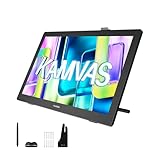
- Unparalleled Screen Clarity: The first 18.4-inch drawing monitor on the market boasts a cutting-edge 4K UHD (3840x2160) resolution, complete with full lamination and anti-glare etched canvas glass 2.0 that elevates friction on the screen surface, imparting a tactile, paper-like sensation. The anti-sparkle display ensures optimal comfort during extended use, while the enhanced resolution delivers unparalleled clarity and detail, rendering images with breathtaking precision.
- Multi-Touch Function: Multi-touch can be achieved on Windows ( MacOS touch is currently in beta testing ), making it more convenient for large-screen users to use shortcut functions such as zooming, scrolling, dragging, and combination keys. The gesture function in the software can also help users create more efficiently.
- Super Accurate Colors: Kamvas Pro 19 accurately covers multiple color gamuts, including sRGB, Adobe RGB, and DCI-P3. 99% sRGB is suitable for web images, videos, and games, and 96% Adobe RGB for packaging design, industrial design, and post-shooting. 98% DPC-P3 for digital cinema and post-production. Combined with 1.07 billion colors, it delivers stunning and realistic color reproduction, immersing professional artists in their creations.
- The Newest Pentech 4.0 Tech: Unleash your creativity with the PW600 stylus with 3 custom keys and the ultra-thin and light PW600S, They boast an eraser and a dust-proof silicone grip for unparalleled comfort and utility. With up to 16,384 pen pressure, 2gf initial active force, tilt function, and 0.3mm enhanced accuracy, they elevate professionalism. The small nib design minimizes cursor blockage, ensuring uninterrupted precision.
- Bluetooth Programmable Keypad with Dial: All 18 buttons can be customized to any shortcut key you want, even the most complex shortcut keys can be used with one click. With the dial function, you can easily adjust the brush size set three different functions, and switch between them easily.
- Best for: Artists who want a portable 4K direct-drawing display, Windows touch gestures, and two pen shapes.
- Consider alternatives if: You want the clearest possible surface, 120 Hz or higher, a standalone tablet, or a more established premium ecosystem.
- Price checked: $879 on Huion’s US store during an August 2026 promotion, reduced from $1,099. Prices and bundles vary.
Price and availability
Huion’s original US list price is $1,099. The official US store showed the standard Kamvas Pro 19 at $879 during a back-to-school promotion reported as running from August 14 through September 15, 2026. Treat that as a dated sale price, not a permanent reduction. Prices below are in US dollars, before sales tax, and were checked around August 16–18, 2026.
- Standard model: $879 sale price, listed from $1,099.
- Refurbished model: $659 observed price. Check condition, warranty, return policy, and included accessories.
- ST100A bundle: $899.99 observed price, listed from $1,148.99.
Bundle contents differ by region and promotion. Verify whether the exact listing includes an adjustable stand, Keydial Mini, or other accessories before comparing prices.
What the Kamvas Pro 19 is—and is not
This is an external pen display: an 18.4-inch monitor with a pressure-sensitive drawing surface. It displays software running on a connected Windows, macOS, Linux, or compatible Android device. It is not an Android tablet, iPad-style computer, or battery-powered workstation.
Huion lists support for Windows 10 or later, macOS 10.12 or later, Android 6.0 or later, and Linux Ubuntu 20.04 LTS. That means platform support, not identical compatibility with every application, phone, USB-C port, or Linux configuration.
Do these 3 things before closing this tab:
1Fix the driver behind crashes, sound loss and screen glitches2Repair Windows errors before they cause bigger problems3Scan for outdated or missing drivers - takes under a minuteSpecifications
| Specification | Kamvas Pro 19 |
|---|---|
| Product type | External pen display |
| Model | GT-1902 |
| Screen | 18.4-inch IPS, 16:9 |
| Resolution | 3,840 × 2,160 UHD |
| Refresh rate | 60 Hz |
| Brightness | 220 nits typical |
| Contrast | 1,000:1 |
| Response time | 15 ms typical |
| Surface | Fully laminated etched anti-glare Canvas Glass |
| Touch | 10-point capacitive; reported as Windows-only in independent coverage |
| Color claims | 99% sRGB, 96% Adobe RGB, 98% DCI-P3 |
| Color-gamut volume | 150% sRGB volume, listed separately by Huion |
| Color output | 1.07 billion colors; 8-bit + FRC |
| Calibration | Hardware calibrated; Huion claims average Delta E below 1.5 |
| Pens | PW600 and PW600S, battery-free |
| Pressure and tilt | 16,384 levels; ±60 degrees |
| Dimensions and weight | 448.9 × 272.4 × 21.3 mm; approximately 2 kg |
| Stand and mounting | Built-in 20-degree stand; 75 × 75 mm VESA |
| Ports | Two USB-C ports and 3.5 mm headphone jack |
These are manufacturer specifications from Huion’s product page. The Delta E figure is a manufacturer claim with a calibration report, not an independent colorimeter result for every unit.
Rank #2

- Unparalleled Screen Clarity: The first 18.4-inch drawing monitor on the market boasts a cutting-edge 4K UHD (3840x2160) resolution, complete with full lamination and anti-glare etched canvas glass that elevates friction on the screen surface, imparting a tactile, paper-like sensation. The anti-sparkle display ensures optimal comfort during extended use, while the enhanced resolution delivers unparalleled clarity and detail, rendering images with breathtaking precision.
- Multi-Touch Function: Multi-touch can be achieved on Windows, making it more convenient for large-screen users to use shortcut functions such as zooming, scrolling, dragging, and combination keys. The gesture function in the software can also help users create more efficiently.
- Super Accurate Colors: Kamvas Pro 19 accurately covers multiple color gamuts, including sRGB, Adobe RGB, and DCI-P3. 99% sRGB is suitable for web images, videos, and games, and 96% Adobe RGB for packaging design, industrial design, and post-shooting. 98% DPC-P3 for digital cinema and post-production. Combined with 1.07 billion colors, it delivers stunning and realistic color reproduction, immersing professional artists in their creations.
- The Newest Pentech 4.0 Tech: Unleash your creativity with the PW600 stylus with 3 custom keys and the ultra-thin and light PW600S, They boast an eraser and a dust-proof silicone grip for unparalleled comfort and utility. With up to 16,384 pen pressure, 2gf initial active force, tilt function, and 0.3mm enhanced accuracy, they elevate professionalism. The small nib design minimizes cursor blockage, ensuring uninterrupted precision.
- Bluetooth Programmable Keypad with Dial: All 18 buttons can be customized to any shortcut key you want, even the most complex shortcut keys can be used with one click. With the dial function, you can easily adjust the brush size set three different functions, and switch between them easily.
Display quality: detailed, colorful, but not perfect
The 3,840 × 2,160 resolution gives the Kamvas Pro 19 a detailed workspace at this size. The claimed gamut coverage is useful for illustration, design, and photo work, particularly when the display is set to the appropriate color mode. However, 4K alone does not determine display quality: this is still a 60 Hz, 220-nit panel with a 1,000:1 contrast ratio.
The etched glass is designed to reduce reflections and add a paper-like drawing texture. That extra friction is valuable to artists who dislike slippery glossy displays. The trade-off is that the image can look slightly soft, hazy, grainy, or sparkly compared with a clearer surface. Parka Blogs found the drawing feel positive but the visuals somewhat soft; TechRadar also praised the overall image while noting the surface issue.
TechRadar reported that its review unit was unusually easy to scuff or mark. Huion says the etched glass is harder than its standard and felt nibs and does not require an additional film. These claims are not necessarily universal opposites, but the warning deserves attention. Keep the display and nib clean, avoid grit and abrasive cloths, and do not assume that “no protector required” means “immune to marks.”
Do these 3 things before closing this tab:
1Clear out junk files and repair common Windows errors2Fix the driver behind crashes, sound loss and screen glitches3Repair Windows errors before they cause bigger problemsPen performance
The Kamvas Pro 19 includes two battery-free PenTech 4.0 styluses:
- PW600: conventional grip, three side buttons, and a tail eraser.
- PW600S: slimmer pencil-like grip, two side buttons, and a tail eraser.
Both are specified at 16,384 pressure levels, ±60-degree tilt, 5,080 LPI resolution, more than 260 PPS report rate, and approximately 2 g initial activation force. The two shapes are a practical advantage: some artists prefer a substantial grip, while others want something slimmer for long sessions.
Rank #3
- Please Note:★The Kamvas 22 (Gen 3) pen display is not a standalone product, this device must be connected to a computer/laptop to work.★ ★For Mac users: Ambient light customization is fully supported on MacBook Air and MacBook Pro, but temporarily not supported on Mac Mini, Mac Pro, or iMac.★ ★The Canvas Glass 2.0 utilizes an etched frosted surface, which may give the screen a slightly hazier appearance compared to standard glossy displays.★
- Experience a Generational Leap: 2.5K 90Hz Screen-Experience a generational leap in clarity and responsiveness on this drawing tablet for pc. The Kamvas 22 (Gen 3) features a large 21.5-inch 2.5K (2560x1440) screen, delivering a stunning 250% resolution boost over its predecessor for drastically sharper details. Driven by a 90Hz refresh rate, it also achieves a 50% increase in line display speed compared to standard 60Hz tablets, making every stroke smoother and every detail sharper for fluid digital painting and animation.
- Start with Precision: PenTech 4.0 Stylus-Master every detail with Huion’s latest pen technology. The advanced stylus delivers a true-to-life drawing feel, featuring a feather-light 2g initial force for instant response in fine sketching. It offers 16,384 pressure levels and ±60° tilt support for nuanced brushstrokes in painting and shading. Tilt auto-alignment ensures exceptional accuracy for line art, while three customizable side keys streamline your workflow in animation and design.
- Color Confidence for Every Project: 5 Professional Modes – Create with accurate colors across all your work. This art tablet is factory-calibrated to ΔE<1.2, ensuring true hues out of the box. Switch between 5 color spaces: 99% sRGB/Rec.709 for web and video, 90% Adobe RGB for print, or 94% Display P3 for vivid illustrations. Plus, a dedicated Black & White (monochrome) mode can be easily activated via the OSD settings, providing perfect contrast for sketching, manga, and storyboarding.
- Designed for Real Drawing: Canvas Glass 2.0 Screen-Experience a natural, paper-like feel on this digital drawing tablet. The nano-etched AG glass reduces glare for comfortable viewing and provides the perfect pencil-on-paper texture for control. This 2nd-generation glass minimizes sparkle and graininess for a smoother visual experience. Combined with a fully laminated screen that eliminates parallax, it ensures your pen tip and cursor align with pinpoint accuracy for detailed work.
Independent reviews found the pen accurate, smooth, and responsive, with little visible parallax. TechRadar reported good results with arcs, spirals, and blended brush strokes, although it noticed some lag when moving the nib very quickly. The 16,384-level figure should not be treated as proof that the pen is automatically better than every lower-rated stylus; pressure curves, driver tuning, nib friction, and application support matter more in daily use.
Touch and software workflow
The display has 10-point capacitive touch and a physical switch for enabling or disabling it. Touch is one of the Kamvas Pro 19’s clearest advantages over the XPPen Artist Pro 19 Gen 2, but it is not universally available: Parka Blogs reports that touch support works only on Windows.
Windows Errors? Fix Them Before They Spread
Repair common Windows errors and clear accumulated junk for a smoother, more stable PC - no reinstall needed.Free scan · no reinstallCrashes, No Sound, or Screen Glitches?
Random freezes, missing sound and display glitches usually trace back to one bad driver. Find and replace yours safely.Free scan · under a minuteThree layers must work correctly:
- The display must recognize touch hardware.
- The operating system and Huion driver must map it to the correct screen.
- The creative application must support the gesture you want.
For Photoshop, Huion says multi-touch requires Edit → Preferences → Performance → Use Graphics Processor to be enabled. If the cursor appears on the wrong monitor, use the Huion driver’s monitor calibration or work-area settings. Huion says factory calibration is already performed, so avoid manual recalibration unless alignment is actually wrong.
It works with applications such as Photoshop, Illustrator, Krita, Clip Studio Paint, and Blender, subject to the host operating system and driver.
Design, portability, and setup
At approximately 2 kg, the Kamvas Pro 19 is light for an 18.4-inch 4K pen display. Its built-in stand opens to 20 degrees, and VESA 75 × 75 support allows a more adjustable arm or stand. The built-in support is useful, but artists who work for long sessions may still prefer a larger adjustable stand.
Rank #4

- Unparalleled Screen Clarity: The first 18.4-inch drawing monitor on the market boasts a cutting-edge 4K UHD (3840x2160) resolution, complete with full lamination and anti-glare etched canvas glass that elevates friction on the screen surface, imparting a tactile, paper-like sensation. The anti-sparkle display ensures optimal comfort during extended use, while the enhanced resolution delivers unparalleled clarity and detail, rendering images with breathtaking precision.
- Multi-Touch Function: Multi-touch can be achieved on Windows, making it more convenient for large-screen users to use shortcut functions such as zooming, scrolling, dragging, and combination keys. The gesture function in the software can also help users create more efficiently.
- Super Accurate Colors: Kamvas Pro 19 accurately covers multiple color gamuts, including sRGB, Adobe RGB, and DCI-P3. 99% sRGB is suitable for web images, videos, and games, and 96% Adobe RGB for packaging design, industrial design, and post-shooting. 98% DPC-P3 for digital cinema and post-production. Combined with 1.07 billion colors, it delivers stunning and realistic color reproduction, immersing professional artists in their creations.
- The Newest Pentech 4.0 Tech: Unleash your creativity with the PW600 stylus with 3 custom keys and the ultra-thin and light PW600S, They boast an eraser and a dust-proof silicone grip for unparalleled comfort and utility. With up to 16,384 pen pressure, 2gf initial active force, tilt function, and 0.3mm enhanced accuracy, they elevate professionalism. The small nib design minimizes cursor blockage, ensuring uninterrupted precision.
- Bluetooth Programmable Keypad with Dial: All 18 buttons can be customized to any shortcut key you want, even the most complex shortcut keys can be used with one click. With the dial function, you can easily adjust the brush size set three different functions, and switch between them easily.
“Portable” needs qualification. The display is reasonably easy to move between studios or workstations, but it still needs a computer, power supply, and cables. It is not a self-contained travel tablet.
The Tool Desk
Outbyte Driver Updater FREEScan for outdated or missing drivers - takes under a minuteDriver Scan →Outbyte PC Repair FREEClear out junk files and repair common Windows errorsFree Scan →The standard package is reported to include the display, both pens, pen holder, standard and felt nibs, 3-in-2 cable, USB-C-to-USB-C cable, USB-C power cable, power adapter, glove, cleaning cloth, documentation, and calibration report. The Keydial Mini and adjustable stand may depend on the region or promotion.
Independent reader supportYour contribution helps us test, update, and keep practical guides available for everyone.Connectivity and compatibility
You can connect it in two main ways:
- Use a full-featured USB-C cable with a separate power cable.
- Use the supplied 3-in-2 cable.
A one-cable USB-C connection requires a port with video output through DisplayPort. Huion specifies at least USB 3.1 Gen 1 data transfer and DisplayPort 1.2 for third-party full-featured USB-C cables. A charge-and-data USB-C port without video will not work for one-cable display output.
Huion says the included 65 W GaN PD adapter can provide up to 40 W reverse charging to a laptop in supported setups. That is a convenience feature, not a guarantee that every laptop will charge at the same rate.
Android support is device-dependent. Huion warns that not every Android phone supports full-screen mode. Linux support is specifically listed for Ubuntu 20.04 LTS, so Linux users should confirm driver and application compatibility before buying.
What’s actually slowing this PC down?
Pick the symptom - the matching free tool is one click away.
Best Value

- [Outstanding Visuals] You can enjoy immersive viewing in great clarity and fine detail with the help of 15.6-inch full-laminated screen and anti-glare glass of the Huion Kamvas Pro 16 drawing tablet with screen. For a good feel while drawing, the graphics drawing monitor contains smooth but slight texture.
- [Brilliant Color] See your creations in vibrant and true-to-life colors on this pen display with 120% sRGB (92% AdobeRGB) color gamut volume(16.7 million 8-bit). 1000:1 contrast ratio shows shadow details clearer and sharper.
- [Optimized Workflow] Kamvas pro 16 drawing monitors comprise with 6 customized express keys and a touch bar which is helpful to get access to favorite shortcuts of keywords or mouse to achieve different operations like zooming in and out, adjusting brush size, saving time and keystrokes.
- [Adjustable Stand ST200] The adjustable stand can be moved between 20 and 60 degrees to suit your working way, which helps reduce tension for your neck, shoulder, and back, and offers you the best viewing angle for drawing and typing.
- [Advanced Pen Performance]The art tablet includes a pen without battery which provides accurate and responsive performance, 60° tilt recognition, and virtually lag-free tracking. Moreover, the pen contains 2 side buttons that can be programmable to the software’s shortcuts.
USB-C produces no image
- Confirm that the computer’s USB-C port supports DisplayPort output.
- Use Huion’s full-featured USB-C cable and required power connection.
- Try the supplied 3-in-2 cable.
- Check duplicate or extended display mode in the operating system.
- Install or update the Huion driver.
See Huion’s connection guidance before assuming the display is defective.
How it compares with alternatives
| Alternative | Choose it when… | Main compromise |
|---|---|---|
| XPPen Artist Pro 19 Gen 2 | You want a close 4K rival with a sharper-looking surface and do not need touch. | No equivalent touch advantage; sale prices vary. |
| Xencelabs Pen Display 16 | Portability, brightness, carrying setup, and premium accessories matter most. | Smaller screen and higher cost for a complete bundle. |
| Wacom Cintiq Pro 17 | You value Wacom’s professional ecosystem and can justify a much larger budget. | Approximately $2,499.95 in comparison coverage. |
| Huion Kamvas Pro 24 Gen 3 | You want a larger permanent desk setup. | Less portable and more desk-oriented; reported launch price was $1,399. |
| Screenless graphics tablet | You already have a good monitor and want lower cost and less desk clutter. | No direct on-screen drawing or touch surface. |
Who should buy the Kamvas Pro 19?
Buy it if you want a large but relatively light 4K pen display, regularly draw in Windows, value touch gestures, and like having both a standard and slim pen included. It is particularly attractive for illustration, concept art, photo retouching, and animation workflows that benefit from a direct drawing surface.
Skip it or compare carefully if you need a standalone tablet, 120 Hz or higher refresh, maximum image clarity, a very bright display, or physical shortcut keys built into the display. You may also prefer the XPPen if surface sharpness and durability concern you more than touch.
Final recommendation
At $1,099, the Kamvas Pro 19 is good but must be compared closely with the XPPen Artist Pro 19 Gen 2. Around $879, it becomes much easier to recommend because the combination of touch, two pens, 4K resolution, and low weight is distinctive. Around $659 refurbished, it could be excellent value, but warranty, condition, return terms, and included accessories become essential parts of the decision.
Quick wins for a faster PC:
Scan for outdated or missing drivers - takes under a minuteDriver Scan →Clear out junk files and repair common Windows errorsFree Scan →Choose the XPPen if you prioritize surface clarity and do not need touch; the Xencelabs if portability and accessories matter most; and Wacom if ecosystem confidence justifies a major price premium. For everyone else, the Kamvas Pro 19 is a capable, feature-rich pen display with one important caveat: inspect the etched surface carefully and buy from a seller with a clear return policy.
Quick Recap

Product prices and availability are accurate as of the date/time indicated and are subject to change. Any price and availability information displayed on Amazon at the time of purchase will apply.




