Crashes, No Sound, or Screen Glitches?
Quick wins for a faster PC:
Repair Windows errors before they cause bigger problemsFix Now →Scan for outdated or missing drivers - takes under a minuteDriver Scan →Outbyte Driver Updater · freeRandom freezes, missing sound and display glitches usually trace back to one bad driver. Find and replace yours safely.
Find the Right Drivers →ThatPainter is reader-supported. When you buy through links on our site, we may earn an affiliate commission. Learn More
For editable AI instrumental beats, start with Beat Shaper: it generates drums, basslines, synth parts, loops, and arrangements, then lets you shape genre, mood, energy, and syncopation before exporting for DAW work. Soundverse AI Beat Maker and InsMelo AI Beat Maker are stronger starting points when you want a complete prompted instrumental; Songen suits a MIDI-first, part-by-part workflow on Apple devices.
Instrumental beat work needs more than a genre label. A useful draft has a clear groove and arrangement, no unwanted vocals, and parts you can adjust to fit a visual edit, game scene, or creator project. The tools below offer different degrees of control: from prompt-led full tracks to editable MIDI loops and drum patterns. Availability and supported details vary by product; check the vendor’s site for anything not specified here.
Best AI Instrumental Beat Generators For Customization
- Beat Shaper — best overall for editable electronic beats and DAW handoff.
- Soundverse AI Beat Maker — best for full prompted instrumentals across web and mobile.
- InsMelo AI Beat Maker — best for adjusting BPM, instruments, and structure with flexible exports.
- Songen — best for building an instrumental part by part with MIDI.
- AI Music Generator by Media.io — best for specifying duration and musical details in a prompt.
- Beatbot — best for quickly iterating mobile instrumental ideas.
- AIBeatMaker — best for prompt-led drafts aimed at creator content.
- Drummer Buddy — best for shaping a structured drum performance on iPhone.
- DAACI Natural Drums — best for real-time drum groove generation inside a desktop DAW workflow.
- CedarGrooveNET — best for extending or transcribing a drum pattern as MIDI.
| Tool | Customization Focus | Instrumental Output Or Handoff |
|---|---|---|
| Beat Shaper | Genre, mood, energy, syncopation; piano-roll editing | MIDI, WAV, MP3, stems, and DAW project options |
| Soundverse AI Beat Maker | Prompt, tempo, key, and mood | WAV mix, separated stems, and MIDI |
| InsMelo AI Beat Maker | Text prompt, genre, BPM, mood, and structure | MP3, WAV, MIDI, and stems |
| Songen | Style, section regeneration, and piano-roll note editing | MIDI, lossless WAV, and separate stems |
| AI Music Generator by Media.io | Prompt can specify BPM, mood, instruments, voice, genre, and duration | MP3, WAV, or MP4 lyrics video |
| Beatbot | Genre, mood, and tempo iteration | Instrumental generation; export details not stated |
| AIBeatMaker | Prompt-led direction for rap, trap, lo-fi, and creator use cases | Paid plans include MP3/WAV downloads and stem splitting |
| Drummer Buddy | Prompt, song sections, BPM, time-feel, repeat, reverb, room, and humanizing controls | Focused on drum creation; export details not stated |
| DAACI Natural Drums | Fills, shuffle, complexity, and genre | MIDI and audio via drag-and-drop workflows |
| CedarGrooveNET | Grid editing, sub-style, temperature, density, and velocity | Drum-pattern MIDI; no audio export stated |
1. Beat Shaper: Best Overall For Editable Beats
Beat Shaper is the most complete fit when the beat needs to become a production asset rather than a finished, fixed track. It generates editable drums, basslines, synths, loops, and arrangements in a browser workspace. Genre, mood, energy, and syncopation controls help move a draft toward a specific scene or visual pace, while piano-roll editing gives you note-level adjustment.
For a short animation cue, try a direction such as “dark electronic beat, restrained energy, syncopated drums, sparse bass and synth.” Then adjust the groove and parts in the piano roll rather than relying on a prompt to settle every detail. Exports include MIDI, WAV, MP3, stems, and DAW project options. The Starter plan limits downloads to MP3 and personal, non-commercial use; paid plans start at €9 per month, and Creator and Producer include commercial use. Ableton Live project export and real-time MIDI require Producer. Beat Shaper runs in a browser, not as a standalone desktop app.
#1 Best Overall

- Expand Your Performance - Add any sound sample to your drum or percussion setup via standard SD card
- In-Demand Sound - Built-in library of the 25 most-commonly requested percussion and electronic drum sounds mapped across 8 ready-to-play kits
- Designed for Maximum Creative Expression - Four velocity-sensitive pads and a dual trigger input for expanded performance potential
- Shape your Sound - Tune and add reverb to your sounds, then assign them to any of the four pads or the kick input
- The Centrepiece of Your Performance - MIDI output for use as a controller for triggering sound modules and software
2. Soundverse AI Beat Maker: Best For Full Prompted Instrumentals
Soundverse AI Beat Maker is suited to creators who want a complete instrumental with drums, bass, melody, and arrangement from a text description. You can specify tempo, key, and mood; supported examples include trap, drill, boom-bap, EDM, and lo-fi. A prompt such as “dusty boom-bap, relaxed mood, warm bass, and a steady head-nod groove” gives the generator a concrete musical direction.
It runs on web, iOS, and Android, with a browser-based multitrack studio and WAV mixes, separated stems, and MIDI for further editing. The Free Tier starts with 1,000 tokens upon signup. The listed Creator & Pro plan includes unlimited generations, studio multitrack access, stem export, and commercial licenses. The vendor describes its beats as royalty-ready and says a commercial license is available for releasing and monetizing tracks; check the applicable plan terms before release.
3. InsMelo AI Beat Maker: Best For Prompt And Structure Controls
InsMelo AI Beat Maker pairs text prompting with controls for genre, BPM, mood, and structure. It supports instrumental directions across rap, pop, hip-hop, trap, lo-fi, R&B, EDM, and piano or guitar beats. For a video montage, a prompt like “lo-fi instrumental, mellow mood, unhurried BPM, piano-led, with a clear build” gives the tool both a style and arrangement target; refine the structure and instruments from there.
Recommended Free Tools
It can extend beats, separate tracks, and export MP3, WAV, MIDI, or stems. The Free plan is limited to 3.9 credits, and advanced remix features are reserved for paid plans. The vendor describes its beats as royalty-free and usable for personal projects and commercial campaigns, while the directory notes that commercial rights depend on subscription or license terms. Check the terms tied to your account before using a track commercially.
Rank #2
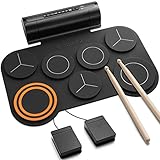
- [Fun Drum Pad Machine] DED-20 electronic drum pad 's high-quality sound source sample is taken from a real drum source, faithfully reproducing the acoustic drum's sound. 7 drum sets(1 SNARE, 1 CRASH, 1 RIDE, 1 HI-HAT, and 3 TOMS), 12 demonstration songs, and 9 accompaniments were set up to accommodate the needs of performance and entertainment.
- [2.2W Stereo Dual Speakers] The DED-20 electric drum pad has two fantastic stereo speakers that deliver the powerful, impactful sound you want. The volume of the electric drum set can be adjusted to 9 different levels and you can adjust the volume according to your needs. 180s-long recording function can record a drummer's Moment of inspiration and enhance their creative potential.
- [Quiet, No Worry From Noise] Donner electronic drum pad is made of high-quality soft silicone, which can reduce the noise when drumming. It supports a 3.5mm headphone output, you can wear a set of headphones to improve your technique without disturbing your family, roommates, or neighbors. It is so easy to store that you can roll it up, and pack it in your bag.
- [MIDI Connect & Gameplay] Come with standard midi out jack and USB midi out jack, you can connect the drum to computers to produce music or play games, or connect external speakers for family entertainment/birthday parties. Perfect for adults who need MIDI functionality and children for entertainment.
- [40 Free and Entertaining Drum Lessons from Melodics] We have carefully created drum teaching courses for users ranging from beginner to advanced, which can effectively help drummers practice beats, build a good sense of music, and improve learning efficiency. 40 free and entertaining courses are sufficient to master all aspects of arrangement creation. Then comes your free time to create! Remember to get the course from customer service!
4. Songen: Best For MIDI-First, Part-By-Part Editing
Songen starts with a generated MIDI loop and lets you shape it into a song by regenerating sections and editing notes. Its generated parts include lead, chord, bass, and drum MIDI loops, making it a good match when you want to arrange an instrumental yourself instead of accepting a finished audio render. A practical workflow is to generate a loop in a fitting style, keep the strongest section, regenerate another part, and fine-tune the notes in the piano roll.
Songen’s listed device focus is iOS and macOS. It exports MIDI, lossless WAV, and separate stems offline. The free tier includes 100 generated loops per day and one free export; Premium unlocks unlimited generating and exports. The vendor says it generates royalty-free beats and that creators own what they make. Review its terms for your intended use, especially if your project includes material from other people.
5. AI Music Generator By Media.io: Best For Prompting Duration And Detail
AI Music Generator by Media.io is a useful choice when the brief needs an instrumental with a defined length and a detailed musical description. Its prompt controls cover BPM, mood, instruments, voice, and genre; duration can be set from 30 seconds to 5 minutes. For an art-process video, a specific prompt could be “lo-fi hip-hop, 80 BPM, jazzy piano, rainy-night mood, no vocals, two minutes.” The “no vocals” instruction is a prompt direction, so check the generated result before using it.
Examples span lofi, cinematic, vlog, hip-hop, R&B, and workout music. Exports include MP3, WAV, or an MP4 lyrics video. The vendor says commercial licensing is included on paid plans; plan prices and a free-tier limit are not stated here, so check the vendor’s site before choosing a plan or budgeting a project.
Rank #3

- 16 Pad Controller with customizable lighting: The midi drum pad STARRYPAD's 16 soft silicone backlit pads can trigger drums, samples, effects and more; One button push allows you to quickly switch between 3 different pad banks for a total of 48 assignable pads; In addition, the beat maker STARRYPAD comes with adjustable velocity sensitivity curves. Perfect for all music makers
- Additional Control: STARRYPAD midi controller has an additional 2 faders, 2 knobs, and 3 buttons, to customize and match your virtual instrument. The Shift Key brings in another layer of customized control
- Compatibility: The beat machine STARRYPAD is class-compliant to work with everything and comes with a standard USB C power supply and data interface for easy plug and play; Tips: if you want to connect to your iPhone or iPad, you need to buy an Apple Lightning to USB Adapter; The additional MIDI in/out (Cable included) allows you to connect to an external synthesizer or other vintage MIDI equipment
- Customizable lighting: The MIDI controller pad STARRYPAD backlit pad lighting with 7 vibrant colors. Helps you group your instruments with a visual reference; Tips: the editor only can set this drum pad, doesn't have the function of recording and arranging music
- Boost Your Rhythm Game: Worried about a weak sense of rhythm? Tap Tempo is directly synchronized with DAW to help you quickly grasp the BPMs of any song and play along. In addition, Note Repeat's ultra-low latency perfectly connects each sample segment without getting stuck or errors! This USB drum pad controller suits you
6. Beatbot: Best For Mobile Beat Iteration
Beatbot generates beats and instrumentals from a text prompt on iOS and Android. It supports rap, hip-hop, trap, EDM, lo-fi, pop, cinematic, and rock directions, with mood and tempo iteration. For a quick visual concept, try a prompt such as “dreamy lo-fi instrumental for a quiet night scene,” then refine the mood or tempo to better fit the edit.
Beatbot is described as generating finished songs, beats, lyrics, or instrumentals. Pricing, export formats, and licensing terms are not established here; check the vendor’s site and app terms before relying on a particular download workflow or publishing a generated track.
7. AIBeatMaker: Best For Creator-Focused Prompt Drafts
AIBeatMaker focuses on prompt-to-beat creation for instrumental drafts, with directions for rap, trap, lo-fi, video, podcast, and social content. Start with the intended use, then add mood, pace, and a couple of musical references: for example, “subdued lo-fi beat for a sketching timelapse, gentle pace, muted drums.” Its listed workflow is web-based.
The Free plan supports online streaming and 30-day cloud storage; free songs are public by default. Paid plans include MP3/WAV downloads, stem splitting, and vocal removal, with paid exports and privacy features starting at annual billing. The listed paid starting price is $10 per month on annual billing. Check current plan details and licensing terms before making a beat private or using it commercially.
Rank #4

- 【Professional 9 Pads Electric Drum Pad】Sboet electronic drum set includes 3 TOMS, 2 CRASHES, 1 HI-HAT, 1 RIDE, 1 SNARE, 1 BASS and 2 Pedals, offers 7 Timbres, 10 DEMO Songs and 9 Rhythms, it contains all the drums you need to get started, perfect for kids beginners or professional drummers
- 【Stereo Speakers and AUX Jack】Sboet digital drum pad has high-quality stereo speakers that bring you astonishing bass effects. 10 levels of sound volume can be adjusted , the foot pedals can bring you a more realistic drumming experience. With audio output jack, you can connect drum sets with your phone to play more games
- 【Recording & HEADPHONE JACK】Supports 3.5mm headphone output, immerse yourself in drumming, wherever you are, no restrictions or disruptions. Customize your playing style with 10 adjustable volume levels and 9 adjustable tempo levels. Capture your unique compositions by using the recording button, 180-second ultra -long performance recording function Let you savor your creation!
- 【Portable-Drumming On The Way】Our kids drum set is built-in rechargeable battery,powered by 5V 2A adaptor (not included), lasting up to 10 hours playing per charge, Perfect for long practice.This roll-up silicone electronic drums pad lets you can be able to take it with you anytime and anywhere even play outside for a long time.
- [Great Music Enlightenment Toy Gift- For Kids] You can send this electric drum set for your kids, families, and friends as gifts- for Birthdays or Christmas. The 9-pad electric drum fit the musical interests of children ages 3+, one-year protection ensures your peace of mind.
8. Drummer Buddy: Best For Structured Drum Songs On IPhone
Drummer Buddy focuses on drum creation rather than full instrumental production. Its AI can generate a song with sections such as intros, verses, drops, fills, and outros; you can also use text prompts and edit sections and notes. BPM, time-feel, repeat, reverb, room, and humanizing controls make it relevant when the beat’s drum performance needs a deliberate arc.
It is an iOS tool, and AI actions consume credits. Try a prompt describing the genre and feel, then build or adjust sections to match the pacing of a video or game sequence. Pricing and export details are not stated here; check the vendor’s site and terms for current options.
9. DAACI Natural Drums: Best For Real-Time Groove Shaping In A DAW
DAACI Natural Drums is a drum-groove plugin, not a full beat generator. It creates grooves in real time and offers controls for fills, shuffle, and complexity, plus a genre picker. That makes it useful when a visual cue already has bass and melodic parts, but its drum groove needs more movement. Its listed workflow supports major DAWs and drag-and-drop MIDI and audio export.
The plugin is for macOS and Windows, with no free tier listed. The listed lifetime-license product is marked out of stock, so check the vendor’s site for current purchase availability and terms.
Best Value

- 9 Pads Portable Electric Drum Set: Marrilley electronic Drum Set contains all the drums you need to get started: 3 Toms, 2 Crashes cymbals, 1 Hi-hat, 1 Ride cymbal, 1 SNARE, 1 Bass drum. 2 Foot Pedals play the sound of Bass Drum.This roll-up drum kit offers 7 Timbres, 10 DEMO Songs and 9 Rhythms,Perfect for professional and beginner
- Stereo Speakers and AUX Jack: Marrilley digital drum pad has high-quality stereo speakers that bring you astonishing bass effects. There are 10 levels of sound volume can be adjusted as your need. With audio output jack, you can connect drum sets with your phone to load more demos
- Record And HEADPHONE JACK: Supports 3.5mm headphone output, allows you to play anywhere you feel inspired to drum without barriers or disturbing. 7 drum tones, 10 demo songs and 9 drum rhythms are optional for different music styles. Recording button allow you record your beats, 180-second ultra -long performance recording function Let you savor your creation!
- Drumming On The Way: Our kids drum set has built-in 1200mAh rechargeable battery, lasting up to 10 hours play per charge. It is easy to store, doesnt take very much space so that you can roll it up, pack it in your bag to take it anywhere for outdoor parties, choir practice, studio, music/drum lessons
- Best Gift For Your Kids:The 9-pad electric drum pad caters to the musical interests of children of ages 3+, making it the perfect Christmas or holiday gift for them. Being made with environmentally friendly materials, you can be guaranteed safety. The One-year Warranty makes your purchase without worry.
10. CedarGrooveNET: Best For Drum Continuation And MIDI Transcription
CedarGrooveNET is a focused drum-pattern tool for extending an idea or turning a drum loop into editable MIDI. It accepts MIDI or drum audio and offers grid editing, genre sub-styles, and controls for temperature, density, and velocity across 11 drum classes. Use it when you have a rhythm that needs variation: continue the pattern, tune the density and velocity, then take the MIDI into a DAW.
It transcribes WAV, MP3, AIFF, and FLAC drum loops in the browser and exports Standard MIDI files. The free tool works without an account or subscription; its listed upload limits are audio clips up to 6 minutes and 100 MB. It does not provide audio-file exports or separate audio stems, and its focus is drum patterns rather than complete instrumentals.
Independent reader supportYour contribution helps us test, update, and keep practical guides available for everyone.How To Prompt And Refine An Instrumental Beat
A prompt works best when it describes the beat’s job as well as its sound. For a looping background under a painting video, try: “lo-fi instrumental, 80 BPM, mellow mood, jazzy piano, light drums, no vocals, steady groove.” For a scene change, try: “dark trap instrumental, 140 BPM, heavy 808 bass, sparse melody, rising energy, no vocals.” These are prompt examples, not guarantees that every generator supports each detail; check the product’s stated controls and listen for unwanted elements.
Quick wins for a faster PC:
Fix the driver behind crashes, sound loss and screen glitchesFind Drivers →Clear out junk files and repair common Windows errorsFree Scan →Scan for outdated or missing drivers - takes under a minuteDriver Scan →- Set the use and feel. Name the visual context, genre, mood, and whether you want a calm bed or a beat that drives the cut.
- Specify the musical anchors. Where the tool supports them, add tempo, key, lead instrument, bass character, and drum feel. Keep the first prompt focused.
- Generate and listen for fit. Check the groove, arrangement, and vocal presence against the intended scene. Generate another direction if the draft’s energy or parts do not fit.
- Customize the part that needs work. Use section regeneration or note editing for arrangement changes; use stems or MIDI when you need to adjust individual parts in a DAW.
- Check the project’s rights and terms. Use only prompts, reference material, and samples you have permission to use. For generated output, confirm the specific platform’s terms and the license on your plan, particularly for commercial use, voices, covers, or samples.
Which Tool Fits Your Beat Workflow?
Choose Beat Shaper when you want editable electronic parts and multiple DAW handoff options. Choose Soundverse AI Beat Maker or InsMelo AI Beat Maker when the priority is a complete prompted instrumental with stems or MIDI for later work. Choose Songen when note-level editing and building from MIDI loops suits your process. For drum-specific work, Drummer Buddy, DAACI Natural Drums, and CedarGrooveNET cover structured drum songs, real-time groove generation, and pattern continuation respectively.
Quick Recap

Product prices and availability are accurate as of the date/time indicated and are subject to change. Any price and availability information displayed on Amazon at the time of purchase will apply.

