The Tool Desk
Outbyte Driver Updater FREEFix the driver behind crashes, sound loss and screen glitchesFind Drivers →Outbyte PC Repair FREEClear out junk files and repair common Windows errorsFree Scan →
ThatPainter is reader-supported. When you buy through links on our site, we may earn an affiliate commission. Learn More
A VEVOR heat press problem usually falls into one of two groups: the machine is not powering or heating correctly, or the press is working but producing poor transfers. Diagnose the hardware first, then correct temperature, time, pressure and material settings. A brief temperature fall of up to 10 °C (18 °F) when a cold garment, mug or plate is loaded can be normal; persistent heating, control or wiring faults require VEVOR support rather than user disassembly.
Start safely
Use a suitable grounded outlet and place the press on a stable, ventilated platform. Unplug it before moving the machine or installing attachments, and never touch the heating platen while it is hot. VEVOR’s safety guidance says not to use the press when it is not working properly and warns users not to disassemble or repair it themselves.
- Stop immediately if you see damaged wiring or connectors, smoke, uncontrolled heating or an erratic display.
- Keep hands, clothing and other objects clear of the platen and hinge mechanism.
- Have the exact model number, symptom, displayed temperature, any measured temperature, timer setting and transfer material ready before contacting support.
If the press will not power on or heat
Display is completely off
- Test the wall outlet with another appliance and confirm the press power switch is on.
- With the machine unplugged, check that the heating-element connection is firmly seated as shown in the manual for your exact model, including the documented 12 × 15 model.
- Reconnect it and allow the controller to start. If the display remains off, stop using the press and contact VEVOR for model-specific service instructions.
Display works but the platen stays cold
Confirm that the target temperature and timer parameters are set, then watch whether the displayed temperature rises. A cold platen after the machine has had time to warm up points to a heating element, connector or controller fault. Do not open the housing or replace parts without VEVOR’s instructions; the 8-in-1 manual directs owners to support for issue-specific guidance and compatible spare parts.
Recommended Free Tools
Temperature overshoots or fluctuates
Wait briefly and observe the reading. A temporary change can occur as the controller regulates heat, but a persistent overshoot, large fluctuation or visibly malfunctioning controller should be escalated to VEVOR because the digital controller may require replacement.
#1 Best Overall

- 2-in-1 Heat Press Machine: The 15 x 15 in flat platen and 6 x 3 in curved cap platen use silica gel and sponge for fast heating and improved transfer results. A soft heating liner accommodates various materials and reduces unpleasant smells during use
- Precise Temp Control: This 15x15 heat press is equipped with a precise control panel, allowing you to accurately regulate the temperature and time. After heating is complete, the machine will automatically sound an alarm to remind you to remove the items
- PTFE Insulation Coating: The PTFE material lowers the surface temperature for a skin-friendly feel. Our heat transfer machine is less likely to cause scratches. The coating reduces adhesion between clothes and the platen, ensuring excellent results
- 360° Swing Away Design: This swing-away sublimation heat press rotates smoothly 360°. The non-slip rubber grip provides a comfortable user experience. Simply adjust the mats tightly to fit the materials for excellent heating results
- Easy to Use: The VEVOR 2-in-1 T-shirt press is ideal for creating personalized items for friends and family. Easily customize T-shirts, pillows, bags, caps, and more. Quickly transfer colorful images and designs onto cotton, fabric, HTV, flax, and more
A temperature drop during pressing
When a cold item begins transferring, heat moves from the platen into the item. VEVOR describes a drop of up to 10 °C (18 °F) as normal, particularly with mugs and plates. The temperature should recover; a continuing decline or failure to reheat is not a normal transfer effect.
If the timer does not start
Controls vary by SKU, so follow the manual for your exact model. On the documented 12 × 15 model, set the time parameter, lower the press to close the circuit, and use that model’s start sequence to begin the countdown. A long buzzer indicates completion. If the countdown never begins after the correct sequence, record the model and controller behavior and contact VEVOR rather than bypassing the control.
Rank #2

- 16 x 24inch Heat Press: The larger heating pad, 16 x 24 in / 40.6 x 61 cm, adopts sponge, reaching a service life of 20,000 hours. Deliver a quicker heating speed and a better transfer effect. Soft heating liner is applied for accommodating various kinds of materials. It can also reduce unpleasant smells during operation.
- Teflon Insulation Coating: Revolutionary Teflon material reduces the surface temperature to a comfortable body feeling. Hence, it's less prone to cause a scratch. This kind of coating also lessens the risk of adhesion between clothes and platen, ensuring an excellent transfer result.
- Digital Control Board: This heat press is equipped with a precise control panel, helping you accurately regulate the temperature and time. After finishing heating, the machine will automatically sound an alarm to remind you to take out the items. Temperature Range: 0 - 570 ℉ / 0 - 299 ℃; Time Control: 0 - 999 seconds; Power: 1700W; Voltage: 110V.
- Effortless Use: VEVOR 16" x 24" sublimation machine is helpful to make gifts for all family members or friends. It can be used for T-shirts, pillows, bags, phone shells, etc. Quickly transfer colorful pictures and characters onto textiles such as cotton, cloth, HTV, ceramics, glasses, fabrics, flax, nylon, etc.
- Adjustable Pressure Knob: You can increase or decrease the pressure by turning the full-range knob clockwise or counterclockwise in line with the thickness of materials you're transferring. Please try a few times to set the desired pressure. Outfitted non-slip rubber grip also brings you a comfortable user experience.
Diagnose the transfer before changing settings
Once the press reaches temperature and the timer operates, match the visible defect to the most likely process cause. Change one variable at a time and follow the transfer-media manufacturer’s instructions.
| Visible result | Likely causes | What to check |
|---|---|---|
| Light or faded image | Temperature too low, pressure too low or press time too short | Verify platen temperature, increase pressure only as appropriate for the material, and use the recommended dwell time |
| Fuzzy or blurred image | Press time too long; localized blur can also indicate uneven heat or pressure | Reduce dwell time if the media calls for it and inspect platen contact across the design |
| Dull or overly dark image | Excessive pressure or temperature | Reduce the applicable setting within the media maker’s range |
| Scarred image | Press time too long | Shorten the dwell time to the transfer manufacturer’s specification |
| Different colors from the expected result | Incorrect pressure or poor-quality transfer paper | Confirm pressure and test a known-good paper or transfer |
| Scorched image | Temperature too high or poor ink | Lower temperature if allowed by the media and replace questionable ink or transfer stock |
| Adhesive paper or poor release | Pressure or temperature too high, or poor ink/paper quality | Check both settings and the consumables before repeating the press |
Set temperature and time for the material
VEVOR’s 8-in-1 manual gives clothing-transfer examples of 180–200 °C (356–392 °F). It lists approximately 35–45 seconds for chemical-fibre or sublimation-paper work and 20–25 seconds for cotton with transfer paper. These are starting examples for the referenced machine and materials, not universal settings. The transfer-media manufacturer’s instructions take priority, especially for heat-sensitive fabrics.
Rank #3

- Digital Control and Display】The Upgraded Vevor heat press machine includes a digital display controller with a dual-screen display that is precise and simple to use. The buttons are made of silicone, making them comfortable and effortless to press. Press ( plus/-) to switch℃ and °F at will.
- 【Dual-Tube Heating】Our 15x15 heat press uses double-tube heating technology, which is superior to traditional single-tube heating. With our technology, the temperature difference between the center and the edge is only around 5℃, whereas with old-fashioned heating tubes, the difference can be over 10℃.
- 【360° Swing Away Design】By using a swing-away arm, the pressure is evenly distributed on the sublimation machine, resulting in better transfer quality. Additionally, this design allows for the heating element to be moved to the side, decreasing the likelihood of accidental contact.
- 【High-Security Performance】By utilizing a dual insulation technology, the surface temperature of the heat press machine only reaches 50-70℃ despite a working temperature of 210℃. In contrast, traditional shirt press machines can reach temperatures as high as 70-100℃.
- 【Wide Application】The 8 in 1 heat press comes with a large 15"x 15" (38 x 38 cm) heat platen that is coated with Teflon, making it non-stick and stable. This makes it perfect for applying letters, numbers, and patterns on various items like caps, T-shirts, mugs, plates, aluminum pots, etc.
Fix uneven pressure or localized defects
Check contact and loading
- Lay the garment or substrate flat, without seams, zippers or thick folds under the artwork.
- Make sure the transfer sits within the platen’s evenly heated and clamped area.
- Compare a test press in the centre and near the edges. A defect confined to one area suggests heat or pressure distribution rather than a global time setting.
Adjust the main pressure mechanism
Use the main pressure knob or adjustment mechanism for the material’s thickness. Pressure should close firmly without crushing the substrate or forcing adhesive beyond the design.
Do not casually alter platen regulators
VEVOR notes that four platen regulators are factory set and normally should not need adjustment. Change them only when the manual for your exact model provides a procedure; incorrect adjustment can worsen contact and create new uneven areas.
Rank #4
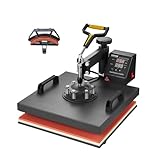
- 🔥 2 in 1 Heat Press: The two large heating pads, 15x15 inch flat platen and 6x3 inch curved cap platen, adopts silica-gel and sponge. Both deliver a quicker heating speed and a better transfer effect. A soft heating liner is applied for accommodating various kinds of materials. It can also reduce unpleasant smells during operation
- 🔥 Precise Temp Control: This heat press is equipped with a precise control panel, helping you accurately regulate the temperature and time. After finishing heating, the machine will automatically sound an alarm to remind you to take out the items
- 🔥 Teflon Insulation Coating: Revolutionary Teflon material reduces the surface temperature making it feel pleasant on the skin. Hence, it's less prone to cause a scratch. This kind of coating also lessens the risk of adhesion between clothes and platen, ensuring an excellent transfer result
- 🔥 360° Swing Away Design: This swing-away heat press machine can smoothly rotate 360 degrees. Outfitted non-slip rubber grip also offers you a comfortable user experience. Simply adjusting the mats tightly to fit the materials, offers great heating effects
- 🔥 Easy to Use: VEVOR 2-in-1 sublimation machine is perfect for making gifts for friends and family. You can create T-shirts, pillows, bags, phone cases, caps, hats, etc. Quickly transfer colorful pictures and characters onto textiles such as cotton, cloth, HTV, ceramics, glasses, fabrics, flax, fiber, nylon, etc.
When to stop troubleshooting and escalate
Stop using the press if it overheats, the display or controller behaves erratically, wiring or connectors look damaged, or the heating element remains cold. Contact VEVOR through the support route and manual for the exact SKU. VEVOR’s instruction article includes a one-year product-performance warranty table dated December 25, 2023, but coverage and available parts can differ by model, so confirm the terms for your machine.
Choosing a replacement or spare part
If repair is uneconomical, match the replacement to your actual work rather than buying by wattage alone.
| Comparison point | Why it matters |
|---|---|
| Platen size | It determines the maximum design area and how evenly a garment is supported |
| Clamshell or swing-away design | It affects clearance, loading safety and workspace requirements |
| Included attachments | Mug, hat and plate attachments matter only if you use those substrates |
| Control range and timer behavior | Confirm the temperature range, countdown procedure and completion signal |
| Pressure adjustment | Choose a mechanism that suits your material thickness and repeatability needs |
| Service parts and warranty | Verify availability and terms for the exact SKU, not just the product family |
| Transfer materials | Ensure the machine’s temperature, pressure and platen configuration suit your paper, vinyl or sublimation workflow |
The Bottom Line
Separate a dead or unstable machine from a bad transfer: verify power, connections, heating and timer operation first, then correct the media-specific temperature, time and pressure. Normal cold-load recovery is limited to a brief drop of up to 10 °C; overheating, persistent control faults, damaged wiring or a cold platen are reasons to stop and use VEVOR’s model-specific support.
Quick Recap

Product prices and availability are accurate as of the date/time indicated and are subject to change. Any price and availability information displayed on Amazon at the time of purchase will apply.




