Outdated Drivers Are Slowing You Down
One free scan finds every outdated or missing driver and matches the right update for your exact hardware.Free scan · exact hardware match
PC Slower Than It Used to Be?
A free scan shows the junk files, broken settings and background clutter dragging Windows down - then fixes them in one click.Free scan · Windows 10 & 11
ThatPainter is reader-supported. When you buy through links on our site, we may earn an affiliate commission. Learn More
To use a Mutoscope, insert the required coin if its mechanism is active, turn the crank in the direction marked on the cabinet, and look through the single eyepiece. The crank rotates a drum carrying hundreds of individual photographic cards; their rapid, slightly different images create the appearance of motion.
Using a Mutoscope safely
- Read the instruction plate. Confirm which way the crank should turn and whether the coin mechanism is engaged. A Science Museum Group example is labelled, “Push coin in slot, then turn crank to right.”
- Check the mechanism. Make sure the crank and reel can move freely. Do not force a stiff handle or try to turn a jammed drum.
- Insert the coin when required. Arcade machines may lock the crank until the specified coin is accepted. The required denomination depends on the individual machine.
- Turn the crank steadily in the marked direction. The crank drives the card drum and controls how quickly successive images reach the viewing position. A smooth pace generally gives the clearest motion effect.
- Look through the eyepiece. Place one eye at the opening and use the hood or shield to keep stray light out. The image should appear as a moving scene rather than a static photograph.
- Stop at the end of the reel. Do not pull on the cards, reverse the crank aggressively, or open the cabinet while the drum is moving.
These instructions describe the common hand-cranked arcade form. Electrically lit or motor-assisted examples can differ; use the documentation for that specific machine. Electrical, mechanical, lubrication, and conservation work should be handled by a qualified specialist rather than improvised inside the cabinet.
How a Mutoscope creates motion
A Mutoscope is a mechanical flip book viewed through an eyepiece. Its reel consists of opaque photographic cards arranged radially around a rotating drum. Each card shows a frame that is slightly different from the preceding one. As the crank moves the cards past the viewing aperture in rapid succession, the eye combines the changing views into an apparent moving image.
The Library of Congress describes Mutoscope drums as carrying hundreds, or in some cases more than a thousand, sequential photographs. One named Pope Leo XIII drum in its collection contains 742 original photos (Library of Congress, 2019). That figure identifies that particular reel; it is not a universal capacity for every Mutoscope.
#1 Best Overall

- Compatibility:fit 35,135, 120,127mm B&W and color film format
- This spiral reel also have twin ball ratchet system
- It can processing and developing 1 roll of 35/135mm film or 2 roll of 120mm film at same time
- Package include: 1x spiral reel
- Note: please don't draw the spiral reel both side with violence to separate the two round plate, if you don't know how to disassembly this spiral reel and convert to 120 spiral reel, you can refer our last image or inquire professional people.
What is inside a Mutoscope?
Card drum and core
The drum or core supports the radial stack of photographic cards and presents them one after another at the viewing point. The cards are the image carrier, not a strip of motion-picture film.
Crank and drive
The hand crank supplies the mechanical power. Its rotation advances the drum and lets the viewer set the viewing speed. Some later or modified machines use a motor or electric drive instead of relying entirely on a hand crank.
Free tools Windows power users keep installed
One-click scans. No signup required.
Rank #2

- Regular 8MM
- 3 INCH
- 50 ft
Eyepiece, hood, and viewing aperture
The eyepiece is intended for one viewer. A surrounding hood or shield blocks ambient light and helps the small image appear brighter and more legible.
Coin mechanism
Many public arcade examples include a coin mechanism that releases the crank for a viewing cycle. A non-coin-operated museum, home, or replica machine may omit this feature or leave it inactive.
Rank #3

- 8mm Film Take-Up Reel 7" Metal Reel
- For Use with 8mm Film Projectors
Light source and cabinet
Period machines may use ambient light entering the viewing system, while later examples can include an internal electric lamp. The cabinet houses and aligns the drum, viewing optics, and drive mechanism.
Interchangeable reels
The reel is the machine’s subject program. Museum records identify reels featuring subjects such as Felix the Cat and Charlie Chaplin. Reel dimensions, hubs, locking arrangements, and loading procedures vary by model, so a reel should not be forced into a cabinet simply because it looks similar.
Quick wins for a faster PC:
Clear out junk files and repair common Windows errorsFree Scan →Fix the driver behind crashes, sound loss and screen glitchesFind Drivers →Repair Windows errors before they cause bigger problemsFix Now →Rank #4
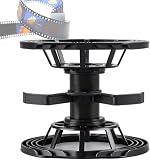
- Tailored specifically for 4x5, 5x7, and 8x10-inch sheet film, this features dedicated PL45/410, PL57, and PL810 reels. Their dimensions are perfectly calibrated to match various film sizes, ensuring a snug and secure fit during loading. This design effectively prevents the film from shifting or making improper contact during the development process, thereby safeguarding the integrity and quality of your images.
- Each reel is equipped with a dedicated locking ring: simply insert the film into the reel and secure it by engaging the lock ring. This robust mechanism firmly anchors the film in place, preventing it from shifting, slipping, or dislodging during the developing, washing, and fixing stages—offering comprehensive protection for your precious sheet film.
- Although the height of the reels varies to accommodate different film sizes, all models share a standardized diameter. This ensures complete compatibility with the 2520, T4000, and 2550 series processing tanks.
- The PL45/410 reel includes a removable divider clip: when the clip is installed, the reel can process six 4x5-inch sheets of film; when removed, it accommodates three 4x10-inch sheets. This innovative design eliminates the hassle of switching between different tools for varying film sizes, significantly enhancing operational convenience and efficiency.
- This comprehensive kit covers all major large-format film sizes (4x5, 4x10, 5x7, and 8x10), eliminating the need to purchase multiple single-purpose tools for different film formats.
How a Mutoscope differs from a Kinetoscope or projector
| Feature | Mutoscope | Kinetoscope or film projector |
|---|---|---|
| Viewer count | Designed for one person at one eyepiece | A Kinetoscope is also viewed individually; a projector presents an image for an audience on a screen |
| Image carrier | Individual photographic cards mounted on a rotating drum | Motion-picture film on a strip |
| Drive | Commonly hand-cranked; some later examples add motor or electric systems | Film transport is driven through the projector or viewing machine |
| Presentation | Cards are viewed directly inside the cabinet, without screen projection | Projectors enlarge and throw film images onto a screen |
The Library of Congress describes the Mutoscope’s card-based “flipbook” design as separate from the film-strip path associated with the Kinetoscope. Its simpler, robust construction helped it remain in peep-show outlets such as arcades and fairs for much of the twentieth century.
Brief history
Herman Casler submitted a Mutoscope patent application on November 21, 1894, during the formative 1894–1895 period of early cinema. In 1895, the American Mutoscope Company was founded by Elias Koopman, Herman Casler, Henry Marvin, and William Kennedy Laurie Dickson, according to the Smithsonian. Their system used photographic cards on a drum rather than a continuous film strip, creating a durable one-person exhibition machine.
Best Value
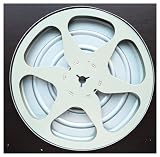
- 8MM
- 6 INCH
- 300 foot
Reels, replacement, and maintenance
Because reels are removable subject programs, changing the subject is conceptually straightforward but mechanically model-specific. Before attempting a change, identify the exact cabinet and reel design, find its period or institutional documentation, and verify how the hub, retaining hardware, and card stack are secured. Do not bend cards, pull on the drum, or dismantle a cabinet whose mechanism is still under tension.
- Keep dust, moisture, and direct heat away from photographic cards.
- Turn the crank only in the indicated direction unless the machine’s documentation explicitly permits otherwise.
- Stop immediately if cards scrape, buckle, or fail to clear the viewing point.
- Have restoration, lubrication, electrical work, and reel fabrication performed by a conservator or technician familiar with the specific model.
There is no single loading, lubrication, repair, or electrical-safety procedure that applies to every surviving Mutoscope. Museum descriptions establish the general card-and-drum principle, not a universal service manual.
The Tool Desk
Outbyte Driver Updater FREEScan for outdated or missing drivers - takes under a minuteDriver Scan →Outbyte PC Repair FREEClear out junk files and repair common Windows errorsFree Scan →What to expect when viewing one
The image is small, private, and directly viewed rather than projected. Turning the crank too slowly can make individual cards noticeable; turning it too quickly may make the sequence hard to follow or strain the mechanism. The best result comes from a steady rotation and a properly shielded eyepiece. When the reel ends, the moving sequence simply stops; the cards should never be pulled through by hand.
Quick Recap

Product prices and availability are accurate as of the date/time indicated and are subject to change. Any price and availability information displayed on Amazon at the time of purchase will apply.




