Outdated Drivers Are Slowing You Down
Outbyte Driver Updater · freeOne free scan finds every outdated or missing driver and matches the right update for your exact hardware.
Scan My Drivers Free →ThatPainter is reader-supported. When you buy through links on our site, we may earn an affiliate commission. Learn More
Digital technology is changing art restoration by extending what conservators can see, measure and compare. Visible-light photography records appearance; ultraviolet, infrared, raking-light and reflectance-transformation images can expose different evidence; material analysis and 3D capture add further information. The technology does not decide a treatment. Conservators interpret the evidence, select compatible methods and document every professional decision.
How is technology used in art restoration?
Technology supports four connected tasks: documenting an artwork’s present condition, investigating materials and hidden features, monitoring change, and planning treatment or display. Each method answers a different question, so a conservation team normally builds a combination rather than relying on one spectacular image.
- Document: create repeatable records of appearance, dimensions, surface condition and treatment stages.
- Investigate: examine varnishes, restorations, underdrawings, working changes, surface relief, elemental composition and internal structure.
- Monitor: compare images, measurements and 3D models over time or before and after handling.
- Plan: use evidence to decide how an object can be cleaned, moved, displayed or protected.
What can different imaging modes reveal?
No single photograph is a complete account of an artwork. The useful comparison is not which technique is “best,” but which evidence the conservator needs.
What’s actually slowing this PC down?
Pick the symptom - the matching free tool is one click away.
| Method | Primary record | Typical conservation questions |
|---|---|---|
| Visible-light photography | Surface appearance and color under controlled illumination | What does the artwork look like now, and can its condition and treatment be compared consistently? |
| Ultraviolet-induced fluorescence | Fluorescence produced by selected materials under UVA | Are varnishes, retouching or some later restorations visible as differences in fluorescence? |
| Infrared reflectography or imaging | Responses to infrared illumination, often beneath paint layers | Are underdrawings, compositional changes or other working stages detectable? |
| Raking light | Shadows from light set at a shallow angle | Where are raised, indented or otherwise uneven surface features? |
| Reflectance transformation imaging (RTI) | A relightable digital record of surface reflectance | Can changing virtual light directions make inscriptions, tool marks or topography more legible? |
The Isabella Stewart Gardner Museum describes visible and ultraviolet digital photography, infrared reflectography and RTI as complementary tools for examining varnishes, restorations, underdrawings, working changes and surface topography. Results are interpreted alongside the object and other examinations, not treated as automatic identifications.
#1 Best Overall

- ENTRY-LEVEL 3D SCANNING: The Fox 3D Scanner by 3DMakerpro offers an accessible medium-format scanning solution for beginners and hobbyists
- PRECISION YOU CAN SEE: At 0.07mm accuracy and 0.10mm resolution, handheld 3d scanners Fox outperforms typical entry-level scanners. It captures the kind of detail that makes your 3D scans truly useful — holding up under the closest scrutiny for effortless 3D printing, modeling, precise 3D measurement, and quality inspection.
- SCAN WITH CONFIDENCE: The Fox 3D Printing Scanner + JMStudio 3D scanning software handle the hard parts — so you don't have to. Built on the same proven ecosystem trusted by tens of thousands of 3DMakerpro users.
- MARKERLESS AI VISUAL TRACKING: Moved too fast during a handheld 3D scan? No problem. Fox's markerless AI feature recognition relocks onto your object in seconds. Just point the scanner back at the area you've already scanned — the software picks up where you left off. No need to start over.
- INTELLIGENT PRE AND POST DATA PROCESSING: JMStudio scanning software integrates scanning, editing, and optimizing into one seamless process.
How do conservators document an artwork before treatment?
Documentation is a workflow, not a single snapshot. The Library of Congress treatment-documentation workflow includes capture choices, metadata, post-capture processing and archival output, with normal illumination and digital SLR photography alongside raking, transmitted, polarized, UVA-induced fluorescence, infrared and other modes.
- Define the conservation question. Decide whether the record must show color and appearance, relief, a suspected underdrawing, a material difference or change over time.
- Control the capture. Record lighting, camera and lens setup, scale, color references, object orientation and other conditions needed for repeatability.
- Capture appropriate modes. Add raking, transmitted, polarized, ultraviolet or infrared imaging when the object and question justify them.
- Preserve metadata. Keep information about equipment, settings, illumination, date, operator and file handling with the image set.
- Process transparently. Make working derivatives for examination while retaining original files and documenting adjustments.
- Produce usable outputs. Create access copies, treatment records and archival prints or files without confusing an enhanced view with the original observation.
This structure matters because an image without its capture conditions may be difficult to reproduce or interpret. The Metropolitan Museum of Art likewise describes dedicated digital documentation and multispectral capability spanning visible, ultraviolet and infrared illumination, supported by collaboration among conservators, scientific researchers, imaging specialists, digital staff, engineers and technologists.
What can infrared and ultraviolet imaging reveal about a painting?
Ultraviolet imaging
Under UVA illumination, some varnishes and retouching fluoresce differently from surrounding original material. That contrast can help a conservator map coatings or later interventions. Fluorescence is not a universal material label: the result depends on the object, illumination, camera and interpretation.
Rank #2
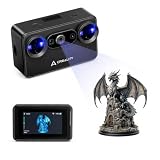
- Pocket-Sized & Wireless Freedom: At only 260g and 1006035mm, Pika fits in your palm. Features Wi-Fi 6 wireless PC mode, 3-inch HD touchscreen (500 nit), dual swappable 3350mAh batteries for extended sessions, and supports outdoor scanning up to 110,000 lux - scan anywhere, anytime without cables
- Dual-Mode Scanning with Blue Laser & NIR Structured Light: Switch between 7-line blue laser mode for fine detail capture and NIR structured light mode for full-body scanning with 24-bit true color. Scan objects from 101010mm to 200020002000mm - from tiny miniatures to life-size body scans - all with one device
- Ultra-High Precision 0.03mm Accuracy: Equipped with 7 parallel blue laser lines, Creality Pika delivers up to 0.03mm scanning accuracy and 0.1mm 3D resolution, capturing intricate details on small parts, figurines, mechanical components, and collectibles with professional-grade precision for 3D printing and reverse engineering
- AI-Powered Smart Features: Built-in AI Body Completion generates full-body 3D models from just a face scan and photos in as little as 10 seconds (10 faster). AI Retexturing maps real photo textures onto scanned models for lifelike results. AI Hole Filling automatically repairs incomplete scans for cleaner, print-ready output
- Scan Black & Metal Without Spray and Multi-Platform Export: Directly scans dark and metallic surfaces without scanning spray. Exports STL/OBJ/PLY/ASC formats compatible with all major 3D printing and CAD software. Works with Windows, macOS, iOS, and Android via CrealityScan app. Includes tripod, turntable, calibration board, and full accessories
Infrared imaging
Infrared reflectography can penetrate or pass through some paint layers more readily than visible light. It may reveal an underdrawing, a changed contour or another working stage that is not apparent in normal viewing. The depth and clarity of the result vary with pigments, grounds, thickness and equipment.
Why both are needed
Ultraviolet and infrared answer different questions. A visible photograph remains essential for appearance, while raking light or RTI may show relief that neither spectral method records well. Conservators compare all views with direct examination and treatment history.
Why imaging is combined with material analysis
Images can show a pattern without proving exactly which material caused it or what lies inside an object. Depending on the conservation question, teams may add microscopy, portable X-ray fluorescence (pXRF), X-radiography, computed tomography (CT) or other examination.
Rank #3

- DUAL-LIGHT SOURCE SYSTEM – 7-parallel blue laser (0.03mm accuracy) captures fine details on precision parts, while infrared structured light enables fast 1-minute full-body scans. Scans objects from 5mm to 2000mm – from tiny components to large items.
- AI-POWERED INTELLIGENCE – Exclusive AI retexturing brings color details to life; AI body completion (no competitor offers this) drastically reduces model generation time; AI hole-filling delivers complete models effortlessly.
- SCAN ANYTHING, ANYWHERE – No spray needed for black/metal objects. Outdoor scanning with professional NIR filter handles up to 80,000 lux brightness. Intelligent anti-shake ensures stable capture even when moving during scan.
- ULTRA-COMPACT & WIRELESS – Weighs just 260g with a pocket-sized 100×60×42.5mm body. Built-in Wi-Fi 6 connects to phones/PCs cable-free – no laptop needed, even entry-level phones deliver smooth scanning.
- DUAL-BATTERY & ONE-CLICK PRINT – Two hot-swappable 3,350mAh batteries eliminate range anxiety. One-click export to STL/OBJ/PLY/ASC formats – scan-to-print closed loop compatible with mainstream 3D printers. Free OTA updates bring ongoing features.
- Microscopy: examines fibers, particles, tool marks and paint-layer history at close range.
- Portable X-ray fluorescence: provides non-destructive elemental readings at selected points.
- X-radiography: can reveal density differences and structural features within an object.
- CT: produces cross-sectional and three-dimensional views of internal structure.
- Geophysical and ultrasonic methods: can investigate large or complex objects where internal condition is otherwise difficult to assess.
The Gardner Museum describes pXRF and microscopy in its conservation research and collaboration for X-radiography and CT. Museo Egizio’s Statuaria project combines 3D and multispectral documentation with ground-penetrating radar, ultrasonic CT, archaeometric analysis and, where appropriate, micro-invasive investigation. These methods are complementary: an elemental reading, a surface image and an internal scan do not produce interchangeable evidence.
The Tool Desk
Outbyte PC Repair FREEClear out junk files and repair common Windows errorsFree Scan →Outbyte Driver Updater FREEScan for outdated or missing drivers - takes under a minuteDriver Scan →Can 3D scanning help restore artwork?
Yes. A 3D scan records measured surface geometry as a point cloud or mesh. It can improve dimensional documentation, support condition monitoring and provide a digital model for access or replication. It does not, by itself, restore damaged material or determine the correct treatment.
Scanning versus photogrammetry
| Approach | How data is created | Useful outputs |
|---|---|---|
| 3D scanning | A scanner measures the surface through its own sensing system | Detailed geometry for condition records, comparison, virtual models and replication |
| Photogrammetry | Software derives three-dimensional data from overlapping photographs | Image-based models and distributed digital records when suitable photography is available |
The Smithsonian Museum Conservation Institute describes photogrammetry as an image-based method and 3D scanning as a separate measurement approach. Choice depends on surface, scale, access, required accuracy, equipment and the need to repeat the capture.
Rank #4

- 【Industrial-Grade Accuracy】Achieve single-frame accuracy up to 0.03 mm and volumetric accuracy of 0.03 mm + 0.05 mm x L(m), faithfully reproducing the finest surface details and complex geometries with exceptional consistency. Full-Field Structured Light accuracy reaches 0.08 mm; VCSEL mode delivers 0.10 mm @ 300-500 mm and 0.20 mm @ 500-800 mm. Engineered to meet the demanding requirements of 3D printing, reverse engineering, and precision modeling applications.
- 【Ultra-Fast Scanning & Robust Frame Rate】Multi-line Laser mode delivers up to 105 fps with NVIDIA GPU acceleration. Full-Field Structured Light mode achieves up to 5,000,000 points/s. The high frame rate ensures a smooth, uninterrupted scanning experience, especially suited for rapidly capturing large objects and complex scenes, significantly boosting overall workflow efficiency.
- 【AI-Powered & Photo-Grade Retopology】 AI object segmentation (Windows only) identifies your target in one click, tracks it throughout the scan, and auto-filters background noise — delivering clean data and streamlining post-processing. The patented 3D Gaussian Splatting converts point cloud and RGB data into true-to-life 1:1 photorealistic models; import photos from your phone or camera to apply real textures, then export in splat format for gaming, animation, and VR.
- 【All-Weather Outdoor Scanning】Multi-line Laser mode operates reliably up to 50,000 lux; with an outdoor filter attached, scanning remains stable in lighting conditions of up to 100,000 lux; VCSEL mode operates reliably in up to 100,000 lux ambient light. Designed to overcome lighting challenges, it provides consistent all-weather performance for construction sites, archaeological digs, and industrial fieldwork.
- 【5 Scanning Modes】NIR band supports Full-Field HD Scanning (markerless, fine structured light), Hybrid HD Scanning (dual projectors, fast high-quality modeling), and VCSEL Rapid Scanning (high-density pattern, fast markerless capture). Blue light band supports 30-Cross Laser Lines Scanning (handles high-reflectivity metals & dark objects) and Single-Line Deep Hole Scanning (captures from deep holes & narrow grooves). Five modes for comprehensive indoor and outdoor coverage.
A conservation and access example
The Hong Kong Conservation Office used a scan of a vulnerable copper bell to support production of a colored plastic replica. Visitors could approach the copy while the original remained protected. This demonstrates a practical public-access benefit of 3D data, not a claim that every artwork should be reproduced or that a replica carries the original’s material history.
Independent reader supportYour contribution helps us test, update, and keep practical guides available for everyone.How digital data supports monitoring over time
Repeatable images and geometry allow teams to compare an object before and after handling, treatment or display. Comparisons are meaningful only when capture conditions and alignment are controlled. Differences may reflect lighting, camera position, processing or registration errors as well as genuine change.
Museo Egizio reports using distance-map comparisons to map cracks before and after handling in its Statuaria project. The project examined 28 granodiorite statues with ground-penetrating radar and ultrasonic CT and describes a long-term objective of developing a reproducible diagnostic protocol for monitoring large stone sculptures. That figure and objective belong to this project; they are not field-wide statistics.
Best Value

- Ultra-High 0.05mm Accuracy & 30fps Fast Scanning: Capture every fine detail with precision up to 0.05mm using advanced stereo-matching algorithm and DOE structured light technology. Scan at up to 30 frames per second for a smooth, efficient workflow for reverse engineering, 3D printing, prototyping, and quality inspection
- Scan Anything from Coins to Cars Quad-Camera Design: Innovative 4-camera system with dual long-focal lenses for fine details and dual short-focal lenses for large coverage. Scan objects from 0.8" 0.8" 0.8" up to 78" 78" 78". Single-frame capture area reaches 1460mm 1017mm at 1200mm distance - finish large projects in minutes, not hours
- No Spray Required Scan Black & Metallic Objects Directly: Advanced DOE technology delivers concentrated light energy with one-shot 3D imaging, allowing you to scan dark, shiny, and metallic surfaces without any powder or spray. Works outdoors in up to 30,000 lux sunlight for automotive parts, machinery, and industrial applications
- True-to-Life 24-Bit Full Color Texture Capture: Built-in megapixel RGB camera with 2 white LED fill lights reproduces vibrant, accurate colors and textures even in dim environments. Bring your 3D models to life with realistic color mapping for figurines, artwork, heritage preservation, and e-commerce product displays
- Eye-Safe & Versatile Multiple Alignment Modes & Formats: Class I laser safety (invisible near-infrared light) makes it safe for face and full-body scanning in about 1 minute. Supports marker, geometry, and texture alignment. Exports to PLY, OBJ, STL, ASC, 3MF, GLTF, FBX. Works with CrealityScan 4 software (Windows/macOS/iOS/Android) featuring AI-powered head mesh repair
A current institutional example: Museo Egizio’s Statuaria project
Museo Egizio reports scans of the King’s Gallery collection, multispectral photogrammetry of a Ramesses II statue, and combined ground-penetrating radar and ultrasonic CT investigations of 28 granodiorite statues. The museum says these findings inform handling, restoration and display planning, alongside digital epigraphy and other diagnostics.
The museum also reports restoration of two statues for the gallery’s 2024 reopening and planned interventions in 2026. Those are the project’s stated status milestones, not a universal timetable or proof that one digital method guarantees a treatment outcome.
What technology cannot replace
Digital tools extend observation and record-keeping; they do not remove the need for conservation judgment. A conservator still has to understand the object’s materials and history, assess risks, select compatible treatment methods, decide whether sampling is justified, and document uncertainty. Handling, cleaning or attempting a repair based only on an online image can cause irreversible damage.
The Tool Desk
Outbyte Driver Updater FREEFix the driver behind crashes, sound loss and screen glitchesFind Drivers →Outbyte PC Repair FREEClear out junk files and repair common Windows errorsFree Scan →- Interpret spectral contrast in relation to pigments, coatings, support and illumination.
- Distinguish genuine change from differences in capture, processing or alignment.
- Balance access, safety, reversibility and long-term stability.
- Integrate scientific readings with historical, visual and physical examination.
- Record why a treatment was chosen, not merely what an instrument displayed.
Choosing a digital method: a practical decision framework
Start with the conservation question and then match the method to the evidence required.
Quick Recap
- What is being recorded? Choose among appearance, topography, elemental composition, internal structure or change over time.
- How will the method interact with the object? Identify non-invasive imaging or scanning options first, then assess any method that requires sampling or unusually close access.
- What output is needed? Specify a photograph, spectral image, analytical reading, cross-section, point cloud, mesh or physical replica.
- What constraints apply? Consider scale, material, access, resolution, equipment, expertise, lighting control and repeatability.
- How will the record be reused? Plan metadata, file preservation, comparison and access copies before capture begins.

Product prices and availability are accurate as of the date/time indicated and are subject to change. Any price and availability information displayed on Amazon at the time of purchase will apply.




