Windows Errors? Fix Them Before They Spread
What’s actually slowing this PC down?
Pick the symptom - the matching free tool is one click away.
Repair common Windows errors and clear accumulated junk for a smoother, more stable PC - no reinstall needed.
Fix My PC Now →Free scan · no reinstall
ThatPainter is reader-supported. When you buy through links on our site, we may earn an affiliate commission. Learn More
Short answer: not for 2D and 3D modeling in general. BeeGraphy Editor is better understood as a browser-based visual-programming platform for parametric and computational design. Its most distinctive direction is combining node-based modeling with collaboration, configurable products, marketplace distribution, and increasingly direct fabrication workflows.
That makes BeeGraphy promising for reusable product systems, architectural variations, furniture, education, and customer-facing configurators. It does not yet establish itself as a universal replacement for Rhino and Grasshopper, Blender, Houdini, or mature mechanical CAD.
#1 Best Overall

- Wacom Intuos Small Graphics Drawing Tablet: Enjoy industry leading tablet performance in superior control and precision with Wacom's EMR, battery free technology that feels like pen on paper
- Works With All Software: Wacom Intuos tablet can be used in any software program to explore new facets of digital creativity; draw, paint, edit photos/videos, create designs, and mark up documents
- What the Professionals Use: Wacom's industry leading pen technology and pen to paper feeling makes it the preferred drawing tablet of professional graphic designers
- Software and Training Included: Only Wacom gives you software with every purchase. Register your Intuos tablet and gain access to some of the best creative software and Wacom's online training
- Wacom is the Global Leader in Drawing Tablet and Displays: For over 40 years in pen display and tablet market, you can trust that Wacom to help you bring your vision, ideas and creativity to life
What BeeGraphy Editor actually is
BeeGraphy describes its Editor as an online node editor for creating 2D and 3D parametric models. Instead of manually editing every version of an object, you connect nodes representing geometry, mathematics, inputs, transformations, materials, and exports. Change an input and the downstream result updates.
That distinction matters. BeeGraphy can generate 2D and 3D geometry, but its defining question is not simply “Can it make a model?” It is “Can you define a reusable system that generates many valid versions of a model?”
The platform advertises drag-and-drop nodes, smart snapping, real-time 3D preview, node search, suggested connections, visual grouping, subgraphs, custom nodes, and plugins. See the official Editor overview and the foundational documentation.
How node-based modeling works in practice
A simple product graph might expose width, height, and thickness inputs; generate a profile; extrude or sweep it; repeat elements; and send the result to an exporter. One graph can produce a family of related objects rather than one manually edited file.
The Tool Desk
Outbyte PC Repair FREEClear out junk files and repair common Windows errorsFree Scan →Outbyte Driver Updater FREEScan for outdated or missing drivers - takes under a minuteDriver Scan →- Benefits: explicit relationships, rapid variations, reusable logic, and easier parameter propagation.
- Costs: graphs can become difficult to read, debug, and maintain. Poorly named inputs, hidden assumptions, mixed units, and undocumented custom nodes can make a parametric model harder to manage than a conventional one-off model.
Parametric flexibility also does not guarantee structural validity or manufacturability. A graph can generate self-intersections, non-manifold geometry, thin walls, or combinations of parameters that a machine cannot produce.
Where BeeGraphy is strongest
Reusable products and design variations
Furniture, architectural components, jewelry, fixtures, and 3D-printable products often need many dimensional variations. A parameter-driven graph can reduce repetitive remodeling and expose only the controls a client or customer should change.
Browser collaboration
BeeGraphy advertises live multi-user editing, visible cursors, comments, chat, invitations, and role-based permissions. That is attractive when designers, clients, fabricators, and sales teams need to review the same model without installing a desktop application.
Rank #2

- Battery-Free Pen: StarG640 drawing tablet is the perfect replacement for a traditional mouse! The XPPen advanced Battery-free PN01 stylus does not require charging, allowing for constant uninterrupted Draw and Play, making lines flow quicker and smoother, enhancing overall performance
- Ideal for Online Education: XPPen G640 graphics tablet is designed for digital drawing, painting, sketching, E-signatures, online teaching, remote work, photo editing, it's compatible with Microsoft Office apps like Word, PowerPoint, OneNote, Zoom, Xsplit etc. Works perfect than a mouse, visually present your handwritten notes, signatures precisely
- Compact and Portable: The G640 art tablet is only 2 mm thick, it's as slim as all primary level graphic tablets, allowing you to carry it with you on the go
- Chromebook Supported: XPPen G640 digital drawing tablet is ready to work seamlessly with Chromebook devices now, so you can create information-rich content and collaborate with teachers and classmates on Google Jamboard’s whiteboard; Take notes quickly and conveniently with Google Keep, and effortlessly sketch diagrams with the Google Canvas
- Multipurpose Use: Designed for playing OSU! Game, digital drawing, painting, sketch, sign documents digitally, this writing tablet also compatible with Microsoft Office programs like Word, PowerPoint, OneNote and more. Create mind-maps, draw diagrams or take notes as replacement for mouse
However, live editing is not automatically enterprise product-data management. Before adoption, verify revision history, restore points, approvals, audit trails, branching, and conflict handling for your workflow.
Interactive configurators
BeeGraphy promotes embeddable 3D experiences, dynamic pricing, instant quotes, mobile-responsive interfaces, and e-commerce integration. Its announced WooCommerce support gives this direction more practical relevance. A typical workflow is:
- Build a parametric model.
- Expose selected parameters and constrain their ranges.
- Publish a viewer or configurator.
- Connect options to pricing or service logic.
- Generate a downloadable or manufacturing-oriented output.
A visual demo is not the same as a complete commerce system. Payment, inventory, tax, fulfillment, customer records, and manufacturing exceptions still need to be validated in the actual deployment.
What changed in 2026
BeeGraphy’s 2026 announcements suggest a move from a node editor toward a broader design-to-production platform. These are company-reported features, not independent performance tests.
March 2026: CAM and geometry workflow
The March 2026 update describes CAM View, machine-related node packages, G-code toolpath generation for CNC mills or laser cutters, CSV export, interactive geometry selection, measurement-system support, and new nodes such as Glue, Hollow Surface, Parse Vector Graphics, and URL to Image.
Crashes, No Sound, or Screen Glitches?
Random freezes, missing sound and display glitches usually trace back to one bad driver. Find and replace yours safely.Free scan · under a minuteWindows Errors? Fix Them Before They Spread
Repair common Windows errors and clear accumulated junk for a smoother, more stable PC - no reinstall needed.Free scan · no reinstallJune 2026: manufacturing, nesting, and distribution
The June 2026 update describes a Toolbox plugin, hardware and placement nodes, machining operations, a Machining Visualizer, additional machine support, nesting improvements, WooCommerce support, BAZON furniture-manufacturing export, DXF point export, rendering tools, asset sharing, and memory-management improvements. It also lists upgrades to geometry operations including Loft, Revolve Surface, NURBS Curve, Chamfer, Fillet, Boolean Solids, Extrude Surface, Sweep, and Curve Array.
Those additions strengthen BeeGraphy’s case for fabrication-oriented parametric work. They do not prove that every machine, post-processor, tolerance scheme, or production pipeline is supported.
Rank #3

- Word-first 16K Pressure Levels: The upgraded stylus features 16,384 levels of pressure sensitivity and supports up to 60 degrees of tilt, delivering smoother lines and shading for a natural drawing experience. With no battery or charging needed, it operates like a real pen, making it easy for beginners to create effortlessly. This functionality helps novice artists develop their skills and explore their creativity without the intimidation of complex tools
- Designed for Beginners: This drawing pad desinged with 8 customizable shortcuts for both right and left-hand users, express keys create a highly ergonomic and convenient work platform
- Perfectly Adapted for Android: The XPPen Deco 01 V3 art tablet supports connections with Android devices running version 10.0 and above. It is recommended to download the XPPen Tools Android application, which adapts to your smartphone's screen aspect ratio, ensuring accurate mapping. It also supports mapping on Android screens with different aspect ratios in portrait mode
- Large Drawing Space, Bigger Bold Inspiration: This expansive drawing pad has10 x 6.25-inch helps you break through the limit between shortcut keys and drawing area
- Easy Connectivity for Beginners: The Deco 01 V3 offers USB-C to USB-C connectivity, plus adapters for USB C. This ensures easy connection to various devices, allowing beginner artists to set up quickly and focus on their creativity without compatibility concerns. Whether using a laptop, tablet, or desktop, the Deco 01 V3 provides a seamless experience, making it an ideal choice for those just starting their digital art journey
Manufacturing: promising, but validate everything
BeeGraphy now advertises or announces CAM views, G-code, nesting, machining operations, DXF-related exports, and furniture-manufacturing outputs. That could shorten the path from design logic to fabrication, especially for configurable products.
Do not treat a viewport result or generated toolpath as automatically production-ready. A qualified operator should check units, tolerances, tool access, feeds and speeds, material assumptions, workholding, nesting, collisions, geometry validity, and post-processing on the target machine. Test on a safe sample before any production run.
What’s actually slowing this PC down?
Pick the symptom - the matching free tool is one click away.
Plugins, packages, and portability
The package documentation, updated July 15, 2026, lists core packages such as Input, Exporter, Math, Service, Material, and Tool, plus plugins including Nesting, Imaging, and Light. The displayed documentation included 19 Input nodes, 9 Exporter nodes, and 69 Math nodes.
BeeGraphy also says users can write custom node logic in JavaScript, use API access, create templates, and manage custom-node versions. Before making a commercial project dependent on a plugin, check its maintenance, version compatibility, permissions, dependencies, and behavior if it becomes unavailable. A static STL, OBJ, or DXF export will not normally preserve the original parametric graph.
BeeGraphy versus established alternatives
Rhino and Grasshopper
Grasshopper has a mature Rhino NURBS foundation, a large professional community, extensive plugins, and long-established fabrication workflows. BeeGraphy’s apparent advantages are browser access, live collaboration, configurable publishing, marketplace distribution, and a potentially easier deployment path for customers who should not install Rhino.
BeeGraphy’s own comparison table is useful for identifying intended differentiators, but it is first-party material rather than independent benchmarking. Choose Rhino/Grasshopper when ecosystem maturity, advanced Rhino geometry, and proven desktop workflows dominate. Consider BeeGraphy when browser collaboration and customer-facing deployment matter more.
Blender Geometry Nodes
Blender is a broad 3D suite covering mesh modeling, sculpting, animation, rendering, simulation, materials, and visual effects. BeeGraphy is narrower and more focused on cloud parametric design, configurable products, collaboration, and fabrication-oriented outputs. Blender is the stronger central tool for media production; BeeGraphy may be the better fit for a reusable design system or browser configurator. They can also be complementary.
Rank #4

- Wacom Intuos Small Bluetooth Graphics Drawing Tablet: Enjoy industry leading tablet performance in superior control and precision with Wacom's EMR, battery free technology that feels like pen on paper
- Works With All Software: Wacom Intuos tablet can be used in any software program to explore new facets of digital creativity; draw, paint, edit photos/videos, create designs, and mark up documents
- Wireless Superior Connectivity: Connect wirelessly via Bluetooth or directly using USB-A cable which enables you to work, draw or create whether it's at a desk, on the sofa, in classroom or even outside
- Software and Training Included: Only Wacom gives you software with every purchase. Register your Intuos tablet and gain access to some of the best creative software and Wacom's online training
- Wacom is the Global Leader in Drawing Tablet and Displays: For over 40 years in pen display and tablet market, you can trust that Wacom to help you bring your vision, ideas and creativity to life
Houdini
Houdini targets advanced procedural modeling, simulation, visual effects, and games. It offers exceptional depth but a steeper technical workflow. BeeGraphy is aimed at a more accessible, browser-based computational-design and production context rather than high-end VFX.
Onshape
Onshape is a cloud-native mechanical CAD and product-data platform. It is the more natural choice for feature-based mechanical design, structured releases, assemblies, and PDM requirements. BeeGraphy centers on visual programming, configurable geometry, marketplace distribution, and fabrication-linked procedural workflows.
Where BeeGraphy is not the best choice
- Organic sculpting, character work, animation, and cinematic rendering.
- Fully offline operation or environments with unreliable connectivity.
- Large enterprise CAD/PDM/PLM deployments requiring mature release controls.
- Legacy pipelines that depend on specific CAD formats, assemblies, or round-tripping.
- Projects whose success depends on an independently validated plugin ecosystem.
- Simple one-off models where designing a parametric system adds unnecessary overhead.
Exports and interoperability
The Editor page explicitly mentions STL, OBJ, DXF, and other exports. 2026 announcements add G-code and CAM-related outputs, CSV, DXF point export, and BAZON packages. Confirm the exact import/export support you need—such as STEP, IGES, 3DM, DWG, FBX, or GLB—before switching.
Also check what an export actually contains: a mesh, curve drawing, solid, toolpath, metadata, or project package. File export is not the same as preserving design history, tolerances, assemblies, or parametric intelligence.
Independent reader supportYour contribution helps us test, update, and keep practical guides available for everyone.Pricing and marketplace considerations
BeeGraphy’s terms describe Free Solo, Standard, Business, and Entertainment account categories, but the accessible official material does not provide a reliable current public price table. Check live account-specific pricing before purchase.
The marketplace displays both free and paid models; the crawled listing showed examples from free up to at least $16.99. BeeGraphy’s terms state an 80/20 split for platform model sales, with BeeGraphy retaining a 20% transaction fee. Check each model’s license to determine whether you receive an editable graph, a static asset, commercial rights, plugin dependencies, and redistribution rights.
A practical evaluation checklist
Before committing, build a small representative project and verify:
Quick wins for a faster PC:
Fix the driver behind crashes, sound loss and screen glitchesFind Drivers →Clear out junk files and repair common Windows errorsFree Scan →Best Value
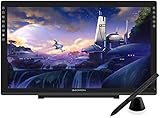
- Please kindly note that GAOMON PD2200 drawing tablet is not a standalone tablet, It must be connected to a laptop or computer to work.
- 【FOR ONLINE TEACHING & MEETING】You can use GAOMON PD2200 pen display tablet for online education and remote meeting. It works with most online meeting programs, like Zoom, and so on. 【FOR DIGITAL ART & CREATION】-- It's not only for beginner but also for professionalists in digital drawing, sketching, graphics design, 3D art work, animation, etc. 【FOR ANNOTATING AND SIGNATURE】--It is also broadly used in annotating and signing file in excel, word, pdf, ppt, etc.
- 【FULL GLASS STYLISH DESIGN】 It’s full glass design with 8 touch keys. No PVC frame on 3 sides.【HD FULL-LAMINATED SCREEN & 130% sRGB/92%NTSC】--Visually the parallax will be deduced to the lowest level. 【WITH AG-FILME PRE-APPLIED】--To protect the PD2200 drawing monitor during long shipping and to avoid bubble when applying film, we applied an anti-glare film in advance in our no dust factory. After you peel off the outside layer protective film, the real film remains on PD2200.
- 【8192 LEVELS PRESSURE & BATTERY-FREE PEN AP32】【TILT SUPPORT FUNCTION】--GAOMON PD2200 Drawing Display Tablet uses 8192 battery-free pen with tilt support function allow you to create your remarkable piece with superior control and stunning fluidity. [PEN HOLDER & PEN NIBS]-- 8 replacement nibs are put inside the pen holder. [8 TOUCH SHORTCUTS]--They are areavailable to customize in GAOMON driver.
- 【1000: 1 CONTRAST RATIO】--Enables more clear and vivid images effects. 【OTHER DISPLAY INFO】--Max Viewing Angle: 89°/89°(H)/89°/89°(V) (Typ.)(CR>10). Display Area: 476.64 x 268.11mm(18.8*10.6 inches). Resonse Time: 25MS. 【HOW TO UNSE OSD MENU】--Longe Press Menu Button for 6 seconds to active the OSD panel. You can adjust the color, brightness, etc here. 【HOW TO ADJUST COLOR】--Go to RGB-Color--Color Effect--Enter ''USER''--Then you can adjust the hue & saturation of RGBCYM here.
- Whether changing a primary dimension updates every dependent element correctly.
- Parameter limits, units, invalid combinations, and error handling.
- Performance with repeated elements and larger graphs.
- Collaboration permissions, comments, revisions, and recovery.
- STL, OBJ, DXF, and any required CAD or CAM export in downstream software.
- Scale, watertightness, layers, metadata, and tolerance behavior.
- Plugin installation, updates, removal, and project behavior when a plugin is missing.
- CAM output validation on a non-production sample.
- Data backup and portability if an account, subscription, or service changes.
Final recommendation
BeeGraphy is worth testing if your work depends on parametric variation, browser access, collaboration, configurable products, or a bridge from design to fabrication. It is especially relevant to furniture and product businesses, computational designers, educators, and teams building customer-facing 3D configurators.
Grasshopper users may find it valuable for deployment and collaboration, but should not assume feature parity. Blender users will usually see it as complementary rather than equivalent. Manufacturers should treat its CAM and export features as accelerators that still require shop-floor validation. Traditional CAD users should make interoperability, engineering depth, and revision control the deciding tests.
Verdict: BeeGraphy could represent an important future direction for parametric design, but the evidence supports “promising specialist platform,” not “the future of all 2D and 3D modeling.”
Frequently Asked Questions
Is BeeGraphy Editor a replacement for Rhino and Grasshopper?
Not universally. BeeGraphy offers browser collaboration, configurators, and marketplace-oriented deployment, while Rhino and Grasshopper have a deeper, more mature desktop geometry and plugin ecosystem.
Do these 3 things before closing this tab:
1Scan for outdated or missing drivers - takes under a minute2Repair Windows errors before they cause bigger problems3Fix the driver behind crashes, sound loss and screen glitchesCan BeeGraphy generate files for manufacturing?
BeeGraphy advertises STL, OBJ, DXF, CAM-related outputs, G-code workflows, nesting, and other manufacturing exports. A qualified operator must validate geometry, units, toolpaths, and machine settings before production.
Is BeeGraphy suitable for ordinary 3D modeling?
It can generate 3D geometry, but its main advantage is reusable parametric systems. For sculpting, animation, rendering, or general mesh production, Blender is usually the more appropriate category of tool.
Quick Recap

Product prices and availability are accurate as of the date/time indicated and are subject to change. Any price and availability information displayed on Amazon at the time of purchase will apply.




