Quick wins for a faster PC:
Outdated Drivers Are Slowing You Down
One free scan finds every outdated or missing driver and matches the right update for your exact hardware.Free scan · exact hardware matchWindows Errors? Fix Them Before They Spread
Repair common Windows errors and clear accumulated junk for a smoother, more stable PC - no reinstall needed.Free scan · no reinstallScan for outdated or missing drivers - takes under a minuteDriver Scan →Repair Windows errors before they cause bigger problemsFix Now →Fix the driver behind crashes, sound loss and screen glitchesFind Drivers →
ThatPainter is reader-supported. When you buy through links on our site, we may earn an affiliate commission. Learn More
The right baby monitor depends on what you need to know at 2 a.m.: hear a cry from another room, see your baby on a dedicated parent screen, check the nursery while away from home, or follow optional sleep data. Audio-only monitors are the simplest. Local-video models keep the feed inside your home. Wi-Fi models add phone-based remote viewing. Hybrid monitors provide both a local receiver and an app.
These nine picks represent distinct use cases rather than a single ranking. Before choosing, decide whether you need remote access, how many children or rooms you will cover, whether a phone can be your only screen, and how much setup and account management you are willing to accept. No monitor replaces safe-sleep practices, direct supervision, or a caregiver’s judgment.
As an Amazon Associate I earn from qualifying purchases.
Quick comparison: match the monitor to your home
| Monitor | Connection | Best fit | Notable considerations |
|---|---|---|---|
| VTech DM221 | Audio-only | Families who only need sound | No video, camera, or phone app; simplest daily routine |
| HelloBaby 6550/HB6550 | Local video | Budget-conscious in-home viewing | Dedicated receiver with pan and tilt; no remote internet viewing |
| Momcozy BM01 | Non-Wi-Fi local video | Parents wanting a 5-inch class screen without an app | Confirm the exact BM01 package and included camera before buying |
| Momcozy BM04 | Dual-mode | Families wanting local viewing plus optional app access | BM04 is a different variant from BM01; verify bundle and software requirements |
| eufy Baby Monitor E21 | Hybrid local and Wi-Fi | One monitor that works at home and remotely | High-resolution video and a portable camera; setup has both local and network components |
| Wyze Cam v4 | Wi-Fi | Lower-cost phone-based monitoring | Phone dependence; additional cloud functions or storage can add cost |
| Nanit Smart Baby Video Monitor | Wi-Fi/app | Remote viewing and sleep-tracking features | Check the current subscription terms and the exact bundle |
| Babysense PRO | Local video, multi-camera capable | Monitoring more than one child or room locally | Do not confuse it with the recalled Babysense Max View VBM55 display |
| Hubble Connected GoBaby AI Portable Pro | Portable model; verify current connectivity | Travel, temporary rooms, or grandparents’ homes | Confirm the exact model and current listing because names and bundles vary |
Advertised range is not a guarantee inside a particular house. Masonry, foil-backed insulation, plumbing, neighboring wireless networks, floor levels, and the receiver’s position can all change results. The most reliable test is to place the camera where it will be used and walk the parent unit through the rooms where you actually sit.
How the four monitor types differ
Audio-only monitors
An audio monitor transmits sound from the nursery to a receiver. It has the fewest components, does not require a camera angle or screen, and usually avoids account and network setup. This is enough when you can hear movement or crying but do not need to check whether a child is awake, covered, or standing. The trade-off is that every alert is sound-based; you cannot visually confirm what happened.
#1 Best Overall

- Crystal Clear Audio with DECT 6.0 Technology: No static, no white noise, no interference - DECT 6.0 digital transmission means you only ever hear your baby. Unlike analog monitors that produce constant background hissing, the DM111 is completely silent until your baby makes a sound. The moment they stir, you hear it clearly. Encrypted FHSS channel shared exclusively between baby unit and parent unit - no internet, no cloud, no account. Cannot be hacked
- Portable Design with Long Battery Life: 8-hour rechargeable battery and belt clip keep you connected with both hands free. The parent unit attaches to your belt, waistband, or pocket and moves with you through the house, yard, or garage. The 1,000ft range maintains a strong connection wherever you go. AAA batteries (included) serve as backup when you can't charge
- Visual Sound Indicator with Mute Function: Mute the speaker - 5 LED lights still show exactly how loud the nursery is. Check the sound indicator from across the bed without picking up the unit or waking your partner. One light means quiet, five means crying. When your attention is needed, the parent unit emits an alert tone - low battery, out of range, or sound activity above your set threshold
- Simple Setup and Operation: Plug in, power on, connected in 60 seconds - no app, no WiFi, no account, no pairing screens. Connect both units to power and they link automatically. That's the entire setup. Volume is controlled with a single up/down button on the parent unit
- Versatile Use for Multiple Situations: Reliable audio monitoring without complexity for new parents, travel, and grandparents. The DM111 is the monitor you hand to a grandparent without explaining anything, pack in a bag for a trip, or set up as a secondary unit in a second room. Trusted by US families for over 30 years
Local-video monitors
A local system sends video to a paired parent display over its own radio link. It keeps viewing inside the home, so an internet outage does not normally remove the feed and you do not have to leave a phone in the bedroom. Dedicated displays are convenient for a caregiver who wants a quick glance without opening an app. Indoor range still depends on walls and layout, and the parent unit must remain charged.
Wi-Fi monitors
A Wi-Fi camera sends video through your home network to an app. The benefit is remote access: you can check the nursery while at work, traveling, or sitting elsewhere without carrying a separate receiver. The costs are dependence on broadband, a phone or tablet, an account, and the manufacturer’s cloud or storage policies. A network or service interruption can remove viewing even when the camera has power.
Hybrid monitors
Hybrid models combine a local display with Wi-Fi access. At home, the parent unit can provide quick, low-friction viewing; away from home, the app can provide a check-in. They are useful when caregivers have different preferences, but there are more settings to configure and more software to keep updated.
Nine baby monitors, each for a different need
1. VTech DM221: the straightforward audio choice
Choose the VTech DM221 when your priority is hearing your baby rather than watching a video feed. It suits a household where the nursery is close enough that sound is the useful signal and where caregivers want a dedicated receiver instead of a phone app. Audio-only operation also avoids camera placement, night-vision glare, and video that can tempt adults to check constantly.
It is not the right tool if you need to distinguish a whimper from a child who is awake, check a second room visually, or view the nursery while away. Those requirements call for local video, Wi-Fi, or a hybrid model.
2. HelloBaby 6550/HB6550: budget local video
The HelloBaby 6550, also listed as HB6550, is a lower-cost local-video option. The Bump’s guide highlights pan and tilt and a dedicated receiver, making it practical when you want to adjust the view from the parent unit without relying on a phone.
Because it is a local system, plan around in-home viewing rather than remote check-ins. Test the receiver in the nursery, kitchen, bedroom, and any outdoor area where you expect to sit. If the signal drops at a doorway or on another floor, reposition the camera or receiver before assuming the advertised range is achievable.
3. Momcozy BM01: non-Wi-Fi viewing on a larger screen
The Momcozy 5-inch monitor appears in current buying guides in two different variants. BM01 is the non-Wi-Fi model, intended for families who want a local screen and do not want an internet-connected camera. A larger display can make it easier to inspect the crib at a glance, while the absence of an app keeps daily use simple.
Rank #2

- TOTAL COVERAGE & 5” HD DISPLAY – Monitor your nursery with a large 5-inch LCD screen providing a crystal-clear view. This video baby monitor features a remote 355° pan, 120° tilt, and 2x zoom with a 1,000ft range, ensuring you never miss a corner of the room.
- 30HR BATTERY & SMART VOX MODE – Equipped with a 3500mAh rechargeable battery, get up to 30 hours of audio/video in VOX mode or 10 hours with the screen on. The auto-wake VOX function triggers the screen instantly when it detects crying, saving power while keeping you alert.
- 2-WAY TALK & LULLABIES – Soothe your little one from any room using the two-way audio talk-back system. This smart baby camera also features 8 built-in lullabies to help your infant drift back to sleep, making it an essential nursery security camera.
- NIGHT VISION & TEMPERATURE SENSOR – Rest easy with automatic infrared night vision that captures clear video in total darkness without disturbing baby’s sleep. The integrated room temperature monitor sends instant alerts if the nursery gets too hot or cold.
- HACK-PROOF PRIVACY & FEEDING ALARMS – Protect your family with 100% secure FHSS technology; this no-WiFi baby monitor requires no apps or internet, making it unhackable. Includes a convenient feeding timer alarm to help parents stay on schedule.
Model names matter: BM01 and BM04 are not interchangeable. Confirm the model number, number of cameras, included parent unit, and charging accessories in the listing you buy. Select BM01 when remote access is unnecessary and keeping video off the home network is a priority.
4. Momcozy BM04: dual-mode flexibility
BM04 is the dual-mode Momcozy variant, designed for families that want local viewing plus optional app access. It can cover the everyday case of a dedicated screen at home while preserving the ability to check in remotely when the caregiver is elsewhere.
That flexibility adds complexity. Verify which functions work locally without an internet connection, whether an account is required for app use, and whether cloud recording or other features involve a recurring charge. Buy by exact model number rather than assuming every Momcozy 5-inch package has the same connectivity.
5. eufy Baby Monitor E21: a hybrid for home and travel
The eufy Baby Monitor E21 is a hybrid candidate with local and Wi-Fi modes. Current guides describe high-resolution video and a camera that can be moved, useful when the same unit needs to serve a nursery, a bassinet in another room, or a temporary travel setup.
Use the local mode when you want a dedicated parent display and the Wi-Fi mode when remote access matters. Before installation, identify where the camera will get stable power, then test both paths: walk the local receiver through the home and confirm that the app reconnects after your phone changes from cellular data to home Wi-Fi. A hybrid is most valuable when you will genuinely use both modes; otherwise a simpler local or Wi-Fi model may involve fewer points of failure.
6. Wyze Cam v4: lower-cost app monitoring
The Wyze Cam v4 is a general-purpose Wi-Fi camera adapted for nursery monitoring. It is a fit for caregivers comfortable using a phone as the only viewing screen and who value app access over a dedicated parent unit. The lower initial cost can be attractive, but phone dependence is a real trade-off: notifications, battery level, operating-system permissions, and network availability all affect the experience.
Free tools Windows power users keep installed
One-click scans. No signup required.
Review the current cloud and storage options before purchase. The guide notes that additional cloud features or storage can add cost. If you choose this route, keep a charged device available for overnight alerts and decide how recordings will be stored and deleted.
7. Nanit Smart Baby Video Monitor: remote viewing and sleep data
The Nanit Smart Baby Video Monitor is a Wi-Fi/app-based option for parents who want remote viewing and sleep-tracking features. The Bump reported that 20 percent of respondents in its 2026 community survey named this monitor as their go-to model; that is a survey result, not a performance guarantee.
Rank #3

- Remote 355° Pan and Tilt Baby Monitor & 5" Color Display: Enjoy a 5" Big Screen on this baby camera monitor. Remote control camera rotate 355° in horizontal and 120° vertical gives you a larger view of your baby's room. 2X zoom function ensures clear visuals. Noiseless camera rotation for a peaceful environment.
- Infrared Night Vision & 2-Way Audio Video Baby Monitoring: Crisp night vision gives you a clear view of your little one as they snooze, even in low-light conditions. We are the first brand to adopt the invisible infrared LED baby monitor, you can have a clear video feed at night without disrupting your little baby.
- Easy Set up & Safe Travel Baby Monitor No WiFi Needed: This is a non-wifi video baby monitor. Adopted advanced 2.4GHz FHSS and digital encryption technology. The data transferred between the camera and monitor is so fast, and you don’t need to worry about hacking risks. Believe me, your baby is safe.
- HB6550 Loved Baby Monitor Features: The crystal clear Two-Way Audio feature allows conversation both ends as clear as if you were in the same room with your little one. Room Temperature Monitor and Alert, Night vision, 8 Lullabies, Sound Level LED Indicator, Audio only Saving Power Mode, Tabletop or Wall Mounting Options, Multi-Camera Expandability (up to 4 cameras), Date/Time on the Screen, ideal for baby register, baby shower, new parent.
- Selling #1 Baby Monitor Around the World - HelloBaby HB6550. Customer Satisfaction Guaranted: A worthwhile video baby monitors, great for friends, new moms, baby registry! We provide the same assurance for presents! If you need "Extra cameras for HB6550", just get 2cams-HB6550 or reach us for the right camera. Reach us anytime for any questions or concerns!
Check the current subscription requirements and exact bundle before ordering. Sleep reports and other software features may depend on a plan, camera generation, or included accessory. Treat sleep data as convenience information, not a diagnosis or a safety alarm. The camera remains a monitoring aid, not a substitute for checking your child directly.
8. Babysense PRO: local multi-camera coverage
Babysense PRO is a local multi-camera candidate for families monitoring siblings, a nursery and playroom, or two sleeping spaces. A multi-camera system can reduce the need to move equipment as children grow, but check how the parent display switches between cameras and whether simultaneous views are available on the exact package.
Do these 3 things before closing this tab:
1Scan for outdated or missing drivers - takes under a minute2Repair Windows errors before they cause bigger problems3Fix the driver behind crashes, sound loss and screen glitchesDo not confuse Babysense PRO with the Babysense Max View VBM55. A current U.S. Consumer Product Safety Commission notice identifies the Max View VBM55 display unit as recalled, instructs consumers to stop using it, and directs them to contact Hisense for a free replacement. The notice does not identify Babysense PRO as that recalled model. Check the model label and current recall information before using any second-hand unit.
9. Hubble Connected GoBaby AI Portable Pro: a travel-oriented option
The Hubble Connected GoBaby AI Portable Pro is identified by The Bump as a portable or travel candidate. Portability matters when a baby sleeps in a hotel, a grandparent’s room, or a temporary rental where wall mounting is impractical. Look for a stable base, a power arrangement that works at the destination, and a setup process that does not assume your home network.
Verify the exact model and current listing before buying because portable product names and bundles can change. Confirm whether the unit uses a dedicated receiver, Wi-Fi app, or both, and whether an unfamiliar network requires a different setup step. A travel monitor is only useful if you can test it before the first trip.
What to look for before you buy
Connection and range
Start with the rooms and situations, not the brand name. For a single-floor home where a caregiver stays nearby, local video may be enough. For work trips or a hospitalized parent who wants to check in, Wi-Fi access is the deciding feature. For mixed households, hybrid connectivity avoids choosing one mode for everyone.
Range figures are measured under conditions that may not match your building. After setup, place the camera in its final position and test the parent unit at the couch, kitchen, bathroom, backyard, and bedroom. Repeat with doors closed and, if relevant, from another floor. A stable signal in the nursery alone does not prove useful whole-home coverage.
Image and viewing controls
Night vision is essential for a dark room; pan, tilt, and zoom help when a child moves or when one camera covers a larger space. High-resolution video can make small movements easier to interpret, but clarity does not make a monitor a medical device. If you are choosing a multi-camera system, check whether you can scan cameras quickly, hear one camera while viewing another, or display feeds simultaneously.
Rank #4

- The World's First 6'' IPS Screen Baby Monitor with Camera and Audio HB6560 - Perfect for New Parents & Grandparents: Our revolutionary baby monitor boasts a larger and portable 6-inch display, specifically designed to reduce eye fatigue and provide unparalleled viewing comfort from any angle. Enjoy a truly immersive and convenient baby monitoring experience with clear visuals that rival even the ranked #1 video baby monitor HB6550. Ideal large screen baby monitor for new mom and grandparents.
- 16-30 Hours Long Battery Baby Monitor & Infrared Night Vision: Our baby monitor screen have an ultra long standby time, with one charge, the battery life will last 16 to 30 hrs, parents will worry free all night! The advanced automatic infrared night vision video baby camera allows you to clearly observe your baby's every move even in the pitch black of the night.
- Remote 355° Pan and Tilt Baby Monitor & Wide Angle Lens: Fully remote Pan & Tilt achieved a seamless 360-degree viewing, with the hello baby camera panning 355 degrees side to side and tilting 120 degrees up and down. Plus, the wide-angle lens enhances coverage, letting you capture every detail without a blind spot. Stay in control and never miss a precious moment with the ability to adjust the screen for the complete view of your baby's room, every time!
- Easy Setup, Stable Connection, Secure, No WiFi Needed: This HelloBaby non-wifi baby monitor with camera and audio is truly plug-and-play—power on—auto pairs in 2 seconds. The private 2.4GHz FHSS digital-encrypted tech keeps your video private and off the internet—no WiFi, no app, no account, no monthly fees—no hacking risks. Ideal for first-time moms, grandparents, babysitters, travel, and homes with spotty internet. Enjoy secure, long-range, low-latency signal so you can focus on your baby.
- Infrared Night Vision & two-way radio Video Baby Monitor: Crisp night vision gives you a clear view of your little one as they snooze. We are the first brand to adopt the invisible infrared LED baby monitor, you can have a clear video feed at night without disrupting your little baby.
Power and everyday handling
Identify what stays plugged in and what runs on a battery. A parent unit that dies overnight is a practical failure even when the camera is working. Charge the receiver at a predictable time, keep the camera’s cable secured, and confirm that the app can send alerts without your phone’s battery-saving settings silencing it.
Privacy, accounts, and recurring costs
For Wi-Fi models, use a unique monitor-account password and a separate strong password for the home wireless network. Install firmware and app updates, enable multi-factor authentication when offered, and review which family members have access. The American Academy of Pediatrics advises following the manufacturer’s instructions, updating software, and reducing interference and security risks through strong credentials and a secured network.
What’s actually slowing this PC down?
Pick the symptom - the matching free tool is one click away.
Check whether cloud recording, sleep reports, extra cameras, or extended history require a subscription. A lower-cost camera can become more expensive over time if the features you expect are paid add-ons. Local systems generally avoid cloud-storage fees, while Wi-Fi systems trade that simplicity for remote access.
Independent reader supportYour contribution helps us test, update, and keep practical guides available for everyone.Safe placement and responsible use
Keep the camera, parent-unit charger, and every cord well out of a baby’s reach. Babylist recommends placing a monitor at least six feet from the crib. Secure cords along the wall and never leave a dangling loop near the sleep space. Follow the camera’s mounting instructions and check the mount periodically as the child becomes mobile.
Monitors are not SIDS or SUID prevention devices. The FDA’s September 16, 2025 communication says many over-the-counter infant vital-sign monitors lack FDA marketing authorization, and inaccurate readings can lead to unnecessary care or delayed treatment. The agency says these devices have not been evaluated to support monitoring for asthma, apnea, SIDS, SUID, or an infant’s overall health, and that no device, including an infant monitor, has been authorized to prevent SIDS or SUID. Its consumer guidance states: “The FDA is not aware of any clinical or scientific evidence that shows that currently available baby products prevent or reduce the chance of SIDS.”
The AAP’s HealthyChildren.org guidance is equally direct: “First and foremost, never let baby-monitoring technology substitute for direct supervision and taking sensible safety measures.” Wearables and camera-based breathing or heart-rate features may provide information, but they do not make an unsafe sleep surface safe and should not delay calling a clinician when a child appears ill.
The Tool Desk
Outbyte PC Repair FREEClear out junk files and repair common Windows errorsFree Scan →Outbyte Driver Updater FREEFix the driver behind crashes, sound loss and screen glitchesFind Drivers →Setup checklist for the first night
- Confirm the model. Record the exact model number, camera count, and included accessories. This is especially important for products with BM01/BM04 or similarly named variants.
- Update before mounting. Charge the parent unit, install app and firmware updates, and complete account security settings while the camera is still easy to reach.
- Choose a safe position. Place the camera at least six feet from the crib, secure the cord, and aim for a clear view without placing equipment on the sleep surface.
- Pair every component. Test the camera, receiver, app, microphone, speaker, night vision, and any pan/tilt controls.
- Test the actual route. Walk with the receiver through normal sitting areas. For Wi-Fi, test both home Wi-Fi and cellular viewing if remote access is important.
- Set alerts deliberately. Start with conservative sound or motion notifications, then adjust after observing normal household noise. Disable alerts you cannot respond to reliably.
- Plan for failure. Keep a charged phone or receiver available, know how to restart the camera, and decide how you will supervise if the network or monitor stops working.
Troubleshooting common problems
The video freezes or disconnects
Check camera power first, then move the local receiver closer to the camera or reduce obstacles between them. For Wi-Fi models, verify that the home network is online, restart the camera and router, and check whether your phone has app permissions and current software. If only one room loses service, the issue is likely layout or interference rather than the camera itself.
Alerts arrive late or not at all
Confirm that the app is allowed to send notifications, run in the background, and use the required network permissions. Disable aggressive battery optimization for the monitor app. Review sensitivity settings after a normal night; overly narrow thresholds miss events, while overly broad thresholds create alert fatigue.
Best Value
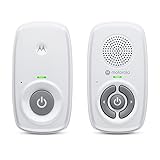
- SIMPLE, RELIABLE AUDIO MONITORING WITH DECT TECHNOLOGY: The Motorola AM21 uses secure DECT wireless technology to provide a strong, consistent connection with clear audio. A dependable audio baby monitor with no WiFi required for private, uninterrupted monitoring.
- LONG RANGE COVERAGE UP TO 1000 FT: Move freely around your home while staying connected. This long-range baby monitor lets you hear your baby from another room so you can complete daily tasks with confidence.
- HIGH-SENSITIVITY MICROPHONE WITH CRY DETECTION: The built-in microphone picks up even subtle sounds and alerts you when your baby starts crying, helping you respond quickly when needed.
- PORTABLE PARENT UNIT FOR FLEXIBLE USE: Battery-powered (AAA x2, NOT included) parent unit allows you to monitor your baby from room to room without being tied to an outlet—ideal for active parents.
- EASY-TO-USE CONTROLS WITH VISUAL ALERTS: Adjust volume directly on the parent unit and stay informed with LED indicators for power, sound detection, and out-of-range alerts.
The parent unit battery runs down
Lower screen brightness, shorten the display timeout, and charge the unit after each night. If the camera works only when plugged in, treat the parent unit and camera as separate power problems and replace the appropriate cable or battery according to the manufacturer’s instructions.
A second camera will not appear
Confirm that the exact model supports additional cameras and that you bought a compatible camera generation. Pair it near the parent unit or router, update software, and check whether the system offers sequential viewing rather than a simultaneous split screen.
Recommended Free Tools
How to choose among the nine
- Choose VTech DM221 if sound is sufficient and you want the fewest moving parts.
- Choose HelloBaby 6550/HB6550 or Momcozy BM01 for local video without remote internet access.
- Choose Momcozy BM04 or eufy Baby Monitor E21 when you want both a local screen and optional app viewing.
- Choose Wyze Cam v4 if a phone-based Wi-Fi camera and possible cloud add-ons fit your budget and routine.
- Choose Nanit when remote viewing and sleep-tracking features justify checking subscription terms.
- Choose Babysense PRO for a local multi-camera arrangement, while checking the model against recall notices.
- Choose Hubble Connected GoBaby AI Portable Pro when portability is more important than a permanent nursery installation.
In a May 2026 community survey, just over 67 percent of The Bump respondents rated monitor security a must-have. That preference is a useful tie-breaker: if you do not need remote access, a local or audio system can reduce the number of accounts, network settings, and cloud decisions you must manage. If you do need remote access, secure the account and network rather than treating convenience as a reason to skip basic protections.
Frequently Asked Questions
Do I need a Wi-Fi baby monitor?
Only if you need to view the nursery when you are away from home or want app-based features. A local video monitor is usually sufficient for in-home viewing, while an audio monitor works when sound alone answers your question.
Which baby monitor has the best range?
No single advertised range is best for every house. Walls, floors, insulation, and interference change performance, so test the exact camera and receiver in the rooms where you will use them.
Can a baby monitor prevent SIDS?
No. The FDA says no infant monitor has been authorized to prevent SIDS or SUID, and it reports no clinical or scientific evidence that currently available baby products reduce SIDS risk.
What’s actually slowing this PC down?
Pick the symptom - the matching free tool is one click away.
Is a wearable vital-sign monitor a medical device?
Many over-the-counter infant vital-sign products lack FDA marketing authorization. Do not use readings to diagnose illness or replace direct supervision and medical advice.
How far from the crib should a monitor be placed?
Babylist recommends at least six feet from the crib, with cords secured and all equipment kept out of the baby’s reach.
Quick Recap

Product prices and availability are accurate as of the date/time indicated and are subject to change. Any price and availability information displayed on Amazon at the time of purchase will apply.

