Recommended Free Tools
Windows Errors? Fix Them Before They Spread
Free scan · no reinstall
Crashes, No Sound, or Screen Glitches?
Windows Errors? Fix Them Before They Spread
Repair common Windows errors and clear accumulated junk for a smoother, more stable PC - no reinstall needed.Free scan · no reinstallOutdated Drivers Are Slowing You Down
One free scan finds every outdated or missing driver and matches the right update for your exact hardware.Free scan · exact hardware matchFree scan · under a minute
PC Slower Than It Used to Be?
Free scan · Windows 10 & 11
ThatPainter is reader-supported. When you buy through links on our site, we may earn an affiliate commission. Learn More
The best camera for scrapbooking depends on how you want to print. Choose the Fujifilm instax mini 13 for simple, immediate mini prints; choose the Fujifilm instax mini Evo when you want to preview and select photos before using film; and choose a smartphone or digital camera with a printer for editing, flexible sizes, and reliable digital backups.
As an Amazon Associate I earn from qualifying purchases.
Free tools Windows power users keep installed
One-click scans. No signup required.
Quick picks
| Camera or workflow | Best for | Print format | Preview before printing | Digital files | Main limitation |
|---|---|---|---|---|---|
| Fujifilm instax mini 13 | Easy shoot-and-print scrapbooking | Instax mini, 62 × 46 mm image area | No | No normal file workflow | Every exposure uses film |
| Fujifilm instax mini Evo | Selective instant printing | Instax mini | Yes | Internal memory and microSD | Higher camera cost and still-small prints |
| Fujifilm instax mini Evo Cinema | Video-linked creative albums | Instax mini | Yes | microSD and app-connected files | U.S. MSRP of $409.95; features add complexity |
| Smartphone plus instant printer | Editing existing photos and printing only favorites | Printer-dependent | Yes | Yes | Requires a phone, app, and charged printer |
| Digital mirrorless camera plus printer | Large prints, cropping, and documentation | Any supported printer or lab size | Yes | Yes, with archivable originals | Highest learning curve and equipment cost |
Choose the workflow before the camera
Analog instant: shoot and decorate
An analog instant camera gives you a physical print in roughly the time the film needs to develop. The border can become part of the page design, and there is no transfer or editing step. The trade-off is commitment: blinks, poor framing, dark rooms, and accidental shutter presses all consume film.
Hybrid instant: preview, then print
A hybrid camera records a digital image first. You can reject a failed shot, print only the keepers, and often reprint an image later. This is particularly useful for children, pets, parties, and other unpredictable subjects.
#1 Best Overall

- 16MP Sensor: Captures detailed photos with a CMOS sensor for everyday shooting
- Optical Zoom: 5x optical zoom with a 28mm wide angle lens for flexible framing indoors or outdoors
- Full HD Video: Records 1080p video for travel clips, family moments, or simple vlogging
- Memory Support: Works with Class 10 SD, SDHC, or SDXC cards up to 512GB
- Rechargeable Battery: Included LB-012 lithium-ion battery charges in the camera over USB with the supplied adapter in about 2 hours; charge it for at least 4 hours before first use to maximize battery life
Digital camera or smartphone: maximum control
Digital files can be cropped, color-corrected, backed up, and printed at several sizes. The price is a longer workflow involving storage, transfer, editing, and a printer or lab. For many scrapbookers, a smartphone already provides the camera and the easiest low-light processing.
Best simple instant camera: Fujifilm instax mini 13
The instax mini 13 is the strongest choice when the priority is an uncomplicated camera that produces small, scrapbook-friendly prints. Fujifilm lists automatic light adjustment, a constant-firing flash with automatic adjustment, a selfie mirror, two-second and ten-second self-timers, film-pack confirmation, and a close-up mode with parallax correction. See the official product page and specifications.
What’s actually slowing this PC down?
Pick the symptom - the matching free tool is one click away.
- Picture area: 62 × 46 mm (about 2.4 × 1.8 inches).
- Lens: 60 mm equivalent, f/12.7.
- Normal shooting range: 0.3 m and beyond; close-up mode: approximately 0.3–0.5 m.
- Flash range: approximately 0.3–2.2 m.
- Development: approximately 90 seconds, varying with temperature.
- Power: two AA batteries.
- Weight: approximately 327 g without batteries, with film loaded and strap attached.
Fujifilm announced a U.S. MSRP of $93.95 and expected availability around late June 2026 in its March 16, 2026 announcement. That is an announced MSRP, not a guaranteed current retailer price.
Choose it if: you want immediate prints, minimal settings, and a low-friction camera for family pages or craft nights. Skip it if: you need to approve photos before printing, preserve high-resolution originals, or make large prints.
Best hybrid instant camera: Fujifilm instax mini Evo
The mini Evo is the best fit for most scrapbookers who like the tactile result of instant film but dislike wasting exposures. Its LCD lets you review images before printing. It can print selected smartphone photos, store images internally or on microSD, and reprint from a print history of up to 50 images. Full details are in Fujifilm’s official specifications.
Rank #2

- 16MP Sensor: Captures detailed photos with a CMOS sensor for everyday shooting
- Optical Zoom: 4x optical zoom with a 27mm wide angle lens for flexible framing indoors or outdoors
- Full HD Video: Records 1080p video for travel clips, family moments, or simple vlogging
- Memory Support: Works with Class 10 SD, SDHC, or SDXC cards up to 512GB
- LCD Screen and Battery: 2.7in LCD screen with 2 AA alkaline batteries for convenient on-the-go use
- Sensor: 1/5-inch CMOS.
- Recorded image size: 2560 × 1920.
- Internal memory: approximately 45 images.
- Focus distance: 10 cm to infinity.
- Exposure compensation: −2.0 to +2.0 EV.
- Automatic ISO: 100–1600.
- Creative system: 10 lens effects and 10 film effects.
- Print time: approximately 16 seconds, with about seven additional seconds for instax-Rich immediately after startup.
- Battery: internal rechargeable lithium-ion; Fujifilm rates approximately 100 prints depending on use.
- Weight: approximately 285 g.
The mini Evo’s digital image is useful for sharing and selection, but it is not a substitute for a modern interchangeable-lens camera when you need heavy cropping or large, highly detailed prints. You still buy instant film for every physical copy.
Premium specialty option: Fujifilm instax mini Evo Cinema
The mini Evo Cinema is aimed at scrapbookers who want to connect a physical photo with a short video memory. Fujifilm describes a hybrid camera with instant mini prints, clips up to 15 seconds, QR-linked video functionality, app connectivity, a microSD slot, USB-C, an LCD monitor, self-timer, and selfie mirror. Its announced U.S. MSRP is $409.95, with availability announced for early February 2026. See the official announcement.
This premium makes sense mainly for technology-focused memory keeping or gifts. It does not automatically deliver better ordinary still-photo quality than the standard mini Evo, and app, storage, and regional-availability details can change.
When a larger instant print is better
Mini prints are easy to arrange beside journaling, stickers, and embellishments, but faces and fine text can become difficult to see. Square or wide formats occupy more page area and work better for group photos, landscapes, and feature images. They also require more film space and may cost more per print. The Polaroid Now+ Gen 3 is a commonly cited larger-format alternative, but verify the current U.S. product page, film compatibility, app requirements, and price before buying; the scrapbook recommendation comes from secondary coverage at Instant Photo Cam, not independent testing here.
Best for flexible printing: smartphone plus instant printer
A smartphone-printer setup is often the most practical choice if you already have years of images on your phone. You can edit, crop, make collages, and print only the final selections. Fujifilm’s instax mini Link+ announcement describes a multiple-print mode that can print up to ten previewed images in one operation.
Quick wins for a faster PC:
Repair Windows errors before they cause bigger problemsFix Now →Fix the driver behind crashes, sound loss and screen glitchesFind Drivers →Rank #3
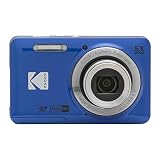
- 16MP Sensor: Captures detailed photos with a CMOS sensor for everyday shooting
- Optical Zoom: 5x optical zoom with a 28mm wide angle lens for flexible framing indoors or outdoors
- Full HD Video: Records 1080p video for travel clips, family moments, or simple vlogging
- Memory Support: Works with Class 10 SD, SDHC, or SDXC cards up to 512GB
- Rechargeable Battery: Included LB-012 lithium-ion battery charges in the camera over USB with the supplied adapter in about 2 hours; charge it for at least 4 hours before first use to maximize battery life
This workflow depends on a compatible app, operating system, wireless connection, and charged printer. Check current compatibility before purchase. It is not a standalone camera, but it supports photos made years before the printer existed.
Best for large prints and scrapbook documentation: digital camera
An entry-level mirrorless camera is the most capable option for large prints, precise cropping, controlled color, and photographing completed pages. Suitable systems may include Canon EOS R50, Sony a6400 or ZV-E10 II, and Fujifilm X-series bodies; treat these as examples of a camera class rather than a tested ranking. Canon’s camera buying guide explains the trade-offs among camera types, skill levels, stills, video, and price.
For small embellishments, paper texture, heirlooms, and flat lays, a digital camera with a close-focusing lens gives you much more control than an instant camera’s close-up mode. A smartphone can also be sufficient when paired with even lighting and a stable support.
Independent reader supportYour contribution helps us test, update, and keep practical guides available for everyone.What matters most for scrapbook photos
Print size and page design
Use mini prints for dense layouts and wide or square prints when the photograph is the page’s focal point. Choose based on the space available and the amount of visual detail the image contains.
The Tool Desk
Outbyte Driver Updater FREEScan for outdated or missing drivers - takes under a minuteDriver Scan →Outbyte PC Repair FREEClear out junk files and repair common Windows errorsFree Scan →Preview and reprint ability
If film waste bothers you, give this criterion more weight than decorative effects. Analog cameras print immediately; hybrid cameras and phone printers let you choose.
Rank #4

- 16MP Sensor: Captures detailed photos with a CMOS sensor for everyday shooting
- Optical Zoom: 5x optical zoom with a 28mm wide angle lens for flexible framing indoors or outdoors
- Full HD Video: Records 1080p video for travel clips, family moments, or simple vlogging
- Memory Support: Works with Class 10 SD, SDHC, or SDXC cards up to 512GB
- Rechargeable Battery: Included LB-012 lithium-ion battery charges in the camera over USB with the supplied adapter in about 2 hours; charge it for at least 4 hours before first use to maximize battery life
Close-up capability
The mini 13’s 0.3–0.5 m close-up mode is useful for nearby faces and simple details. It is not true macro photography. Dedicated digital macro equipment provides more working-distance, focus, lighting, and cropping control.
Indoor performance
Automatic flash cannot fix every dim room. Move subjects near a window, add ambient light, avoid placing them directly in front of a bright window, and keep them within the stated flash range. For an important, unpredictable indoor event, digital capture or a previewable hybrid reduces the risk of an unusable print.
Cost per usable print
Compare the camera, film or paper, batteries or charging, wasted exposures, printer supplies, and reprints. Prices vary by country, pack size, seller, and date; an announced MSRP is not the same as a current street price.
Do these 3 things before closing this tab:
1Scan for outdated or missing drivers - takes under a minute2Clear out junk files and repair common Windows errors3Fix the driver behind crashes, sound loss and screen glitchesPortability and ergonomics
Consider grip, button size, screen readability, one-handed use, battery access, and whether a self-timer or tripod can reduce shake. AA-powered analog cameras are easy to keep running with spare batteries; the mini Evo uses an internal rechargeable battery.
How to photograph scrapbook pages and details
- Place the page on a flat surface and keep the camera parallel to it.
- Use soft side light from a window or diffuse lamps; avoid direct overhead light on glossy embellishments.
- Lock the camera or use a tripod when possible.
- Keep white balance and exposure consistent when documenting a series.
- Check the edges for distortion, glare, and clipped journaling.
- For irreplaceable pages, retain the original digital file rather than relying only on an instant print.
Prevent common failures
Wasted or blank exposures
- Confirm the film pack is loaded and the counter has advanced.
- Keep faces within the camera’s focus and flash range.
- Watch for blinking, accidental shutter presses, and reflections in glass.
- Use a hybrid camera or phone-printer workflow when every frame matters.
Dark or flat indoor prints
- Move closer to the subject.
- Add ambient light.
- Avoid strong backlighting.
- Keep the subject within the manufacturer’s flash range.
- Switch to digital or hybrid capture for scenes that cannot be repeated.
Close-up framing errors
At short distances, the viewfinder and lens see different perspectives. Use the mini 13’s close-up mode and parallax correction, then leave a little framing margin.
Film development and temperature
The mini 13’s approximately 90-second development figure varies with temperature. Follow the film maker’s handling instructions rather than treating that number as a guaranteed deadline.
No digital backup
Scan or photograph important instant prints under even, diffuse light. Keep original digital files in cloud storage and at least one separate physical location.
Quick Recap
Buying checklist
- Want an immediate print and accept occasional waste? Buy the instax mini 13.
- Want to preview, select, and reprint? Buy the instax mini Evo.
- Want video-linked creative pages? Consider the mini Evo Cinema only if its premium features matter to you.
- Want existing phone photos and selective printing? Use a smartphone with an instant printer.
- Want large prints, accurate documentation, or extensive cropping? Use a digital camera or smartphone workflow with a printer.
- Want to photograph tiny craft details? Prioritize close focus, stable support, and controlled lighting over an instant-camera aesthetic.

Product prices and availability are accurate as of the date/time indicated and are subject to change. Any price and availability information displayed on Amazon at the time of purchase will apply.




