Crashes, No Sound, or Screen Glitches?
What’s actually slowing this PC down?
Pick the symptom - the matching free tool is one click away.
Outbyte Driver Updater · freeRandom freezes, missing sound and display glitches usually trace back to one bad driver. Find and replace yours safely.
Find the Right Drivers →ThatPainter is reader-supported. When you buy through links on our site, we may earn an affiliate commission. Learn More
Blender 4.4.0 is the original stable release of the Blender 4.4 series, launched on March 18, 2025. It introduced workflow improvements in animation, modeling, sculpting, and video editing, alongside changes across Blender’s wider production toolset. But it is no longer the version to choose by default: Blender 4.4.3 is the later maintenance build in the same branch, and Blender’s developer update reported 108 fixes in 4.4.1 alone. For new work, choose a later maintained release or a validated LTS version. Install 4.4.0 when you specifically need to reproduce its environment, match a tutorial or studio pipeline, or investigate a version-specific file or bug.
What is Blender 4.4.0?
Blender 4.4.0 is a full release of Blender, not an add-on, trial, or partial edition. Blender is a free, open-source 3D creation application for modeling, sculpting, animation, rigging, rendering, compositing, video editing, motion tracking, asset work, and Python-based customization. The official Blender site describes the application and its capabilities at blender.org.
The version number identifies its place in the release line:
- 4 is the major Blender series.
- The second 4 identifies the 4.4 feature release.
- 0 means this was the initial release before maintenance updates.
Blender 4.4.0 was released on March 18, 2025. It supports Windows, macOS, and Linux, with x64 and arm64 builds available where supported by Blender’s download and requirements pages.
#1 Best Overall
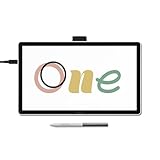
- BIGGER CANVAS, BETTER DETAIL: Redesigned with more drawing area, the laminated 14" crisp IPS Full HD display offers generous space with 98% sRGB color accuracy and a paper-like texture that won’t glare or smudge – keeping you in your creative zone longer
- PRECISE, NATURAL FEEL: Draw with the control that made Wacom a favorite; the battery-free pen never needs charging and captures everything from light lines to bold strokes with Wacom’s responsive pressure sensitivity
- COMPLETE CREATIVE STARTER KIT: Includes trials of Clip Studio Paint Pro, Magma, Concepts & Foxit software, and Skillshare training courses - your jumpstart to creating beautiful art right away
- RELIABLE PERFORMANCE: Wacom's proven reliability works seamlessly with your computer – no driver headaches, mysterious disconnects, or frustrating "why isn't this working?" moments common with cheaper alternatives
- COMPATIBILITY: PC (Windows 10 or later), Mac (OS 13 or later), Chromebook; Easy plug-in via single USB-C: devices requiring HDMI require additional converter, cable and power adapter kit (sold separately)
Blender 4.4.0 versus 4.4.3
“Blender 4.4” and “Blender 4.4.0” are not interchangeable when exact reproducibility matters. Version 4.4.0 is the first build; versions 4.4.1, 4.4.2, and 4.4.3 are later maintenance releases.
| Version | Role | Best use |
|---|---|---|
| 4.4.0 | Initial feature release | Historical reproduction, exact pipeline matching, or version-specific testing |
| 4.4.1 | First maintenance release | A more corrected 4.4 environment; a Blender developer update reported 108 fixes relative to 4.4.0 |
| 4.4.2 | Maintenance release | Testing or working within the 4.4 branch after additional fixes |
| 4.4.3 | Later listed 4.4 maintenance release, dated April 29, 2025 | The preferable 4.4 build for most users who must remain on that branch |
Blender’s official download page distinguishes current releases from older and LTS branches, while the previous-versions archive preserves historical builds. The 4.4.1 fix count is useful context, but it is not a complete measurement of reliability and does not guarantee that every scene or add-on will work correctly.
What changed in Blender 4.4?
Blender’s official 4.4 download summary highlights an improved animation workflow, better modeling, a new sculpt brush, smoother video editing, and extensive maintenance work. The official download page and the linked 4.4 release notes should be treated as the authority for exact feature names, behavior, limitations, and module-by-module changes.
Animation and rigging
The 4.4 line’s animation improvements are primarily workflow improvements: changes to keyframing, animation editing, and the way artists work in animation editors. That makes the release most relevant to character animators and anyone who spends substantial time in the Timeline, Dope Sheet, or related animation tools.
Do not assume that a workflow improvement means every shortcut or editor behavior is unchanged. Before moving a production file from 4.3, test the actions your team uses most—key insertion, editing, selection, timeline navigation, rig controls, and animation export—rather than relying only on a successful file open.
Modeling
Blender 4.4 improves modeling workflows and related productivity. For a modeler, the practical question is whether a change reduces interaction cost in mesh editing, selection, snapping, modifiers, or asset-based work—not merely whether a new menu item exists.
Rank #2

- Entry-Level Tablet: Drawing tablet dimensions are 9.92" x 7.13" x 0.31" with a 8.5" x 5.3" active area; pen-on-paper feeling for digital pen starters, drawing, editing photos, or visual communication
- Precision Pen Performance: Included Wacom One Pen features natural tilt recognition, virtually lag-free tracking, 4096 levels of pressure sensitivity, and 2 customizable switches
- Optimal Efficiency: Shortcut buttons on the pen can be customized for your favorite keyboard shortcuts like undo or copy/paste, helping you stay immersed in your art
- Multiple Compatibility: Connect to Windows PC, Mac, Chromebook, and Android smartphones and tablets via USB-C (some devices require 2nd USB-A adapters)
- Includes: Medium Wacom One graphic design tablet, battery-free Wacom One Pen, power adapter, USB-C cable and quick start guide
Existing meshes and modifiers should be tested rather than presumed to be identical. Opening a file is only an application-compatibility check; it does not prove that modifier evaluation, shading, linked data, exports, or downstream tools behave exactly as they did in 4.3.
Sculpting
The official 4.4 summary specifically calls out a new sculpt brush. Its exact name, placement, and behavior should be checked in the official 4.4 release notes and in Blender’s Sculpt Mode brush library. This is a feature for Sculpt Mode, not a general Object Mode tool.
For digital painters and sculptors, the benefit is best evaluated on the kind of surface you actually create: test the brush on a copied sculpt with your usual symmetry, remeshing, masking, pressure, and tablet settings. A new brush can expand a workflow without making every sculpting task faster.
Video editing
Blender 4.4 also describes video editing as smoother. That wording should not be read as a universal playback guarantee. Usable Sequencer performance still depends on codec, resolution, storage speed, CPU, proxy or cache settings, and the number of effects being previewed.
Test the exact footage and timeline you use. Scrub through a representative section, preview transitions and effects, and check final encoding. “Smoother editing” is a workflow description, not a benchmark result for every computer.
Crashes, No Sound, or Screen Glitches?
Random freezes, missing sound and display glitches usually trace back to one bad driver. Find and replace yours safely.Free scan · under a minuteWindows Errors? Fix Them Before They Spread
Repair common Windows errors and clear accumulated junk for a smoother, more stable PC - no reinstall needed.Free scan · no reinstallRendering and viewport work
Rendering and viewport behavior can be affected by changes to EEVEE, Cycles, GPU support, drivers, shaders, denoising, compositing, and scene evaluation. A feature-release upgrade should therefore be tested with the same scene, frame, resolution, samples, render engine, color-management settings, output format, and hardware.
Rank #3

- Entry-Level Tablet: Drawing tablet dimensions are 7.4" x 5.55" x 0.31" with a 6.0" x 3.7" active area; pen-on-paper feeling for digital pen starters, drawing, editing photos, or visual communication
- Precision Pen Performance: Included Wacom One Pen features natural tilt recognition, virtually lag-free tracking, 4096 levels of pressure sensitivity, and 2 customizable switches
- Optimal Efficiency: Shortcut buttons on the pen can be customized for your favorite keyboard shortcuts like undo or copy/paste, helping you stay immersed in your art
- Multiple Compatibility: Connect to Windows PC, Mac, Chromebook, and Android smartphones and tablets via USB-C (some devices require 2nd USB-A adapters)
- Includes: Small Wacom One graphic design tablet, battery-free Wacom One Pen, power adapter, USB-C cable and quick start guide
There is no basis for promising that Blender 4.4 renders every scene faster. Cycles GPU rendering has additional requirements, and Blender recommends current graphics drivers from the GPU manufacturer. See the official requirements page.
Geometry Nodes, Grease Pencil, compositing, and interchange
Technical artists should read the release notes for changes affecting Geometry Nodes, Grease Pencil, the compositor and viewport compositor, and import/export formats such as USD, FBX, OBJ, Alembic, and glTF. These details can matter more than headline features because node behavior, linked assets, data paths, exporters, and caches are often embedded in a studio pipeline.
Python developers and add-on authors should also check the 4.4 API and release-note documentation for renamed properties, deprecated operators, changed registration behavior, and modified data paths. An add-on can appear to install successfully while failing only in a particular editor or production operation.
The Tool Desk
Outbyte PC Repair FREEClear out junk files and repair common Windows errorsFree Scan →Outbyte Driver Updater FREEFix the driver behind crashes, sound loss and screen glitchesFind Drivers →Blender 4.4.0 system requirements
The table below summarizes Blender’s published requirements page. That page is a current requirements document rather than a version-locked historical specification for every detail of the original 4.4.0 build, so treat it as a practical baseline and verify archived documentation when an exact 4.4.0 platform exception matters.
| Platform | Published minimum baseline | Published recommended baseline |
|---|---|---|
| Windows | Windows 8.1 64-bit; 4-core SSE4.2 CPU; 8 GB RAM; GPU with 2 GB VRAM and OpenGL 4.3 | Windows 10 or 11; 8-core CPU; 32 GB RAM; GPU with 8 GB VRAM |
| macOS | macOS 11.2 Big Sur; 8 GB RAM; Metal 2.2-capable GPU | Use the hardware guidance on Blender’s requirements page; workload and GPU memory remain decisive |
| Linux | 64-bit distribution with glibc 2.28 or newer; 8 GB RAM; OpenGL 4.3 GPU with 2 GB VRAM | More RAM and GPU memory for large scenes, simulations, and GPU rendering |
- Blender recommends a 1920×1080 display for comfortable use.
- A three-button mouse is recommended; a pen tablet is useful for sculpting, painting, and Grease Pencil work.
- Requirements are not performance guarantees. Large scenes, simulations, high-resolution textures, and GPU rendering can require substantially more memory.
- Cycles GPU rendering has separate hardware and driver requirements.
Apple Silicon, Intel Macs, and Windows ARM
On an Apple Silicon Mac, use the native Apple Silicon build unless a particular plug-in requires Intel compatibility through Rosetta. Intel Macs should use the Intel build. A Windows ARM build is listed separately from ordinary Windows x64 installers and portable builds; do not assume that every add-on, render engine, codec, or Python dependency supports ARM identically.
How to download Blender 4.4.0 safely
- Start at Blender’s official download page.
- Use the previous-versions page when you specifically need the archived 4.4.0 build.
- Choose the correct platform and architecture: Windows x64 or ARM, macOS Intel or Apple Silicon, or Linux.
- Choose the installer when you want a conventional system installation, or the portable archive when you need side-by-side testing or a clean, self-contained build.
- Keep your existing Blender installation until projects, add-ons, renders, caches, and exports have been validated.
Blender can run portably, but portable execution does not manage external textures, linked libraries, user preferences, GPU drivers, add-ons, or operating-system permissions for you. Avoid unofficial mirrors, repackaged installers, and unknown “portable” bundles.
Rank #4

- Wacom Intuos Small Graphics Drawing Tablet: Enjoy industry leading tablet performance in superior control and precision with Wacom's EMR, battery free technology that feels like pen on paper
- Works With All Software: Wacom Intuos tablet can be used in any software program to explore new facets of digital creativity; draw, paint, edit photos/videos, create designs, and mark up documents
- What the Professionals Use: Wacom's industry leading pen technology and pen to paper feeling makes it the preferred drawing tablet of professional graphic designers
- Software and Training Included: Only Wacom gives you software with every purchase. Register your Intuos tablet and gain access to some of the best creative software and Wacom's online training
- Wacom is the Global Leader in Drawing Tablet and Displays: For over 40 years in pen display and tablet market, you can trust that Wacom to help you bring your vision, ideas and creativity to life
Should you install Blender 4.4.0?
| Your situation | Recommendation |
|---|---|
| You must reproduce a tutorial, bug, benchmark, or historical scene | Install 4.4.0, preferably alongside another version |
| A studio pipeline has been validated specifically against 4.4.0 | Use 4.4.0 until the pipeline owner approves a change |
| You want the most reliable build within the 4.4 branch | Prefer 4.4.3 over 4.4.0 |
| You are starting a new personal project | Use a later maintained Blender release unless a dependency requires 4.4 |
| You are choosing a production target for a team | Use the validated LTS or maintained version that your add-ons and pipeline support |
| You are learning from a course | Match the course’s supported version, then test before saving important work |
A stable release is not risk-free. Scene-specific crashes, add-on regressions, different render results, changed defaults, invalidated caches, export discrepancies, and hardware-specific performance problems can still occur.
Safe upgrade and project-migration checklist
- Back up the original. Keep the original
.blendfile untouched. - Copy the whole project. Include textures, linked libraries, simulation caches, reference media, and other external assets.
- Open the copy first. Do not use the first launch as a reason to overwrite the production file.
- Save under a new name. This preserves a route back to the old version.
- Test essential add-ons individually. Check the developer’s compatibility information; Blender’s release page cannot establish third-party support.
- Render a short frame range. Compare lighting, color management, shaders, modifiers, simulations, denoising, and output timing.
- Test exports and imports. Verify the formats your pipeline actually uses.
- Rebuild or verify caches. Do not assume simulation or video caches remain valid after a version change.
- Migrate preferences gradually. If a clean configuration works, copy only the settings you need instead of importing a whole potentially damaged configuration.
Blender generally aims for forward compatibility, but it is unsafe to promise perfect round-tripping. A file saved by a newer Blender build may change data, modifier behavior, node setups, simulation caches, or legacy features in ways that do not reopen identically in 4.4.0.
Independent reader supportYour contribution helps us test, update, and keep practical guides available for everyone.Common Blender 4.4.0 problems
Blender will not launch
Check the graphics driver, OpenGL or Metal support, downloaded architecture, and whether antivirus or enterprise policy is blocking execution. Try a clean user configuration. If that works, migrate preferences and add-ons one at a time rather than copying the entire old configuration.
“Graphics card or driver not supported”
Possible causes include an outdated driver, a GPU below the minimum API requirement, a remote-desktop session exposing a software renderer, a virtual machine without GPU passthrough, or an incorrect platform build. Update the manufacturer’s driver and test locally where possible. The official requirements page lists the relevant baseline.
An add-on disappears or fails
Disable it, install a release explicitly compatible with Blender 4.4, test with a clean configuration, and re-enable add-ons individually. Keep the old Blender installation available until the workflow is proven. Render engines and commercial plug-ins may require their own matching builds.
Recommended Free Tools
Textures are missing
A .blend file can contain references to external assets without containing those assets itself. Package or relink the project before migration, then verify paths after opening the copied file.
Best Value

- Wacom One Creative Pen Display: High definition creative pen display designed for creative hobbyists, visual thinkers, and anyone needing a second screen or bigger digital canvas for work or play
- Works With All Software: Wacom One display can be used in any software program to explore new facets of digital creativity; draw, paint, edit photos/videos, create designs, and mark up documents
- Beautiful Display For Digital Freedom: Bring your creative juices to life in a full color spectrum on a 13.3" high definition display and draw,edit photos and videos, or use for easy note taking
- Time Saving Pen Technology: Wacom One's button on pen can be customized for your favorite shortcuts like undo or copy/paste, helping you stay immersed in your art with efficiency and ease
- Wacom is the Global Leader in Drawing Tablet and Displays: For over 40 years in pen display and tablet market, you can trust that Wacom to help you bring your vision, ideas and creativity to life
Rendering is slower or looks different
Use a controlled comparison before calling it a regression. Match the engine, device, driver, frame, resolution, samples, denoising, color management, shaders, cache state, and output format. Test CPU and GPU devices separately when relevant.
Video playback remains slow
Check the footage codec, resolution, storage, proxy settings, cache, CPU load, and effects in the timeline. The 4.4 workflow improvements do not guarantee real-time playback for every media format or computer.
What to use instead
If your priority is long-term stability, a Blender LTS release may be a better production target than a short-lived feature release. If you need newer tools, choose a later maintained feature release—but validate add-ons and files first.
What’s actually slowing this PC down?
Pick the symptom - the matching free tool is one click away.
Paid alternatives such as Maya, 3ds Max, Cinema 4D, and Houdini can make sense when an employer, school, or studio already uses their pipeline, support arrangements, or proprietary plug-ins. Maya and 3ds Max are common choices in established commercial pipelines, Cinema 4D is strongly associated with motion-graphics workflows, and Houdini is particularly suited to procedural and simulation-heavy work. None is universally better, and they generally use commercial licensing models while Blender’s core application is free.
Optional resources and costs
You do not need to pay to download or use Blender 4.4.0. Optional services can support particular workflows:
- Blender Studio offers training, production assets, open-movie files, and production knowledge. Subscription prices and regional taxes can change.
- The Blender Development Fund is a contribution route, not a required license fee.
- Third-party tools and assets are available through marketplaces such as Blender Market, but compatibility must be checked for the exact Blender build and operating system.
- Render farms such as RenderStreet, GarageFarm.NET, Fox Renderfarm, and RebusFarm may help with final renders, but costs depend on hardware, frames, resolution, samples, scene complexity, upload time, storage, and queue availability.
More RAM helps large scenes and simulations; more VRAM helps texture-heavy scenes and GPU rendering; faster CPUs help simulation, encoding, CPU rendering, and some modifiers; and SSD storage helps project loading and caches. These are workflow considerations, not blanket hardware-buying instructions.
Quick Recap

Product prices and availability are accurate as of the date/time indicated and are subject to change. Any price and availability information displayed on Amazon at the time of purchase will apply.
Do these 3 things before closing this tab:
1Fix the driver behind crashes, sound loss and screen glitches2Repair Windows errors before they cause bigger problems3Scan for outdated or missing drivers - takes under a minute



