The Tool Desk
What’s actually slowing this PC down?
Pick the symptom - the matching free tool is one click away.
Outbyte Driver Updater FREEScan for outdated or missing drivers - takes under a minuteDriver Scan →Outbyte PC Repair FREERepair Windows errors before they cause bigger problemsFix Now →
ThatPainter is reader-supported. When you buy through links on our site, we may earn an affiliate commission. Learn More
A kinetic sand art table uses a magnet moved beneath a tray to pull a steel or other magnetic ball across sand, tracing patterns as it goes. A Cartesian or CoreXY-style gantry provides a rectangular work area; a motorized spirograph is a different option for creating intricate paths. Treat published parts lists as examples, and test the magnet, ball, surface, and sand together before building the finished table.
What you are building
A Kinetic Sand art table is an automated drawing machine, not simply a children’s sensory table. A concealed magnet moves below the sand surface and attracts a ball above it. The moving ball leaves a persistent groove; it stays on the surface rather than lifting between strokes.
This guide focuses on a Cartesian or CoreXY-style gantry, which moves the magnet over a rectangular work area. Another option is a motorized spirograph mechanism. These are different motion geometries, not a controlled performance comparison: choose based on the paths and construction you want.
Quick wins for a faster PC:
Fix the driver behind crashes, sound loss and screen glitchesFind Drivers →Clear out junk files and repair common Windows errorsFree Scan →Scan for outdated or missing drivers - takes under a minuteDriver Scan →How the magnetic drawing system works
- Frame and sand bed: a rigid structure supports a shallow tray or recessed surface.
- Drawing ball: a steel or other magnetic ball moves across the sand and leaves a groove.
- Magnetic coupling: a magnet beneath the tray attracts the ball through the separating surface and sand.
- Motion and control: motors move the magnet along programmed paths, using the mechanics and control workflow selected for the build.
The magnet must keep the ball tracking through the surface and sand. If attraction is too weak, the ball may fall behind or stop; if it is too strong, friction can increase enough to stall motors, cause missed steps, or produce grinding noise. Tune the magnet spacing or strength, ball, and sand together.
#1 Best Overall

- One & only Kinetic Sand: Made from natural sand, Kinetic Sand is reusable, never dries out & sticks together for easy cleanup. It’s safe for creative play, sand art & kids crafts
- 2lbs colored sand & 10 tools: Unlock a world of mesmerizing sand art & effects with pink, yellow & teal Kinetic Sand, 10 molds & tools & a satisfying squisher tool for limitless creations
- Mix, mold & create: Experiment with 3 cutter tools you won’t find anywhere else to create mesmerizing sand effects. Layer, carve, slice & flow to transform sand & reveal stunning designs
- Loads of sensory sand fun: Kinetic Sand for kids develops creative & sensory skills & allows kids to create anything they can imagine. This Kinetic Sand kit is a welcome addition to the sensory bin
- Arts & crafts kids toys: Kinetic Sand toys are exciting building toys for kids as an alternative to a slime kit, kids crafts & fidget toys. Add Kinetic Sand kits to sand art, craft kits & learning toys
Choose a motion architecture
| Architecture | Motion and work area | Build considerations |
|---|---|---|
| Cartesian or CoreXY-style gantry | Moves a magnet over a rectangular work area. | Examples use stepper motors, belts, rails, and a CNC-style controller. Scale frame, rails, belt path, and motor arrangement together. |
| Motorized spirograph | Uses rotating and other linked motion to form intricate paths. | Its geometry and construction differ from a gantry. An Arduino-described example uses stacked laser-cut plywood; the frame could also be made with a CNC router or scroll saw. |
Published projects demonstrate these approaches but do not establish that one is universally better. Decide what patterns you want and how you intend to construct and control the mechanism.
Parts and compatibility
Parts lists from published builds are examples, not universal requirements. Match the motors, drivers, controller, power supply, belts, rails, and frame to one another and to your intended mechanism.
| Example | Source-reported components or dimensions | How to use the information |
|---|---|---|
| DIY-Machines gantry | Two 12 V NEMA 17 stepper motors, GT2 belt, Arduino Uno, CNC Shield, two TMC2208 drivers, magnets, a 20 mm steel ball, and rails listed as two 40 cm and one 60 cm MGN12H rails. The project also lists lighting and other components. | These are specifications from that build, not a prescription for every table. Confirm component compatibility and adapt the dimensions to your frame. |
| Arduino linear-gantry example | Arduino UNO Rev3, CNC Shield V3, two TMC2209 drivers, two-axis CNC mechanics, linear rails, GT2 belts, and stepper motors. | This is a separate implementation. Do not assume its board, drivers, mechanics, or firmware are interchangeable with parts from another project. |
Frame and sand bed
- Rigid material for a frame and a level tray or recessed center panel.
- Fasteners, mounting hardware, and a stable base.
- Rails, carriages, belts, pulleys, and motors appropriate to the selected gantry design, if building a gantry.
- A magnet and steel or other magnetic ball that work together through the chosen surface and sand.
- Homing switches, which the SandTable project recommends for each axis.
Before cutting or assembling, define the intended work area and plan the frame and moving parts together. The DIY-Machines project describes an example frame around 80 x 60 cm; this is that project’s dimension, not a universal table size.
Rank #2
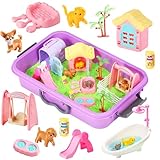
- LEARN TO CARE FOR PETS:This toddler sensory playset includes green magic sand,sand box,5 dog and cat figures,dog and cat food,1 fish,1 bone,1 chicken leg,1 pet house,1 pet carrier,1 slide,1 swing,1 bathtub,1 tower,2 fences,2 pet bowls,1 scoop. Let your kids become more loving and patient by caring for pets.Bathe,feed,and play with pets,they will spend hours play with it.
- LEARN MORE SKILLS:Sensory bins offer an opportunity for children to explore and learn through their senses.They can also tell their own story.This can increase their language skills,fine motor skills,social skills and hand-eye coordination.
- TIPS FOR SAFETY:Environmentally-Friendly materials,safe,tasteless.Smooth surface can not hurt hands.Conforming To American Toy Standards.
- BEST VALUE KIT AND A THOUGHTFUL GIFT:This sensory kit is a great gift for Kids.It can provide hours of fun for kids of all ages.
- 100% GUARANTEED:If you are dissatisfied with our sensory bins, we promise to refund or replace it for you . If you have any question about our product, please contact our after-sales service for help.
Electronics and control
A controller and motor drivers must suit the chosen motors and mechanism. Arduino’s linear-gantry example uses an UNO Rev3, CNC Shield V3, and TMC2209 drivers, while the DIY-Machines example lists an Arduino Uno, CNC Shield, and TMC2208 drivers. Verify board, shield, driver, motor-current, power-supply, and firmware compatibility for your own build.
A Raspberry Pi is not inherently required for every table. The SandTable software project describes a web interface for generating mathematical patterns, text, clip art, and images, and says a Raspberry Pi and CNC controller are needed for its physical-table setup; LEDs are optional. Other projects use different control workflows.
Build the frame and mechanism
- Choose the work area and architecture. Plan the frame, rails or linked mechanism, and intended pattern space as one design.
- Make a small coupling test. Try the magnet, ball, surface material, and sand together before finishing the enclosure.
- Build a rigid frame and tray. Support the drawing surface and check that it is level and does not flex.
- Install the motion components. For a gantry, align the rails, motors, pulleys, and belts to the chosen design. For a spirograph, follow the geometry of that mechanism rather than substituting gantry assumptions.
- Secure the magnet and route wiring. Keep components clear of the mechanism’s travel and protect wiring from moving parts.
- Install homing switches. Provide a switch for each axis where appropriate, as recommended by the SandTable project.
Do not copy a frame dimension or rail length from another project without adapting the associated belt path, motor placement, and work area.
Rank #3

- Construction-Themed Sensory Bin for Ages 3+: This all-in-one sensory bin invites kids to explore, build, and imagine! Packed with sensory play sand, construction toys, castle molds, and glow-in-the-dark rocks, it’s perfect for creative, hands-on fun both indoors and outside
- Glow-in-the-Dark Rock Decor: Add a thrilling twist to playtime with glow-in-the-dark rocks! Kids can create glowing pathways and exciting designs as they build in their construction site. These unique rocks spark creativity and bring extra fun to every play session
- Mess-Free, Easy-to-Mold Sand: Our sand is designed to cling together, making it easy for kids to mold and shape without the mess! Low in dust, this sand offers clean sensory play and is perfect for molding, and excavating activities
- Promotes Fine Motor & Sensory Skills: Boost your preschooler’s development with a kit that fosters sensory exploration, creativity, and fine motor skills. Kids can dump, and build, creating their own work zone and engaging in sensory-rich activities
- Perfect Gift for Ages 3+: A thoughtful, hands-on gift that offers hours of engaging play, inspiring creativity and exploration. Nice for birthdays, holidays, or any special occasion, it’s a gift that entertains while promoting learning and imaginative play
Choose a software and pattern workflow
Software paths vary by project. Select a pattern source and confirm that its output format is supported by your controller and firmware.
Windows Errors? Fix Them Before They Spread
Repair common Windows errors and clear accumulated junk for a smoother, more stable PC - no reinstall needed.Free scan · no reinstallCrashes, No Sound, or Screen Glitches?
Random freezes, missing sound and display glitches usually trace back to one bad driver. Find and replace yours safely.Free scan · under a minute- Generate or select a path. Options include mathematical patterns and paths derived from text, clip art, or images in the SandTable web interface.
- Confirm how the controller accepts paths. Arduino’s linear-gantry example extracts coordinate sequences from a G-code file and copies them into its sketch; it does not run G-code directly.
- Configure and home the machine. Set up the chosen controller and verify that homing switches establish the intended positions.
- Test cautiously. Begin with a simple path and observe whether the ball tracks the magnet over the actual surface and sand.
Do not assume a coordinate format or control setup from one project will work with another. Check the firmware, mechanism, and path workflow together.
Tune the magnet, ball, and sand
The SandTable project describes a trade-off: weak attraction can leave the ball behind or cause it to stop, while excessive attraction can increase friction, stall steppers, cause missed steps, or make grinding noise. The sources do not establish a universal magnet grade, surface gap, sand depth, ball size, or motor setting. Test and adjust the components as a system.
Rank #4
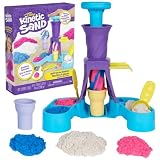
- Make ice cream swirls: Kids can scoop, swirl & decorate their own soft serve-inspired creations with 3 colors of Kinetic Sand, 2 ice cream cones, a scoop with sweet treat molds & a tool for toppings
- Endless possibilities: This Kinetic Sand kit mimics a real soft serve experience; scoop classic cones or make colored swirls – flow sand into the station, push down to swirl & remove the cone to decorate
- 14oz sand, cones & tools: Unbox blue, pink & white colored sand; top cones with molded details from the scoop & add sprinkles with the grater; make your ice cream creations & squish to create again
- One & only Kinetic Sand: Made from natural sand, Kinetic Sand is reusable, never dries out & sticks together for easy cleanup; it’s safe for creative play, sand art & kids crafts
- Arts & crafts kids toys: Kinetic Sand toys are exciting building toys for kids as an alternative to a slime kit, kids crafts & fidget toys; add Kinetic Sand kits to sand art, craft kits & learning toys
- Start with the actual tray or surface material, magnet, ball, and sand you plan to use.
- Observe whether the ball follows the magnet continuously or lags and stops.
- If tracking is unreliable, adjust magnet spacing or strength, ball, and sand amount or type.
- Watch for excess drag, missed steps, stalling, or grinding, and adjust the same variables before relying on a long path.
- Test the homing switches and confirm that the machine can establish its axis positions repeatably.
The DIY-Machines repository reports around 600 g of sand for its example build. That figure describes its project, not a recommended amount for other table sizes or mechanisms.
Independent reader supportYour contribution helps us test, update, and keep practical guides available for everyone.Safety and maintenance
- Guard moving belts, rails, linked mechanisms, and pinch points.
- Keep wiring clear of moving parts and disconnect power before adjusting the mechanism or electronics.
- Use a stable frame and secure the table against tipping or sliding.
- Keep sand away from electronics and clean spills before they reach the mechanism.
- Supervise initial operation and do not assume a previously used path is safe for a modified machine.
- Follow component safety information, especially for magnets, and guard sharp or breakable surfaces.
Inspect belts, rails, homing switches, wiring clearance, and the magnet mount before extended runs. Recheck alignment and coupling if the ball stops tracking or the mechanism begins missing steps.
Do these 3 things before closing this tab:
1Fix the driver behind crashes, sound loss and screen glitches2Repair Windows errors before they cause bigger problems3Scan for outdated or missing drivers - takes under a minuteFrequently Asked Questions
How does a magnetic sand art table work?
A magnet moves beneath the tray and attracts a steel or other magnetic ball across the sand. The ball traces grooves as the mechanism follows a programmed path.
Best Value

- 【34 Complete Toddler Sensory Bin】--Including storage box X 1, coconut tree X 4, worker model X 4, road sign X 5, crane tower X 1, shovel X 1, rake X 1, pusher X 1, plastic castle X 6, 1.1 pound space sand X 2, Small Truck X 5, Truck X 3. The perfect indoor/outdoor toy for toddler aged 3-5, which can promote creativity and motor skills!
- 【Simulating Real Construction Sites】--8 construction vehicles including 3 large vehicles (excavator/bulldozer/forklift) and 5 small vehicles (excavator/roller/drilling truck/dump truck/bulldozer), allowing kids to enhance their cognitive and hands-on abilities in simulating real construction scenes. The perfect construction toys 3 4+ year old.
- 【Easy to Use and Clean Sand】-- Upgraded sand has better texture and fluidity. It is easy to shape, non stick to the hand, not easy to dry, and has a good hand feel. Kids can create various buildings by kneading sand. An ideal outdoor toy for toddler 3-5. Toddler can exercise fine motor skills, stimulate creative thinking, and create educational and entertaining immersive toys through interactive games.
- 【Easy to Storage】--The sensory bins can also serve as a play area, with size of 9.45 X 14.17 X 3.15 in. It not only allows for easy storage and carrying, but also greatly reduces clutter. Both indoor and outdoor play can be quickly cleaned.
- 【Perfect Gift for Boy 3+】--The sensory boy toys offer hours of creative styling and sculpture, perfect for solo or group gaming. 3 4 5 6 year old boy birthday gift! Durable gift box packaging, 34pcs accessories. It can be used as a birthday/Christmas/holiday gift to help young engineers embark on a construction adventure!
Should I build a Cartesian gantry or a spirograph mechanism?
A gantry moves the magnet over a rectangular work area. A motorized spirograph uses different linked motion to make intricate paths. The cited sources show examples rather than a direct performance comparison, so choose by intended patterns and build method.
Do I need a Raspberry Pi?
Not necessarily. Requirements depend on the control workflow: the SandTable project describes a Raspberry Pi and CNC controller for its web-interface setup, while Arduino examples use different approaches.
Can I use any sand or magnet?
No universal combination is established by the reviewed sources. Magnet strength and spacing, ball size, and the type and amount of sand interact. Test the parts together and watch for weak tracking or excessive drag.
Does an Arduino example run G-code directly?
Not the cited Arduino linear-gantry example. It extracts coordinate sequences from a G-code file and copies them into its sketch. Other projects may use different control software and path formats.
The Bottom Line
A kinetic sand art table is a drawing machine built around magnetic coupling: a moving magnet beneath the tray guides a ball across sand. Choose a gantry or spirograph mechanism for the paths and construction you want, treat published parts lists as examples, and verify controller compatibility. Test the magnet, ball, surface, and sand together before committing to the finished build.
Quick Recap

Product prices and availability are accurate as of the date/time indicated and are subject to change. Any price and availability information displayed on Amazon at the time of purchase will apply.




