PC Slower Than It Used to Be?
Outbyte PC Repair · freeA free scan shows the junk files, broken settings and background clutter dragging Windows down - then fixes them in one click.
Run a Free PC Scan →ThatPainter is reader-supported. When you buy through links on our site, we may earn an affiliate commission. Learn More
The Creality Falcon2 Pro is an enclosed blue-diode laser engraver and cutter sold in 22W, 40W, and 60W versions. It suits supervised work on materials such as wood, plywood, leather, cardboard, bamboo, and suitable opaque acrylic, but it is not a CO2 or fiber laser and cannot safely process every plastic or metal.
The 40W model is a balanced choice for many buyers who want more cutting capacity than the 22W version. Choose 60W when maximum diode cutting power matters; choose 22W when engraving and moderate cutting are enough. All versions require active supervision, suitable material selection, and smoke management.
What is the Creality Falcon2 Pro?
The Falcon2 Pro is a desktop CNC-style laser engraver and cutter with an integrated enclosure, camera, and air-assist system. Creality documents three optical-power configurations: 22W, 40W, and 60W, using a blue-diode laser at approximately 455 ± 5 nm. The 40W and 60W configurations can include a 1.6W fine-detail module in relevant bundles; the 22W model is generally sold as a single-module configuration.
Outdated Drivers Are Slowing You Down
One free scan finds every outdated or missing driver and matches the right update for your exact hardware.Free scan · exact hardware matchPC Slower Than It Used to Be?
A free scan shows the junk files, broken settings and background clutter dragging Windows down - then fixes them in one click.Free scan · Windows 10 & 11Unlike an open-frame diode engraver, the Pro encloses the working area and adds safety and positioning equipment. This helps contain stray light and smoke, but does not make cutting risk-free: material can ignite, smoke can be hazardous, and the machine needs continuous attention.
#1 Best Overall
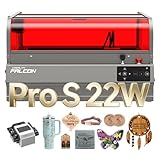
- 【Ideal for Professional Cutting – 2025 Upgraded Falcon2 Pro S】The 2025 newest Creality Falcon2 Pro S 22W laser engraver features a fully integrated enclosure, enhanced safety containment, Z-Axis Auto Focus, Auto Cut Through path compensation, precise camera positioning, and one-key intelligent control. Designed for high efficiency and wide material compatibility, it is perfectly suited for professional makers, small studios, and sole traders seeking reliable batch production.
- 【22W Output & 600mm/s High-Speed Cutting】Falcon2 Pro S laser engraver delivers a powerful 22W optical output (Class 1, up to 120000mW machine power), capable of one-pass cutting 15mm basswood, 10mm black acrylic, and even 0.1mm thin metal sheets. With an upgraded cutting speed of up to 500mm/s, it enables true high-speed batch processing that lower-power machines simply can’t achieve.
- 【Built-in Camera with Intelligent Auto Focus】Creality 22W laser engraver and cutter machine with practical large space batch automatic positioning function, built-in a camera above the center of the product in the shield, USB connected to the computer, preview into the picture intuitive and efficient, significantly improve the success rate of creation. Compared with others, users no longer need to manually measure the distance between different works, and can be operated intelligently with one key!
- 【Class 1 Certified &Several Security Protections】-Creality Falcon2 Pro S 22W laser engraver for wood and metal is equipped with a flame detector, dual wire limit switch, safety lock, emergency stop button, and laser detection cover five safety features. In addition, Transparent design, a full metal frame, fully enclosed structure, covered with fireproof fiber cover, to isolate smoke, dust and noise during the creation process, allowing you to devote yourself to your work!
- 【10-Minute Setup & Easy Cleaning Design】Shipped 80% pre-assembled, the Falcon2 Pro S can be installed and tested in 10 minutes or less. A built-in debris drawer collects cutting residue during operation, simply pull it out and empty after use, reducing cleaning frequency and making it ideal for compact workshops and small studios.
Creality’s official manual documents Windows and macOS compatibility and support for LightBurn and LaserGRBL. Creality software is also available for relevant product listings.
Falcon2 Pro 22W vs. 40W vs. 60W
| Feature | 22W | 40W | 60W |
|---|---|---|---|
| Laser type | Blue diode | Blue diode | Blue diode |
| Nominal optical power | 22W | 40W | 60W |
| Nominal work area | 400 × 415 mm | 400 × 415 mm | 400 × 400 mm, according to Creality’s FAQ |
| 1.6W detail module | Generally not included | Included in relevant bundles | Included in relevant bundles |
| Best suited to | Engraving and moderate cutting | Faster, deeper cutting and fine-detail work | Maximum cutting capacity in the family |
| Main trade-off | Lower cutting power | Higher price and heat load | Highest cost and material-management demands |
These specifications come from Creality’s official manual and FAQ. Regional bundles and included accessories vary, so check the exact listing before ordering. Confirm the 60W work area for the package you plan to buy.
Which model should you choose?
- Choose 22W for engraving, thin wood, leather, cardboard, and occasional moderate cutting when a lower entry cost matters.
- Choose 40W if plywood and thicker wood are important, faster production is useful, or the relevant 1.6W detail-module bundle suits your work.
- Choose 60W if maximum diode cutting power is the priority and you accept higher cost, greater heat and smoke-management demands, and more material testing.
Key specifications and workspace
Creality’s official manual lists approximate machine dimensions of 664 × 570 × 328.4 mm and weights of 18.04 kg for 22W, 18.56 kg for 40W, and 18.87 kg for 60W. It lists input compatibility as 100–240V, 50–60Hz and a recommended operating temperature of 5°C–35°C.
Allow more room than the machine footprint for exhaust tubing, power cables, loading material, cleaning, air-assist equipment, and access around the enclosure. Rotary or raised-work setups can need considerably more clearance. The manual lists common formats including JPEG, JPG, PNG, BMP, SVG, and DXF; confirm current software and device-profile support for your operating system.
What can the Falcon2 Pro engrave and cut?
Creality lists cardboard, wood, bamboo, rubber, leather, fabric, acrylic, and plastic among supported material categories in its official manual. These categories are a starting point, not a guarantee that every material is safe or suitable.
Strongest use cases
Wood, plywood, paperboard, leather, bamboo, and many dark or opaque acrylic sheets are obvious applications. Projects include signs, ornaments, labels, gifts, personalized products, stencils, packaging components, and small-batch craft goods. Engraving is generally less demanding than cutting.
Cutting depends on optical power, material species and density, thickness, moisture, focus, flatness, air assist, speed, power, passes, lens cleanliness, and ventilation. Settings that work on one plywood brand may fail on another.
Rank #2

- 【Ideal for Cutting Professional】-Newest Creality Falcon2 Pro integrated enclosure 60W laser engraver machine, with intelligent two adjustable beams, high output power, high containment safety, intelligent focus, accurate positioning, one key control, wide applicability characteristics. Based on the above, the laser cutter and engraver machine's speed to rapidly realize mass production is perfectly suited for professional players and sole traders.
- 【Native 60W Output & 500+mm/s Engraving Speed】-Creality Falcon2 Pro 60W laser engraver power up to 240000mW, works of utility upgraded again! It can cut through 0.2mm stainless steel, 22mm basswood, and 30mm black acrylic in a single pass. With engraving speeds exceeding 500mm/s, it enables high-efficiency batch production and significantly reduces processing time. The powerful laser system tackles projects that lower-powered machines cannot handle, helping bring your creative ideas to life with speed and precision.
- 【Built-in Camera with Intelligent Focus】-Creality Falcon2 Pro 60W laser engraver machine with practical large space batch automatic positioning function, built-in a camera above the center of the product in the shield, USB connected to the computer, preview into the picture intuitive and efficient, significantly improve the success rate of creation. Compared with others, users no longer need to manually measure the distance between different works, and can be operated intelligently with one key!
- 【Class 1 Certified & Several Security Protections】-Creality Falcon2 Pro 60W laser engraver is equipped with a flame detector, dual wire limit switch, safety lock, emergency stop button, and laser detection cover five safety features. In addition, Transparent design, a full metal frame, fully enclosed structure, covered with fireproof fiber cover, to isolate smoke, dust and noise during the creation process, allowing you to devote yourself to your work!
- 【10 Min Quick Install & Easy cleaning】-Falcon2 pro 60W laser engraver machine is shipped in an over unit (80% assembled), you only need to spend 10 minutes or less to install and test the machine when you receive it. The bottom of the drawer is designed to organize the debris during the creation process. After the creation process is finished, you only need to pull out the drawer and pour out the debris, making the cleaning very convenient and less frequent, which is perfect for small studios.
Acrylic and plastic limitations
A blue diode laser is a poor match for much transparent acrylic because blue light can pass through the sheet rather than being absorbed. Dark, opaque, or appropriately colored acrylic generally absorbs the beam more effectively, but formulation and coating matter.
“Plastic” is not a single safe material. Some plastics melt, flare, release toxic gases, or damage the machine. Do not process unidentified material just because it is called plastic. Avoid PVC, vinyl, and other chlorine-containing materials because emissions can be hazardous and corrosive.
Metal
Bare reflective metal is not a normal cutting target for this blue-diode machine. Painted, anodized, coated, or marking-compound-treated metal may be markable, but that is different from directly engraving or cutting bare metal.
Creality’s 60W product listing advertises cutting up to 22 mm basswood and 0.2 mm stainless steel in one pass under stated conditions. These are manufacturer claims, not guaranteed production results; the stainless-steel claim does not mean general bare-metal cutting capability. Material, setup, coating, focus, air assist, and operating parameters all matter.
Quick wins for a faster PC:
Scan for outdated or missing drivers - takes under a minuteDriver Scan →Clear out junk files and repair common Windows errorsFree Scan →What does “60W” really mean?
The headline wattage refers to nominal optical laser power, not total electrical consumption or a CO2-laser equivalent. A 60W blue diode has more cutting power than a 22W diode, but it retains important wavelength and material limitations.
Do not assume a 60W Falcon2 Pro performs like a 60W CO2 laser. CO2 systems are generally better suited to clear acrylic and broader cutting work, while fiber systems are designed for direct metal marking and engraving. The Falcon2 Pro’s advantage is an enclosed diode workflow for common craft materials, not universal material coverage.
Enclosure, camera, and air assist
Enclosure and safety
Creality identifies the Falcon2 Pro as Class 1 under FDA classification in relevant documentation and product material. That applies to the intended enclosed configuration. The manual warns that radiation at the aperture can exceed Class 1 if enclosure safety assumptions are defeated or the machine is altered.
Rank #3
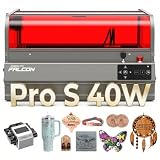
- 【Ideal for Professional Cutting –Upgraded Falcon2 Pro S】The newest Creality Falcon2 Pro S 40W laser engraver features a fully integrated enclosure, enhanced safety containment, Z-Axis Auto Focus, Auto Cut Through path compensation, precise camera positioning, and one-key intelligent control. Designed for high efficiency and wide material compatibility, it is perfectly suited for professional makers, small studios, and sole traders seeking reliable batch production.
- 【40W Output & 600mm/s High-Speed Cutting】Falcon2 Pro S laser engraver delivers a powerful 40W optical output (Class 1, up to 240000mW machine power), capable of one-pass cutting 20mm basswood, 30mm black acrylic, and even 0.1mm thin metal sheets. With an upgraded cutting speed, it enables true high-speed batch processing that lower-power machines simply can’t achieve.
- 【Built-in Camera with Intelligent Auto Focus】This creality falcon 40W laser engraver and cutter machine with practical large space batch automatic positioning function, built-in a camera above the center of the product in the shield, USB connected to the computer, preview into the picture intuitive and efficient, significantly improve the success rate of creation. Compared with others, users no longer need to manually measure the distance between different works, and can be operated intelligently with one key!
- 【Class 1 Certified & Several Security Protections】Creality Falcon2 Pro S 40W laser engraver is equipped with a flame detector, dual wire limit switch, safety lock, emergency stop button, and laser detection cover five safety features. In addition, Transparent design, a full metal frame, fully enclosed structure, covered with fireproof fiber cover, to isolate smoke, dust and noise during the creation process, allowing you to devote yourself to your work!
- 【10-Minute Setup & Easy Cleaning Design】Shipped 80% pre-assembled, the Falcon2 Pro S can be installed and tested in 10 minutes or less. A built-in debris drawer collects cutting residue during operation, simply pull it out and empty after use, reducing cleaning frequency and making it ideal for compact workshops and small studios.
The enclosure does not permit unattended operation, interlock bypassing, removing the tray without understanding the consequences, processing unknown materials, or ignoring smoke extraction. Supervise every job and have suitable fire-safety equipment available.
Recommended Free Tools
Camera positioning
The built-in camera helps align artwork to an object, place designs on scraps or irregular stock, and reduce waste in batch work. Creality’s 60W product page describes a 360-degree visual-positioning camera covering the workspace.
Camera positioning is not an automatic precision guarantee. Calibration, perspective, reflections, lighting, and material placement can introduce errors; warped or moving material can defeat alignment. Use the camera with framing or a low-power positioning check before committing valuable stock. Workflows can differ between Falcon Design Space, LightBurn, LaserGRBL, and firmware versions.
Air assist and exhaust do different jobs
Air assist directs airflow at the cutting point. It can reduce flare-ups, clear smoke from the cut, improve edge quality, reduce soot, and keep the laser path clearer. Exhaust removes smoke from the enclosure. Filtration recirculates air through a purifier but needs appropriate filters and does not make every emission harmless.
For indoor use, vent outdoors through a properly designed system where permitted, or use filtration designed for the emissions involved. A fan and short tube are not automatically complete smoke control.
Software: Creality, LightBurn, or LaserGRBL?
| Software | Best for | Considerations |
|---|---|---|
| LightBurn | Complex layouts, vector preparation, material libraries, camera workflows, and repeat production | Paid software; check current pricing with LightBurn |
| LaserGRBL | Many basic workflows and a lower-cost entry point | Less polished for advanced layout and camera-assisted production |
| Creality software | Beginners seeking first-party integration | Verify current operating-system support and whether needed camera and advanced features are included |
Whichever application you choose, confirm the machine profile, workspace dimensions, focus procedure, air-assist controls, and camera calibration for your exact variant.
Setup and first project
- Assemble the machine using instructions for the exact 22W, 40W, or 60W configuration.
- Install the chosen software and connect the machine.
- Complete any required activation, firmware, or device setup.
- Prepare a known, laser-safe material and make sure it is flat and supported.
- Import or create artwork.
- Set focus, speed, power, passes, and air assist.
- Use the camera and framing function to confirm placement.
- Start the job while present; watch for flame, abnormal movement, or smoke buildup.
- Stop immediately if anything behaves unexpectedly.
- Let the workpiece and machine cool, then remove the piece and clean residue, tray, and optics as needed.
There is no universal best setting. Make a material test grid for each new material and thickness, change one variable at a time, and record the result.
Rank #4

- 【FDA Safety】With a 360° visual enclosed design, the Falcon2 Pro S laser engraving machine not only giving you a clean and quiet working environment, but also allowing you observe the processing from any angle and protact your eyes from laser radiation. The Laser Class 1, Laser Output Level: 22000mW
- 【Smart Auto Focus】Smart Auto Focus: One-click auto-focus instantly adjusts to the optimal height for any material, ensuring sharp, precise results without manual effort—ideal for smooth, efficient engraving every time.
- 【Powerful & High Speed Engraving】Falon2 Pro S 22w laser engraver enables rapid engraving and cutting of materials like 15mm basswood, 10mm black acrylic, and 0.1mm thin metal in a single pass, with speeds up to 25,000mm/min for enhanced efficiency
- 【Falcon Design Space】Falcon Design Space is easy to use, free, and powerful, and the Falcon2 Pro S also can be used with popular engraving software such as LaserGRBL and LightBurn. It supports Windows and Mac OS systems.
- 【Pilot Technology with Precise Positioning】Falcon 2 Pro S laser cutter has a built-in top camera with pilot technology & visual assistance for accurate alignment and full-frame functionality. Support real-time preview and one click picture output, effortlessly handles various shapes objects engraving or batch processing.
Safety rules that matter
- Never leave the machine operating unattended.
- Keep the supplied silicone tube connected to the laser module to reduce lens contamination risk.
- Never look directly at the beam or touch the moving system during operation.
- Keep the work area and tray free of debris.
- Vent smoke outdoors or through a properly designed filtration system.
- Use only identified, suitable materials.
- Clean the body and laser module only with the machine powered off.
- Do not connect or disconnect the laser module while powered on.
- Inspect the work continuously for flame or flare-ups.
If a flame appears, stop the job immediately. Keep the enclosure closed unless emergency intervention requires otherwise, and use an appropriate fire extinguisher if the flame does not go out. Do not restart until the material, tray, lens, and airflow path have been inspected.
Independent reader supportYour contribution helps us test, update, and keep practical guides available for everyone.Rotary engraving and oversized materials
The standard enclosed bed is intended for flat stock within its specified workspace. Rotary engraving and larger objects may require raising the machine or removing the bottom tray. Creality’s compatibility documentation warns these changes can introduce laser-light leakage.
A rotary attachment is therefore not a risk-free extension of the normal workflow. Verify compatibility for the exact model, check clearance, preserve shielding and interlock protection, and understand how a modified setup changes the machine’s safety assumptions.
Maintenance and troubleshooting
Routine maintenance
- Remove debris from the tray and enclosure.
- Inspect and clean the laser and camera lenses when powered off.
- Check air-assist tubing and airflow.
- Inspect cables, connectors, enclosure panels, and safety sensors.
- Check for smoke buildup and residue.
- Keep software and firmware compatible with the selected device profile.
- Run a small test cut after maintenance or laser-module replacement.
Poor cutting despite high power
Check focus, material flatness, lens contamination, air-assist tubing, material density, speed, passes, and whether the material absorbs 455 nm light. High nominal power cannot compensate for poor focus or unsuitable material.
Excessive soot or smoky edges
Possible causes include insufficient air assist, excessive power, low speed, poor exhaust, dirty optics, or unsuitable material. Clean the lens, improve airflow, and run a test matrix before assuming the laser module has failed.
Camera alignment errors
Clean the camera lens, confirm workspace dimensions, recalibrate if necessary, flatten the material, and frame the design before engraving. Reflections and unusual lighting can distort the view.
The Tool Desk
Outbyte PC Repair FREEClear out junk files and repair common Windows errorsFree Scan →Outbyte Driver Updater FREEFix the driver behind crashes, sound loss and screen glitchesFind Drivers →Unexpected movement or alarm
Creality’s FAQ describes a protective response in which abnormal movement can switch off the laser, stop the motors, blink the indicator, and trigger a rapid buzzer. Stop the job and check for obstructions, tray placement, loose cables, enclosure sensors, and software connection before restarting.
Best Value

- Commercial-Grade 60W Power: Built for serious makers, workshops and growing businesses, the Falcon2 Pro 60W delivers exceptional cutting power and high-speed engraving for wood, acrylic, leather and more, helping you complete demanding projects faster with professional-quality results.
- 3-Level Adjustable Power (60W/40W/22W): Switch seamlessly between 60W, 40W and 22W laser output to match different materials and applications. Maximize cutting performance with full power or reduce output for finer engraving, greater precision and less material scorching—all with one machine.
- 60W + 1.6W Dual Laser System: The powerful 60W laser handles heavy-duty cutting and engraving, while the integrated 1.6W laser enables precise positioning and fine engraving. Together they deliver greater flexibility, improved accuracy and a smoother workflow across a wide range of projects.
- Fully Enclosed Class 1 Safety: Work confidently with a fully enclosed Class 1 design that minimizes laser exposure while improving smoke containment. Features including a protective viewing window, emergency stop and intelligent safety monitoring help create a safer workspace.
- Professional HD Camera Workflow: The built-in HD camera provides accurate material positioning, live preview and batch engraving alignment, reducing setup time while improving production efficiency and engraving consistency.
Who should buy the Falcon2 Pro?
The Falcon2 Pro suits hobbyists, artists, makers, and small businesses that want an enclosed diode system for signs, gifts, ornaments, leather goods, packaging, and other small-batch products. It is attractive when containing the working area and camera-assisted placement matter more than processing oversized stock.
Consider a CO2 laser if your main requirements are clear or thick acrylic, deeper general-purpose cutting, or higher production throughput and you can provide the space, ventilation, maintenance, and infrastructure. Consider a hybrid diode/IR machine if metal marking is a major requirement and a smaller work area is acceptable. Consider a fiber laser for serious direct metal marking rather than ordinary wood-and-craft work.
The Falcon2 Pro is a poor fit if you cannot provide ventilation, need unattended production, require a large pass-through bed, expect industrial throughput, or want to process bare metal, clear acrylic, and unidentified plastics without material testing.
What’s actually slowing this PC down?
Pick the symptom - the matching free tool is one click away.
Final buying advice
Buy the 22W Falcon2 Pro when engraving and moderate cutting cover your needs. Buy the 40W version when thicker wood, plywood, faster cutting, and the relevant 1.6W detail-module bundle justify the added cost. Buy the 60W version only when maximum diode cutting capacity is useful and you understand it remains a blue-diode machine, not a CO2 laser in a smaller box.
Before ordering, confirm the exact regional bundle, work area, included module, software support, accessory compatibility, and current price on the official documentation and regional product page.
FAQ
Is the Falcon2 Pro a CO2 laser?
No. It is an enclosed blue-diode laser operating at approximately 455 ± 5 nm, including the 60W version. Optical wattage does not make it equivalent to a CO2 laser.
Which Falcon2 Pro should I buy?
Choose 22W for engraving and moderate cutting, 40W for a balance of cutting power and cost, or 60W when maximum diode cutting capacity is worth the added cost and material-management demands.
Free tools Windows power users keep installed
One-click scans. No signup required.
Can the Falcon2 Pro cut clear acrylic or metal?
Clear acrylic is generally a poor match for a blue diode because much of the light passes through it. Bare reflective metal is not a normal cutting target; coated or treated surfaces may be markable, which is different from cutting or directly engraving bare metal.
Can I leave the Falcon2 Pro running unattended?
No. The enclosure does not remove fire risk. Stay present, monitor the work, use suitable materials, and provide effective smoke extraction.
Does the Falcon2 Pro include LightBurn?
Creality documents compatibility with LightBurn and LaserGRBL, but compatibility does not mean LightBurn is included. Check the regional bundle and LightBurn’s current licensing terms.
Quick Recap

Product prices and availability are accurate as of the date/time indicated and are subject to change. Any price and availability information displayed on Amazon at the time of purchase will apply.
Do these 3 things before closing this tab:
1Clear out junk files and repair common Windows errors2Fix the driver behind crashes, sound loss and screen glitches3Repair Windows errors before they cause bigger problems



