Crashes, No Sound, or Screen Glitches?
Crashes, No Sound, or Screen Glitches?
Random freezes, missing sound and display glitches usually trace back to one bad driver. Find and replace yours safely.Free scan · under a minuteWindows Errors? Fix Them Before They Spread
Repair common Windows errors and clear accumulated junk for a smoother, more stable PC - no reinstall needed.Free scan · no reinstallOutbyte Driver Updater · freeRandom freezes, missing sound and display glitches usually trace back to one bad driver. Find and replace yours safely.
Find the Right Drivers →ThatPainter is reader-supported. When you buy through links on our site, we may earn an affiliate commission. Learn More
“It’s Glowtime” iPhone wallpapers are unofficial designs inspired by Apple’s September 9, 2024 event invitation—not wallpapers released by Apple. For the original versions, download the iPhone files from independent designer Basic Apple Guy’s “It’s Glowtime” wallpaper page. It offers two main versions, with coordinated downloads for iPad and Mac.
Download the original “It’s Glowtime” iPhone wallpapers
Basic Apple Guy created the glowing, multicolored Apple-logo designs after Apple used similar artwork for its 2024 event invitation. On the original download page, choose the iPhone file under Version 01 or Version 02. The same page also lists iPad and Mac versions; choose the iPhone file rather than a download sized for another device.
Open the image at full size before saving it. A page thumbnail or compressed preview may look fine on screen but appear soft when enlarged as wallpaper.
Free tools Windows power users keep installed
One-click scans. No signup required.
Find alternate color versions
If you want a different palette, iGeeksBlog presents blue, red, and green adaptations alongside device downloads. These are alternate interpretations, not Apple-issued wallpapers or the original creator’s two versions. See the iGeeksBlog wallpaper page.
#1 Best Overall

- Official PIXAR Merchandise
- Toy Story Phone Case for iPhone; Toy Story iPhone Case; Toy Story Phone Accessories; Toy Story Phone Case; Blue Phone Case; Toy Story Gift; Disney iPhone Case; Toy Story 30th Anniversary; Toy Story Wallpaper; Andy's Wallpaper; Toy Story Clouds; Andy's Room
- Two-part protective case made from a premium scratch-resistant polycarbonate shell and shock absorbent TPU liner protects against drops
- Printed in the USA
- Easy installation
Other secondary pages host their own versions: iOS Hacker’s downloads and a Wallpapers Central rendition. Wallpapers Central lists its iPhone image as 1420 × 3073 pixels; that dimension applies to its rendition, not every “Glowtime” file.
Save the full-size image on your iPhone
- Open Basic Apple Guy’s page in Safari and find the iPhone download for the version you want.
- Tap the download or image link. If it opens a preview, tap the image to open the full-size file; avoid saving a small thumbnail.
- Press and hold the full-size image and choose the image-saving option, such as Save to Photos. If that option does not appear, try Safari’s share sheet and choose Save Image.
- Open Photos and check that the image is there. If it looks unusually small or blurry, return to the page and open the original file rather than the preview.
Safari’s menu wording can vary with iOS and the way a site serves its images. On ad-heavy download pages, make sure you have selected the wallpaper itself rather than an advertisement or app prompt.
Rank #2

- Cute Fruity Wallpaper design. Coquette Puffy Stars Fruit Summer Wallpaper 3d Fruity Women
- Two-part protective case made from a premium scratch-resistant polycarbonate shell and shock absorbent TPU liner protects against drops
- Printed in the USA
- Easy installation
Set it as a Lock Screen or Home Screen wallpaper
- Open Settings and tap Wallpaper.
- Tap Add New Wallpaper, then choose Photos.
- Select the saved image and adjust its crop and position in the preview.
- Tap Add, then choose Set as Wallpaper Pair or customize the Lock Screen and Home Screen separately.
You can also open the image in Photos, tap Share, and choose Use as Wallpaper if that action is available on your iOS version. Menu names and customization controls can vary slightly between versions.
Position the artwork so it works with the screen
A wallpaper can fit an iPhone without matching its display proportions exactly. The phone may enlarge or crop an image, and different iPhone screens can frame the same file differently. Adjust the preview rather than assuming a device-specific label guarantees a perfect fit.
Rank #3
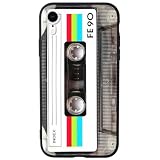
- 【Compatible Model】This funny case is only compatible with iPhone XR (6.1" Inch). not compatible with other Phone model, please check your Phone model carefully before buying.
- 【Stylish Design】This cool phone case features a vintage cassette tape design, ensuring your device stands out in any crowd. More than just an accessory, it's a conversation starter that turns heads and earns compliments wherever you go.
- 【Premium Material】Crafted from high-quality, flexible TPU with a special matte finish, this iPhone XR case offers a comfortable grip while effectively resisting fingerprints, oil, and everyday smudges.
- 【360° Full Protection】The soft yet rugged skin effectively absorbs impact from drops and shocks, while the raised edges around the screen and camera lens help guard against scratches and daily wear.
- 【Perfect Fit】Designed to hug your phone like a glove, this case offers a snug yet flexible fit without adding bulk. All ports, buttons, cameras, and speakers remain fully accessible and accurately aligned.
- If the logo looks too large, pinch inward slightly to reduce the zoom, if the wallpaper editor allows it.
- Keep the brightest part of the glow clear of the Lock Screen clock and widgets. The clock occupies the upper part of the screen, so move the artwork down if it competes with the time.
- Check the top-center area for the notch or Dynamic Island, which can obscure small details.
- Preview the Home Screen as well as the Lock Screen. A vivid or busy image can make app icons harder to distinguish; a darker, quieter version may work better there.
- If iOS offers a blur or tonal treatment for the Home Screen, check how it changes the artwork before confirming.
Choose a version for your priorities
| Your priority | Where to start | Trade-off |
|---|---|---|
| Closest to the event-inspired original | Basic Apple Guy Version 01 or Version 02 | The two compositions may frame differently; preview both with your clock and widgets. |
| More color choices | Blue, red, or green adaptations on iGeeksBlog | These depart from the original palette. |
| Less interference with icons | A darker or less busy version | The brightest designs may have more visual impact but can reduce icon contrast. |
| Use across Apple devices | Basic Apple Guy’s iPhone, iPad, and Mac downloads | Use the file intended for each device; a single crop may not suit every screen. |
Are these official Apple wallpapers?
No. The downloadable designs are independent, event-inspired wallpapers. Basic Apple Guy’s versions recreate the look of the glowing Apple-logo artwork associated with Apple’s invitation; secondary publishers host their own adaptations. Apple’s “It’s Glowtime” presentation took place on September 9, 2024, and introduced the iPhone 16 family alongside Apple Watch and AirPods updates. It is a past event, not an upcoming announcement. A contemporary event recap records that context.
Independent reader supportYour contribution helps us test, update, and keep practical guides available for everyone.Attribution and redistribution
For personal use as an iPhone wallpaper, download from the creator or the host whose version you want. Before rehosting, selling, bundling, or otherwise redistributing a file, check that creator’s or host’s terms; permissions for one version should not be assumed to apply to another. Wallpapers Central’s listing specifically requires attribution when its rendition is redistributed, a condition that should not be generalized to Basic Apple Guy’s files. Apple’s marks and event artwork may also involve separate rights. Credit the creator when sharing or discussing the work.
Quick Recap
Best Value

- Fine Art History design. A Phone Case For People Looking For Art History Designs.
- Klimt The Kiss Painting Art Wallpaper - Famous Art For Men & Women Who Love Unique Designs & Colors.
- Two-part protective case made from a premium scratch-resistant polycarbonate shell and shock absorbent TPU liner protects against drops
- Printed in the USA
- Easy installation
Rank #4

- Fine Art History design. A Phone Case For People Looking For Art History Designs.
- Klimt The Kiss Painting Art Wallpaper - Famous Art For Men & Women Who Love Unique Designs & Colors.
- Two-part protective case made from a premium scratch-resistant polycarbonate shell and shock absorbent TPU liner protects against drops
- Printed in the USA
- Easy installation

Product prices and availability are accurate as of the date/time indicated and are subject to change. Any price and availability information displayed on Amazon at the time of purchase will apply.
Do these 3 things before closing this tab:
1Clear out junk files and repair common Windows errors2Scan for outdated or missing drivers - takes under a minute3Repair Windows errors before they cause bigger problems



