PC Slower Than It Used to Be?
Free tools Windows power users keep installed
One-click scans. No signup required.
A free scan shows the junk files, broken settings and background clutter dragging Windows down - then fixes them in one click.Free scan · Windows 10 & 11
Crashes, No Sound, or Screen Glitches?
Random freezes, missing sound and display glitches usually trace back to one bad driver. Find and replace yours safely.Free scan · under a minute
ThatPainter is reader-supported. When you buy through links on our site, we may earn an affiliate commission. Learn More
The ELEGOO Saturn 2 8K can still make sense if you want its large build area and find a well-supported offer at a price below comparable newer printers. But availability and price depend on region and seller: when checked on October 7, 2026, ELEGOO’s US collection listed it at $209.99 and marked it sold out, while its EU page showed €275.99. Treat those as dated regional snapshots, not guaranteed offers or proof that a particular listing is a good deal.
This is a specification- and source-based buying guide, not a hands-on or long-term reliability review. Before buying, check the unit’s condition, included parts, seller, return terms, and the price of a newer alternative.
What the Saturn 2 8K is
The Saturn 2 is a 405 nm MSLA resin printer. ELEGOO lists a 10-inch monochrome LCD with 7,680 × 4,320 pixels, a stated XY resolution of 28.5 μm, and a build volume of 218.88 × 123.12 × 250 mm. Its published layer-thickness range is 0.01–0.2 mm, and its listed print-speed range is 30–70 mm/h. These are manufacturer specifications, not independent measurements. See ELEGOO’s product page.
ELEGOO also describes a Fresnel-collimated light source and built-in activated-carbon filter. Those are design claims; they do not establish print consistency or make a room safe for resin printing.
#1 Best Overall

- 【Big Builds, Big Ideas】With an impressive build volume of 302.4 × 161.98 × 300 mm, Jupiter 2 enables the printing of bigger objects or multiple smaller objects in a single print job. 2.5× larger build volume compared to Saturn 4 Resin 3D Printer.
- 【Stunning 16K, True to Life】15120 × 6230 resolution. 20 × 26 μm XY resolution. The fully enclosed light source eliminates light leaks, ensuring uniform exposure and flawless results every time.
- 【Smart from the Start】Multi-point auto leveling system. Smart tank heating with quick preheat maintains a precise 30 °C. The automated resin system ensures you never run out mid-print.
- 【Intuitive Design Built for You】Double-door design. Transparent viewing window. User-friendly laser-engraved build plate with quick-release. Resin drip tray provides reliable protection against resin spills. 4.0-Inch Touch Screen has an intuitive interface. Compatible with Elegoo Marsmate air purifier.
- 【Simplified Setup and Maintenance】Intuitive Manual Leveling with real-time data feedback. Quick-Swap Release Film enables you hassle-free, tool-free swaps in seconds.
ELEGOO Saturn 2 8K specifications
| Specification | ELEGOO-published value |
|---|---|
| Printing technology | MSLA resin |
| LCD | 10-inch monochrome |
| LCD resolution | 7,680 × 4,320 pixels |
| XY resolution | 28.5 μm |
| Build volume | 218.88 × 123.12 × 250 mm |
| Wavelength | 405 nm |
| Layer thickness | 0.01–0.2 mm |
| Listed print speed | 30–70 mm/h |
The “8K” label refers to the LCD pixel count. It does not guarantee a particular level of visible detail: finished results depend on factors including the model and print settings.
Is 8K resolution useful for miniatures?
The stated 28.5 μm XY resolution and large build area may suit miniature batches and other detailed models. However, the specification alone cannot predict the quality of an individual print. The dossier did not establish independent controlled results or long-term comparative reliability for the Saturn 2, so treat manufacturer figures as specifications rather than test findings.
What’s actually slowing this PC down?
Pick the symptom - the matching free tool is one click away.
Rank #2
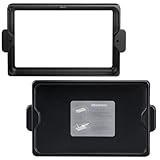
- Original resin tank used for ELEGOO Saturn 2 3D printer, and the FEP film is pre-installed.
- Made of anodized aluminum and durable for long-term usage, you don’t need to worry about changing your resin vat frequently.
- Easy to assemble and replace, provide the extra lid to keep away dust, UV light source, or direct sunlight.
- The metal vat with neat screws to fix it in place, feet on the bottom to keep the FEP film from making contact with your workbench.
- The perfect spare resin vat when you need to change resin color faster and have a better printing experience.
How to judge current price and availability
When checked on October 7, 2026, ELEGOO’s US 8K resin-printer collection showed the Saturn 2 at $209.99 USD but marked it sold out. ELEGOO’s EU product page showed €275.99, reduced from a crossed-out €344.99. These snapshots differ by region and do not verify stock at other sellers, Amazon availability, or used-market value. Check ELEGOO’s US collection and its EU product page for current regional listings.
ELEGOO’s US collection advertises up to a one-year warranty, 14-day returns, and lifetime support. Confirm which terms apply to your seller, region, unit condition, and purchase channel before relying on them. Historical prices on comparison pages are not current purchase quotes.
Rank #3

- 【10-Inch 12K Mono LCD】With a 10-inch 12K mono LCD boasting a stunning resolution of 11520 × 5120 and an XY resolution of 19 × 24 μm, ELEGOO Saturn 3 Resin 3D Printer is capable of producing highly detailed and intricate models with ease, at a printing speed of up to 70 mm/h. The 9H hardness tempered glass protects the LCD screen from scratches and damage caused by resin dripping or penetration.
- 【Generous Build Volume】With a generous build volume of 218.88 × 122.88 × 250 mm³/8.62 × 4.84 × 9.84 inches, you can try to print larger models and more ambitious projects for greater flexibility and versatility.
- 【Fresnel Collimating Light Source】The COB light source and Fresnel collimating lens work together to emit a uniform light beam of 405 nm wavelength, and ensure that the light angle reaches within 5°, light uniformity is over 90%, and light-scattering coefficient within 0.5%. This results in highly accurate and consistent prints with exceptional clarity and detail.
- 【Laser-carved Build Plate】The build plate with a laser-carved surface provides excellent adhesion, ensuring that your prints stick to the build plate for a higher printing success rate.
- 【Voxeldance Tango Software】ELEGOO Saturn 3 Resin Printer offers 3 printing modes: static mode and dynamic mode (including smooth mode and high-speed mode) to improve printing efficiency. The open-source GOO slice file format is compatible with third-party slice software, such as CHITUBOX and Lychee Slicer.
Saturn 2 8K versus Saturn 8K
ELEGOO’s comparison page, dated August 25, 2026, lists both machines with 7,680 × 4,320 pixels. It lists the Saturn 2 with 250 mm of Z height and the Saturn 8K with 210 mm, and describes the Saturn 2 as having 40 mm more Z height. It also lists different light-source designs: a 48-LED Fresnel source for the Saturn 2 and a 28-LED matrix source for the Saturn 8K. This comparison does not establish a measured print-quality advantage. See ELEGOO’s comparison.
How to assess a Saturn 2 offer
- Check condition: Confirm whether it is new, used, refurbished, or sold for parts. Ask about the machine’s history and what is included.
- Verify seller protection: Read the actual return policy and warranty terms for the seller, region, and unit condition.
- Decide whether the build area matters: The listed build volume is 218.88 × 123.12 × 250 mm. Consider whether the extra capacity, especially the height, helps with the models you plan to print.
- Compare the full offer: Include shipping, any missing parts, replacement parts, resin, and post-processing supplies. Current replacement-part costs were not verified in this research.
- Compare alternatives: Check the current price and features of newer models before deciding that a discount makes the Saturn 2 the better value.
Ownership considerations
Resin is a recurring input, and resin printing also requires post-processing supplies and appropriate handling. A wash-and-cure station may be useful, but it is optional equipment and should not be assumed to come with the printer. The research for this review did not establish reliable current costs for resin or replacement parts, so check local prices before budgeting.
Recommended Free Tools
Rank #4

- 4-Color Printing with CANVAS: Create vibrant multi-color models effortlessly with CANVAS 4-color printing. Independent motors, instant color switching, RFID filament recognition, and auto refill work together to deliver smooth color transitions without complicated setup, making colorful printing easier for beginners and creators
- Start Printing with Confidence: Full auto calibration and smart pre-print checks simplify setup, while 22 intelligent sensors monitor every print in real time. From first layer to final result, enjoy consistent printing with less manual adjustment, making it ideal for beginners and experienced makers alike.
- Designed for Speed: Experience faster creation with a high-speed CoreXY system reaching up to 500mm/s and 20,000mm/s² acceleration. The rigid aluminum frame and precision linear guides maintain smooth, stable motion, helping deliver accurate prints even at high speeds
- Smoother, Sharper, Smarter: From the first layer to the final detail, intelligent calibration, vibration compensation, and precise extrusion control help produce clean surfaces, sharp edges, and consistent results—even on complex models
- A Seamless Workflow from Idea to Print: Simplify your entire workflow with the ELEGOO ecosystem. Discover ready-to-print models on Nexprint, prepare projects with ELEGOOSlicer, and control your printer remotely through ELEGOO Matrix app. Create, manage, and print with ease.
ELEGOO advertises a built-in activated-carbon filter, but that claim should not be treated as proof that printing is safe in an occupied room. This research did not establish authoritative resin exposure, ventilation, protective-equipment, or disposal guidance. Consult the safety documentation for the specific resin and applicable local rules.
Independent reader supportYour contribution helps us test, update, and keep practical guides available for everyone.Who should consider the Saturn 2?
The Saturn 2 may suit buyers who want the listed build capacity and resolution and who find a verifiable offer with adequate seller protection. It is less compelling when the price approaches a newer machine, when the listing’s condition or included parts are unclear, or when regional support is difficult to confirm. No long-term comparative reliability finding was established for this review.
Best Value

- Input voltage range of AC 100-240V allows for use in different countries and regions. Output current of DC 24V 4A 96W for efficient power conversion.
- Compatible with Elegoo Model Saturn 2 Saturn2 8K 10-Inch Monochrome 10'' Mono LCD MSLA Photocuring Desktop Resin 3D Printer
- Compatible with Elegoo Model Saturn 8K Saturn8K 9.1-inch Monochrome Mono LCD Panel MSLA Photocuring Resin 3D Printer
- Friendly Material——Made of fireproof Polycarbonate(PC) material, --Flame resistance applies to UL94-V1, ensuring a long-term use. › See more product details
FAQ
Is the Saturn 2 8K still worth buying in 2026?
It may be, if its actual local price and condition make sense compared with newer alternatives. The US listing was sold out when checked on October 7, 2026, so do not assume the displayed price represents an available offer.
What is the Saturn 2 8K’s build volume?
ELEGOO lists a build volume of 218.88 × 123.12 × 250 mm on its product page.
Does an 8K LCD guarantee highly detailed prints?
No. The 8K label describes the LCD’s pixel count. It is a specification, not a guarantee of the finished result.
Is the Saturn 2 better than the Saturn 8K?
ELEGOO lists the same pixel count for both, but gives the Saturn 2 40 mm more Z height. The published comparison does not establish that one produces better real-world print quality.
Is the Saturn 2’s built-in filter enough for room safety?
The filter is a manufacturer-described feature, not proof that resin printing is safe in an occupied room. Consult the safety documentation for the specific resin and applicable local rules.
Quick Recap

Product prices and availability are accurate as of the date/time indicated and are subject to change. Any price and availability information displayed on Amazon at the time of purchase will apply.
Do these 3 things before closing this tab:
1Scan for outdated or missing drivers - takes under a minute2Clear out junk files and repair common Windows errors3Fix the driver behind crashes, sound loss and screen glitches



