The Tool Desk
Free tools Windows power users keep installed
One-click scans. No signup required.
Outbyte Driver Updater FREEFix the driver behind crashes, sound loss and screen glitchesFind Drivers →Outbyte PC Repair FREEClear out junk files and repair common Windows errorsFree Scan →
ThatPainter is reader-supported. When you buy through links on our site, we may earn an affiliate commission. Learn More
A flyer template gives you an editable layout to adapt for an event, promotion, class, sale, or community notice. Choose a design tool that fits how you want to edit and share it, replace the sample content with the details readers need, and export a file suited to print or digital use.
Choose a flyer template tool
Canva, Adobe Express, and Microsoft Word all offer template-based flyer workflows. The right choice depends on the editing experience, collaboration, export formats, and whether you want to order prints through the editor.
| Tool | What it offers | Useful when |
|---|---|---|
| Canva | Browser-based flyer maker, editable templates and design elements, real-time collaboration, PDF print-file downloads, and Canva Print ordering. Canva says the maker is free to use for creating, downloading, or sharing; some premium assets may cost. Canva flyer maker | You want to customize a visual layout, collaborate, or explore print ordering and finishes. |
| Adobe Express | Editable flyer templates, text-prompt generation, PDF/JPG/PNG downloads, and print ordering listed for the US, UK, Australia, and Canada. Its flyer maker is presented as free to use with no credit card required. Adobe Express flyer maker Adobe help: generate editable templates | You want to start from a prompt or choose among PDF and common image exports. Print ordering availability is region-specific. |
| Microsoft Word | Customizable event, business, and holiday templates; edit online, then save or share as a PDF or link. Microsoft flyer templates | You prefer editing in a familiar document editor and sharing or saving a PDF. |
These are feature descriptions from the vendors, not a ranking based on comparative testing. Template selection and feature availability can change.
Make the flyer easy to understand at a glance
Before editing, decide what a reader should notice first and what action they should take. Keep the layout focused so the main message does not compete with secondary details.
#1 Best Overall

- Premium Medium Weight Smooth Cardstock, White, 80lb, 176gsm, 8.5” x 11” – Ideal for Invitations, Menus, Business Cards - Printer Paper
- Cranium Press offers thick, white card stock paper with a high bright-white shade and smooth finish. This premium medium cardstock paper ensures excellent printability, proper ink holdout, and minimal show-through, resulting in vibrant prints.
- Our medium weight cardstock paper presents a thick, white option boasting a high bright-white shade and a smooth finish. This premium cardstock paper guarantees outstanding printability, effective ink holdout, and minimal show-through, ensuring vibrant prints.
- Perfect for printing at home, school, or the office, this premium cardstock printer paper enhances colors, making them bolder, brighter, and more realistic. Additionally, it offers superior strength, making it ideal for die-cutting, scoring, and folding tasks.
- Derived from sustainable sources, our papers are entirely made in the USA and hold Forest Stewardship Council (FSC) certification. Purchasing our cardstock paper contributes to forest replenishment efforts and sustains forestry jobs for American landowners, fostering environmental and economic sustainability.
- Use a clear, attention-getting headline and a concise message.
- Establish a visual hierarchy with suitable typography, spacing, and imagery. Canva’s guidance highlights hierarchy, white space, appropriate type, and images as parts of an effective flyer. Canva flyer guidance
- Include the information needed to act: date and time when relevant, location or website, contact details, and a call to action.
- Add a logo or other brand identity when it helps readers recognize the organization or business.
Choose a size for where the flyer will appear
Start by deciding whether the flyer will be printed, shared digitally, or used both ways. Canva identifies 8.5 × 11 inches as a common flyer size and lists 11 × 17 inches and 5.5 × 8.5 inches as larger and smaller alternatives. These are Canva’s product guidance, not a universal standard; confirm accepted dimensions with the printer or service you plan to use. Canva flyer sizes
Create and export the flyer
- Pick the distribution format. Decide whether you need a printed flyer, a digital image, or both; this determines the dimensions and export format to consider.
- Select a relevant template. Choose a layout that suits the event or promotion and has room for the essential information.
- Replace the sample content. Update the headline, supporting copy, date or contact details, and call to action. Adjust colors, type, and imagery so the design fits the message. Microsoft’s template guidance likewise describes selecting a template, editing text and headings or colors, and then saving or sharing. Microsoft flyer templates
- Check the reading order. Make sure the headline, key details, and next action are easy to find, and that images or decoration do not crowd the message.
- Export for the intended channel. Canva describes PDF print-file downloads. Adobe lists PDF, JPG, and PNG downloads, describing PDF as suitable for professional printing and JPG or PNG as useful digital formats. Follow the receiving printer’s specifications rather than assuming a universal bleed or color setting. Canva flyer maker Adobe Express flyer maker
- Review the final file. Open the exported file and check that text, images, and layout appear as intended. If printing, confirm the dimensions and file requirements with the printer before placing an order.
What to check before ordering prints
Print ordering and production choices vary by provider and region. Adobe lists flyer print ordering for desktop and mobile users in the US, UK, Australia, and Canada; check current availability if you are elsewhere. Canva describes Canva Print and paper finishes. Neither description establishes universal paper, finish, bleed, color, or printer-compatibility requirements, so confirm the current options and specifications with the service you select. Adobe Express flyer maker Canva flyer maker
Quick Recap
Best Value

- CARD SIZE: 8.5" x 11" letter-size cardstock sheets measuring 11.0 inches long & 8.5 inches wide provide ample space for booklets, report covers & brochures
- SHEET COUNT: 250 sheets of white cardstock per pack deliver a generous supply for extended use across multiple printing projects & creative applications
- PAPER WEIGHT: 65 lb / 176 gsm heavyweight cardstock provides sturdy construction & durability for projects requiring a sturdier stock than standard copy paper
- BRIGHTNESS LEVEL: 96 bright smooth white cardstock delivers crisp print resolution & vibrant contrast for sharp text & high-quality graphic reproduction
- VERSATILE MATERIAL: Amazon Basics card stock paper suitable for creating & printing booklets, report covers, brochures & other professional printed materials
Rank #4
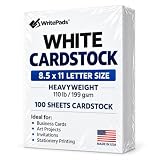
- Heavyweight Cardstock Printer Paper White– Premium 110lb Index weight(199gsm) cardstock delivers a thick, sturdy feel, ideal for professional-quality printing, business cards, and creative projects.
- Printer-Friendly Performance Cardstock printer paper– Engineered for flawless results with both laser and inkjet printers—no jamming, no smudging, just sharp, vibrant prints every time.
- Acid-Free for Long-Lasting Prints – This White Card stock paper Archival-quality, acid-free paper resists yellowing over time, perfect for certificates, resumes, and important documents.
- Versatile Uses – Whether you're crafting greeting cards, designing invitations, or printing flyers, this cardstock offers a smooth, clean surface for all your ideas.
- Made in the USA – Proudly manufactured in the USA for consistent quality heavyweight cardstock paper, eco-friendly sourcing, and reliable performance in home, office, or school settings.
Rank #3

- NEENAH INDEX WHITE CARDSTOCK: The smooth texture and crisp white color of our 90 lb cardstock produces high resolution images and prints for attention-getting and professional documents
- LIGHTWEIGHT CARDSTOCK: This is 90 lb. INDEX cardstock, which is measured differently than COVER cardstock. For a weight comparison, it’s heavier than 67 lb. Bristol cardstock, yet lighter than 65 lb. COVER cardstock
- LETTER SIZE CARDSTOCK: This 8.5" x 11" white cardstock comes in a pack of 300, so you always have enough on hand
- IDEAL FOR EVERYDAY PROJECTS This smooth cardstock is ideal for documents, flyers, brochures, calligraphy hand lettering, and crafting!
- PRINTER COMPATIBLE: Works well with printers including inkjet and laser for jam-free every day printing Plus, it's crafted to be lignin and acid-free for long-lasting results
Rank #2

- Smooth finish for superior printing results
- Inkjet, laser, copier and offset guaranteed
- 65 pound cardstock
- Acid and lingin free for great quality that doesn't deteriorate
- 75 Sheets

Product prices and availability are accurate as of the date/time indicated and are subject to change. Any price and availability information displayed on Amazon at the time of purchase will apply.
What’s actually slowing this PC down?
Pick the symptom - the matching free tool is one click away.




