Quick wins for a faster PC:
Scan for outdated or missing drivers - takes under a minuteDriver Scan →Clear out junk files and repair common Windows errorsFree Scan →
ThatPainter is reader-supported. When you buy through links on our site, we may earn an affiliate commission. Learn More
Google Mixboard is an experimental Google Labs concepting board for exploring and refining visual ideas with images and text. You can start with a prompt or starter board, add your own or generated visuals, and iterate with natural-language edits and variations. It is an ideation workspace, not a validated design or finished production asset.
Google first announced a U.S. public beta on September 23, 2025, and later announced an expansion to over 180 additional countries. That announcement does not establish current eligibility in every country. Check the current Mixboard page for access where you live.
What is Google Mixboard?
Mixboard combines an open visual canvas with AI image generation and editing, uploaded references, and contextual text. You can describe a direction, explore visual possibilities, and refine them on the board.
Google describes Mixboard as an experimental, AI-powered concepting board for exploring, expanding, and refining ideas. Its examples include home décor, event themes, DIY projects, product ideas, party planning, and storyboarding. It is intended for visual exploration, rather than producing final artwork or validated designs.
#1 Best Overall

- Package Includes:Includes 1 magnetic feeling poster chart measuring 7.4 x 5.9 inches (18.7 x 15 cm) and 1 magnetic ring measuring 1.6 inches (4 cm). This feelings chart with magnetic frame piece features 20 clearly illustrated emotions
- Exquisite Design:Designed as a composition notebook daily mood tracker, this decorative piece blends notebook inspired graphics with easy to read emotion icons. Complements composition notebook classroom decor and themed display areas
- Reliable Material:Made from coated cardstock with a protective laminated finish and a flexible magnetic ring. This magnetic feeling chart resists daily wear, stays neat over time, and offers smooth movement between emotion selections
- Suitable Size:The composition notebook magnetic feeling poster measures approximately 7.4 x 6 inches (18.7 x 15 cm), while the magnetic circle measures 1.6 inches (4 cm). Suitable for refrigerators, cabinets, whiteboards, and magnetic bulletin board decor displays
- Fun and Practical Tool:Use this today I’m feeling magnet poster as a magnetic mood tracker to mark changing emotions throughout the day. Suitable for home offices, staff rooms, reception areas, wellness corners, thoughtful gifting, and personal reflection spaces
How Mixboard differs from a conventional moodboard
A traditional moodboard usually involves finding, downloading, cropping, arranging, and annotating references. Mixboard adds an iterative AI loop:
- Describe an idea or start with a pre-populated board.
- Add your own images or generate visuals.
- Arrange promising images and notes on the canvas.
- Ask for edits, combinations, or variations.
- Compare directions and refine the concept.
That makes Mixboard an AI-assisted ideation canvas rather than just a static image gallery. It helps you explore possibilities; its output should not be treated as proof that a design is feasible or production-ready.
What can Mixboard do?
| Capability | What Google describes |
|---|---|
| Prompt or starter-board ideation | Start with a text prompt or a pre-populated board. |
| Image inputs and generation | Add your own images or generate visuals for a concept. |
| Natural-language edits | Request changes to images, including combining images. |
| Variations | Regenerate an idea or request “more like this.” |
| Contextual text | Generate text using context from images on the board. |
| Multiple boards in a project | Organize ideas across multiple boards within a project. |
| PDFs and other added content | Google announced support for PDFs and other added content types. |
| Doodle-based edits | Use doodles to make edits to images and presentations. |
| Presentations | Turn board content into presentations using Nano Banana Pro. |
These features were announced over time, and availability may vary. Google said it enlarged boards to four times their prior size in its October 2025 announcement; that refers to board size, not image quality or output resolution.
Recommended Free Tools
Google named Nano Banana as the image-editing model in its September 2025 launch description. Its December 2025 update described presentation generation using Nano Banana Pro. These announcements do not establish that every Mixboard function uses the same model.
How to use Mixboard
The documented workflow is to start a concept, gather or generate visuals, then iterate. Exact controls may change:
Rank #2

- Bring your dreams to life with our all-in-one vision board supplies featuring vision board stickers, manifestation quotes, and themed clip art for manifestation journals and self care journals for women.
- Includes everything from a scrapbook kit, scrapbooking supplies kit, and scrap book supplies to magazines, ransom note sticker books, and photo board for pictures—ideal for crafting your personal story.
- Perfect for art supplies for adults, adult crafts for women, and crafts for adults women, our collage kit, craft kit, and card making kit unlock endless possibilities for scrapbooking, journaling, and decorating.
- Complete your aesthetic setup with journal stickers, bullet journal supplies, journal kit, picture collage, collage book, and even vogue magazine cutouts for a beautifully personalized layout.
- Includes everything from picture boards, black board, book binding kits, folding board, book board, art book, collage soup books, to ephemera for junk journals and photo board for photos.
- Open Google Mixboard and check whether it is available to you.
- Start with a text prompt or a pre-populated board.
- Add your own images or generate visuals for the concept.
- Arrange images and notes on the canvas to compare directions.
- Request natural-language edits, including small changes or combinations.
- Regenerate an idea or ask for “more like this” to explore alternatives.
- Use contextual text generation for text informed by images on the board.
- If available, use added content such as PDFs, doodle-based edits, multiple project boards, or presentation generation.
Mixboard is experimental. Preserve important images, notes, and decisions outside the experiment rather than relying on it as your only archive.
Prompt examples
Home décor
“Create a warm, minimalist Japandi home-office concept using pale oak, off-white plaster, charcoal accents, indirect daylight, and practical storage. Generate several distinct directions while keeping the palette restrained.”
Quick wins for a faster PC:
Scan for outdated or missing drivers - takes under a minuteDriver Scan →Repair Windows errors before they cause bigger problemsFix Now →Fix the driver behind crashes, sound loss and screen glitchesFind Drivers →Refining an image
“Keep the room layout and palette, but make the furniture more compact, add concealed cable management, and replace the open shelving with closed storage.”
Comparing constraints
“Generate three alternatives: one budget-friendly, one premium, and one suitable for a small rental apartment.”
Useful prompts specify the subject, intended use, style, colors, materials, viewpoint, context, what must remain consistent, and what should change. A prompt can guide exploration, but it cannot establish accurate dimensions, real products, feasible construction, or material availability.
Rank #3

- ❤Size and material: This poster is made of high-quality natural linen. Its dimensions are 14 x 18.5 inches, which is just right, suitable for wall decoration in any home, office of mental health or school.
- ❤Our Wall Art Quality:Our wall hangings have undergone special treatment to make the patterns clearer and more durable. The vivid text and graphics retain their true colors over time. No matter how long it is hung, the color will not change.
- ❤Carefully designed:This vibrant mood meter helps children and adults recognize how they’re feeling based on energy and positivity levels.The simple emoji-style faces help users — especially kids — easily engage with and identify their current feelings.
- ❤Applicable places:Perfect for decorating therapy offices, counseling rooms, classrooms, or home spaces, these posters help cultivate a positive, safe, and uplifting atmosphere—encouraging focus, emotional well-being, and personal growth in work, study, or daily life.
- ❤Easy to use: This wall poster comes with a hanging rope.No installation is needed. Just hang it directly on the wall.It's very convenient, beautiful and has no color difference.It's a perfect complement to any space.
Is Google Mixboard free?
The official sources reviewed do not state a price or establish a permanent unlimited-free promise. Check Mixboard’s current page and interface for access and any current terms.
Google says generation limits may fluctuate with real-time server load and network traffic. It does not provide a fixed quota in the cited announcement, so check the live interface rather than relying on a specific allowance.
Who should use Mixboard?
- Interior designers and homeowners: Explore visual directions for home décor and room concepts.
- Event planners: Explore event themes and party concepts.
- Product ideators: Develop visual directions for product ideas.
- Artists and creators: Explore storyboards and other visual concepts.
- DIY planners: Use visual exploration to consider project ideas.
Who should choose another tool?
Mixboard is not presented by Google as a tool for finished production assets or validated designs. If you need precise typography, manufacturing-ready specifications, accurate architectural drawings, or dependable long-term project organization, verify that the tool you choose supports those needs.
Do not treat a generated room or product image as technical evidence. A visual concept is not confirmation of correct measurements, feasible construction, or a real available product.
Mixboard compared with alternatives
The research sources establish Mixboard’s features but do not establish rankings or direct comparisons with other products. Compare tools by the workflow you need:
Rank #4

- What you will get: Our boho rainbow bulletin board set measures approximately 47×47 inches, includes 80 adhesive dots and 40 patterns, 53 pieces in total, and is the perfect companion for classroom bulletin board decoration, allowing students to learn confidently and actively.
- Unique appearance: The classroom bulletin board decoration adopts patterns such as rainbows, clouds and water droplets, and the colors are harmonious, which can provide students with pleasing visual effects, and it can make students full of confidence and face themselves squarely.
- Easy to use:The bohemian inspirational decoration kit can decorate the classroom, and provides adhesive dots for you to paste "it's okay to" paper-cuts and posters, which is convenient and quick, and can also improve students' hands-on ability.
- Reassuring material:Our boho bulletin board set is made of high-quality card, sturdy and reusable, non-toxic and odor-free, with beautifully printed patterns, it looks so bright and vivid, easy to catch eyes.
- Extensive use: It's okay to bulletin board set can be used for different classroom projects on windows, blackboards, bulletin boards, doors and hallways.These cute and colorful are suitable for decorating classrooms and bedrooms.
| What to compare | Questions to ask |
|---|---|
| Starting inputs | Can you begin with a prompt or starter board and add your own images or other content? |
| Image revision | Can you request edits in natural language or mark up an image? |
| Organization | Can you organize work across multiple boards within a project? |
| Presentations | Can you turn ideation into a presentation? |
| Access and limits | Is the tool available in your region, and are any generation limits fixed or variable? |
Google announced that Mixboard supports prompt-based exploration, image inputs, natural-language edits, multiple boards, and presentation generation. Check other tools’ current documentation to compare these workflows; do not assume a particular competitor is better on every axis.
Independent reader supportYour contribution helps us test, update, and keep practical guides available for everyone.Important limitations
It is experimental
Google calls Mixboard an experiment. Treat it as a space for exploring and refining ideas, not as a guaranteed long-term archive or a source of validated design work.
Access and limits can vary
Google announced expansion to over 180 additional countries after the U.S. public beta, but that is not a verified current country-by-country eligibility list. Check the live Mixboard page for access where you are. Google also says generation limits may fluctuate with server load and network traffic.
Product details remain limited
The official announcements reviewed do not provide a price, fixed generation quota, independent performance benchmark, or detailed account of present-day regional availability. Check Google’s current product information for details that may have changed.
Privacy and uploaded content
The product announcements do not explain retention, training use, or detailed privacy terms for uploaded content. Before uploading sensitive or confidential material, check Mixboard’s current terms and privacy notice; do not infer its data practices from feature descriptions.
Best Value
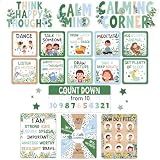
- Package Included: You will receive a complete calm down corner bulletin board set, including 3 x titles, reading "Calming Corner"; 4 x posters themed "How Do I Feel? ", "I Can Control", "I AM STRONG", and "Counting Down from 10"; 10 x calm down cards; along with 80 glue points, This bulletin board sets fully meets your demands to build a dedicated calming corner classroom
- Exquisite Design: The calm corner posters are crafted from cardstock paired with Boho color palettes that deliver a soft visual experience without straining kids'eyes. The feelings chart is filled with vivid patterns, including moon, dancing figures, and more, which jointly form a cozy corner decor. The calm down corner posters stay clear, and each bulletin board cutouts for classroom has a smooth, flat surface. The feelings poster adopts moderately enlarged font sizes, making it eye-catching and easy for children to recognize different moods
- Freely DIY: The classroom bulletin board sets bring you creative freedom, and no extra cutting work is required. You can arrange the pieces of pastel classroom decor by referring to our suggested layout examples, and assemble the calming posters according to your calming room ideas. This allows you to adapt the display, helping you build a calm corner that naturally creates a gentle atmosphere supported by our learning posters. Besides, the bulletin board decorations can be reused for multiple semesters
- Wide Application: The calming corner poster set fits a range of educational spaces. The calming corner items can create a dedicated cozy corner for kids classroom, and cut down teachers' decoration workload when designing a themed bulletin board. It works well as daily classroom decorations elementary and essential kindergarten decorations. This calming corner sign kit can refresh an empty calm corner classroom, and fit for mounting on bulletin boards sets for classrooms, as warm colors posters for classroom wall, study rooms, windows, chalkboards, doors, and hallways
- Emotion Theme: These calming posters for kids act as practical daily emotional regulation tools for kids. Lively facial expressions printed on the emotions poster guide students to distinguish and name their inner feelings, and with the listing coping skills poster, such as "TALK TO SOMEONE", "LISTEN TO MUSIC". The calm down kit serves as a complete zones of regulation bulletin board set, teaching them simple ways。
The verdict
Google Mixboard is an experimental Google Labs workspace for generating, arranging, and refining visual ideas. Google describes uses such as home décor, events, DIY, products, and storyboarding, and has announced features including multiple boards and presentation generation.
Use it to explore and refine concepts, not as evidence that a design is accurate, feasible, or production-ready. Check current access, limits, and terms directly with Google, and preserve important work outside the experiment.
FAQ
What is Google Mixboard?
It is an experimental Google Labs concepting board for exploring and refining visual ideas with images and text.
The Tool Desk
Outbyte Driver Updater FREEScan for outdated or missing drivers - takes under a minuteDriver Scan →Outbyte PC Repair FREERepair Windows errors before they cause bigger problemsFix Now →How do I make an AI moodboard with Google Mixboard?
Start with a prompt or pre-populated board, add your own or generated visuals, arrange them on the canvas, and refine the ideas with edits or variations.
Can Mixboard turn a board into a presentation?
Google announced presentation generation using Nano Banana Pro. Check the current Mixboard interface for availability.
Where is Google Mixboard available?
Google announced expansion to over 180 additional countries after the U.S. beta, but that does not confirm current eligibility in every country. Check the live Mixboard page.
Does Google Mixboard have a fixed generation limit?
The cited Google announcement says limits may fluctuate with server load and network traffic; it does not state a fixed quota.
Quick Recap

Product prices and availability are accurate as of the date/time indicated and are subject to change. Any price and availability information displayed on Amazon at the time of purchase will apply.




