PC Slower Than It Used to Be?
Quick wins for a faster PC:
Clear out junk files and repair common Windows errorsFree Scan →Scan for outdated or missing drivers - takes under a minuteDriver Scan →A free scan shows the junk files, broken settings and background clutter dragging Windows down - then fixes them in one click.Free scan · Windows 10 & 11
Outdated Drivers Are Slowing You Down
One free scan finds every outdated or missing driver and matches the right update for your exact hardware.Free scan · exact hardware match
ThatPainter is reader-supported. When you buy through links on our site, we may earn an affiliate commission. Learn More
You can build a useful standing desk from lumber, but the correct height is personal: set the keyboard and work surface near your standing elbow height, then verify that the frame, brackets, and floor contact are stable. A fixed-height desk is practical for standing-only work; anyone who alternates between sitting and standing needs either an adjustable design or a separate seated setup.
Use the construction drawings for the specific design you choose rather than treating a random cut list or bracket as universal. The published DIY: Standing Desk with Shelving Unit plan is a useful starting point because it shows a lumber-and-connector-bracket approach, but it does not establish a load rating, exact hardware compatibility for every desk, or a tested conversion to adjustable height.
As an Amazon Associate I earn from qualifying purchases.
Decide what your DIY standing desk must do
Before buying material, define the postures and equipment the desk must support. A desk for a person who stands all day has a different geometry from one that must accommodate sitting, standing, a monitor arm, and heavy storage. OSHA states that there is no single “correct” posture or component arrangement for everyone, so your measurements and tasks should drive the design (OSHA Computer Workstations eTool).
Fixed-height standing desk
A fixed desk has a simpler frame and fewer failure points. It is appropriate when the primary task is standing and one user will use the desk. You can still change posture by shifting weight, using a footrest, or taking seated breaks elsewhere. Its limitation is fit: a height that works for one person may force another person to raise their shoulders or bend their wrists.
#1 Best Overall

- Ergonomic Comfort & Height Flexibility: This ErGear electric standing desk frame can enhance your workspace with adjustable desk height from 28.3″ to 46.5″ tall. Enjoy seamless transition between sitting and standing work positions for more comfort and task productivity.
- Choose Your Desktop: Adjustable to fit a wide range of desktop sizes, the standing desk legs feature crossbars that can extend from 35.4″ to 53.1″ in length with a fixed 16.2″ width. Select your choice of desktop from 39.4″–63.3″ in length and 24″–30″ in depth to integrate the standing desk frame with your office design or furniture.
- Smart, User-Friendly Design: The raising desk legs feature an intuitive control panel for quick height adjustment with 4 memory presets to save your favorite height settings. The electric standing desk frame operates at a quiet 55 dB to ensure a peaceful environment without distraction. Anti-collision technology helps to avoid damage to the desk or furniture during operation.
- Built for Stability: Constructed from sturdy heavy-duty steel, the electric standing desk frame can securely hold up to 176 lbs of weight. The electric standing desk frame is backed by a limited 5-year warranty while the motor, controller, and parts are supported by a limited 2-year warranty to ensure long-lasting performance.
- Hassle-Free Assembly: Our standing desk legs can be assembled with ease thanks to detailed instructions and labeled hardware included. Feel free to contact our U.S.-based product support team if you have any questions about standing desk installation or product selection.
Adjustable or sit-stand arrangement
An adjustable desk must place the keyboard, mouse, monitor, cables, and any storage correctly at both extremes of travel. OSHA advises considering adjustability and notes that a fixed-height purchase may require a keyboard tray to provide enough adjustment across users (OSHA purchasing guide). The evidence available for this project does not verify a particular DIY lifting mechanism, frame, actuator, stability rating, or safe load. Do not add an improvised adjustable feature to a fixed plan without engineering the joints and testing the complete assembly.
The Tool Desk
Outbyte Driver Updater FREEScan for outdated or missing drivers - takes under a minuteDriver Scan →Outbyte PC Repair FREERepair Windows errors before they cause bigger problemsFix Now →| Design choice | Best fit | Main advantage | Main limitation to solve |
|---|---|---|---|
| Fixed-height surface | One user, standing-focused work | Straightforward construction and fewer moving parts | Cannot serve seated and standing elbow heights without another setup |
| Fixed surface plus keyboard tray | Users who need limited keyboard adjustment | Allows the typing position to move independently of the top | Tray strength, legroom, and mouse placement must be checked |
| Purpose-designed adjustable frame | Frequent sitting and standing | One work surface can serve both postures | Mechanism, stability, cable slack, and load limits require verified specifications |
| Two-position furniture arrangement | Occasional posture changes with separate seated furniture | A fixed DIY desk can remain simple | Requires room for a second workstation or table |
Measure your standing desk height before cutting wood
Measure yourself in the shoes you normally wear for work. Stand upright with your shoulders relaxed and elbows close to your sides. Bend your elbows to approximately 90 degrees and keep your forearms level. Measure from the floor to the underside of your hands or the surface where the keyboard will sit. That measurement is your starting target, not a universal rule.
CCOHS recommends that a standing platform sit approximately at standing elbow position, with neutral wrists and forearms, relaxed shoulders, and elbows close to the body (CCOHS sit/stand desk guidance). Because keyboards have different thicknesses and some desks use a tray, decide whether you are measuring to the desktop, tray, or key tops and keep that reference consistent.
| Use case | Published guidance | How to apply it |
|---|---|---|
| Standing computer work | OSHA lists 36–46.5 inches for standing tasks and says keyboard height should be about elbow height | Use the range only as a check; set your actual keyboard position from your elbow measurement |
| Seated computer work | OSHA lists 22–30 inches for seated tasks | Use this as a seated reference, not as the target for a standing-only build |
| Any posture | OSHA says no single arrangement fits everyone | Mock up the keyboard, mouse, and monitor before final assembly |
The ranges are ergonomic guidance, not a specification that guarantees comfort. If your surface is at elbow height but the keyboard is on a thick tray, subtract the tray and keyboard thickness when setting the frame. A short test with books or sawhorses can reveal a bad height before you make cuts.
Rank #2

- Powerful Brushless Motor: This standing desk frame features a brushless motor for fast and quiet performance with 75% faster lifting speed and a maximum noise level of 55 dB. The office desk frame is tested to withstand 100,000 lift cycles to ensure excellent stability and long service life.
- Larger and Thicker Frame: The desk frame is made from high-quality carbon steel with 30% longer plates, 25% thicker columns, and 30% wider feet. These enhancements to the standing desk legs provide increased strength and support to hold large desktops with heavy equipment up to 220 lbs.
- DIY Desktop Workstation: The adjustable desk legs are designed with extendable crossbars that can adjust from 41.7″ to 60.6″ in length with a fixed width of 19.5″. The legs are compatible with desktops 43.3″-74.8″ wide and 23.6″-35.4″ deep, offering maximum flexibility for DIY desk setups.
- Ergonomic Height Adjustment: The adjustable desk frame can be smoothly adjusted from 27.9″ to 46.5″ in height, allowing you to choose the perfect level for sitting or standing. 4 programmable preset buttons make it easy to transition between your favorite heights throughout the day.
- Hassle-Free Installation: The electric standing desk frame includes detailed instructions and labeled hardware for hassle-free assembly. A cable management tray and 6 cable clips attach underneath your desktop to organize a power strip and cables, while 2 hooks can hold headphones or bags to keep your workspace clean and clutter-free.
Check the monitor position separately
Desk height and monitor height are related but not identical. CCOHS recommends a level head and a viewing line between horizontal and 35 degrees below horizontal. Set the monitor so you do not have to tilt your chin up or bend your neck to read it. A monitor riser, arm, or shelf may be necessary even when the keyboard height is correct.
Free tools Windows power users keep installed
One-click scans. No signup required.
Choose a plan and make a materials list
The published DIY: Standing Desk with Shelving Unit cut sheet provides construction views for a shelving-style standing desk. Search descriptions of that plan family identify lumber and connector brackets as project materials. Treat those items as plan-specific: the drawings, lumber dimensions, joint locations, and compatible connectors must agree with one another.
Core materials to verify against your drawings
- Lumber in the species, dimensions, and lengths specified by the selected plan.
- Structural connector brackets that match the plan’s hole pattern, material thickness, and intended joint.
- Fasteners of the size and type required by the bracket and lumber manufacturer.
- A work-surface panel or boards specified by the design, with enough depth for your keyboard, mouse, and monitor footprint.
- Optional items identified by your own setup, such as a keyboard tray, monitor support, cable-management parts, footrest, or anti-fatigue mat.
There is no verified universal bracket size, hardware SKU, load capacity, lumber price, or affiliate listing for this project. A defensible shopping search is “desk connector brackets,” but select a product only after comparing its dimensions and fastener requirements with your chosen drawings. Do not assume that a bracket that looks similar will carry your surface or fit the joint.
Inspect the plan before purchasing
- Read every drawing and note the finished desk height, width, depth, shelf locations, and any mirrored parts.
- Count each lumber piece and record its finished length, then add a cutting allowance only if your cutting method requires it.
- Mark every connector, screw, washer, and pilot-hole requirement shown by the plan.
- Check that the proposed surface leaves enough room for your keyboard, mouse, monitor stand, and cable exits.
- Confirm that the finished desk will fit through doors and can be assembled where it will be used.
Build the frame in a controlled sequence
The following workflow keeps the plan’s dimensions authoritative while adding practical checks. It is not a substitute for the selected plan’s drawings or for a structural professional’s review of an unusual load.
Rank #3
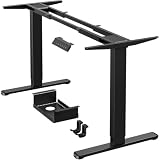
- [Super Durable, Extremely Stable]ErGear upgraded standing desk frame with a total lifting capacity of 264 lbs (120kg), this standing desk frame is built to provide a reliable foundation for your workspace. The upgraded strong steel legs are thicker and wider to offer steady, wobble-free lifting from 28″ to 47″ tall. The standing desk frame travel speed of 1.00”/sec, it is built with your ultimate convenience in mind!
- [Powerful Dual Motor Lifting] With over a decade of proven durability and stability, the ErGear standing desk frames are expertly machined with reliable motors. Driven by two advanced motors, the adjustable desk legs raise and lower your workstation instantly, speeding up the lifting process to 1 inch/sec while operating smoothly and quietly. Tested to withstand 80,000 lift cycles, this dual motor standing desk legs is designed for long-lasting performance.
- [Smart Control within Reach] Full electric adjustable desk frame height from 28'' to 47'' with 4 customizable memory presets. You can preset buttons to quickly transition between the most comfortable sitting or standing work positions. Besides, the ergonomics sit stand desk legs come with an extra extension cord allows more freedom for you to install the hand controller.
- [Cable Management Tray]The standing desk frame features a tray that attaches underneath the desk to organize a power strip and cables out of the way. Cable clips allow you to neatly route wires under the desktop, while a storage hook on each side provides a place to hang your bag or headphones.
- [Ideal DIY Desk Solution] The upgraded standing desk frame is designed for height and width adjustments to fit any shape or size of space. ErGear’s adjustable desk legs with retractable crossbars are engineered for a length range of 44’’-90’’ and a width range of 24’’-31.5’’. Become the designer and choose your favorite standing desk size and style to build the ultimate workstation now!
- Make a full-size height mock-up. Place a temporary board at your measured keyboard height. Stand at it with your actual keyboard and mouse. Confirm relaxed shoulders, level forearms, and enough depth for the monitor.
- Prepare and label the lumber. Transfer each plan dimension to the correct board, mark the face and orientation, and label matching parts. Recheck measurements before cutting; a mirrored side can put a shelf or bracket on the wrong face.
- Cut and inspect. Make square cuts required by the drawings. Remove splinters and check each piece against the plan before drilling. Do not shorten a member to solve a fit problem until you understand which finished dimension changed.
- Pre-fit the joints. Assemble the lumber without final tightening. Confirm that the top sits level, the legs contact the floor evenly, shelves clear your knees and feet, and connector holes line up without forcing the parts.
- Install compatible connectors and fasteners. Use the bracket manufacturer’s specified fasteners and pilot-hole sizes. Keep the drill perpendicular to the material, and avoid driving a screw so close to an edge that it splits the board.
- Square the frame. Measure diagonals of each rectangular section. Adjust the assembly until opposing diagonals match, then tighten gradually while checking that the frame remains square.
- Attach the work surface. Support the top at the locations shown in the plan. Leave any movement allowance required by the surface material, and route cables so they cannot pull the desk out of square.
- Level and anchor where appropriate. Set the desk on its final floor surface, correct rocking with an appropriate leveling method, and anchor to a wall only when the plan and building conditions support it. Never rely on a wall anchor that is unsuitable for the wall type.
- Test progressively. Push the empty desk from several directions, then add the monitor and normal equipment one item at a time. Stop if joints creak, brackets deform, screws loosen, or the desk walks across the floor. The plan does not state a load rating, so do not treat this check as proof of a safe maximum load.
- Finish after fit is confirmed. Sand exposed edges, apply the finish appropriate to the material, and allow it to cure according to the finish maker’s instructions before placing electronics on the surface.
Set up the keyboard, mouse, and monitor for standing
Once the structure is stable, perform the ergonomic setup with the equipment in its working position. CCOHS describes a neutral standing posture as straight wrists, forearms roughly parallel to the floor, a level head, an upright spine, relaxed shoulders, elbows close to the body and about 90 degrees, and no torso twisting (CCOHS sit/stand desk guidance).
- Place the keyboard directly in front of you, close enough that your elbows stay near your sides.
- Keep the mouse on the same level as the keyboard so you do not reach down or twist your shoulder.
- Center the monitor on your body unless your task requires a deliberate offset, and position its viewing line from horizontal to no more than about 35 degrees below horizontal.
- Leave enough front-to-back depth to rest your hands without pressing your wrists against a sharp edge.
- Route power and data cables with slack for normal movement, but secure them so they cannot catch your feet.
- Use supportive footwear, an anti-fatigue mat where it helps, and a footrest or occasional weight shift if those options improve comfort.
Accessories are aids, not repairs for an incorrect frame height. If your shoulders remain raised or your wrists bend upward after you adjust the keyboard, revisit the surface or tray height rather than trying to compensate with posture alone.
Independent reader supportYour contribution helps us test, update, and keep practical guides available for everyone.Alternate positions instead of standing indefinitely
CCOHS recommends changing position as needed and allowing time to adjust. Its guidance cautions that standing too long can contribute to foot, knee, hip, or back problems, and it notes that sit/stand timing recommendations vary. There is no single interval that should be presented as authoritative.
Start with short standing periods and alternate with sitting, walking, or another comfortable position. Pay attention to persistent pain, numbness, swelling, or fatigue; those are reasons to stop and seek advice from a qualified health professional. A fixed desk should not force you to remain standing when your body needs a break.
Rank #4

- Active Workstation Legs: Designed for DIY tables, this ergonomic standing desk frame gives you the height adjustment you want with customization options (table top must be purchased separately).
- Compatibility: Recommended Table Top Sizes: Length of 40” to 77”, Width of 23” to 43”, and a Thickness of 3/4” and greater (Actual Frame Length: 40” to 57.3”, Frame Height: 28.5” to 47.3”).
- Solid 220 lbs Support: All steel construction and a sturdy 2-part column support system hold weights up to 220 lbs when the desk frame is connected to a power source. Leveling feet adapt to nearly any floor surface.
- Electric Lift System: The lift mechanism is powered by hidden-drive internal dual motors with 1” per second lift speed. Strong, 2-piece telescopic legs allow the frame to go from sitting to standing height with a simple touch of the controls.
- Memory Controller: This easy-to-use push button controller features 3 memory settings to save your desired heights.
Troubleshoot the common failure points
My shoulders are raised while typing
The keyboard is too high, the surface reference was measured incorrectly, or the keyboard tray is adding thickness. Re-measure from the floor to the key tops with your normal shoes and lower the tray or surface if the construction permits.
Windows Errors? Fix Them Before They Spread
Repair common Windows errors and clear accumulated junk for a smoother, more stable PC - no reinstall needed.Free scan · no reinstallCrashes, No Sound, or Screen Glitches?
Random freezes, missing sound and display glitches usually trace back to one bad driver. Find and replace yours safely.Free scan · under a minuteMy wrists bend upward
Check keyboard tilt, tray thickness, and the front edge of the desk. Move the keyboard closer and lower it until your wrists are neutral. Do not solve the problem by leaning your torso toward the desk.
The monitor makes me look up or down
Adjust the monitor support independently of the work surface. If the screen cannot move far enough, use a suitable riser or arm after confirming that the top and frame can support it without tipping.
The desk rocks
Empty the desk and identify whether the movement comes from an uneven floor, unequal leg lengths, a loose connector, or a frame that is out of square. Re-square and tighten the joints, correct the floor contact with an appropriate leveling solution, and repeat the progressive test. Do not add weight to stop movement.
Best Value

- 【Dual-motor Lift System】Powered by a dual-motor lift system running under 45 dB, this office standing desk frame glides up and down without disturbing calls, focus time, or your home’s peaceful atmosphere
- 【Multi-Function Intelligent Keypad】 Operating Voltage: 110 - 220V. Equipped with a clear LED display and smooth-touch buttons, this intelligent keypad offers 3 height presets for your preferred positions. Effortlessly switch between sitting, standing, or anything in between with a single press. Adjustable height range: 28.4"~ 46.5". The “S” button allows you to save your desired heights to presets 1, 2, and 3
- 【Electric Desk Frame, DIY Your Desktop】Laser-engraved markings on the crossbeam of the standing desk leg help you align and adjust leg width with precision. Compatible with tabletops from 47.2” to 86.6” long and 23.6” to 39.4” wide—so you can DIY the desktop size and shape that truly fits your space and style
- 【Built for Stability and Strength】Crafted from industrial-grade steel with a sturdy T-frame design, this computer desk standing frame comes with rock-solid stability, even at full height, so you can work confidently with all your gear in place
- 【Thoughtful Details for a Tidy Workspace】Includes a cable management tray to keep wires organized and 2 handy side hooks for your bag or headphones, this standing desk leg keep your space tidier
The frame twists when I lean on it
Stop using it until you inspect the joints and bracing. The available plan does not establish a load limit or certify stability for leaning, shelving, or monitor arms. Reinforcement should follow a compatible structural design rather than an improvised bracket added after failure.
The Tool Desk
Outbyte Driver Updater FREEFix the driver behind crashes, sound loss and screen glitchesFind Drivers →Outbyte PC Repair FREEClear out junk files and repair common Windows errorsFree Scan →I need both seated and standing heights
A fixed top will not place your keyboard near both elbow positions. Use a verified adjustable system, a separate seated surface, or a properly designed keyboard tray; do not claim that the shelving plan itself converts safely to adjustable height.
Safety and maintenance checklist
- Inspect connectors and fasteners after the first few uses and periodically thereafter.
- Remove any component that is cracked, split, bent, or pulling away from the lumber.
- Keep heavy items low and centered rather than at the edge of a shelf or top.
- Maintain clear foot space and tape or route cables away from walking paths.
- Recheck the keyboard and monitor after moving the desk to a different floor or room.
- Respect the absence of a published load rating; keep equipment within what the plan and verified hardware can reasonably support.
A successful DIY standing desk is not defined by lumber alone. It is a stable structure whose keyboard height, monitor position, and working posture match the person using it, with a plan-specific bill of materials and no unverified assumptions about brackets or load.
Quick Recap

Product prices and availability are accurate as of the date/time indicated and are subject to change. Any price and availability information displayed on Amazon at the time of purchase will apply.

