PC Slower Than It Used to Be?
Quick wins for a faster PC:
Fix the driver behind crashes, sound loss and screen glitchesFind Drivers →Clear out junk files and repair common Windows errorsFree Scan →Scan for outdated or missing drivers - takes under a minuteDriver Scan →A free scan shows the junk files, broken settings and background clutter dragging Windows down - then fixes them in one click.Free scan · Windows 10 & 11
Outdated Drivers Are Slowing You Down
One free scan finds every outdated or missing driver and matches the right update for your exact hardware.Free scan · exact hardware match
ThatPainter is reader-supported. When you buy through links on our site, we may earn an affiliate commission. Learn More
To make a landscaping logo without a designer, start with the services you want to be known for and the customers you want to reach. Sketch several distinct ideas, refine one digitally, then test it on a truck door, yard sign, website header and workwear. Green and plant imagery are familiar cues, not requirements: the strongest direction is the one that fits your business and stays readable in color, in one color and at small sizes.
Start with the business, not the icon
A lawn-maintenance crew, a premium design/build firm and an ecological planting specialist serve different needs. A generic leaf or lawn graphic may signal “outdoors,” but it will not explain what makes your company distinct. Before choosing imagery, write a short brief that answers:
What’s actually slowing this PC down?
Pick the symptom - the matching free tool is one click away.

- Which services should the logo bring to mind?
- Who are your intended customers?
- Should the business feel practical, premium, traditional, modern or ecology-focused?
- Where will the logo appear most often?
Use your own projects, planting schemes and service strengths as inspiration. Looking at local competitors can help you understand familiar conventions, but the goal is to find a direction that distinguishes your company—not to copy another mark.
Choose a visual direction
There are three useful starting structures: a simple icon, a wordmark built around the business name, or a combination of name and icon. Choose the structure that makes the name and the work clear at the sizes and in the settings where customers will see it.
#1 Best Overall
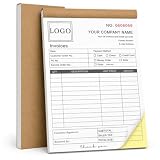
- Custom NCR Receipt Book Personalize your custom NCR receipt book with your company logo, business information, customer fields, payment details, starting number, service description area, or custom layout text.
- Part Business Forms Each NCR 2-part carbonless form is designed to provide one copy for the customer and one copy for your business records, helping organize receipts, invoices, sales orders, and service records.
- Common Customer Scenes Ideal for small business owners, contractors, repair services, auto detailers, towing companies, cleaning teams, landscaping crews, delivery drivers, salons, pet groomers, shops, and market sellers.
- Thicker Cover Design The reinforced cover stock gives the book a sturdier feel and helps protect inner pages from daily wear, making it better for office desks, service vehicles, job sites, counters, and mobile work.
- Bulk Customization Available We support bulk custom NCR receipt books for business teams, service departments, company branches, and promotional business supplies, with responsive support for customization and after-sales questions.
Imagery
Trees, leaves, grass and other nature-related elements can quickly suggest landscaping. They are options, not a formula. A distinctive planting style, a particular service specialty or a clean typographic wordmark may provide a more specific signal than a stock-looking outdoor symbol.
Color
Green and earth tones are common category cues, but they are not mandatory. Let the brief guide the palette, then check that the logo contrasts with its background. A design that looks clear on a white screen may disappear on a dark truck, colored shirt or printed sign.
The Tool Desk
Outbyte Driver Updater FREEScan for outdated or missing drivers - takes under a minuteDriver Scan →Outbyte PC Repair FREERepair Windows errors before they cause bigger problemsFix Now →Rank #2

- Custom Receipt Book with Logo Create a custom receipt book with your logo, business name, address, phone number, email, customer information area, payment method, and personalized business layout.
- Carbonless 2-Part Design The 2-part carbonless form design allows duplicate copies without separate carbon paper, helping businesses record payments, services, sales, and customer transactions.
- Great for contractors, repair services, auto shops, cleaning companies, landscaping crews, salons, retail shops, mobile vendors, delivery businesses, and local service providers. Bulk customization is supported for teams, organizations, service companies, and repeat business use.
- Made for Service Industries Perfect for auto detailing, towing, HVAC, home repair, landscaping, cleaning companies, salons, pet grooming, mobile vendors, contractors, and small business owners.
- Multi-Purpose Business Forms Can be used as invoice forms, receipt books, work orders, sales orders, estimate forms, quote forms, service tickets, payment records, and customer copy forms.
Typography
Choose type that suits the business’s intended character and keeps the name easy to read. Avoid small, intricate lettering if the logo must work on a hat or a distant yard sign. If the company uses a preferred term such as “landscape contractor” rather than “landscaper,” record that language in its brand guidance.
A practical DIY design process
- Write the brief. List the services, customer, desired positioning, brand personality and intended applications.
- Collect references without copying. Note local visual conventions, then look for more specific ideas in your own work and planting schemes.
- Sketch several genuinely different concepts. Try an icon, a wordmark and a name-and-icon combination rather than making minor variations of one idea. Paper sketches are enough at this stage; a sketchbook is optional.
- Refine one concept digitally. A logo-maker or template tool can help if you are comfortable making design choices yourself. Remove details that blur or vanish when the mark is reduced.
- Test it in context. Preview it on a truck door, yard sign, website header and a small shirt or hat mark. Check both the full-color design and a single-color version.
- Prepare the files and usage rules. Keep versions suited to different backgrounds and applications, and request high-resolution artwork for print. Write down the approved colors, typography, logo placement and preferred brand language.
DIY tools or professional design help?
Templates and logo-maker tools, including Canva, are a practical route when you have time to explore ideas and the brand is straightforward. A graphic designer can help develop or formalize a more complex identity, or when you need a distinctive system and production-ready versions but lack the time or design skills to create them.
There is no established price or outcome comparison here that shows one route is always cheaper or better. Base the choice on your available time, confidence with design, the complexity of the identity and how much the finished artwork must do across print, digital and workwear.
Check the logo before you approve it
- Small-size test: Is the company name still legible on a hat or social profile?
- One-color test: Does the mark remain recognizable without its full palette?
- Contrast test: Does it stand out against the actual backgrounds where it will be used?
- Application test: Does it work on signage, a vehicle, a website and apparel without awkward cropping or lost details?
- Distinctiveness check: Does it feel connected to your business rather than like a copy of a nearby competitor?
For shirts, Custom Ink recommends limiting the palette, checking one-color reproduction, keeping lettering legible at small sizes and separating the logo from contact details. It suggests a left-chest logo with contact information on the back; that is one supplier’s practical advice, not a universal apparel rule. Request a sample before ordering a large team run.
Free tools Windows power users keep installed
One-click scans. No signup required.
Rank #4

- Custom Receipt Book with Logo Create a custom receipt book with your logo, business name, address, phone number, email, customer information area, payment method, and personalized business layout.
- Carbonless 2-Part Design The 2-part carbonless form design allows duplicate copies without separate carbon paper, helping businesses record payments, services, sales, and customer transactions.
- Great for contractors, repair services, auto shops, cleaning companies, landscaping crews, salons, retail shops, mobile vendors, delivery businesses, and local service providers. Bulk customization is supported for teams, organizations, service companies, and repeat business use.
- Made for Service Industries Perfect for auto detailing, towing, HVAC, home repair, landscaping, cleaning companies, salons, pet grooming, mobile vendors, contractors, and small business owners.
- Multi-Purpose Business Forms Can be used as invoice forms, receipt books, work orders, sales orders, estimate forms, quote forms, service tickets, payment records, and customer copy forms.
Keep the identity consistent after launch
A logo is one part of a broader brand identity. A compact style guide can show approved logo versions and placement, colors, typography and preferred language so that employees and outside suppliers produce more consistent marketing materials. Landscape Leadership founder and CEO Chris Heiler puts the language point this way: “If you prefer ‘landscape contractor’ over ‘landscaper,’ then you’d want to include this in your brand style guide.”
Wix’s landscaping-logo guide outlines a similar sequence—define the business vision, sketch concepts, digitize a direction, choose imagery, color and typography, and check simplicity and versatility. Treat those steps as a starting framework: the finished mark still needs to fit your own services and pass practical application tests.
Quick Recap
Best Value

- Custom NCR Receipt Book Personalize your custom NCR receipt book with your company logo, business information, customer fields, payment details, starting number, service description area, or custom layout text.
- Part Business Forms Each NCR 3-part carbonless form is designed to provide one copy for the customer and one copy for your business records, helping organize receipts, invoices, sales orders, and service records.
- Common Customer Scenes Ideal for small business owners, contractors, repair services, auto detailers, towing companies, cleaning teams, landscaping crews, delivery drivers, salons, pet groomers, shops, and market sellers.
- Thicker Cover Design The reinforced cover stock gives the book a sturdier feel and helps protect inner pages from daily wear, making it better for office desks, service vehicles, job sites, counters, and mobile work.
- Bulk Customization Available We support bulk custom NCR receipt books for business teams, service departments, company branches, and promotional business supplies, with responsive support for customization and after-sales questions.

Product prices and availability are accurate as of the date/time indicated and are subject to change. Any price and availability information displayed on Amazon at the time of purchase will apply.




