Recommended Free Tools
ThatPainter is reader-supported. When you buy through links on our site, we may earn an affiliate commission. Learn More
The essential rule is simple: keep a proper solar filter over your camera lens whenever any part of the Sun’s bright photosphere is visible. Remove the filter only during genuine totality, and only when you are inside the path of totality and the bright solar disk is completely covered. Replace it before the bright photosphere reappears.
As an Amazon Associate I earn from qualifying purchases.
That distinction changes everything. The partial phases require heavily filtered photography; totality is the brief period when removing the filter lets your camera record the much fainter corona. If you are outside the path of totality—including during a deep partial or annular eclipse—leave the filter on for the entire event.
A smartphone can make excellent photographs of the eclipse experience: the changing landscape, people, shadows, horizon glow and reactions. For a large, detailed image of the eclipsed Sun, corona or Baily’s beads, use a filtered telephoto lens, bridge camera or telescope. The best photographic plan is the one simple enough that you still look up and experience totality.
#1 Best Overall
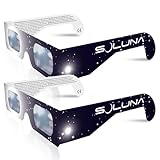
- TRUSTED BY MILLIONS - Soluna Glasses are made in the USA by NASA-approved manufacturer American Paper Optics, and are recognized as ISO-compliant by the American Astronomical Society. Join the millions of eclipse chasers that trusted Soluna Eclipse Glasses for the 2017 Total Solar Eclipse.
- CE AND ISO CERTIFIED FOR DIRECT SUN VIEWING - Our eclipse glasses have been independently tested and verified by ICS Laboratories under the most current standard ISO 12312-2:2015(E) for filters for direct observation of the sun. You can watch the total solar eclipse with absolute confidence in your eye safety.
- OPTIMIZED DESIGN - Soluna Glasses feature scratch-resistant Silver Polymer lens material with an optical density of 5 or greater. Our glasses filter 100% of harmful ultra-violet, 100% of harmful infrared, and 99.999% of intense visible light, offering both unparalleled safety and comfort for the best viewing experience.
- A COMFORTABLE FIT - These certified eclipse glasses are designed for teens and adults, featuring convenient crease lines on both sides for an easy, secure fit.
- 2023 ANNULAR AND 2024 TOTAL SOLAR ECLIPSES - On October 14th 2023, an annular eclipse (when the sun forms a ring around the moon) will cross the United States from Oregon to Texas. We will then experience a once-in-a-generation Total Solar Eclipse on April 8th 2024 - the only USA total eclipse until August 23rd, 2044. You will be amazed as the moon completely blocks the sun during Totality, which lasts but mere minutes. Soluna Glasses are what you need to safely view both of these eclipses.
Choose the result you actually want
Almost any camera can record something during an eclipse, but different equipment produces very different results. Decide whether your priority is the atmosphere of the event or a close-up of the Sun before buying accessories or changing camera settings.
| Goal | Recommended setup | What to expect |
|---|---|---|
| Safest, easiest souvenir | Smartphone on a stable support, using the wide camera | Landscape, people, changing light, shadows, video and audio; little solar detail |
| Recognizable solar disk | Smartphone with a dedicated solar filter and optical telephoto, compact camera or bridge camera | A small-to-moderately large filtered Sun; focus and exposure may require testing |
| Moderately large eclipse | Interchangeable-lens camera with a filtered 200–500 mm lens | A useful solar disk with some room for composition |
| Detailed corona or Baily’s beads | Tripod-mounted camera with a long telephoto lens or telescope, front-mounted solar filter and manual controls | A technically demanding sequence with rapid filter changes and narrow framing |
| Full-corona composite | RAW-capable camera, fixed ISO and aperture, bracketed shutter speeds and post-processing | A blended image made from several exposures, not a single exposure |
| Totality atmosphere | Phone or wide-angle camera on a tripod recording video and ambient sound | The darkened landscape, horizon glow and reactions without requiring a complex close-up sequence |
As a rough focal-length guide, the American Astronomical Society (AAS) describes about 300 mm in 35 mm-equivalent terms as a starting point for a moderately large solar image. Around 1,000 mm or longer is more suitable for close-ups of Baily’s beads, prominences and the corona. These are not universal requirements: sensor size, aspect ratio and the composition you want all matter. Digital zoom only enlarges pixels; it does not create the optical detail of a long lens.
First establish whether you will see totality
Being able to see the Moon cover most of the Sun does not mean you are in the path of totality. A location outside that narrow path sees a partial eclipse, no matter how deep the partial phase becomes. You must not remove the filter during a 99% partial eclipse.
Do these 3 things before closing this tab:
1Fix the driver behind crashes, sound loss and screen glitches2Clear out junk files and repair common Windows errors3Scan for outdated or missing drivers - takes under a minuteOn August 12, 2026, totality will cross Greenland, Iceland, northern Russia, Spain and a small part of Portugal. Portions of northern North America, including parts of the United States, will see a partial eclipse rather than totality. NASA says totality will last less than two minutes at most locations and less than two and a half minutes near the central portion of the path. Check the NASA 2026 eclipse information and the NASA GSFC path data for your exact observing site.
Before eclipse day, record the local times for:
- C1: first contact, when the partial eclipse begins.
- C2: second contact, when totality begins.
- Maximum: the midpoint of the eclipse at your location.
- C3: third contact, when totality ends.
- C4: fourth contact, when the partial eclipse ends.
Citywide times can be misleading. Contact times change with your precise coordinates, and the Sun’s altitude and direction affect both composition and camera placement. Also check the weather, identify a backup observing site if practical, and decide in advance whether you will photograph the Sun, the landscape or the people around you.
Solar-filter safety: what to use and when
Use a filter over the front aperture
During every partial phase, use a filter made for solar observation or solar photography over the front of the camera lens. It must cover the entire active optical aperture and be secured well enough that wind, a bump or the camera’s upward angle cannot dislodge it.
Inspect the filter before use. Do not use it if it has scratches, pinholes, tears, cracks, loose edges or any other damage. Test its attachment with the camera pointed upward before the eclipse begins. If you are inside the path of totality, choose a design that is secure during the partial phases but can be removed quickly without disturbing focus or zoom.
The AAS explains why a solar filter must not be placed at the eyepiece or behind a telescope or telephoto lens: concentrated sunlight can destroy a rear-mounted filter and expose the observer’s eye to dangerous light. Its guidance on camera, telescope and optical filters is the appropriate reference for a particular setup.
Do not rely on ordinary sunglasses
Sunglasses, exposed film, smoked glass, neutral-density filters, polarizers and improvised dark materials are not substitutes for a proper solar filter. Cloud, haze and the darkness of the surrounding sky do not make an unfiltered partial eclipse safe.
Solar viewing glasses protect your eyes when looking at the Sun, but they are not automatically a secure camera-lens filter. AAS states that ISO 12312-2 is a standard for handheld or wearable solar viewers, not a dedicated international standard for camera-lens filters. Treat claims such as ISO-certified camera filter cautiously unless the manufacturer documents exactly what was tested and for what use. For viewer and smartphone-filter sources, consult the AAS vetted supplier information rather than relying on an anonymous marketplace listing or a printed ISO label alone.
Rank #2

- Solar eclipse glasses Approved 2024,Safe Solar Observation - These certified safe shades are designed for direct solar viewing. Our approved solar eclipse glasses are perfect for observing eclipses, sunspots, and planetary transits.
- Meets Industry Standards - Our CE and ISO certified safe shades for direct sun viewing are made while adhering to stringent safety and quality regulations set by the American Astronomical Society.
- A Comfy Fit - These certified sunglasses for eclipse are suitable for teens and adults. Featuring crease lines on both sides, these optical quality safe shades may be worn over prescription glasses.
- Filters Out Harmful Light - View eclipses safely with our paper glasses. Our solar viewers use solar safe filter technology, which helps shield your eyes from IR, UV, and 99.9999% of visible light.
- Excellent Value - Each pack contains 10 non-polarized solar eclipse glasses for viewing the sun. Share them with friends and loved ones so you can all enjoy viewing solar eclipses in complete safety.
Can eclipse glasses be held over a phone camera?
It may be possible as a carefully controlled emergency improvisation if genuine, undamaged solar-viewer material completely covers the active lens and cannot move. It is not the recommended setup. A phone can switch between cameras as you change zoom, and a pair of glasses may leave another lens exposed or shift out of alignment.
Windows Errors? Fix Them Before They Spread
Repair common Windows errors and clear accumulated junk for a smoother, more stable PC - no reinstall needed.Free scan · no reinstallCrashes, No Sound, or Screen Glitches?
Random freezes, missing sound and display glitches usually trace back to one bad driver. Find and replace yours safely.Free scan · under a minuteA dedicated smartphone solar filter is preferable because it is designed to attach over the camera lens. Test the exact lens and zoom setting beforehand. The filter must cover the lens being used—not simply part of the phone body—and it must remain in place for the entire partial phase.
The two radically different photographic situations
Partial phases: the Sun’s photosphere is still visible. The filter stays on. Use short exposures and check that the solar disk is not clipped.
Totality: the Moon completely covers the bright photosphere. Only inside the path of totality may you remove the front filter to record the much fainter corona. A filter left on during totality will normally produce a black or nearly blank image, as explained by the AAS and NASA.
Never remove the filter merely because the Sun is 99% covered. A remaining crescent is still intensely bright. Do not remove it for an annular eclipse, either: an annular eclipse leaves a bright ring of photosphere visible throughout, so the filter remains on from beginning to end.
The Tool Desk
Outbyte PC Repair FREERepair Windows errors before they cause bigger problemsFix Now →Outbyte Driver Updater FREEFix the driver behind crashes, sound loss and screen glitchesFind Drivers →Plan and test several days before the eclipse
- Confirm your eclipse type and location. Use location-specific NASA information to establish whether you get totality or only a partial eclipse.
- Obtain the filter early. Confirm that it fits your lens or phone camera, inspect it and rehearse fitting and removal.
- Choose one primary photographic plan. A close-up, a landscape, a group video and a time-lapse all require different framing and attention. A first-time observer should not attempt all of them at once.
- Practice on the ordinary Sun. Attach the filter before aiming the camera. Test framing, focus, exposure, timer or remote release, burst mode, RAW, storage and battery life.
- Rehearse the filter choreography. If you will photograph totality with a telephoto camera, practise removing and replacing the filter without changing focus or zoom. A screw-on filter may be secure but slow to remove; AAS recommends a secure, quickly removable arrangement for totality photography.
- Use the Moon as a focusing exercise if useful. The full Moon is a convenient practice target for controls and focusing, but it is not an exposure model for the corona, which has a very different brightness distribution.
- Prepare your location. Know where the Sun will be, how high it will be, and whether a tripod or shade will obstruct other observers. Keep the camera shaded while waiting.
How to photograph the eclipse with an interchangeable-lens camera
Before first contact
- Mount the camera on a sturdy tripod or other stable support.
- Attach the solar filter to the front of the lens before pointing at the Sun.
- Turn off the flash.
- Use RAW if your camera and workflow support it, or choose the highest-quality format available.
- Select manual exposure or another deliberately controlled mode rather than allowing the camera to change settings unpredictably.
- Use manual focus where practical.
- Focus on the filtered solar limb or a sunspot, take a test frame and enlarge it on the rear screen.
- Tape the focus ring once it is sharp. If using a zoom lens, tape or otherwise lock the zoom ring as well.
- Set a remote release, cable release, smartwatch shutter or delayed shutter. A two-second timer can reduce tripod vibration.
- Test image stabilization according to your camera and lens manual. Some stabilization systems can behave poorly when left active on a tripod, while others are designed to detect tripod use automatically.
Filtered partial-phase exposure
There is no universal eclipse setting because filter transmission, haze, altitude, aperture, focal length and sensor response all change the exposure. Start with:
- ISO 100 or 200.
- f/8 to f/16.
- A test range around 1/500 to 1/4000 second. Nikon gives a broader practical test range, approximately 1/4000 to 1/30 second, depending on the filter and conditions.
These are calibration ranges, not guaranteed final settings. Photograph the uneclipsed, filtered Sun several days beforehand. Inspect the histogram and enlarge the edge of the solar disk. Avoid clipped highlights. If haze or cloud changes the light, bracket rather than trusting the clear-day exposure; both AAS guidance and Nikon’s eclipse guide treat exposure values as starting points to test.
At second contact: remove the filter only for actual totality
- Keep the filter on while any bright crescent or Baily’s bead—the last visible point of the photosphere—remains.
- When you are genuinely inside the path of totality and the bright photosphere has completely disappeared, remove the front filter.
- Photograph the rapidly changing beginning of totality, including the diamond ring and corona, if your timing and plan allow.
- Move immediately through your preplanned exposure sequence rather than searching through menus.
- Look away from the camera and experience the eclipse. A total eclipse is too brief to spend every second watching a screen.
If you are uncertain whether totality has begun, leave the filter on. The cost is a dark frame; removing it too early can be dangerous and can damage equipment.
Exposure sequence during totality
The corona has an enormous brightness range. A short exposure records the brighter inner corona and prominences; longer exposures reveal progressively fainter outer structure. One frame normally cannot show all of it with equal detail.
Free tools Windows power users keep installed
One-click scans. No signup required.
Keep ISO and aperture fixed where possible and vary the shutter speed. A practical bracket might run from about 1/1000 second or faster through 1/10 second or longer. NASA gives an approximate totality range from 1/1000 second to 1 second. The suitable endpoint depends on focal length, tracking, tripod stability, wind, camera noise and how much outer-coronal structure you want.
Rank #3

- Solar eclipse glasses Approved 2024, Safe Solar Observation - These certified safe shades are designed for direct solar viewing. Our solar eclipse glasses are perfect for observing eclipses, sunspots, and planetary transits.
- Meets Industry Standards - Our CE and ISO certified safe shades for direct sun viewing are made while adhering to stringent safety and quality regulations set by the American Astronomical Society.
- A Comfy Fit - These certified sunglasses for eclipse are suitable for teens and adults. Featuring crease lines on both sides, these optical quality safe shades may be worn over prescription glasses.
- Filters Out Harmful Light - View eclipses safely with our paper glasses. Our solar viewers use solar safe filter technology, which helps shield your eyes from IR, UV, and 99.9999% of visible light.
- Excellent Value - Each pack contains 10 non-polarized solar eclipse glasses for viewing the sun. Share them with friends and loved ones so you can all enjoy viewing solar eclipses in complete safety.
A simple sequence is:
- Short exposure: inner corona and prominences.
- Medium exposures: more of the corona around the lunar disk.
- Long exposure: fainter outer corona, with greater risk of motion blur and framing error.
- Wide scene: the darkened landscape, horizon glow and observers.
At a very long focal length, the Sun can move out of the frame quickly and the outer corona may be cropped. Use a shorter focal length if including more of the corona or surrounding sky matters more than making the lunar disk large.
At third contact
- Watch for the brightening edge, chromosphere, prominences or returning diamond ring.
- Do not wait for a large crescent. As soon as the bright photosphere returns, replace the solar filter.
- Continue filtered photography through the remaining partial phase.
How to photograph the eclipse with a smartphone
A smartphone is usually most successful when it photographs the event rather than trying to make the Sun fill the frame. Its short optical focal length, small sensor and automatic processing make detailed coronal photography difficult. It can still make compelling images of the landscape, people, crescent-shaped shadows under leafy trees and the changing light.
For a filtered image of the Sun
- Use the rear camera.
- Attach a dedicated solar filter over the lens you will actually use.
- If the phone has several cameras, prevent automatic lens switching if the camera app allows it, or make certain that the filter covers every lens the phone might activate.
- Choose the optical telephoto camera only if it focuses reliably and remains covered. Otherwise use the main camera and crop later.
- Avoid relying on digital zoom to create detail.
- Mount the phone in a clamp or brace it against a stable support. A timer, remote shutter or volume-button shutter can reduce movement.
- During the partial phase, tap the Sun and reduce exposure until the filtered disk is not a featureless white blob.
- Lock focus and exposure if your phone supports it.
Focus and exposure controls
On current iPhones, tap the subject to adjust exposure, then touch and hold the focus area until AE/AF Lock appears. You can drag the exposure control to darken or brighten the frame. Controls and menu names vary by iPhone model and iOS version; Apple documents the current procedure in its iPhone camera guide.
Supported Pixel Pro models provide Pro Controls for focus, shutter speed and ISO. Google Camera also supports focus and exposure locking on compatible versions. Android phones are not uniform: manual controls depend on the manufacturer, model and whether the device advertises the necessary Camera2 manual-sensor capability. Check the controls on your exact phone before eclipse day using Google’s Pixel Pro Controls information, Google Camera focus and exposure guidance or the relevant camera app documentation.
During totality
Only if you are inside the path of totality, remove the smartphone solar filter after the last bright photospheric light disappears. Take a few ordinary photographs at different exposures, then replace the filter before the bright photosphere returns.
For totality, ordinary Photo mode is often a better first choice than a computational mode that takes a long time to complete. Google warns that Pixel astrophotography exposures can take up to four minutes—longer than many totalities—so that mode can make you miss the event. Test Night mode, astrophotography mode, HDR and any manual or RAW mode beforehand; do not assume a mode designed for a dark night sky is automatically suitable for a short eclipse.
HDR may help a landscape, but it can create a computational composite rather than a single exposure. Keep the original file where possible and treat the result as a processed image, not necessarily a record of one exposure.
What’s actually slowing this PC down?
Pick the symptom - the matching free tool is one click away.
What smartphone users should photograph
- Wide landscape: show the unusual darkness and changing color near the horizon.
- People: photograph companions wearing eclipse glasses before and after totality, and their reactions during totality.
- Shadows: look for crescent-shaped projections beneath leafy trees and unusual shadow edges.
- Video: stabilize a wide shot and record ambient sound, conversation and reactions.
- The eclipse itself: treat it as an optional small subject rather than the phone’s main assignment.
The AAS notes that smartphones often overexpose bright astronomical objects and can struggle to focus on the dim sky around them. Its advice to record video and audio of the observing group is particularly useful: a wide, stable recording may preserve more of the experience than a blurry, overexposed dot.
A simple totality plan you can print
- Several minutes before C2: check battery, storage, filter, focus, zoom and framing. Start the filtered partial-phase sequence if desired.
- About one minute before C2: put your hand on the filter or release mechanism, but do not remove it early. Have the totality exposure sequence ready.
- Last bright crescent or bead: keep the filter on.
- Bright photosphere completely disappears: if and only if you are inside the path of totality, remove the filter.
- During totality: shoot the short-to-long bracket, then make at least one wide scene or look up.
- Bright photosphere returns: replace the filter immediately.
- After C3: continue filtered photography if wanted, then back up your files.
Video and time-lapse alternatives
Wide video
A wide video started roughly ten minutes before totality and continued through the surrounding minutes can capture the changing light, horizon, crowd reactions and sound. Pointing a phone at the landscape is a low-risk alternative to operating a long lens. If the Sun itself enters the frame during a partial phase, use an appropriate solar filter for that camera setup or reframe so the Sun is not included.
Time-lapse
For a time-lapse, fix the camera on a tripod and take short clips or stills at roughly four- to five-minute intervals, an approach included in AAS guidance. The camera must remain safely filtered whenever the bright photosphere is visible. Test the interval, battery life, storage and exposure changes in advance; a time-lapse is not a reason to leave a telephoto lens pointed at an unfiltered Sun.
Rank #4

- 2026 Total Solar Eclipse: The solar eclipse starting on August 12, 2026. This is an essential accessory for you to prepare for observation. It can produce a clear outline and image of the sun without causing any damage to the eyes. It can reduce ultraviolet, infrared and The hazards of strong light, so you can observe the upcoming total solar eclipse with confidence.
- Absolutely 100% quality assurance: Our solar eclipse glasses lenses are extremely excellent and have passed the rigorous testing conducted by the ICS laboratory of U.S. and have an ISO 12313-2 (2015) quality inspection report. Complying with international standards, it can protect your eyes during observation.
- Suitable for everyone: Our glasses are suitable for adults and children, easy to use and very safe. If you are a scientific practitioner, astronomy enthusiast, parent or person in charge of relevant institutions and organizations, these glasses are your best choice.
- Looking directly at the sun can be dangerous if proper precautions are not taken. Viewing the sun without a proper filter can cause permanent eye damage. Adequate eye protection designed specifically for viewing the sun is crucial and should be taken seriously.
- Strictly follow the instructions for use: Ensuring that there are no risks during the observation process requires our joint efforts with you. Please cooperate and watch this magnificent astronomical spectacle together, because once missed, the next one will be decades away, which is very rare.
Equipment checklist
- Camera or smartphone.
- Proper front-mounted solar filter for the lens or phone camera.
- Tripod, phone clamp or another stable support.
- Remote release, timer, smartwatch shutter or volume-button shutter.
- Spare battery or power bank.
- Empty memory card and sufficient phone storage.
- Lens cloth.
- Tape for focus and zoom rings.
- Red flashlight for handling controls in the dark.
- Solar viewing glasses for you and anyone looking directly at the Sun.
- Written local C1, C2, maximum, C3 and C4 times.
- Weather information and, if possible, a backup location.
Charge everything before leaving, format or clear the memory card, disable the flash and avoid learning a new camera app during totality. NASA recommends a tripod and delayed shutter release; AAS also highlights spare batteries, a formatted memory card, remote release, red light and flash-off settings.
RAW, bracketing and processing the corona
RAW is useful on an interchangeable-lens camera because it preserves more flexibility for highlights, shadows, white balance and exposure adjustments. It is optional rather than mandatory. On phones, RAW availability depends on the model and app. Apple ProRAW is limited to supported iPhone models, creates substantially larger files and is unavailable in some camera modes; see Apple’s ProRAW documentation before relying on it.
For a corona composite:
- Back up the original RAW files.
- Select the sharpest frames at each exposure.
- Correct white balance and apply an appropriate lens profile.
- Align the lunar disk and corona.
- Blend the exposures conservatively so inner and outer coronal detail remain believable.
- Keep a single-frame version alongside the composite.
- Label the finished image if stacking, HDR, sharpening or compositing was used.
A composite can show a wider brightness range than any one exposure, but it should be described as a composite. Smartphone computational photography may also combine exposures, smooth detail, sharpen edges or change apparent color. That can make an attractive image without being a single-frame representation of what the sensor recorded.
Troubleshooting during the eclipse
The image is a white blob
Stop and check the setup. Common causes include an absent or incorrectly fitted filter during the partial phase, excessive exposure, digital zoom, autofocus failure, flare or reflections from the filter, and a phone switching to an uncovered camera.
- Verify that the filter covers the active lens completely.
- Reduce exposure.
- Clean the outer lens and filter carefully.
- Return to the phone’s optical camera rather than digital zoom.
- Lock focus on the filtered solar limb.
- Re-test on the ordinary filtered Sun if there is time.
The frame is black during totality
Likely causes are a filter left on, filtered partial-phase settings carried into totality, a lens cap or cover still in place, or a phone computational mode that has not finished processing.
If—and only if—you are in genuine totality, remove the filter, switch to an ordinary faster photo mode and make a bracket of exposures. If the eclipse is partial or annular at your location, do not remove the filter to solve a dark frame.
Autofocus keeps hunting
Focus on the filtered solar limb or a sunspot before the eclipse, switch to manual focus where possible and lock the focus ring with tape. On a phone, use AE/AF Lock or the device’s manual-focus control if available. Do not expect autofocus to maintain focus reliably against the dark sky during totality.
The phone changes lenses
Changing zoom can activate a different physical camera. Macro and automatic lens behavior can also intervene. Test the exact framing beforehand, disable lens switching if the app permits it and ensure the currently active lens is covered. A filter over the main lens does not protect a telephoto lens that the phone has silently selected.
The filter will not come off quickly
Do not use a filter design that requires a complicated operation during a short totality. Practise the release in advance. Keep the filter attached until the bright photosphere has completely disappeared; if removal is difficult, prioritize safety and viewing over a close-up photograph.
Clouds or haze arrive
Do not remove the filter because clouds make the Sun look dimmer. Cloud is not a solar filter. Haze can change the exposure substantially, so bracket by at least a stop when conditions differ significantly from your test. Thin cloud can create an interesting atmospheric image, but unfiltered partial-phase photography remains unsafe.
Best Value

- TRUSTED BY MILLIONS - Soluna Glasses are made in the USA by NASA-approved manufacturer American Paper Optics, and are recognized as ISO-compliant by the American Astronomical Society. Join the millions of eclipse chasers that trusted Soluna Eclipse Glasses for the 2024 Total Solar Eclipse.
- CE AND ISO CERTIFIED FOR DIRECT SUN VIEWING - Our eclipse glasses have been independently tested and verified by ICS Laboratories under the most current standard ISO 12312-2:2015(E) for filters for direct observation of the sun. You can watch the total solar eclipse with absolute confidence in your eye safety.
- OPTIMIZED DESIGN - Soluna Glasses feature scratch-resistant Silver Polymer lens material with an optical density of 5 or greater. Our glasses filter 100% of harmful ultra-violet, 100% of harmful infrared, and 99.999% of intense visible light, offering both unparalleled safety and comfort for the best viewing experience.
- A COMFORTABLE FIT - These certified eclipse glasses are designed for teens and adults, featuring convenient crease lines on both sides for an easy, secure fit.
- 2026 EUROPEAN TOTAL SOLAR ECLIPSE - Don’t miss the once-in-a-generation European Total Solar Eclipse on August 12th, 2026. Gather your family, friends and Soluna Glasses and prepare to be amazed as the moon passes in front of the sun, completely blocking it from view during Totality, which lasts but mere minutes.
The corona is cut off
Your focal length may be too long for the framing. The corona extends beyond the lunar disk, and a long telephoto leaves little margin for tracking or movement. Use a shorter focal length, widen the composition before totality or accept that a close-up will show only the inner corona.
The camera gets hot
Overheating is equipment-dependent, not an inevitable result of eclipse photography. Keep the camera shaded while waiting, allow heat to escape and avoid leaving a telephoto lens pointed at the Sun without its filter. Carry a spare battery and card, and avoid unnecessary menu changes or repeated power cycling during totality.
The safest strategy for a first-time observer
If this is your first total solar eclipse, use one simple setup—or no camera at all. A wide smartphone video of the observing group, recorded from a stable position, can preserve the voices, shadow and horizon while leaving you free to watch.
Trying to change lenses, remove a filter, bracket ten exposures, reframe a narrow telephoto and monitor a screen can consume the entire period of totality. AAS specifically warns that first-time observers can miss the event by attempting an overly complex sequence. The photograph is replaceable; the experience of totality is not.
Frequently Asked Questions
Can I photograph a partial solar eclipse without a filter?
No. Use a proper front-mounted solar filter whenever any part of the bright photosphere is visible. This includes a deep partial eclipse and the entire duration of an annular eclipse. Clouds, haze, sunglasses and ordinary camera filters do not make unfiltered photography safe.
Can I use my phone without a solar filter during totality?
Only if you are inside the path of totality and the bright photosphere is completely covered. Remove the filter only after the last bright crescent or bead disappears, then replace it before the photosphere returns. If your location sees only a partial eclipse, keep the filter on throughout.
Is a smartphone good enough to photograph the corona?
A smartphone can record a small eclipsed Sun, but it is generally better for the landscape, people, shadows, horizon glow and video. Detailed corona photography usually requires a telephoto camera or telescope. Digital zoom enlarges pixels rather than adding optical detail.
Free tools Windows power users keep installed
One-click scans. No signup required.
Should I use Night mode or astrophotography mode during totality?
Not automatically. Some computational modes take too long for a short totality. Google warns that Pixel astrophotography exposures can take up to four minutes. Test the exact phone and mode beforehand, but use ordinary Photo mode first so you can capture several brief exposures.
What should I do if I am not sure whether totality has started?
Keep the filter on. Remove it only when you are confirmed to be inside the totality path and the bright photosphere has fully disappeared. A dark filtered frame is preferable to removing the filter while a dangerous bright crescent remains.
The Bottom Line
Remember the sequence: filter on for every partial phase; filter off only during genuine totality; filter back on before the bright photosphere returns. Use a tripod, manual focus, tested exposure settings and a simple plan. If operating the camera starts to make you miss the eclipse, stop photographing and look up.
Quick Recap

Product prices and availability are accurate as of the date/time indicated and are subject to change. Any price and availability information displayed on Amazon at the time of purchase will apply.
Do these 3 things before closing this tab:
1Clear out junk files and repair common Windows errors2Scan for outdated or missing drivers - takes under a minute3Repair Windows errors before they cause bigger problems



