Quick wins for a faster PC:
Repair Windows errors before they cause bigger problemsFix Now →Scan for outdated or missing drivers - takes under a minuteDriver Scan →Clear out junk files and repair common Windows errorsFree Scan →
ThatPainter is reader-supported. When you buy through links on our site, we may earn an affiliate commission. Learn More
Use a long shutter speed while the water is moving. Start at a few seconds for a waterfall, keep the camera completely still on a tripod, and make a sequence of exposures until the flow looks smooth without losing the surrounding detail. A shorter exposure preserves ripples and spray; a longer one turns movement into a softer, mist-like mass.
What creates the misty-water look?
The effect is motion blur: water travels across the sensor during the exposure, blending separate ripples into continuous streaks. Shutter speed is the main control. A fast shutter records more individual texture, while a slow shutter smooths it. The same shutter setting can look very different with a fast waterfall, a gentle stream or a shallow pool, so treat published settings as starting points rather than rules.
Washington Trails Association recommends beginning with a few seconds and experimenting. Canon Hong Kong gives two seconds as an example that produced silky waterfall water, while Nikon illustrates a five-second waterfall exposure and stream comparisons at 1/60 and 1/6 second. These are scene-specific examples, not universal prescriptions. See Nikon’s long-exposure guide, the Washington Trails Association waterfall guide and Canon Hong Kong’s waterfall tutorial.
What’s actually slowing this PC down?
Pick the symptom - the matching free tool is one click away.
Choose a composition before slowing the shutter
Soft water is more convincing when it contrasts with something sharp and textured. Frame the fall with its pool, surrounding vegetation, moss, rocks or the stream below instead of filling the entire image with white water. Check foreground and background shapes, colors and textures; the stationary elements give the blurred flow a visual counterpoint.
#1 Best Overall

- 【Import Optical Glass】Crafted from premium AGC optical glass with 8 multi-layer coatings, this ND filter reduces reflections and glare, ensuring superior image quality.
- 【Versatile Light Control】With 1 to 9 stops of adjustable light reduction and 360-degree rotation for precise dimming settings, this filter is perfect for diverse scenarios. (Note: Max stops may cause a cross-pattern effect, commonly known as an "X black cross." This phenomenon is natural and temporary, occurring due to the adjustable ND filter's interaction with specific lenses and focal lengths.
- 【Glare-Free Surface】Treated with an oxidized sandblasting process, this filter prevents unwanted stray light and minimizes unnecessary reflections on the metal surface.
- 【Slim and Secure】At a mere 7.4mm thickness, the CNC-patterned design ensures enhanced friction while rotating, making it easy to attach/detach lenses and accessories anytime, anywhere.
- 【Compatibility Note】This ND filter suits all 67mm lenses. Check your camera's lens thread size (usually beside a "ø" diameter symbol) before ordering. Additionally, a 72mm lens cap is required for this 67mm variable ND filter. Focal Length (mm) ≠ Filter Size (Ø mm)
Look for wind as well as flowing water. Leaves, grasses and branches can move during a long exposure and become unintended streaks. Wait for calmer air or shorten the exposure if those details are important.
A reliable setup in the field
- Compose and focus. Set the camera where the foreground pool, rocks or plants support the flow. Focus on a meaningful stationary subject, then avoid changing focus while making the sequence.
- Mount the camera securely. Use a stable tripod so rocks and other fixed details remain sharp. Keep the legs clear of moving water and check that the camera does not wobble when you touch the controls.
- Set exposure controls. Use a low ISO when the scene allows and choose an aperture that provides the depth of field you need. Select manual exposure, or another mode that gives direct control of shutter time.
- Start with a few seconds. Make one exposure around two to five seconds for a waterfall, then inspect the water and stationary details at magnified playback. The exact starting point depends on water speed, light and the rendering you want.
- Bracket the look. Take several versions with shorter and longer shutter times. If the water still looks choppy, lengthen the exposure. If leaves, grasses or spray become distracting streaks, shorten it or wait for calmer conditions.
- Prevent shutter vibration. Trigger the camera with a compatible remote or cable release, a self-timer or the camera’s exposure-delay feature. A timer is sufficient when you do not have a remote. For exposures longer than 30 seconds, Nikon advises using Bulb mode; operation varies by camera, so follow your model’s manual.
Shutter-speed examples and what they show
| Shutter time | Typical rendering | Use it as |
|---|---|---|
| 1/60 second | More visible movement and texture over rocks | A comparison point from Nikon’s stream example when you want detail in the flow |
| 1/6 second | Noticeably more motion blur while some directional texture remains | A middle step for streams or faster water |
| About 2 seconds | Silky, smooth waterfall water in Canon Hong Kong’s example | A starting exposure for a moderate waterfall in suitable light |
| A few seconds | Softening that can approach a mist-like appearance | Washington Trails Association’s suggested starting range; adjust by eye |
| 5 seconds | Strong smoothing of a waterfall’s flow in Nikon’s example | A longer test when you want less visible texture |
These values describe the cited examples, not guaranteed results for every location. Water speed and the amount of texture you prefer determine the final choice.
Rank #2
- 【Import Optical Glass】Crafted from premium AGC optical glass with 8 multi-layer coatings, this ND filter reduces reflections and glare, ensuring superior image quality.
- 【Versatile Light Control】With 1 to 9 stops of adjustable light reduction and 360-degree rotation for precise dimming settings, this filter is perfect for diverse scenarios. (Note: Max stops may cause a cross-pattern effect, commonly known as an "X black cross." This phenomenon is natural and temporary, occurring due to the adjustable ND filter's interaction with specific lenses and focal lengths.
- 【Glare-Free Surface】Treated with an oxidized sandblasting process, this filter prevents unwanted stray light and minimizes unnecessary reflections on the metal surface.
- 【Slim and Secure】At a mere 7.4mm thickness, the CNC-patterned design ensures enhanced friction while rotating, making it easy to attach/detach lenses and accessories anytime, anywhere.
- 【Compatibility Note】This ND filter suits all 82mm lenses. Check your camera's lens thread size (usually beside a "ø" diameter symbol) before ordering. Additionally, a 86mm lens cap is required for this 82mm variable ND filter.
When you need an ND filter
In bright daylight, the shutter may not be able to stay open long enough without overexposing the frame. A neutral-density (ND) filter reduces the light entering the lens, allowing a slower shutter while keeping the exposure within range. It is a solution for bright conditions, not a requirement for every waterfall: shade, cloud cover and low light may already permit the shutter time you want.
The Tool Desk
Outbyte PC Repair FREEClear out junk files and repair common Windows errorsFree Scan →Outbyte Driver Updater FREEScan for outdated or missing drivers - takes under a minuteDriver Scan →Choose filter strength according to the available light and your target duration; the sources do not identify one strength as best for all scenes. Match the filter’s diameter to your lens, or use the appropriate adapter. Fit the filter before making the final exposure sequence and recheck focus and framing afterward, since mounting a filter can disturb either on some setups.
Rank #3
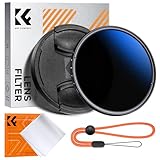
- Import Optical Glass: Crafted from premium AGC optical glass with an astonishing 18 multi-layer coatings, this ND filter reduces reflections and glare, ensuring superior image quality.
- Versatile Light Control: With 1 to 9 stops of adjustable light reduction and 360-degree rotation for precise dimming settings, this filter is perfect for diverse scenarios. (Note: High stops may cause a cross-pattern effect, commonly known as an "X black cross." This phenomenon is natural and temporary, occurring due to the adjustable ND filter's interaction with certain lenses and focal lengths.)
- With Filter Cap & Cleaning Cloth: The K&F Concept unique design filter cap can perfectly fit the filter, and the microfiber cleaning cloth provide harmless cleaning. This ND filter suits all 49mm lenses. Check your camera's lens thread size (usually beside a "ø" diameter symbol) before ordering.
- Glare-Free Surface: Treated with an oxidized sandblasting process, this filter prevents unwanted stray light and minimizes unnecessary reflections on the metal surface.
- Slim and Secure: At a mere 7.4mm thickness, the CNC-patterned design ensures enhanced friction while rotating, making it easy to attach/detach lenses and accessories anytime, anywhere.
Protect detail from spray and weather
Waterfall spray can leave a veil or droplets on the front element, making the entire frame look hazy for the wrong reason. Inspect the lens between exposures and wipe it with a clean microfiber cloth or towel. Shield the camera and lens during setup when spray is heavy, then uncover the lens only for the exposure. Keep checking the preview: stationary rocks should stay crisp, while only the intended moving elements should soften.
Independent reader supportYour contribution helps us test, update, and keep practical guides available for everyone.How to decide that the exposure is right
- Water too choppy: use a longer shutter speed, provided the rest of the scene can remain sharp.
- Water too featureless: shorten the shutter to bring back ridges, spray or directional lines.
- Leaves or grass blurred: wait for less wind or reduce the exposure time.
- Image overexposed: lower ISO or adjust aperture within your depth-of-field needs; if you still need a long shutter, add an ND filter.
- Rocks and camera shake blurred: improve tripod stability and use a remote, self-timer or exposure delay.
- Frame looks generally foggy: check for spray or condensation on the lens before changing exposure settings.
The strongest photographs usually set the softness of the water against harder textures such as rock. As outdoor photographer Tony Sweet explains in Nikon’s guide, the appeal often comes from the difference between soft flow and firm surroundings—not from removing every trace of movement.
Quick Recap
Best Value
- 【Import Optical Glass】Crafted from premium AGC optical glass with 8 multi-layer coatings, this ND filter reduces reflections and glare, ensuring superior image quality.
- 【Versatile Light Control】With 1 to 9 stops of adjustable light reduction and 360-degree rotation for precise dimming settings, this filter is perfect for diverse scenarios. (Note: Max stops may cause a cross-pattern effect, commonly known as an "X black cross." This phenomenon is natural and temporary, occurring due to the adjustable ND filter's interaction with specific lenses and focal lengths.
- 【Glare-Free Surface】Treated with an oxidized sandblasting process, this filter prevents unwanted stray light and minimizes unnecessary reflections on the metal surface.
- 【Slim and Secure】At a mere 7.4mm thickness, the CNC-patterned design ensures enhanced friction while rotating, making it easy to attach/detach lenses and accessories anytime, anywhere.
- 【Compatibility Note】This ND filter suits all 77mm lenses. Check your camera's lens thread size (usually beside a "ø" diameter symbol) before ordering. Additionally, a 82mm lens cap is required for this 77mm variable ND filter.
Rank #4

- 【Import Optical Glass】Crafted from premium AGC optical glass with 8 multi-layer coatings, this ND filter reduces reflections and glare, ensuring superior image quality.
- 【Versatile Light Control】With 1 to 9 stops of adjustable light reduction and 360-degree rotation for precise dimming settings, this filter is perfect for diverse scenarios. (Note: Max stops may cause a cross-pattern effect, commonly known as an "X black cross." This phenomenon is natural and temporary, occurring due to the adjustable ND filter's interaction with specific lenses and focal lengths.
- 【Glare-Free Surface】Treated with an oxidized sandblasting process, this filter prevents unwanted stray light and minimizes unnecessary reflections on the metal surface.
- 【Slim and Secure】At a mere 7.4mm thickness, the CNC-patterned design ensures enhanced friction while rotating, making it easy to attach/detach lenses and accessories anytime, anywhere.
- 【Compatibility Note】This ND filter suits all 40.5mm lenses. Check your camera's lens thread size (usually beside a "ø" diameter symbol) before ordering. Additionally, a 43mm lens cap is required for this 40.5mm variable ND filter.

Product prices and availability are accurate as of the date/time indicated and are subject to change. Any price and availability information displayed on Amazon at the time of purchase will apply.




