PC Slower Than It Used to Be?
What’s actually slowing this PC down?
Pick the symptom - the matching free tool is one click away.
A free scan shows the junk files, broken settings and background clutter dragging Windows down - then fixes them in one click.Free scan · Windows 10 & 11
Outdated Drivers Are Slowing You Down
One free scan finds every outdated or missing driver and matches the right update for your exact hardware.Free scan · exact hardware match
ThatPainter is reader-supported. When you buy through links on our site, we may earn an affiliate commission. Learn More
Canva sirve para crear y compartir materiales visuales y documentos digitales, desde presentaciones y documentos hasta vídeos, publicaciones para redes y sitios web. Su Suite Visual reúne distintos formatos con plantillas, herramientas de edición y opciones de colaboración; algunas funciones y recursos pueden requerir un plan de pago.
¿Qué se puede hacer en Canva?
| Tipo de resultado | Ejemplos | Opciones documentadas |
|---|---|---|
| Documentos | Propuestas, contratos, materiales de formación, ebooks y recetas | Compartir en línea, descargar como PDF o convertir en presentación |
| Presentaciones | Diapositivas para clase, reuniones o proyectos | Colaborar, presentar en directo, grabar una presentación narrada y exportar a PowerPoint, PDF, vídeo o sitio web |
| Vídeos e imágenes | Contenido visual para proyectos y publicaciones | Editar imágenes y vídeos; las herramientas de vídeo incluyen recorte, filtros, conversión a MP4 y grabación de pantalla |
| Otros formatos | Pizarras, hojas de cálculo, sitios web, correo y diseños para impresión | Crear y compartir distintos tipos de contenido en la Suite Visual |
Documentos y proyectos personales
Canva Docs permite crear documentos con texto, imágenes, vídeos y gráficos. Puede servir para preparar propuestas, planes, informes, materiales de formación o proyectos personales como ebooks, recetas y blogs. Los documentos se pueden compartir en línea y, según el flujo de trabajo, descargar como PDF o convertir en presentación.
También puedes usar Canva para organizar ideas en pizarras y trabajar con hojas de cálculo. La Suite Visual reúne estos formatos junto con otros tipos de contenido, de modo que puedes elegir el resultado según la tarea.
Presentaciones para clase y trabajo
Canva sirve para crear diapositivas a partir de plantillas y personalizarlas con texto y elementos visuales. Es una opción para estudiantes, docentes y equipos que necesitan preparar y compartir presentaciones.
#1 Best Overall

- Wide Compatibility for Multiple Devices: Works seamlessly with Samsung, iOS, Android, Chromebook, Smartphone, and other touchscreen devices. No drivers are needed- simply open and play, ensuring compatibility with a variety of tablets and smartphones. No Charging Required, Ready Anytime.
- High-Precision Touch for Smooth Writing & Drawing: Featuring advanced capacitive technology, this stylus pen offers high sensitivity and precision, delivering a smooth, real-pen experience perfect for writing, sketching, note-taking, and more.
- Ergonomic Design for Comfortable Grip: Crafted with a lightweight and durable body, the stylus is designed for long periods of comfortable use. Whether you’re creating, studying, or performing everyday tasks, it ensures a pleasant grip.
- Scratch-Resistant & Durable, Protects Your Screen: Equipped with a soft, high-quality Disc tip that ensures smooth touch without scratching the screen, keeping your device’s display in pristine condition while providing a seamless user experience.
- A great gift: Get 3 different colors of styluses at an unbeatable price instead of a high-priced pencil. You can share these stylus pens with your friends or family.
Las herramientas documentadas incluyen colaboración, presentación en directo y grabación de una presentación narrada. También puedes importar archivos PDF o PowerPoint y exportar presentaciones a PowerPoint, PDF, vídeo o sitio web.
Vídeo e imagen
Canva incluye herramientas para crear y editar contenido de vídeo e imagen. Entre las funciones de vídeo documentadas están recortar, aplicar filtros, convertir el resultado a MP4 y grabar la pantalla. La disponibilidad concreta de herramientas puede depender de la cuenta y cambiar con el tiempo.
Colaboración y uso en equipo
La Suite Visual incluye opciones para colaborar y compartir contenido. En Canva Docs, por ejemplo, se puede colaborar mediante comentarios y compartir documentos con permisos. La descripción de Canva también menciona colaboración y comentarios en tiempo real en distintos formatos.
Rank #2
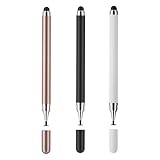
- 【Compatibility and Multi-Purpose】Stylus Pen for Touchscreen, suitable for touch screen devices (for Apple, iPad, Samsung, Lenovo, Xiaomi, nintendo switch 2, etc., and also compatible with major operating systems, such as: Google, Android, Microsoft, etc.)
- 【Lightweight and Portable】Our stylus pen is made of lightweight plastic. This stylus pen is 5.2 inches long, making it easy to hold yet portable. They react well and have no scratches on the display
- 【2-IN-1 Design】The Tablet pen has different tips at each end. One end is a disk tip, which is more precise and sensitive when taking notes and drawing. The other end is a durable silicone tip for surfing or scrolling through websites, which effectively protects the screen from fingerprints or smudges
- 【Battery-free】This capacitive stylus pen can be used anytime, anywhere without charging. You can simply pick up the stylus and start writing, drawing and playing, it's that simple
- 【Say goodbye to hand fatigue】The stylus pen for touchscreen is used to replace your fingers on a touchscreen, this will make the operation of the phone simpler and more effortless, reduces hand fatigue during long writing, sketching, or gaming sessions, also can avoid rubbing your fingers and leaving fingerprints on touchscreen devices
Si varias personas participan, considera qué necesitan hacer: editar, comentar o solo ver el archivo. Comprueba los permisos antes de compartirlo.
¿Canva es gratis?
Canva ofrece herramientas y recursos gratuitos, pero no todo el contenido ni todas las capacidades están necesariamente incluidos. Canva Docs está disponible para distintos tipos de cuenta, incluidas las gratuitas, y Canva IA ofrece acceso inicial gratuito; algunas opciones, más uso o funciones avanzadas pueden requerir un plan de pago.
Si estás decidiendo entre tipos de cuenta, compara el formato que necesitas, la colaboración requerida, el formato de entrega y el acceso a funciones premium. Consulta la página de planes de Canva para conocer las condiciones vigentes; no conviene asumir que un precio, límite o función se mantiene sin cambios.
The Tool Desk
Outbyte PC Repair FREEClear out junk files and repair common Windows errorsFree Scan →Outbyte Driver Updater FREEFix the driver behind crashes, sound loss and screen glitchesFind Drivers →Rank #3

- Stylus Pen for Touchscreen: No Bluetooth or charging needed—use instantly on any capacitive touch screen (iPad, iPhone, Android, Samsung). Dual rubber tips (5mm/6.6mm) ensure precise control for writing, drawing, or gaming. Lightweight aluminum body with vibrant colors.
- Precision & Comfort Redefined: High sensitivity rubber tip glides smoothly without lag or scratches. Ergonomic design reduces wrist strain for extended use. Compatible with tablets, phones, and Laptops.
- Dual-Tip Flexibility: Switch between 0.20” and 0.26” rubber nibs for detailed art or bold notes. Anti-scratch, fingerprint-resistant tip. Pretty bright metal colors inspire creativity.
- Effortless Multi-Device Compatibility: Works seamlessly on Apple, Samsung, Android, and more. No apps or setup—just pick up and write. Perfect for notes, games, or gifts—ready to spark ideas instantly. Replaceable tips included for long-term use.
- Creative Freedom, Anywhere: Lightweight aluminum stylus with natural grip. Includes 6 replaceable tips and 3 color stylus pens. Perfect for sharing with friends, family, or colleagues, this bundle ensures you’re always equipped to capture inspiration.
Canva IA
Canva IA reúne herramientas de inteligencia artificial para ayudar a diseñar y crear. Algunas se pueden probar en el plan gratuito, mientras que un mayor uso o funciones más avanzadas pueden estar disponibles en planes de pago. Las capacidades y condiciones pueden cambiar.
Revisa los textos y elementos que genere antes de compartir o publicar el resultado, y confirma que se ajustan al propósito del diseño.
Cómo empezar en Canva
- Elige el resultado: decide si necesitas un documento, una presentación, un vídeo, una publicación social u otro formato.
- Abre un diseño: parte de una plantilla o de un lienzo en blanco.
- Personaliza el contenido: añade o edita texto y elementos visuales según el objetivo.
- Colabora si hace falta: comparte el archivo con los permisos adecuados para que otras personas puedan trabajar con él.
- Elige cómo entregarlo: comparte el contenido en línea o usa una opción de descarga o exportación disponible para ese formato.
Preguntas frecuentes
¿Para qué sirve Canva?
Sirve para crear y compartir materiales visuales y documentos digitales en formatos como documentos, presentaciones, vídeo, publicaciones sociales y sitios web.
Rank #4

- [Wide Compatibility]-This stylus pen for touchscreen is for capacitive screen electronic product and is specially designed for Android device on the market.The iphone stylus pen is suit with suit with XiaoMi/Huawei/Vivo/Lenovo/Pixel/iPhone 6-15 ,Amazon Fire Series tablet and more other android devices. Some compatible device models- Galaxy Tab A9/A9+/S9/S23 FE/S24/S25/Z Fold5/Z Fold 6/A13 /A25/ (Note: This lenovo pen is not compatible with Microsoft devices,Apple iPad,Kindle devices,Windows,Laptop,S7+, tab s4,S10 and One note app. Please check your device model before placing an order.
- 【Smart Touch Switch & Power Save】-The touch screen pen stylus is easy to use: just double-tap the top of the android tablet capacitive stylus pen . There's no need for drivers or bluetooth settings. This iphone pen uses the USB-C charging port,just 35 minutes of charging will give you 8-10 hours of operation.Our digital pen has smart energy-saving feature, automatically turn to "sleep mode" after 5 minutes of inactivity and avoid unnecessary battery consumption.
- 【High Precise and Sensitive】-The pom tip of the stylist pen is wear-resistant,designed for professionals who need high precision and accuracy,is a great feature for anyone who uses a stylus pen android for designing work or drawing. They are very smooth and high responseon the screen, without lag or jumping.Luntak android stylus pen also a great gift for family and friends who love to create.
- 【Magnetic Absorption】-The magnetic feature is a great convenience for users who want to keep their samsung pen close at hand and prevent it from getting lost,more portable and more easier to organize.(Note: The magnetic function requires a built-in magnet on your tablet; otherwise, it cannot be attached. The magnetic surfaces of other tablets may not be a perfect fit.)
- 【What You Get】-Our tablet pens for touch screen set includes:1* stylist pens,3* Replaceable POM Tips,1* Type-C charging cable,1* User Manual.We support 1-year product warranty and 1-month free return and exchange policy for our pen with stylus tip. If you encounter any issues, please don't hesitate to contact us. Please note the apple pens does not support palm rejection, so avoid touching the screen with your hands.Does not support pressure sensitivity.
¿Qué se puede hacer en Canva?
Puedes crear documentos, presentaciones, vídeos, imágenes, pizarras, hojas de cálculo, sitios web y diseños para impresión. Las opciones disponibles dependen de la herramienta y del tipo de cuenta.
¿Canva es gratis?
Hay herramientas y recursos gratuitos, pero algunas funciones o recursos pueden requerir una suscripción. Consulta la página de planes para verificar las condiciones actuales.
¿Canva sirve para hacer presentaciones?
Sí. Puedes crear y personalizar diapositivas, colaborar, presentar en directo o grabar una presentación narrada. Canva documenta importación de PDF o PowerPoint y exportación a PowerPoint, PDF, vídeo o sitio web.
Best Value

- The round head of the stylus is made of silicone, which is used for mobile phones and tablets.
- The stylus pen tip is made of hard plastic, which can only be used for resistive screens such as GPS and navigator.
- The round head and pointed head of the stylus are compatible with all the capacitive and resistive screens at present.
- SILICONE ROUND HEAD, FOR MODERN DEVICES: The soft, conductive silicone round head is designed specifically for all capacitive touch screens, including iPad, iPhone, Samsung Galaxy, Android tablets/smartphones, and other similar devices. Perfect for scrolling, tapping, and general navigation.
- PLASTIC TIP, FOR SPECIFIC RESISTIVE SCREENS ONLY (PLEASE NOTE): The fine plastic tip is ONLY compatible with older resistive touch screens, such as those found on some GPS devices, Nintendo DS/3DS, and certain POS machines. It will NOT work on capacitive screens like iPhones, iPads, or modern smartphones/tablets.
En resumen
Canva sirve para crear y compartir formatos diversos, no solo imágenes para redes sociales. Puede ser útil para tareas personales, educación y trabajo en equipo; elige la herramienta según el resultado, la colaboración y el formato de entrega que necesites, y comprueba qué funciones están incluidas en tu cuenta.
Fuentes: Suite Visual de Canva; Canva Docs; Presentaciones de Canva; Canva IA; Editor de vídeo de Canva.
Free tools Windows power users keep installed
One-click scans. No signup required.
Quick Recap

Product prices and availability are accurate as of the date/time indicated and are subject to change. Any price and availability information displayed on Amazon at the time of purchase will apply.




