Do these 3 things before closing this tab:
1Clear out junk files and repair common Windows errors2Fix the driver behind crashes, sound loss and screen glitches3Repair Windows errors before they cause bigger problems
ThatPainter is reader-supported. When you buy through links on our site, we may earn an affiliate commission. Learn More
To get the poster you designed, start with the print provider’s current template and specifications. Set the finished size, check resolution at that size, follow its color and bleed instructions, and choose paper for the artwork and where it will be displayed. There is no single resolution, color setting, or paper finish that suits every poster.
How do I prepare a poster for printing?
Use the printer’s template or specifications as the authority for document dimensions, file format, color handling, resolution, bleed, and safe margins. These requirements vary by provider and production method. For example, Print Studio Scotland’s 2026 poster guide asks for PDF, CMYK, 300 dpi, and 3 mm bleed for its orders; those are that provider’s instructions, not universal standards. See its poster printing guide.
- Set the finished size. Build the document at the final poster dimensions, or use the printer’s supplied template.
- Check image resolution at that size. Effective resolution depends on the source image’s pixel dimensions and how large it will print; enlarging a small image does not add detail.
- Confirm color handling. Follow the printer’s requested color mode or profile rather than converting the file blindly.
- Add bleed only as instructed. Extend edge-to-edge artwork beyond the trim line by the amount in the printer’s template.
- Keep important elements inside the safe area. Inset text, logos, QR codes, and faces so a trim shift does not cut them off. If the poster will be framed, allow for the portion the frame may cover.
- Export in the requested format and review the file. Check the PDF or other requested file at actual size, including edges and small text, before submitting.
What resolution do I need for a poster?
Resolution should be judged at the final print size and in relation to viewing distance and image detail, not by a fixed rule. VistaPrint’s guide, dated June 9, 2026, describes 300 dpi as common for close viewing and detail-heavy, smaller posters, and 150–250 dpi as common for larger posters. Utah Valley University (UVU) likewise notes that large-format posters may be suitable at lower effective resolution depending on size, material, and viewing distance. Check the target with the selected printer before exporting: VistaPrint’s poster guide and UVU’s file-preparation guidance.
Recommended Free Tools
- Close viewing or fine detail: Use a higher effective resolution when the image will be examined nearby or contains small details.
- Large format viewed from farther away: A lower effective resolution may be adequate, but the printer should confirm the target for its process and material.
- Low-resolution source image: Avoid assuming that resizing it upward restores detail. Replace it with a higher-resolution original where possible.
Do I need bleed for poster printing?
Bleed is artwork that continues past the final cut line. It gives the printer room for small trimming shifts, preventing a narrow unprinted edge from appearing when a design reaches the edge of the sheet. You need it for edge-to-edge artwork when the printer specifies it; a design with a clear border may not need the same treatment. Exact measurements differ: VistaPrint’s guide gives 0.125 inch of bleed and a 0.25 inch safe zone, while UVU recommends 0.125 inch bleed for most print projects. These are examples, not a shared industry specification. Use the selected printer’s template: VistaPrint and UVU.
#1 Best Overall

- [HIGH QUALITY]: Our white cardstock 8.5 x 11 is made from heavyweight 85 lb (230 GSM) offset paper with a smooth matte finish, and even ink absorption and measures 11 inches x 8.5 inches, Cardstock paper is perfect for writing, drawing, doodling and creating fun and unique covers.
- [Excellent design]: This 8.5 x 11 white cardstock has an Double sided matte design, with a smooth feel and smooth pen strokes, suitable for a wide range of pens (markers, pens, pencils, crayons, etc.). The card is perfect for creating eye-catching posters and making your artwork shine.
- [Production & Printing] 11 x 8.5 Cardstock Ideal for book covers, body copy, inserts, illustrations, maps, posters, colorful packaging, and more. Both the front and back of the card stock for a printer can be printed on multifunction printers and photocopiers, but please refer to your printer manual before ordering to ensure the printer can handle 85 lb (230 GSM) cover paper.
- [MULTIFUNCTIONAL APPLICATIONS] Cardstock paper is thick and strong, rendering it ideal for personal use, office and school supplies, art projects, business communications, posters, printed documents, and more. The cardstock paper holds ink well and delivers rich, vibrant colors and sharp images with perfect results. Unleash your creativity by cutting, folding, and gluing to your favorite size or shape. Card stock paper can be used to create brochures, menus, photo mats, and more.
- [Package] You will receive 30 sheets of white cardstock 8.5 X 11 to ensure you have enough paper for multiple projects.
Keep essential text, logos, QR codes, and faces inside the printer’s safe area rather than close to the trim. For framed work, inset critical details further if the frame may cover the sheet’s edges.
How should I handle color for a printed poster?
Screens emit light and commonly display color in RGB; print workflows use ink or toner and commonly represent color in CMYK. A vivid RGB color may not be reproducible in the same way by a particular printer and paper. Some providers accept RGB files and convert them themselves, so first find out which workflow and profile the printer requests.
Rank #2

- Photo Paper Package: 36 sheets of glossy photo paper, 8.5×11 inch, industry standard 180gsm/48lb, single-sided printing and blank back side for recording or writing something; compatible with inkjet printers and dye ink
- Glossy Finish: our glossy photo paper features its a reflective finish, that adds a professional and attractive touch and makes every picture look like a work of art; the printed photos and graphics are so outstanding
- Leave Vivid Colors: thanks to the good ink absorption of the picture paper, the printed photos come out vibrant colors and sharp details that truly come to life; remain beautiful landscapes and impressive moments forever
- Instant Dry: due to the advanced super cast coating, the ink on prints dry quickly without smearing and jamming; plus, the prints retain their vibrant color over time; makes your memories and designs shine in their full glory
- Wide Application: perfect for printing photos to record important and sweet moments, and also ideal for printing detailed graphics, various greeting cards, posters, chip bags, flyers, brochures, calendars, baby book
For brand colors, skin tones, or other color-sensitive work, ask whether the printer offers a physical proof and assess it under lighting similar to the display location. UVU recommends a printed proof when color accuracy matters. A screen preview alone cannot establish an exact match between a luminous display and a printed surface. See UVU’s file-preparation guidance.
What paper and finish should I use for a poster?
Choose stock according to the artwork, viewing light, desired texture and stiffness, handling, and expected display life. Glossy, semi-gloss, matte, and fine-art surfaces can change perceived contrast, black depth, white purity, gloss, and texture. Canon’s inkjet guidance suggests glossy or semi-gloss for vivid photographic output and fine-art paper for artwork; fine-art papers are generally thicker and vary in finish. The University of Jena print service, for its own offerings, distinguishes simple matte stock for simple posters from silk-matte photo stock for full-color work and photo or art prints. Stock names and availability are service-specific. See Canon’s media-types guide and the University of Jena print service.
Rank #3

- Premium Medium Weight Smooth Cardstock, White, 80lb, 176gsm, 8.5” x 11” – Ideal for Invitations, Menus, Business Cards - Printer Paper
- Cranium Press offers thick, white card stock paper with a high bright-white shade and smooth finish. This premium medium cardstock paper ensures excellent printability, proper ink holdout, and minimal show-through, resulting in vibrant prints.
- Our medium weight cardstock paper presents a thick, white option boasting a high bright-white shade and a smooth finish. This premium cardstock paper guarantees outstanding printability, effective ink holdout, and minimal show-through, ensuring vibrant prints.
- Perfect for printing at home, school, or the office, this premium cardstock printer paper enhances colors, making them bolder, brighter, and more realistic. Additionally, it offers superior strength, making it ideal for die-cutting, scoring, and folding tasks.
- Derived from sustainable sources, our papers are entirely made in the USA and hold Forest Stewardship Council (FSC) certification. Purchasing our cardstock paper contributes to forest replenishment efforts and sustains forestry jobs for American landowners, fostering environmental and economic sustainability.
- Glossy or semi-gloss: Consider these for vivid photographs and strong color. Their reflective surface may cause glare near windows or bright lights.
- Matte or silk-matte: Consider these when you prefer less reflective viewing or a restrained surface, while checking the specific stock’s appearance.
- Fine-art stock: Consider it when texture, a substantial feel, or an artwork-oriented presentation is important; finishes and thickness vary.
- Frequent handling or demanding display conditions: Ask the printer about plastic- or vinyl-based media. The SAIC Service Bureau describes these as more durable but less archival than paper, and notes that ink, paper, and display conditions all affect inkjet-print durability. See SAIC’s large-format printing guidance.
For printing at home
Use paper compatible with the printer’s feed system and ink. Check sheet or roll size, coating, and whether the printer uses pigment or dye ink, then select the matching media type in the print driver before printing. Canon’s guidance emphasizes choosing the paper type in the driver and using inkjet-compatible paper: Canon’s media-types guide.
Independent reader supportYour contribution helps us test, update, and keep practical guides available for everyone.Should I print posters digitally or by offset?
Digital printing is generally suited to short runs and individualized posters, since different copies can carry different images or messages. Offset printing can suit larger quantities of the same design. These are broad tendencies rather than a guaranteed price crossover; ask providers to quote your actual size and quantity. Compare the factors that affect the job:
Rank #4

- 1 ream (500 sheets) of 8.5 x 11 white copier and printer paper for home or office use
- Multipurpose letter size copy paper works with laser/inkjet printers, copiers and fax machines
- Smooth 20lb weight paper for consistent ink and toner distribution; dries quickly and resists paper jams
- Bright white paper (92 GE; 104 Euro) offers great contrast for crisp printing and vivid color
- Virgin copy paper providing professional quality results; acid-free to prevent yellowing
- Run size and whether each copy needs different content
- Available paper, specialty media, mounting, or finishing
- Proofing options and color requirements
- Production and delivery schedule
- Total quoted cost for the specified quantity and format
A print service may be useful for oversized work, special stocks, or mounted boards, or if you do not have a suitable printer. Confirm the provider’s current service area, materials, and options before ordering.
Quick Recap
Best Value
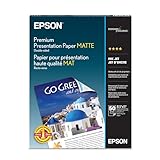
- Perfect for non-glare photographs, craft projects and signage.
- Resists fading up to 72 years.
- Guaranteed to work with all inkjet printers.
- Pack of 50 Sheets

Product prices and availability are accurate as of the date/time indicated and are subject to change. Any price and availability information displayed on Amazon at the time of purchase will apply.




