The Tool Desk
Outbyte Driver Updater FREEScan for outdated or missing drivers - takes under a minuteDriver Scan →Outbyte PC Repair FREERepair Windows errors before they cause bigger problemsFix Now →
ThatPainter is reader-supported. When you buy through links on our site, we may earn an affiliate commission. Learn More
Use a short creative brief, a clear song structure, and a focused first prompt; then revise one musical element at a time and check the rights and export terms before using the result. This checklist is for making a complete song, with vocals or as an instrumental, rather than a loop.
Set The Song Brief Before You Generate
Write down the decisions the generator needs to reflect. Keep the brief specific enough to guide a song, but leave room for it to make musical choices.

- Purpose: Where will the song be used, and what should a listener feel or understand?
- Vocal plan: Decide whether you want vocals, an instrumental, or a vocal track with a particular point of view. Do not name or imitate a real singer unless you have permission to use that person’s voice.
- Story and hook: Summarize the song’s idea in one sentence, then write a short phrase that could anchor its refrain.
- Structure: Choose a sequence such as intro, verse, chorus, verse, chorus, bridge, final chorus, and outro. Treat this as a draft structure, not a promise that every tool will follow it.
- Sound direction: Describe mood, energy, instrumentation, and how the arrangement should change between sections. If a specific genre, instrument, tempo, or duration matters, name it in the brief and verify that the chosen tool supports it; the product details here do not establish those specifics.
Choose A Tool For The Part Of The Workflow You Need
These products have stated features that fit complete-song creation or songwriting support. Their listed features do not establish support for every genre, instrument, tempo, or use case, so check the vendor’s site for any requirement that matters to your project.
Recommended Free Tools
| Tool | Supported role in this checklist | Relevant limit or detail |
|---|---|---|
| Suno | Generate songs with vocals, lyrics, instrumentation, and production; edit, remix, extend, replace sections, or export stems. | Free Plan excludes commercial rights and stem separation. Suno Studio is limited to Premier. |
| Eleven Music | Generate full songs with vocals, lyrics, or instrumental tracks; edit sections and export stems or MP3/WAV. | Free use is personal and Marketplace access is browse-only. Commercial rights vary by plan and exclude film, TV, and studio games. |
| SongIntent | Develop a complete song from an idea, lyrics, flow, beat, or melody, with structure and line-level revisions. | Free plan allows one active project, five AI assists monthly, and one render monthly. |
| Udio | Generate vocal or instrumental songs from prompts and lyrics, edit lyrics, extend or transform audio, and refine it in Sessions. | During the stated transition period, audio, video, and stem downloads are disabled; stem separation is available, but stem export is disabled. |
| Mureka | Generate full songs from text, lyrics, styles, or reference audio; remix, extend, and use multitrack editing and stem separation. | Mureka Studio and up to 12-stem splitting are limited to Premier. |
| Song.do | Generate vocal, instrumental, or lyrics-based songs, extend a song, and separate vocals and instruments into downloadable stems. | Free usage is limited to one credit and one generation per day. |
| Loudly | Generate full songs with vocals, lyrics, and structured controls; remix uploaded audio and export separated stems. | Free generated tracks are limited to 30 seconds; licensing rights depend on plan terms. |
Follow The Song Creation Checklist
- Turn the brief into a prompt. State the song’s subject, mood, vocal plan, desired structure, and arrangement arc. For example: “Write a reflective song about leaving a familiar place. Use a first-person lyric, a concise repeated chorus hook, and a restrained opening that builds toward a fuller final chorus. Keep the bridge distinct from the verses.” This describes a creative target; it does not guarantee a particular genre or sound.
- Generate a first draft. Enter the prompt in a complete-song tool. If you already have lyrics or a melody idea, SongIntent supports starting from lyrics or melody, while Suno, Eleven Music, and Udio list lyric-based creation. Check each vendor’s current workflow for exact input controls.
- Listen for song-level problems. Check whether the central idea is clear, the chorus hook is easy to identify, the sections feel distinct, and the ending sounds intentional. Note specific fixes rather than regenerating with a vague request such as “make it better.”
- Revise one thing at a time. Ask for a change to a specific lyric line, section, vocal or instrumental balance, or arrangement transition. Suno lists section replacement and editing; Eleven Music lists section editing and inpainting; Udio lists lyric editing and audio transformations; SongIntent lists line-level revisions. The supplied details do not establish that every tool offers each of these controls in the same way.
- Compare alternatives against the brief. Keep the version that best serves the song’s purpose and structure, not simply the one with the most elaborate production. If the hook is weak, rewrite or redirect the hook before requesting more production detail.
- Export only what the next step needs. If you plan to edit vocals and instruments separately, confirm that stem export is available on your plan. Suno’s Free Plan excludes stem separation; Udio’s stem export is disabled during the stated transition period. Eleven Music lists stems and MP3/WAV exports, while Song.do lists downloadable stems and MP3/WAV downloads. Verify current availability and formats with the vendor before building a handoff around them.
Check Voice, Rights, And Intended Use
Use voices, reference recordings, and uploaded audio only when you have permission to use them, and check each platform’s terms for voice, cover, sample, and commercial-use rules. The listed product details do not establish a universal permission or licensing rule for those uses. Suno’s Free Plan excludes commercial rights; Eleven Music says commercial rights vary by plan and exclude film, TV, and studio games; Loudly says licensing rights depend on plan terms.
#1 Best Overall
For U.S. copyright registration, the Copyright Office says entirely AI-generated works are not copyrightable, prompts alone do not make someone the author, and only human-authored parts of a mixed work may be protected. Applicants registering a work with more than a minimal amount of AI-generated material must disclose it and describe the human author’s contribution. Read the Copyright Office’s AI report information.
Quick Recap
Best Value
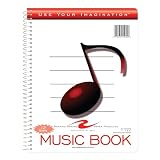
- Music notebook
- 32 sheets of extra-heavy 100# white tag
- 12 stave printing, both sides
- Heavyweight paper resists breakage from erasures
- Snag-proof wire
Rank #4

- 【Hard cover】 High quality waterproof cover with note design and hard kraft paper back cover
- 【Double-coil binding】 Beautiful and solid, smooth page turning, can be on piano and music stands
- 【Manuscript paper size】7.5" x 10.23" inch / 19*26 cm, beige eye protection paper
- 160 pages staff paper notebook, 10 staves per page, enough space between staves for lyrics
- This music notebook is the best choice for kids, student, songwriter and music lovers to handwritten music notation
Rank #2

- Cover: Music art cover design combined with music elements.The beautiful design inspires your creativity.
- Double-coil binding: 100 page manuscript paper; 10 staves per page.The best choice for learning music.
- Premium eye protection paper ensures high quality and long life.Thick paper so ink won't bleed through.
- Dimensions: 7.48inch x 10.23inch.(26cm x 19cm)The best choice for Music composition notebook.
- 100% brand new and high quality, used for music composition.Ideal for piano and a variety of other instruments.

Product prices and availability are accurate as of the date/time indicated and are subject to change. Any price and availability information displayed on Amazon at the time of purchase will apply.

