PC Slower Than It Used to Be?
Recommended Free Tools
A free scan shows the junk files, broken settings and background clutter dragging Windows down - then fixes them in one click.
Run a Free PC Scan →Free scan · Windows 10 & 11
ThatPainter is reader-supported. When you buy through links on our site, we may earn an affiliate commission. Learn More

A TikTok streaming overlay is a visual layer—such as a label, alert, chat box, goal, or decorative graphic—placed over your live video. To add one, build a scene in TikTok LIVE Studio or OBS, add the overlay as an image or supported web source, size it for your portrait, landscape, or dual layout, then preview it before going live.
What a TikTok streaming overlay does
An overlay sits above your camera or gameplay without replacing the underlying video. It can identify the streamer, display a goal or chat, or show event alerts. TikTok LIVE Studio treats a scene as a canvas made from sources such as gaming content, camera footage, text, and web pages; creators can resize and reorder those sources. TikTok’s scene guidance also describes previewing the scene from viewer-facing perspectives.
Free tools Windows power users keep installed
One-click scans. No signup required.
Choose the right canvas before adding graphics
TikTok LIVE Studio supports portrait, landscape, and dual layouts. TikTok describes portrait as suited to mobile viewing, landscape to widescreen PC gaming, and dual as letting viewers switch between views. Choose the layout for your content and intended audience first: an overlay made for a wide screen may be cropped or crowd a vertical scene.
How to add an overlay
In TikTok LIVE Studio
- Choose or create the scene layout. Select portrait, landscape, or dual based on how you want viewers to see the broadcast.
- Add your main sources. Place gameplay or other content and your camera in the scene, then add a static graphic or a web source if your overlay provider supplies a hosted overlay.
- Arrange the layers. Resize and position the overlay so it does not cover important gameplay, faces, or interface elements. TikTok’s scene controls let you arrange and resize sources.
- Preview the result. Use LIVE Studio’s viewer-facing preview modes to catch cropping, overlap, or misplaced elements before starting the LIVE.
For hosted overlays, the exact source type and steps depend on the provider and your installed LIVE Studio version. TokElements, for example, documents adding its overlay with a Link source in LIVE Studio; it is an independent service and says it is not affiliated with TikTok. Check TokElements’ current instructions before relying on a particular feature or workflow.
Rank #2
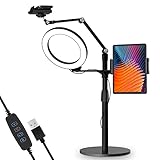
- 【Universal Fit】 viozon 3 in 1 Tablet&cellphone desktop stand includes two holders, which is applicable to 3.5-13" cellphone & tablet, suitable for YouTube/Tiktok broadcasting, online meeting, video recording, daily use and other scenes.
- 【Various combinations】The three adapters can be freely exchanged positions. Place the devices and ring light where you want to meet your needs, combines high functionality and versatility with a clean look.
- 【Adjustable Height&Angle】 The holder can swivel 360 degree, easily adjust your device to the most comfortable position. The height adjustable range: 0-35"(0-88cm) The maximum length extension of the folding arm is 14.6". Helps to fix the posture and reduces the pressure on the neck, shoulder and back. During use, the tension point on the folding arm can be adjusted to change the tightness of the arm.
- 【High Quality&Fashionable】 The sturdy round iron base can ensure stable use. The arm's shaft is made of high-quality Aluminum alloy, combined with an improved second-generation hinge mechanism, providing a more stable experience. The products are CNC precision processed, and the surface has been metal-oxidized.
- 【Ring Light】: The 8" ring light uses USB Power Supply. Brightness and color temperature adjustable. Three-stage of color tempuratures(3200k-6500k): Cool/Nature/Warm. For each color temperature you can change the brightness as you need.
In OBS
- Create the overlay with your provider and copy its hosted overlay URL.
- Add a Browser source in OBS and paste the URL. StreamElements documents this browser-source workflow in its OBS overlay instructions.
- Set the source dimensions and frame rate. StreamElements lists 1920 × 1080 as the OBS browser-source default unless you changed the resolution, and recommends 30 or 60 FPS according to your stream settings and computer capability. For a vertical scene, use the dimensions that match your actual canvas rather than assuming the landscape default fits.
- Position and preview it in your scene, checking that it is not covering the content or being cut off.
Static graphics, alerts, and interactive widgets
A static image or text label is enough for a simple branded layout. Hosted overlays can also supply dynamic elements, but what is available depends on the service. StreamElements documents alerts, labels, goals, chat, and custom widgets; see its OBS overlay guide for its workflow. TokElements describes TikTok LIVE widgets for gifts, goals, chat, and games on its product page. These are vendor-described capabilities, not a guarantee that every widget works in every software version.
Independent reader supportYour contribution helps us test, update, and keep practical guides available for everyone.Which overlay route fits your setup?
| Option | Best fit | What to know |
|---|---|---|
| TikTok LIVE Studio scene sources | Creators building their scene in LIVE Studio | TikTok documents native scene and source controls, portrait, landscape, and dual layouts, and viewer-facing previews. TikTok scene guidance |
| StreamElements overlay in OBS | Creators whose production setup uses OBS | StreamElements documents a hosted overlay URL added as an OBS Browser source, and provides source dimension and frame-rate guidance. StreamElements instructions |
| TokElements widgets | Creators seeking TikTok-focused, vendor-described widgets | TokElements describes a LIVE Studio Link-source or OBS Browser-source workflow. Confirm features and compatibility for your installed version. TokElements |
| Streamlabs Desktop | Creators considering an integrated streaming-software workflow | Streamlabs announced TikTok integration on September 28, 2026, including vertical formatting and Dual Output. Its announcement says TikTok LIVE access is required and lists Windows as supported at publication. Check the Streamlabs announcement for current requirements. |
These options solve different parts of the setup: TikTok LIVE Studio provides scene controls, while third-party services supply their own graphics or widgets, and streaming software determines how you produce the broadcast. An overlay service working in OBS does not by itself establish that it works in every LIVE Studio release.
The Tool Desk
Outbyte PC Repair FREEClear out junk files and repair common Windows errorsFree Scan →Outbyte Driver Updater FREEScan for outdated or missing drivers - takes under a minuteDriver Scan →Quick Recap
Rank #4
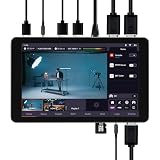
- 【ALL in One 4K Live Studio - No Laptop Needed】 Built-in switcher, encoder (H.264/H.265), recorder, and 8"" touchscreen monitor in one portable device. HDMI IN2 accepts 4K@30Hz input; IN1 & IN2 accept 1080p@30/50/60Hz. Output delivers 108op@30/50/60Hz - 4K capture with efficient HD streaming. No laptop, capture card, or extra software required.
- 【4K Input & 8-Channel Multi-Cam Switching】 Accepts dual HDMI (4K@30Hz + 1080p@60Hz), UVC camera and USB drive inputs, plus up to 4 remote network streams (RTMP/SRT) . Process up to 8 signal sources simultaneously – perfect for mixing 4K cameras, computers, phones, and remote feeds. HDMI output delivers 1920x1080@30/50/60Hz – crisp HD streaming from your 4K sources.
- 【Vertical & Horizontal Streaming - 3+2 Platforms】 Stream to 3 horizontal platforms (YouTube, Facebook, any RTMP/SRT) or 2 vertical platforms (TikTok, Instagram) – directly from the built‑in apps. One‑tap switching between landscape and portrait modes. Custom UNO overlays, graphic overlays, PiP, multi‑layer layouts, and free rotation – all built right into the touchscreen. 4K cameras, HD output – no quality compromise.
- 【Wireless Mobile Integration & Dual Recording】 Wirelessly connect phone screens or cameras as video sources – no cables, no adapters. Perfect for remote interviews or multi‑angle smartphone productions. Dual recording to USB drive and internal storage simultaneously – easy file export for post‑production, perfect for backup and archiving.
- 【All-Day Outdoor Streaming - 8000mAh Battery + Fast Charging】 Built‑in 8000mAh lithium battery powers hours of live streaming – no power outlet needed. Supports Type‑C fast charging for quick top‑ups. Stream via 2.4G/5G Wi‑Fi or Ethernet using RTMP/SRT – truly portable for outdoor events, vlogging, or field productions.
Rank #3
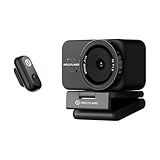
- True 4K Resolution & Low-Light Dominance: Step up your video quality with a massive 1/1.5" CMOS sensor—3x larger than standard webcams. Paired with a 50MP lens and a wide f/1.8 aperture, the Lyra captures stunning, true 4K video at 30fps. Whether you're in a dimly lit home office or streaming at night, you'll get crystal-clear visuals and a premium, naturally blurred background that makes you stand out.
- Crystal-Clear Audio & Direct Wireless Mic Pairing: Sound as professional as you look. The LARK A1 mic features 20dB intelligent noise cancellation to completely block out AC hums, traffic, and keyboard clicks. Need to move around? The Lyra connects directly to the LARK A1 wireless microphone without an extra receiver. Roam freely up to 33 feet (10m) to demonstrate products or teach at a whiteboard while maintaining perfect, drop-free audio.
- Lightning-Fast PDAF & AI Auto-Framing: Never worry about blurry footage again. Advanced Phase Detection Autofocus (PDAF) ensures buttery-smooth, ultra-fast focusing no matter how much you move in front of the lens. Combined with AI-powered tracking and auto-framing, the camera automatically adjusts to keep you—or multiple speakers—perfectly centered in the frame. Ideal for dynamic presentations and active live streams.
- Pro-Level Software with Skin Perfecting & Green Screen: Look your absolute best with zero camera expertise. The HollyStudio app offers one-click skin smoothing, color correction, and AI tuning that adjusts to your room's lighting instantly. Need a virtual set? Our advanced green screen algorithm flawlessly removes backgrounds—even preserving fine hair details. Plus, save up to 10 preset camera angles for instant, one-click switching during your broadcasts.
- Instant Portrait/Landscape Mount & True Privacy: Built for modern creators and professionals alike. The magnetic base lets you instantly snap the camera from landscape (for Zoom, Teams, and OBS) to portrait mode (for TikTok and Instagram Reels). Protect your personal space with the built-in, twist-to-close physical privacy shutter. You can even record lossless 4K30 clips directly to your drive while live streaming for effortless post-production.
Keep the overlay readable and the URL private
- Put gameplay or camera footage in place before arranging decorative elements, then keep overlays away from the action and faces.
- Match graphic proportions and source dimensions to the selected scene; check both portrait and landscape views if using dual layout.
- Use the preview to find clipping, overlap, or text that becomes hard to read at the final viewing size.
- Treat a hosted overlay URL like a private access link. StreamElements warns that overlay tokens are sensitive and says not to share the URL publicly. StreamElements overlay FAQ

Product prices and availability are accurate as of the date/time indicated and are subject to change. Any price and availability information displayed on Amazon at the time of purchase will apply.




