Outdated Drivers Are Slowing You Down
One free scan finds every outdated or missing driver and matches the right update for your exact hardware.Free scan · exact hardware matchPC Slower Than It Used to Be?
A free scan shows the junk files, broken settings and background clutter dragging Windows down - then fixes them in one click.Free scan · Windows 10 & 11ThatPainter is reader-supported. When you buy through links on our site, we may earn an affiliate commission. Learn More
A double exposure combines two exposures into one image. The most convincing results are planned before the shutter is pressed: one frame supplies a recognizable subject or silhouette, while the second contributes texture, pattern, place, or meaning. You can create the effect on film, with a camera’s multiple-exposure function, or by blending separate files in software.
What double exposure photography means
A traditional double exposure records two shutter releases on the same film frame. Digital cameras may combine two or more frames internally; “multiple exposure” is the broader term, and model limits vary. For example, the Nikon Z5 manual describes combining two to ten RAW exposures, while Canon’s EOS R5 documentation describes two to nine: Nikon Z5 manual and Canon EOS R5 manual.
Software compositing uses two separate files on layers. It can resemble an in-camera exposure, but it is not the same process: you retain independent control over alignment, masks, color, and tone. A collage simply places images together; a double exposure creates a shared tonal and spatial relationship between them.
#1 Best Overall
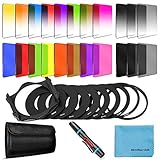
- [Compatibility] : This complete square lens filter set is suitable for Cokin P Series(For Canon Nikon Sony Leica FujiFilm Pentax Lumix Olympus).Manufactured by a professional team for photography enthusiasts to let you possess all-new experience,loving and enjoying your every photo after using it.
- [Package]:Includes 8 x Graduated color filter(Gradual Yellow,Orange,Blue,Red,Green,Purple,Pink,Coffee),8 x Full Color filter(Yellow,Orange,Blue,Red,Green,Purple,Pink,Coffee),4 x Graduated Neutral Density Filter(G.ND2; G.ND4; G.ND8; G.ND16),4 x Full ND Fader(ND2,ND4,ND8,ND16),9 x adapter rings(49-82mm),1 x Filter Holder,1 x Lens Cleaning Pen,1 x Microfiber Lens Cleaning Cloth,1 x 10 slots filter pouch.
- [Color Filters] : The graduated color filters provide a gradual color transition for a smooth blending effect. Give your landscape and skin texture a more colorful touch.The full color filters express a strong color feeling.
- [ND Filters and Filter Holder] : Nd filter: Applies slow shutter speed under strong sunlight exposure.Large aperture is available to create depth of field easily.Filter Holder:Three square filters can be inserted the filter holder at the same time and used in combination to create extraordinary effects. The filter holder can be rotated to adjust the filter direction.
- International products have separate terms, are sold from abroad and may differ from local products, including fit, age ratings, and language of product, labeling or instructions.
Do not confuse this creative technique with HDR. HDR merges exposures to preserve realistic dynamic range. Double exposure overlays imagery to create a visual or conceptual effect.
The visual recipe: subject, texture, and hierarchy
Begin by deciding what the viewer should recognize first. The base image establishes that subject; the overlay fills or intersects it with detail. A technically clean blend can still fail if both images compete equally for attention.
Rank #2

- 【Complete Camera Lens Filter Kit】This lens filter set includes all the filter accessories you need for filming outdoors: ND2 ND4 ND8 neutral density filter, CPL, UV and FLD filter, collapsible rubber lens hood, snap on lens cap, carrying pouch, and safety tether. Compatible with 58mm lens thread (marked with the "Φ58" symbol under lens barrel), regardless of camera models
- 【Balanced Exposure with ND Filters】Neutral density filters reduce the amount of light entering camera sensor by various degrees, ND2 by 1 stop, ND4 by 2 stops, and ND8 by 3 stops, to achieve balanced exposure across images under different light conditions. These ND filters also make long exposure shots possible by slowing shutter speed
- 【Light Control with CPL/UV Filter】Use the CPL filter to reduce unwanted reflections from water, foliage, glass windows, and other nonmetallic surfaces. Apply the UV filter to protect your lens from scratches and fingerprints
- 【FLD Fluorescent Filter】Effectively eliminates fluorescent or "greenish" tones from photos for superior optical clarity. Produces natural, lifelike photos even in harsh indoor or outdoor conditions
- 【A Collapsible Lens Hood with 3 Stages】The collapsible rubber lens hood has three stages for greater versatility. Carry the filters in the pouches for easy travel and the lens cap keeper protects the cap from being misplaced
Pairings that give you a clear starting point
- Portrait and foliage: an accessible combination of organic shape and texture.
- Portrait and cityscape: connects identity with place, memory, or movement.
- Silhouette and sky or clouds: keeps the outline readable.
- Object and texture: turns a still life into an abstraction.
- Architecture and a human figure: emphasizes scale and narrative.
- Flower and eye: uses related circular forms for a visual metaphor.
- Motion sequence and static background: creates rhythm or repetition.
Nikon also lists action sequences, landscapes, musical instruments, sheet music, and celestial subjects as possible combinations in its instructional guide: Nikon multiple-exposure techniques.
Use negative space deliberately
Plain walls, sky, and dark areas give the overlay somewhere to appear. A side-profile silhouette against an uncluttered background is easier to combine than a busy portrait. Try photographing the profile first, then leaves with visible gaps, and position the foliage so it follows the face instead of covering the whole frame. Avoid stacking large areas of white or bright sky unless those highlights are part of the design.
Do these 3 things before closing this tab:
1Fix the driver behind crashes, sound loss and screen glitches2Clear out junk files and repair common Windows errors3Scan for outdated or missing drivers - takes under a minuteRank #3

- Comprehensive Gear – This 58mm lens kit for Canon EF-S 18-55mm IS II STM is a comprehensive equipment set essential for photographers. It bundles a vast array of professional tools into one convenient package, including 43x Wide Angle Lens, 2.2X Telephoto Lens, 3pc Filter Kit, 4pc Close Up Filters, Tulip Lens Hood, Soft Lens Hood, Lens Cap, and Cap Keeper.
- Wide Angle and Telephoto Lens – With its 0.43x wide angle lens, it allows you to add depth and dimension to your shots and this can be split into two macros. The 2.2x telephoto lens offers you the ability to zoom in on distant subjects.
- Compatibilities - This 58mm lens kit is compatible with Canon EOS 80D 77D 1100D 700D 650D 600D 550D 7D, Mark II 6D Mark II 5DS 5D Mark IV 1D Mark II, Rebel T8i T7 T7i T6i T6 T6s T5i T5 T4i T100, and SL3 SL2 SL1.
- Lens Compatibilities - Our 58mm lens filters are compatible with the following models - Canon EF- S 18-55mm f/4-5.6 & f/3.5-5.6 IS STM, EF 50mm f/1.4 USM, EF-S 55-250mm f/4-5.6 IS STM, EF 75- 300mm f/4-5.6 III USM, EF 85mm f/1.8 USM, Nikon AF-P & AF-S, NIKKOR 50mm f/1.4G & f/1.8G, 70-300mm f/4.5-6.3G ED VR, Fujifilm XC 16-50mm f/3.5-5.6 OIS II, Olympus M.Zuiko Digital ED 40- 150mm f/4-5.6 R, and Panasonic Lumix G X Vario 12-35mm f/2.8 II
- Superior Build Quality - With a durable steel barrel design, our 58 mm lens filter kit uses multi coated anti-reflection glass. The high-grade 58mm UV filter component shields your lens against dust, scratches, and sun glare for durable usability. The close-up filters enable macro photography using a standard lens.
Plan before pressing the shutter
- What is the main subject?
- Which frame supplies texture, pattern, or secondary meaning?
- Where should the overlay appear, and which areas must remain clear?
- Will both frames be color, or will one be monochrome?
- Which image should be brighter, darker, simpler, or more detailed?
- Can you keep orientation, aspect ratio, perspective, and camera position compatible?
For a first attempt, choose one simple outline and one textured image with limited competing highlights. Similar orientation and aspect ratio reduce alignment problems. There is no universal first-frame rule: use the portrait first when an electronic overlay preview helps you place the second image; with film, or when the first frame determines the composition, a bright-background or silhouette-defining image may be the practical starting point. In software, test both layer orders because Lighten, Darken, Screen, and Multiply produce different results.
How to shoot a double exposure in camera
Menu names differ by brand, model, and firmware. Search your exact manual for “multiple exposure,” not only “double exposure.” Some cameras also offer an after-the-fact image overlay function, which combines recorded files rather than requiring consecutive shutter releases. Nikon describes that distinction here: Nikon image overlay guide.
Rank #4

- 【58mm Lens Filter Accessories】This NEEWER lens filter accessory kit has 9 pieces to choose from: UV/CPL/FLD filter, ND2/ND4/ND8 filter, tulip visor, foldable rubber sun visor, snap-on lens cap, carrying pouch, safety clip and lens cleaning wipe. Compatible with all 58mm lens threads (marked with the symbol "Φ58" under the lens barrel), regardless of camera models
- 【Balanced Exposure with ND Filters】Neutral density filters reduce the amount of light entering the camera sensor by varying degrees, ND2 by 1 stop, ND4 2 stops and ND8 by 3 stops, to achieve balanced exposure on images under different lighting conditions. These ND filters also enable long exposure shooting by slowing down shutter speed
- 【Light Control with CPL/FLD/UV Filter】Use the CPL filter to reduce unwanted reflections from water, foliage, glass windows and other non-metallic surfaces. A FLD fluorescent filter is also included to remove fluorescent or "greenish" tones from photos for superior optical clarity. Apply UV filter to block ultraviolet rays and protect your lens
- 【Two Sun Shades Provided】 A tulip shaped sunshade and a foldable rubber sunshade help block excessive sunlight and reduce glare and glare. The foldable rubber sunshade can be folded into three shapes, tulip, flower and pedal, for greater versatility. The tulip lens hood is well suited for wide-angle lenses as it does not cause vignetting
- 【Protective Lens Accessories】Easily mount the snap cap on your camera lens to protect it from scratches and fingerprints. The safety clip provides additional protection against falls. And the cleaning wipe helps keep filters clean and crisp
- Set RAW or the highest-quality format your camera supports.
- Enable Save Individual Exposures (or similarly named option) before a serious shoot.
- Choose two exposures for your first test.
- Select Average for a safer starting point, or Additive when you want direct control over cumulative brightness.
- Turn on overlay shooting or preview if available.
- Photograph the main subject with a clean background and deliberate framing.
- Photograph the texture or secondary subject while watching its placement over the first frame.
- Review the composite, then repeat with small changes to exposure, focus, orientation, or position.
- Turn multiple exposure off before returning to ordinary shooting.
What the controls generally do
- Average: divides gain across the selected exposures. Nikon’s Z5 documentation gives 1/2 gain for two frames and 1/3 for three.
- Additive: combines exposure values with little or no automatic normalization.
- Lighten/Bright: favors brighter pixels.
- Darken/Dark: favors darker pixels.
- Overlay shooting: displays earlier frames translucently for composition.
- Save individual images: preserves source files for later editing.
Nikon documents Add, Average, Lighten, Darken, source-frame saving, and overlay shooting for the Z5: Z5 multiple-exposure controls. Canon’s EOS R5 documentation lists Additive, Average, Bright, and Dark, and notes that some corrections, lenses, formats, or shooting modes may be incompatible: EOS R5 multiple-exposure controls. The EOS R6 Mark III manual also documents two-to-nine exposures: EOS R6 Mark III manual.
Independent reader supportYour contribution helps us test, update, and keep practical guides available for everyone.Exposure control and brightness math
Two normally exposed frames can become too bright in an additive workflow. Canon’s EOS R5 guidance suggests approximately −1 stop per frame for two exposures, −1.5 stops for three, and −2 stops for four in Additive mode. Those are model-specific guidelines, not a universal rule for film, every camera, or software. Metering, subject brightness, and blend method all matter.
The Tool Desk
Outbyte PC Repair FREERepair Windows errors before they cause bigger problemsFix Now →Outbyte Driver Updater FREEFix the driver behind crashes, sound loss and screen glitchesFind Drivers →Best Value

- K&F Concept 55mm UV/CPL/ND Lens Filter Kit (3 Pieces)-18 Multi-Layer Coatings, UV Filter + Polarizer Filter + Neutral Density Filter (ND4) + Cleaning Cloth+ Filter Pouch for Camera Lens (K-Series)
- 【Import Optical Glass】All filters made by Import Japanese optical glass with 18 layers nanometer coatings, high anti-reflectivity to ensure image real color and quality, CNC frame design increasing friction can easily install and remove the filter.
- 【Cleaning Cloth & Filter Pouch】Microfiber cleaning cloth with no static electricity, great for cleaning dusty in lens and camera, the filter pouch can hold 3 filters, easy for carrying.
- 【Filter Fuction】UV filter for lens protecting and prevent the UV ray effect for the image quality. Circular polarizing filter for color and contrast enhancement, remove the glaring from non-mentallic surface, such as water and glass. ND4 filter provide 2-stop light reduction, recommended for cloudy day use.
- 【NOTE】This K&F Concept filters kit are compatible with all 55mm lenses. Please verify your camera's lens thread size before ordering. This number is always preceded by a "Ø" (diameter) symbol. For example: Ø55=55mm lens thread size.
An Average mode may perform this normalization automatically; Nikon describes gain of 1/2 for two exposures, 1/3 for three, and so on. In any workflow:
- Keep the main subject slightly brighter and simpler than the overlay.
- Watch cumulative highlights, especially white clothing and sky.
- Judge the combined preview rather than each frame alone.
- Shoot RAW when supported and retain the individual frames.
How to create the effect in Photoshop or another layer editor
- Open both photographs and place them in one document as separate layers.
- Put the recognizable subject on the lower layer and the texture or secondary image above it.
- Try Screen or Lighten for bright detail on a dark background; Multiply or Darken for dark detail; Overlay or Soft Light for contrast and texture; and Normal mode with reduced opacity for direct control.
- Add a layer mask so the effect is confined to the subject or selected areas.
- Use Curves or Levels independently on each layer to separate tones.
- Desaturate one layer if competing color weakens the design.
- Transform, rotate, scale, or warp the overlay to match perspective and important edges.
- Inspect hair, shoulders, hands, eyes, and other high-contrast boundaries at full size.
- Reduce opacity or contrast until the main subject remains readable, then check the image at thumbnail size.
- Keep the original files and export a separate finished copy.
No blend mode is universally correct. Tonal distribution, masks, and subject placement matter more than choosing a fashionable setting. Adobe’s Photoshop product information is available at Adobe Photoshop.
Double exposure on film
Film gives you no composite preview. The second exposure lands on the same frame, so frame counting, rewind discipline, and exposure notes are essential. Start with two exposures, use clear silhouettes, and keep the camera position fixed where possible.
- Record frame number, shutter speed, aperture, and subject placement.
- Reduce exposure as your film and subject require; additive behavior is not identical to a digital Average mode.
- Bracket when the film and assignment allow it.
- Test with inexpensive film before using an important roll.
- Confirm that your camera is designed for intentional multiple exposures; transport mechanisms vary.
Creative exercises
- Side-profile portrait plus leaves or branches.
- Self-portrait plus a meaningful street, room, or landscape.
- An object plus the material or environment it belongs to.
- A motion sequence over a stationary background.
- Architecture plus a human silhouette for scale.
- A flower plus an eye or hand.
- Moon or clouds plus a landscape.
Troubleshooting muddy, bright, or confusing results
| Problem | Likely cause | Fix |
|---|---|---|
| Too bright | Normal exposures in Additive mode or large bright areas | Reduce exposure, use Average, darken a source, or apply Lighten selectively. |
| Muddy and gray | Competing midtones and detail | Simplify one frame, increase tonal separation with Curves or Levels, or convert one layer to black and white. |
| Main subject disappears | Overlay is too opaque or covers key features | Lower opacity, mask eyes and contours, and increase contrast in the base image. |
| Alignment feels accidental | Camera movement, incompatible perspective, or mismatched field of view | Use a tripod and overlay preview, or transform the layer in software. |
| Camera refuses to merge | Unsupported format, lens, image origin, correction, or shooting mode | Check the exact manual, switch to a supported format, disable incompatible modes, or combine the files in software. |
| Original frames are missing | Source-image preservation was disabled | Enable the individual-image option before shooting. Nikon and Canon describe model-specific retention behavior in their manuals: Nikon and Canon. |
Which method is right for you?
| Method | Best when | Advantages | Trade-offs |
|---|---|---|---|
| In-camera digital | You want interactive composition and a camera-generated result. | Immediate feedback and electronic overlay preview on supported models. | Menus, limits, compatible formats, and source-frame handling vary; editing control is limited. |
| Software compositing | You need precise masks, corrections, or images captured at different times. | Unlimited revisions, layer control, transforms, and independent color and exposure adjustments. | Requires more editing skill and can become a generic opacity effect without strong planning. |
| Film | You value an analog, unpredictable process. | Tactile workflow and distinctive physical process. | No preview, slower iteration, processing cost, and harder alignment. |
Do not buy a camera solely for this feature unless it also fits your wider work. A camera without live preview can still be excellent when you are comfortable compositing later. Lightroom is useful for selection and preparation, but layer-based masking generally requires another editor; see Adobe Lightroom.
Free tools Windows power users keep installed
One-click scans. No signup required.
Quick Recap

Product prices and availability are accurate as of the date/time indicated and are subject to change. Any price and availability information displayed on Amazon at the time of purchase will apply.

