The Tool Desk
Outbyte Driver Updater FREEScan for outdated or missing drivers - takes under a minuteDriver Scan →Outbyte PC Repair FREEClear out junk files and repair common Windows errorsFree Scan →
ThatPainter is reader-supported. When you buy through links on our site, we may earn an affiliate commission. Learn More
Aurora was the image-generation model xAI announced for Grok on X on December 9, 2024; xAI later presented Grok Imagine as a broader image-and-video generation and editing service, including an API. The reviewed sources do not establish that Aurora remains the model behind every current Grok interface. To understand what changed, separate the launch model name from today’s product branding, documented workflows, and variable access terms.
What Aurora was at launch
On December 9, 2024, xAI announced Aurora as a new autoregressive image-generation model for Grok on X. The company described it as an autoregressive mixture-of-experts network trained on interleaved text and image data. xAI said Aurora emphasized photorealistic rendering, following text instructions, and using submitted images for inspiration or editing. These were the company’s claims, not independent comparative test results.
The launch examples and announcement highlighted real-world entities, artistic text, memes, portraits, and celebrities, along with details such as text and logos. Those demonstrations do not guarantee accurate lettering, likenesses, or suitability for commercial use.
Windows Errors? Fix Them Before They Spread
Repair common Windows errors and clear accumulated junk for a smoother, more stable PC - no reinstall needed.Free scan · no reinstallCrashes, No Sound, or Screen Glitches?
Random freezes, missing sound and display glitches usually trace back to one bad driver. Find and replace yours safely.Free scan · under a minutexAI initially said image generation was available in select countries, with a rollout to all users promised within a week. On December 12, 2024, xAI said Grok was becoming available to everyone on X, while Premium and Premium+ users received higher usage limits and first access to future capabilities. This was part of Grok’s changing rollout, not the launch of a separate Aurora app.
#1 Best Overall
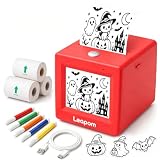
- AI Voice-to-Image Technology: Simply speak your ideas and watch as the printer instantly transforms your words into unique sticker designs, making creativity fun and accessible for kids
- Instant Thermal Printing: No ink or toner required - uses advanced thermal printing technology to produce clear, vibrant black and white images that kids can color and customize
- Complete Creative Kit: Includes 3 rolls of thermal printing sticker and markers, providing everything needed to start creating personalized stickers right out of the box
- Portable and Kid-Friendly Design: Compact, lightweight sticker maker is easy for children to use independently, encouraging imaginative play and artistic expression anywhere
- Interactive Learning Toy: Combines technology and creativity to help children develop communication skills, artistic abilities, and confidence through hands-on sticker making activities
What changed: Aurora to Grok Imagine
xAI’s later product materials use the name Grok Imagine for an image-and-video creation service. Its January 2026 announcement introduced the Grok Imagine API for creative workflows; the current API documentation describes image and video generation and editing. This is a documented expansion in product framing and workflow, but the reviewed materials do not map the exact model behind each consumer interface or establish a direct, uninterrupted model lineage from Aurora.
| Area | December 2024 launch | Later documented offering |
|---|---|---|
| Name and identity | Aurora was the codename for Grok’s announced image-generation model. | xAI uses Grok Imagine for its image-and-video service and API; the model behind every consumer surface is not established. |
| Workflow | Image generation, including use of submitted images for inspiration or editing. | API documentation lists text-to-image, natural-language image editing, style transfer, multi-image compositing, video generation, and video editing. |
| Documented API output | Not specified in the launch announcement as a current API limit. | xAI says an API request can generate up to 10 images at 1K or 2K resolution across multiple aspect ratios. |
| Access | Initially select countries, with a rollout to all users promised within a week. | Current access, rate limits, model selection, and pricing can vary and should be checked in current official materials. |
The image count and resolutions in the table are API specifications from xAI’s documentation, not a guarantee for every consumer interface. xAI’s API page also lists automatic moderation for generated images and videos and says image output starts at $0.02 per image on one model, with prices varying by model and resolution. Treat that price as a vendor snapshot, not a lasting quote.
What the API announcement says about video comparisons
In its January 2026 announcement, xAI reported results from a side-by-side human-rating comparison on IVEBench at 1280 × 720. It reported 57% for Grok Imagine versus 43% for Kling o1 overall, 53.1% versus 46.9% for instruction following, and 60.6% versus 39.4% for consistency. These are results reported by xAI for that comparison, not an independent or universal ranking of video tools.
Free tools Windows power users keep installed
One-click scans. No signup required.
Rank #2

- All-in-One Convenience - Print and Cut in One Step. Say goodbye to the hassle of using separate machines. The PixCut S1 seamlessly integrates high-resolution photo printing and precise die cutting into one streamlined device. With just a few clicks on the user-friendly app, you can edit, print, and cut directly from your smartphone via Bluetooth. Create stickers in just 2 minutes! This all-in-one solution saves you time and effort, making your creative projects more enjoyable and efficient.
- AI Image Extraction & Precision Cutting - Unleash your creativity with the AI image extraction feature that automatically recognizes and extracts subjects from your photos. Then watch as the high-precision cutting system, guided by the same AI technology, perfectly follows every edge with pinpoint accuracy. This seamless AI-to-cut workflow ensures flawless results every time. Turn any moment into custom stickers with professional edges in minutes - just masterpieces made simple.
- High-Resolution Prints - Vivid and True-to-Life Colors. Utilizing thermal dye-sublimation technology, the PixCut S1 delivers stunning 300 dpi high-resolution prints with 16.7 million colors. Whether you're printing photos, stickers, or labels, you can expect vibrant, true-to-life color effects that make your creations stand out. Every detail is captured with precision, providing professional-quality results every time.
- AI Lab - Bring Your Imagination to Life. Upload a photo, pick a style from the Liene Photo App, and watch AI bring your vision to life instantly. Turn selfies into an anime character, a fantasy hero, or a festive holiday illustration — all with stunning realism. One style, endless versions of you. Print your AI art as custom stickers, unique gifts, or social media posts — perfect for avatars and DIY projects. No design experience required. Your creativity is just one click away from magic.
- Durable Stickers - Create Long-Lasting Creations .Thanks to the four-layer thermal dye-sublimation technology, the photopaper is automatically laminated during printing. Stickers produced by PixCut S1 are durable, waterproof and scratch-resistant, ensuring they remain vibrant and intactover time. Perfect for creating custom stickers, labels, and more that last.
Access and provenance: check the current terms
Access statements are date- and platform-specific. An Associated Press report dated January 9, 2026 said image generation and editing had been restricted to paying subscribers on X at that time, while free users could still edit images on the standalone Grok website and app. That report does not establish access terms on October 7, 2026. Check current official user-facing terms before relying on a particular plan, region, platform, or limit.
The current Grok FAQ says generated images and videos include a Grok watermark, with no setting to remove it. It also says that altering or obscuring watermark or provenance signals violates xAI’s Acceptable Use Policy. Do not assume launch-era behavior or a product demonstration overrides current rules.
Practical guidance for image editing
If the available Grok Imagine interface supports editing a reference image, treat the result as a draft and preserve the original. A prompt cannot guarantee that protected details will remain unchanged.
Rank #3

- 💡【Imaginative AI Voice Partner】Kids press the Magic AI button and speak any idea – "a dragon eating pizza," "a mermaid sleeping on a rainbow," or "a cat with a pizza hat." The AI listens and turns words into printable sticker art. No parental help needed. Builds vocabulary, sentence confidence, and creative thinking with every print. Perfect for screen-free play at home, travel, classroom rewards, or rainy days
- ♻️【Clear Printing: No Ink, No Mess】Say goodbye to expensive ink cartridges and messy refills. Advanced thermal technology delivers crisp, smudge-free black-and-white prints on self-adhesive sticker paper or regular thermal rolls – even colored paper! The printer comes ready with 1 pre-installed white roll + 5 extra self-adhesive rolls. Clean, quiet, and portable
- 📺【See It First – HD Preview & Smart AI】No more wasted paper. The 2.4-inch HD screen lets kids preview every AI-generated design before printing. Not happy with the result? Just press the AI button to cancel and regenerate – instantly. When connected to Wi-Fi, the voice model automatically updates to the latest version, getting smarter over time. Print with confidence, not guesswork.
- 🔒【Privacy You Can Trust – 100% Kid-Safe】We put your child's safety first – no shortcuts. The intelligent AI filter continuously scans and blocks inappropriate, violent, or sensitive content. What you see is always safe to print.Your family's privacy is equally protected. FamilyKit does not record, does not listen, and does not store any voice data – ever. The free companion app is used only for initial Wi-Fi setup. No subscription. No data collection. No hidden fees or hidden ears.
- 🔋【 Long Battery Life & Ready to Play】No more running out of juice mid-creation. The built-in high-quality lithium battery delivers 3+ hours of continuous printing or 7+ days of standby on a single charge. Certified and lab-tested for safety and durability. When imagination strikes at a restaurant, on a road trip, or in the backyard – the printer is ready. Universal Type-C charging means you can top up anywhere, anytime, with the same cable you use for your phone. Long-lasting power for endless creativity
- Work from a copy of the original image.
- Describe the edit precisely: say what may change and what must remain unchanged.
- Make one major change at a time so errors are easier to spot.
- Inspect important details, including faces, hands, lettering, logos, and object boundaries.
- Check permissions and current policy before uploading someone’s photo or using the result publicly or commercially.
What artists and image-makers should take from the launch
For painters and other visual creators, image generation can help explore compositions, lighting, palettes, subject combinations, or possible backgrounds before making a work. Treat generated images as provisional references: inspect anatomy, perspective, shadows, material behavior, and repeated forms rather than assuming a photorealistic surface is structurally accurate.
A system’s ability to create or edit a recognizable person, character, or logo does not settle whether a particular use is lawful, ethical, permitted by platform rules, or appropriate for a commission.
Independent reader supportYour contribution helps us test, update, and keep practical guides available for everyone.How to describe Grok’s image generator accurately
| Claim | Careful wording | Avoid |
|---|---|---|
| Launch identity | Aurora was the image model codename announced for Grok in December 2024. | Aurora is definitely behind every current Grok image. |
| Current product | xAI’s later product materials use Grok Imagine for image-and-video creation and its API. | Aurora and Grok Imagine are necessarily identical in every technical respect. |
| Quality | xAI highlighted photorealism and instruction following as launch capabilities. | Aurora was objectively the best image generator. |
| Access | Access and limits are time- and platform-dependent; verify current terms. | Every user has the same permanent access. |
| Provenance | Grok’s FAQ says generated images and videos include a watermark and prohibits obscuring provenance signals. | Watermarks can be removed or hidden under the current policy. |
Bottom line
Aurora was xAI’s December 2024 image-generation model announcement for Grok on X. The later Grok Imagine product and API documentation describes broader image and video workflows, but the reviewed sources do not prove which model serves every current consumer surface. Check current access, pricing, model details, and policy before relying on any specific capability or entitlement.
Rank #4
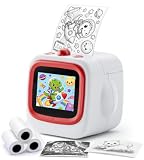
- SPEAK, CREATE & PRINT WITH AI: This AI sticker printer turns spoken ideas into unique stickers. Complete the one-time app setup via Bluetooth and 2.4GHz WiFi, then hold the AI button and speak. It prints automatically and describes the image aloud.
- COLOR, CREATE & PERSONALIZE: Every black-and-white AI sticker becomes a hands-on coloring activity. This sticker maker for kids lets children color and personalize creations for journals, scrapbooks, cards, reward charts, crafts, and school projects.
- TWO WAYS TO CREATE WITH WIFI & BLUETOOTH: After one-time app setup, 2.4GHz WiFi enables direct AI voice printing. Connect via Bluetooth for app printing, including custom stickers, photos, cartoon effects, coloring pages, labels, notes, and more.
- EXPLORE 6 AI ART STYLES: Choose Anime, Cartoon, Ink Wash, Sketch, Line Art, or Simple Drawing. Turn ideas—from funny animals and fantasy characters to learning cards and custom designs—into creative projects for kids, teens, and families.
- SAFE, PORTABLE & GIFT-READY: This portable thermal sticker printer for kids ages 4–12 offers BPA-free inkless printing, AI content filtering, and USB-C charging. Includes 2 sticker rolls and 1 thermal paper roll—ideal for birthdays and travel.
FAQ
Was Aurora a separate app from Grok?
No. xAI announced Aurora as an image-generation model for Grok on X, not as a separate consumer app.
Is Aurora still the model behind Grok Imagine?
The reviewed official materials do not establish the exact model behind each current consumer interface or prove that Aurora remains in use across them. Grok Imagine is the later product framing.
Can Grok Imagine edit an existing image?
xAI’s API documentation lists natural-language image editing, style transfer, and multi-image compositing. Specific availability may vary by interface and should be checked in current official materials.
Can I remove the Grok watermark?
Grok’s FAQ says generated images and videos include a watermark, with no setting to remove it, and says altering or obscuring provenance signals violates the Acceptable Use Policy.
Is Grok image generation free for everyone?
Do not assume so. Access and limits can differ by date and platform. The January 2026 AP report described differences between X and the standalone Grok website and app at that time; it does not establish current terms.
Quick Recap

Product prices and availability are accurate as of the date/time indicated and are subject to change. Any price and availability information displayed on Amazon at the time of purchase will apply.
Recommended Free Tools




