PC Slower Than It Used to Be?
Recommended Free Tools
A free scan shows the junk files, broken settings and background clutter dragging Windows down - then fixes them in one click.Free scan · Windows 10 & 11
Outdated Drivers Are Slowing You Down
One free scan finds every outdated or missing driver and matches the right update for your exact hardware.Free scan · exact hardware match
ThatPainter is reader-supported. When you buy through links on our site, we may earn an affiliate commission. Learn More
Looking for Midjourney prompts for cartoon characters, comic panels, and covers? These 30 adaptable prompts give you a subject, visual medium, setting, mood, and composition to start from; replace story details to fit your project. Treat them as creative directions, not guarantees that every detail will appear exactly as written.
Midjourney’s Prompt Basics guide recommends describing the image’s subject, medium, environment, lighting, color, mood, and composition. Add parameters after the descriptive text, and check the current parameter reference before using version-specific settings.
Do these 3 things before closing this tab:
1Repair Windows errors before they cause bigger problems2Scan for outdated or missing drivers - takes under a minute3Clear out junk files and repair common Windows errorsHow to adapt these prompts
- Replace the character, action, setting, or story detail with your own idea.
- Keep the visual choices that matter to your scene, such as silhouette, palette, lighting, mood, and framing.
- For a panel, make one action and the viewer’s position clear. For a cover, give the focal image room to read and describe any negative space intended for later title placement.
- If you add parameters, place them at the end of the prompt and confirm they are compatible with the model version you are using.
These are original prompt starters, not tested outputs. Prompt wording can guide a result but does not guarantee exact control over every visual detail.
Character concepts
1. Coastal cartographer
A brave young cartographer with a copper compass and oversized raincoat, full-body character design, expressive inked cartoon illustration, wind-swept coastal cliffs, bold teal and ochre palette, adventurous mood, clean silhouette, three-quarter view
#1 Best Overall

- PLEASE NOTE: The XPPen Artist 15.6 Pro needs to connect with a computer to use. You need to use it with your Computer or Laptop. It is NOT a standalone drawing tablet
- Outstanding Visuals: The immersive 15.6 inch large screen with 1920x1080 p full HD resolution presents your creation in the depth of detail, provides you with clarity to see every detail of your work
- 8 customized express keys: The Artist 15.6 Pro monitor features 8 fully customizable shortcut keys and puts more customization options at your fingertips to suit you preferred work style, allowing you to capture and express your ideas easier and faster for optimized workflow
- Full-laminated Technology: XPPen Artist15.6 Pro art tablet is adopting full-laminated technology, seamlessly combines the glass and the screen, to create a distraction-free working environment that's also easy on the eyes
- Advanced Pen Performance: With up to 16384 levels of pressure sensitivity, the Battery-free Stylus provides you with increased accuracy and enhanced performance to create the finest sketches and lines
2. Moonlit raccoon detective
A watchful raccoon detective in a rumpled coat, one paw holding a magnifying glass, graphic-novel character portrait, crisp ink contours, rain-dark city alley, navy and amber palette, wary expression, waist-up framing
3. Greenhouse astronaut
A curious astronaut with a cracked helmet and seed packets clipped to a suit, cartoon character concept, abandoned orbital greenhouse, floating leaves, soft teal light and rust-red accents, quietly hopeful mood, strong readable silhouette
4. Clockwork baker
An elderly baker with brass flour-dusted prosthetic fingers and a tall striped apron, whimsical comic character design, tiny midnight bakery, warm oven light against cool blue shadows, flour in the air, friendly three-quarter pose
5. Dragon librarian
A small dragon librarian with round spectacles, oversized wings, and a key ring, charming storybook cartoon design, perched on a stack of books in a candlelit library, plum and honey palette, clear silhouette, amused expression
6. Rooftop courier
A masked bicycle courier with a bright scarf and patched messenger bag, dynamic cartoon character design, standing above a dense city skyline, graphic ink lines, slate and crimson palette, wind lifting the scarf, alert three-quarter pose
7. Marshland inventor
A young inventor in patched waders, carrying a handmade brass telescope, expressive cartoon character design, misty marsh workshop, reeds and hanging tools, moss green and copper palette, determined expression, full-body view
Free tools Windows power users keep installed
One-click scans. No signup required.
8. Starship mechanic
A cheerful starship mechanic with oversized goggles, grease-marked coveralls, and a tiny robot wrench, clean animation-inspired character design, compact engine room, bright flat colors, energetic pose, distinctive silhouette
Rank #2

- PLEASE NOTE:XPPen Artist13.3 Pro drawing tablet Need to connect with computer,you need to use it with your computer or laptop, the 3 in 1 cable is included
- Drawing Tablet with Screen: Tilt Function- XPPen Artist 13.3 Pro supports up to 60 degrees of tilt function, so now you don't need to adjust the brush direction in the software again and again. Simply tilt to add shading to your creation and enjoy smoother and more natural transitions between lines and strokes
- Graphics Tablets: High Color Gamut- The 13.3 inch fully-laminated FHD Display pairs a superb color accuracy of 88% NTSC (Adobe RGB≧91%,sRGB≧123%) with a 178-degree viewing angle and delivers rich colors, vivid images, and dazzling details in a wider view. Your creative world is now as powerful as it is colorful
- Drawing Pad: One is enough- The sleek Red Dial on the display is expertly designed with creators in mind, its strategic placement allows for natural drawing postures. With just one wheel, you can effortlessly zoom in and out, adjust brush sizes, and flip the canvas—all tailored to suit the habits of everyday artists. The 8 customizable shortcut keys allow you to personalize your setup, streamlining your workflow and enhancing creative efficiency
- Universal Compatibility & Software Support:supports Windows 7 (or later), Mac OS X 10.10 (or later), Chrome OS 88 (or later), and Linux systems. Fully compatible with major creative software including Photoshop, Illustrator, SAI, and Blender 3D. Register your device to access additional programs like ArtRage 5 and openCanvas for expanded creative possibilities.
9. Fox stage magician
An elegant fox magician in a slightly oversized tailcoat, holding a fan of blank cards, theatrical cartoon illustration, backstage dressing room, velvet shadows and gold highlights, playful confidence, waist-up portrait
10. Mountain messenger
A determined young mountain messenger with a red hood, snow goggles, and a folded map, graphic-novel character concept, steep alpine trail, windblown snow, icy blue and warm red palette, low-angle full-body view
Comic panels
11. The map breaks loose
A masked courier leaps between two rooftops as a paper map tears loose, dynamic comic-book panel, low-angle composition, rain streaks crossing the foreground, sharp black inks, limited crimson and slate palette, one clear action
12. The hidden message
A tired detective lifts the corner of a diner tablecloth to find a note beneath it, noir comic panel, close framing from table height, hard window-blind shadows, black ink and pale cream palette, restrained tension
13. The first garden on Mars
An astronaut kneels beside the first sprout in a red-dust greenhouse, quiet science-fiction comic panel, intimate side view, soft light through a cracked dome, rust red and luminous green palette, hopeful mood, clear focal point
14. Doorway to the sea
A child opens a bedroom door to reveal an ocean tide rolling through the hallway, surreal cartoon comic panel, wide framing from behind the child, cool moonlight and coral accents, wonder without menace
15. A spell goes wrong
A young wizard’s teacup grows to the size of a bathtub as a spell fizzles, humorous fantasy comic panel, tilted camera, bold ink outlines, warm kitchen colors, expressive reaction, uncluttered staging
Crashes, No Sound, or Screen Glitches?
Random freezes, missing sound and display glitches usually trace back to one bad driver. Find and replace yours safely.Free scan · under a minuteWindows Errors? Fix Them Before They Spread
Repair common Windows errors and clear accumulated junk for a smoother, more stable PC - no reinstall needed.Free scan · no reinstallRank #3
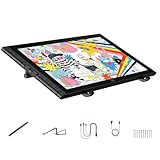
- Revolutionary 16K Magnetic Stylus: Say goodbye to pen wobble and lag. The Artist 16 3rd features the upgraded X4 smart chip stylus. It delivers an unprecedented 16,384 levels of pressure sensitivity with an ultra-low 2g initial activation force and a mere 0.3mm retraction, ensuring smooth, precise lines with zero delay. Plus, the built-in magnetic design allows you to easily attach the pen to the tablet, preventing loss and keeping your workspace tidy
- Anti-Glare Etched Glass and No Parallax: Unlike traditional scratch-prone plastic films, this drawing display features premium AG+AF nano-etched glass. It effectively reduces glare and resists fingerprints while providing a natural, paper-like drawing friction. The fully laminated 15.4-inch FHD display minimizes parallax to almost zero, ensuring the cursor aligns perfectly with your pen tip for true what you see is what you draw accuracy
- Stunning Color Accuracy and OSD Control: Elevate your digital art with a brilliant 99% sRGB, 98% Adobe RGB, and 97% Display P3 color gamut coverage, alongside 16.7 million colors. Enjoy vibrant, true-to-life hues without the color shifting common in other tablets. The built-in OSD (On-Screen Display) color space management allows you to quickly switch profiles and fine-tune colors for professional illustration and animation
- Dual Scroll Wheels and Effortless Workflow: Revolutionize your creative process with 8 customizable shortcut keys and 2 independent scroll wheels. Easily adjust brush sizes, zoom in on the canvas, or scroll through layers without constantly reaching for your keyboard. Furthermore, it includes the S20 foldable stand right out of the box, providing comfortable ergonomic support to prevent neck pain during long drawing sessions
- Clutter-Free Setup and Broad Compatibility: Keep your desk neat by connecting with just one full-featured USB-C to USB-C cable, or use the included 3-in-1 cable for older PCs. This pen tablet is highly versatile, supporting Windows 7 or later, macOS 10.13 or later, Android 10.0 or later, ChromeOS 88 or later, and Linux. It works seamlessly with leading software like Photoshop, Illustrator, Clip Studio Paint, and SAI
16. The bridge gives way
Three adventurers scramble as a rope bridge snaps above a glowing canyon, fantasy action panel, diagonal composition, clear separation between figures and background, emerald shadows and gold light, dramatic but readable poses
17. The last train
A traveler reaches toward a departing night train as a small paper lantern rises into the sky, emotional graphic-novel panel, platform-level perspective, wet reflections, indigo and amber palette, quiet negative space
18. The robot’s penalty kick
A tiny robot takes a penalty kick while a much larger goalkeeper lunges, playful sports-comic panel, low sideline view, crisp cel-like shading, bright stadium lights, bold primary colors, clear action and focal point
19. The monster at the window
A friendly shaggy monster peeks through a rain-streaked bedroom window to return a lost kite, gentle cartoon-horror panel, child’s-eye view, soft blue night and warm indoor light, reassuring expression, no gore
The Tool Desk
Outbyte PC Repair FREERepair Windows errors before they cause bigger problemsFix Now →Outbyte Driver Updater FREEScan for outdated or missing drivers - takes under a minuteDriver Scan →20. The library in the clouds
A pair of young explorers step onto a paper bridge leading to a library suspended among clouds, wide fantasy establishing panel, foreground books framing the scene, soft pastel palette, airy light, clear foreground and distance
Cover compositions
21. The clocktower hero
Cover illustration of a young hero facing a collapsing clocktower, strong central silhouette, dramatic storm clouds, polished comic-book ink, limited red, black, and cream palette, open negative space across the upper third for later title placement
22. The garden in the city
A tiny astronaut faces a giant garden growing through an abandoned city, graphic-novel cover illustration, strong central silhouette, dramatic dusk lighting, deep blue and luminous green palette, mysterious hopeful mood, open negative space across the upper third for later title placement
Rank #4

- Word-first 16K Pressure Levels: The upgraded stylus features 16,384 levels of pressure sensitivity and supports up to 60 degrees of tilt, delivering smoother lines and shading for a natural drawing experience. With no battery or charging needed, it operates like a real pen, making it easy for beginners to create effortlessly. This functionality helps novice artists develop their skills and explore their creativity without the intimidation of complex tools
- Designed for Beginners: This drawing pad desinged with 8 customizable shortcuts for both right and left-hand users, express keys create a highly ergonomic and convenient work platform
- Perfectly Adapted for Android: The XPPen Deco 01 V3 art tablet supports connections with Android devices running version 10.0 and above. It is recommended to download the XPPen Tools Android application, which adapts to your smartphone's screen aspect ratio, ensuring accurate mapping. It also supports mapping on Android screens with different aspect ratios in portrait mode
- Large Drawing Space, Bigger Bold Inspiration: This expansive drawing pad has10 x 6.25-inch helps you break through the limit between shortcut keys and drawing area
- Easy Connectivity for Beginners: The Deco 01 V3 offers USB-C to USB-C connectivity, plus adapters for USB C. This ensures easy connection to various devices, allowing beginner artists to set up quickly and focus on their creativity without compatibility concerns. Whether using a laptop, tablet, or desktop, the Deco 01 V3 provides a seamless experience, making it an ideal choice for those just starting their digital art journey
23. The lighthouse map
Cover illustration of a young cartographer holding a glowing map before a lonely lighthouse, bold coastal silhouette, wind and sea spray, teal and ochre palette, adventurous mystery, clear negative space above the figure for a title to be added later
24. The last dragon’s library
A small dragon curls around a towering library window as books fly through a moonlit sky, whimsical fantasy cover composition, plum and honey palette, intricate but readable silhouette, open space near the top for later typography
25. The underground city
A young engineer stands above a vast underground city lit by lanterns, graphic-novel cover art, strong vertical depth, crisp ink contours, copper and midnight-blue palette, atmosphere of discovery, uncluttered title area at the top
26. The runaway moon
A bicycle messenger races along a rooftop beneath a moon slipping between skyscrapers, energetic comic cover illustration, sweeping diagonal composition, bold black linework, limited violet and yellow palette, clear negative space for a later title
27. The haunted greenhouse
A botanist faces a glass greenhouse filled with luminous ghostly flowers, atmospheric cartoon mystery cover, centered doorway framing, deep green and pale lilac palette, eerie but inviting mood, space above the greenhouse for title placement
Quick wins for a faster PC:
Fix the driver behind crashes, sound loss and screen glitchesFind Drivers →Repair Windows errors before they cause bigger problemsFix Now →Scan for outdated or missing drivers - takes under a minuteDriver Scan →28. The skyship expedition
A crew gathers on the deck of a battered skyship above a sea of clouds, adventure-comic cover composition, strong central figure and readable silhouettes, warm sunset light, blue and gold palette, open sky reserved for later lettering
29. The fox and the comet
A small fox watches a comet arc over a sleeping village, picture-book comic cover illustration, simple expressive shapes, midnight blue and peach palette, gentle wonder, clear focal point and uncluttered space above the rooftops for a title
Best Value

- PLEASE NOTE: The XPPen Artist 15.6 Pro V2 needs to connect with a computer to use. You need to use it with your Computer or Laptop. The 3 in 1 cable is included
- 16K Pressure Sensitive: XPPen Artist 15.6 Pro V2 drawing tablet introducing X3 Pro smart chip stylus, which has 16384 pressure levels, 100%* higher than that of its peers. It delivers much more precise and smoother lines than ever before, excelling at hyper-nuanced creation, a game-changer in details
- Easy Control, One Red Dial for All: The innovative Red Dial interface is designed for a smooth workflow and optimal efficiency, allowing illustrators or designers to master essential controls such as brush size, navigation, and zoom In/Out. It fits comfortably in your hand and ensures a natural hand position, reducing wrist strain during prolonged use
- Full Laminated Anti-glare Screen: The 15.4-inch graphic art tablet adopts full laminated technology, anti-glare etched glass, and a wide angle of 178°, which will help you avoid parallax errors between the stylus nib and cursor, precisely positioning every single one of your strokes
- 8 customized express keys: The Artist 15.6 Pro V2 drawing display features 8 fully customizable shortcut keys and puts more customization options at your fingertips to suit your preferred work style, allowing you to capture and express your ideas easier and faster for optimized workflow
30. The last page
A young reader steps from an open book into a city of floating panels, imaginative graphic-novel cover illustration, dramatic perspective, inked cartoon linework, saturated cyan and orange palette, bold central silhouette, empty upper margin for later title placement
Independent reader supportYour contribution helps us test, update, and keep practical guides available for everyone.Using image and style references
Midjourney’s Image Prompts guide describes references as a way to influence content, composition, and colors; include important details in the text prompt as well. A Style Reference can guide overall qualities such as color, medium, texture, or lighting. Its behavior varies by version, so consult the current reference documentation and Style Creator guide when using those features.
What’s actually slowing this PC down?
Pick the symptom - the matching free tool is one click away.
Do not assume that a reference guarantees an identical character or exact visual result. Midjourney’s Character Reference workflow is a legacy feature: its documentation notes that V7 replaced it with Omni Reference and V8.X with the Edit Model. Check the current version documentation before following older examples.
Text, lettering, and rights
If a cover needs a title or a panel needs dialogue, ask for open negative space or blank balloons and add the lettering separately. A prompt cannot guarantee reliable generated typography.
Use original character descriptions and only submit images you are authorized to use. Midjourney’s Terms of Service make users responsible for the content they input or generate and prohibit using the service to violate third-party intellectual-property rights. Those terms do not settle copyright questions for every jurisdiction.
FAQ
What should a Midjourney cartoon prompt include?
Name the subject and describe its action or pose, visual medium, distinctive details, setting, lighting, palette, mood, and composition. Add compatible parameters at the end if needed.
How do I prompt a clear comic panel?
Describe one readable action, who is present, the viewer’s position or framing, and the visual focus. Avoid asking a single panel to communicate several simultaneous moments.
How do I leave room for a cover title?
Describe clear negative space and where it should appear, such as an open upper margin. Add final typography separately rather than relying on generated lettering.
Can I use references to keep a character or style consistent?
References can influence a result, but they do not guarantee exact continuity. Feature behavior depends on the reference type and model version; consult Midjourney’s current documentation before using a version-specific workflow.
Should I use Character Reference with V7 or V8.X?
Midjourney documents Character Reference as a legacy feature, replaced by Omni Reference in V7 and the Edit Model in V8.X. Check the current version and feature documentation rather than assuming older instructions still apply.
Quick Recap

Product prices and availability are accurate as of the date/time indicated and are subject to change. Any price and availability information displayed on Amazon at the time of purchase will apply.




