Windows Errors? Fix Them Before They Spread
Repair common Windows errors and clear accumulated junk for a smoother, more stable PC - no reinstall needed.Free scan · no reinstall
Outdated Drivers Are Slowing You Down
One free scan finds every outdated or missing driver and matches the right update for your exact hardware.Free scan · exact hardware match
ThatPainter is reader-supported. When you buy through links on our site, we may earn an affiliate commission. Learn More
A new vinyl cutter can make far more than stickers: use adhesive vinyl for decals and labels, heat-transfer vinyl for suitable fabrics, and paper or cardstock for cards and decorations. Here are 34 projects to try, grouped by material and purpose. Before cutting, check your cutter’s material compatibility, blade and mat requirements, size limits, and the material maker’s instructions.
Choose the right material before you start
Adhesive vinyl sticks to a surface; heat-transfer vinyl (also called iron-on) is applied to compatible textiles with heat. Permanent and removable describe different adhesive-vinyl uses: permanent vinyl is intended for longer-lasting applications, while removable vinyl is useful for temporary ones. Paper and cardstock open up a separate set of projects, including cards and party decorations. Cricut’s materials guide, vinyl guide, and project-selection advice explain these distinctions for Cricut materials; check your own cutter and material instructions rather than assuming compatibility across brands.
Permanent vinyl is described by Cricut as water- and UV-resistant, and its removable vinyl as removable without residue. Those are product-family claims, not guarantees for every surface, cleaning routine, exposure, or length of use. Choose a suitable blank, prepare the surface as its manufacturer recommends, and test an inconspicuous area when appropriate. A car, mailbox, or outdoor sign needs material intended for that use.
For adhesive-vinyl projects, transfer tape can help move a cut design to the surface, while a weeding tool can help remove unwanted pieces. For textile projects, use compatible heat-transfer material and the appropriate heat application equipment. Cricut’s beginner checklist and materials cheatsheet are useful examples of the tools Cricut pairs with its project types, not universal requirements for every cutter.
#1 Best Overall
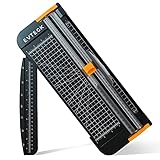
- Professional School Paper Cutter: with sharp blade, easily to cut straight along the transparent wire. Very smooth and no resistance.Portable and simple operation, meets the basically cutting needs , the best choice for school, home and office.
- Size: 14.17x 5.90x 0.78 inch. Suitable for cutting A3, A4, A5 paper, photos, cards, decal, cardboard (within 1.2MM), label, card stock and etc.
- Security Design: This paper cutter trimmer is lightweight and safe. The blade works only when you press on it, which perfectly ensures the safety of users especially children.It is a good helper to accompany children to make handmade works.
- Anti-slip Design: There are 6 non-slip round sponges at the bottom of the slide paper cutter, which can prevent the paper trimmer from moving when cutting paper. If you use it on glass, the non-slip sponges can be well fixed, too.
- Multifunctional Paper Cutter: With 45 degree to 90 degree angle measuring plate and cm/inch scale that can help trim the angle and length you wanted. This is an great paper slicer for school,home,and office.
Do not guess heat settings. Cricut’s Heat Guide provides settings after you select a transfer material and base; if you use another brand, follow its instructions instead. Also check dimensions before designing: a large wall phrase or door decoration may exceed your cutter’s working area or require multiple sections. Cricut Smart Materials work only with compatible Cricut machines.
Decals, labels, and home projects
-
Removable wall quote or geometric pattern
Cut a short phrase, shapes, or a simple repeating pattern from removable adhesive vinyl for an indoor wall. Keep the design within your machine’s capacity, and consider testing the wall surface first.
DriversCrashes, No Sound, or Screen Glitches?PerformanceWindows Errors? Fix Them Before They SpreadDriversOutdated Drivers Are Slowing You DownSpecial offer. See more information about Outbyte and uninstall instructions. Please review EULA and Privacy policy. -
Mirror name or motif
Add a name, initials, or a small decorative shape to a mirror with adhesive vinyl. A simple design is easier to position neatly on a reflective surface.
-
Window decal
Cut a small graphic or seasonal shape for a window. Check the vinyl’s intended use and the window-cleaning guidance before applying it.
-
Personalized water bottle
Make a name or monogram for a bottle with suitable adhesive vinyl. Surface shape, washing, and material compatibility affect how well a decal performs.
-
Tumbler or cup graphic
Decorate a cup with a small, uncomplicated graphic. Choose material suitable for the blank and its use, and follow care guidance rather than assuming a vinyl decal makes drinkware dishwasher-safe.
Do these 3 things before closing this tab:
1Fix the driver behind crashes, sound loss and screen glitches2Clear out junk files and repair common Windows errors3Scan for outdated or missing drivers - takes under a minuteSpecial offer. See more information about Outbyte and uninstall instructions. Please review EULA and Privacy policy. -
Kitchen jar or pantry labels
Cut matching labels for jars and containers. Use clear lettering and a consistent size so contents are easy to identify at a glance.
-
Storage-bin or drawer labels
Label bins, drawers, or shelves to make a craft area, closet, or pantry easier to organize. Removable vinyl can suit labels you expect to change.
-
Indoor sign lettering
Add a word, name, or short message to a sign blank with adhesive vinyl. Check that the blank’s finish is suitable for application.
-
Outdoor welcome sign
Use vinyl and a sign blank intended for outdoor exposure to make a welcome sign. Permanent vinyl is the relevant category to consider; weather resistance does not promise a particular lifespan on every substrate.
Quick wins for a faster PC:
Clear out junk files and repair common Windows errorsFree Scan →Fix the driver behind crashes, sound loss and screen glitchesFind Drivers →Repair Windows errors before they cause bigger problemsFix Now →Special offer. See more information about Outbyte and uninstall instructions. Please review EULA and Privacy policy.Rank #2
 VEVOR Vinyl Cutter Machine Upgraded 28" Paper Feed Cutting Plotter Bundle
- 28in Large Cutting Area: Max Paper Feed: 28.3 in / 720 mm; Max Cutter Width: 24.8 in / 630 mm. This excellent vinyl cutter machine features a thickened, high-quality aluminum body with powerful stepper motors.
- High-precision Operation: The LCD panel facilitates the adjustment of pressure and speed with a clear readout and buttons. Adjustable Cutting Pressure: 10 - 500 g; Cutting Speed: 10 - 800 mm / s; Blade Accuracy: 0.0004 in / 0.01 mm.
- Ample Accessories: With 5 extra rolls of 23 x 39-inch pieces of vinyl (black, white, red, blue, and yellow), a utility knife, a ball pen core, 2 holders, 1 blade, and other items, this practical plotter machine will perfectly satisfy your various DIY requirements.
- Superior Compatibility: Equipped with COM & USB interface, we offer SignMaster software for more kinds of connections. Support language: DM/PL, HP/GL; System: Pentium processor-based PC or Windows XP / Vista / 7 / 8 / 10 / 11. NOT compatible with the Mac system.
- Wide Application: This machine can cut various materials such as heat transfer vinyl, paper, craft paper, card stock, and paint masks. Extensively used in advertising, decoration, DIY, label, and logo-making fields.
-
Mailbox number or name
Cut a house number or name for a mailbox using material intended for the surface and outdoor conditions. Make sure the placement remains visible and does not cover required labels or openings.
-
Small appliance or device decal
Add a small label or motif to an appliance or device. Removable vinyl may be preferable if you may want to change it; avoid vents, controls, and areas where heat or frequent handling could be an issue.
-
Seasonal planter phrase
Give a planter or pot a seasonal phrase or simple graphic. Check the surface texture and intended exposure before choosing vinyl; a rough or curved pot can be harder to decorate than a smooth, flat blank.
-
Car decal
Cut a simple car decal with material specifically intended for that application. Follow the vinyl and vehicle-care instructions for placement and cleaning.
What’s actually slowing this PC down?
Pick the symptom - the matching free tool is one click away.
Special offer. See more information about Outbyte and uninstall instructions. Please review EULA and Privacy policy. -
Painted-sign stencil
Cut a design to use as a stencil on a sign or craft surface. Use a stencil-compatible material and test how it adheres to the blank without damaging its finish.
-
Door decoration or large wall phrase
Cut a large phrase or seasonal door design, splitting it into manageable sections if needed. Check the cutter’s usable area and the surface before committing to a full-size design.
Wearables and textiles
These projects call for heat-transfer vinyl made for the fabric and application method. Choose a suitable base, and follow the transfer material maker’s instructions for cutting, layering, heat, and care.
-
T-shirt name or graphic
Make a team name, simple graphic, or personalized shirt design with compatible heat-transfer vinyl. Check the fabric and the material’s application guidance before pressing.
Free tools Windows power users keep installed
One-click scans. No signup required.
Special offer. See more information about Outbyte and uninstall instructions. Please review EULA and Privacy policy. -
Personalized tote bag
Add a name, monogram, or bold graphic to a compatible tote. A simple design can be easier to position on the bag’s flexible fabric.
-
Tea towel decoration
Make a small kitchen motif or label for a tea towel using suitable textile-transfer material. Confirm that the fabric and care routine are compatible with the transfer.
Rank #3
 VEVOR Vinyl Cutter Machine 34 inches Bundle Manual Vinyl Plotter Cutter
- Cutting Capacity: With maximum paper feed of 870mm (34.3"), maximum cutting width of 780mm (30.7"), cutting precision of +/-0.01mm (0.0004") and paper feed precision of 3m (118").
- Strong Stability: With D-typed motherboard and 4M high speed cache memory. Double spring pinch-rollers, and roughened steel roller ensure that the paper feed will not deviate by long distance.
- Digital Control: Cutting pressure with 20-500g adjustable, cutting speed with 20-800mm per second adjustable. Backlight LCD display for more intuitive operation.
- High Compatibility: Available with COMPIM and USB interface. DM/PL, HP/GL language. Works with your installed Fonts, including Dingbat/Wingding Fonts. Import various file formats, including SVG and PDF.
- Widely Used: With extra supplies, can be used in advertisement field, various decoration, handcraft, supplementary for heat transfer, label & sign making, etc.
-
Pillow-cover design
Personalize a pillow cover with a name, phrase, or graphic. Apply the design to the cover before stuffing it if that makes the fabric easier to press evenly.
-
Hat personalization
Add initials or a small mark to a hat only when its material and shape suit the transfer and pressing method. Curved surfaces can make even contact difficult.
The Tool Desk
Outbyte Driver Updater FREEScan for outdated or missing drivers - takes under a minuteDriver Scan →Outbyte PC Repair FREEClear out junk files and repair common Windows errorsFree Scan →Special offer. See more information about Outbyte and uninstall instructions. Please review EULA and Privacy policy. -
Denim detail
Try a small design on a denim pocket or panel with transfer material compatible with the fabric. Check the maker’s instructions for texture, seams, and pressing.
-
Matching team or event apparel
Cut names, numbers, or a shared motif for a group of shirts or other garments. Confirm that each garment’s fabric works with the same transfer material and settings.
-
Blanket or canvas textile accent
Add a small accent to a compatible blanket or canvas piece. Test the material and application method on the base fabric before making a larger design.
Paper, cards, and party details
A vinyl cutter can also cut paper and cardstock, making it useful for stationery and decorations. Check your machine’s blade, mat, and material guidance for the paper you choose; a delicate design may need a careful test cut.
-
Custom greeting card
Cut a design, window, or layered detail for a greeting card. Pair contrasting cardstock colors to make the cut shapes stand out.
-
Invitation with cut-paper details
Add a name, border, or decorative cutout to an invitation. Keep the design legible at the finished size and test how the paper handles intricate cuts.
-
Gift tags
Cut tags in a custom shape and add a name or small motif. Leave room for a hole and string if you plan to tie them to gifts.
-
Paper flowers
Cut petals and leaves from paper or cardstock, then assemble them into flowers. Vary the colors or layer shapes for depth.
Recommended Free Tools
Special offer. See more information about Outbyte and uninstall instructions. Please review EULA and Privacy policy.Rank #4
Sale Firbon A4 Paper Cutter, 12 Inch Paper Trimmer with Extened Ruler, Black
- Professional Guillotine: Present the clean straight cutting along printed line. No drag! And easy to replace the blade when it become blunt
- Size and Materials: Design to cut A3,A4,A5 Paper, Photos, Cards, Laminated Stuff (within 1.5 mm) and more. Max cut 10 sheets paper (80 g/m2) every time. Cut a little lesser prolongs blades' service life better
- Accurate Measurement: With 45-degree to 90-degree angle measuring plate and cm/inch scale. Ensure to trim the angle and length you wanted
- Portable and Safe: This cutter is lightweight and convenience. Only work when you press the blade, perfectly protect user especially children
- Versatile Making: Your ideal cutting tool for making craft projects, wedding invitation cards and greeting card. Suit for home, office, and school
-
Paper wreath or layered arrangement
Cut repeated leaves, petals, or other shapes and arrange them into a wreath or layered display. Repeating one or two shapes can make assembly more manageable.
-
Party banner
Cut letters or shapes for a banner celebrating a birthday, shower, or other gathering. Plan spacing before attaching the pieces to a cord or ribbon.
-
Cake topper or table decoration
Cut a paper phrase or shape for a cake topper or table display. Keep paper decorations away from food unless the materials are suitable for food contact, and secure the design appropriately.
-
Vinyl shapes on a card
Add small adhesive-vinyl shapes to a card for a sticker-like accent. Use a surface and adhesive appropriate for the card stock, and test first if the paper is delicate.
Special offer. See more information about Outbyte and uninstall instructions. Please review EULA and Privacy policy. -
Scrapbook embellishment
Cut a layered motif, title, or small shape for a scrapbook page. Coordinate paper colors and sizes with the page before cutting a full set.
-
Place cards
Cut folded or flat place cards for a table setting, with each guest’s name added by writing, printing, or layering cut shapes.
-
Dimensional layered-paper decoration
Cut several cardstock layers and stack them to make a dimensional decoration. Align the layers carefully and use an adhesive suitable for paper.
Plan a first project that is likely to go smoothly
-
Pick the base and purpose. Decide whether the project is a surface decal, a textile transfer, or a paper cut. That choice determines the material family to investigate.
Quick wins for a faster PC:
Clear out junk files and repair common Windows errorsFree Scan →Scan for outdated or missing drivers - takes under a minuteDriver Scan →Special offer. See more information about Outbyte and uninstall instructions. Please review EULA and Privacy policy. -
Check compatibility. Confirm the cutter supports the material and design size, then check any blade, mat, and software requirements. For Cricut, the beginner project checklist pairs its examples with Design Space and relevant materials; other machines may differ.
-
Match the material to use. For adhesive vinyl, consider removable versus permanent and the surface’s texture, exposure, and cleaning. For fabric, verify that the transfer material suits the textile. For paper, select a weight and finish your cutter can handle.
-
Test before making the full design. Make a small test cut or try the material on a discreet area of the blank when appropriate. This can reveal problems with cutting, weeding, placement, or adhesion before they affect the finished project.
-
Follow application instructions. Use transfer tape when appropriate for adhesive vinyl. For heat-transfer projects, select settings for the specific transfer and base using the manufacturer’s instructions, rather than applying a guessed time or temperature.
Special offer. See more information about Outbyte and uninstall instructions. Please review EULA and Privacy policy.Quick Recap
Bestseller No. 1

Product prices and availability are accurate as of the date/time indicated and are subject to change. Any price and availability information displayed on Amazon at the time of purchase will apply.




