What’s actually slowing this PC down?
Pick the symptom - the matching free tool is one click away.
ThatPainter is reader-supported. When you buy through links on our site, we may earn an affiliate commission. Learn More
The best HP laptop for most digital artists and graphic designers is the HP OmniBook Ultra Flip 14. Its premium OLED screen, active-pen support, and 360-degree hinge make it the strongest all-around choice for drawing directly on the display. Choose the OmniBook X Flip 16 OLED if you want a larger canvas, the OmniBook X Flip 14 OLED for portability, or an OmniBook 7 16 with RTX graphics or HP ZBook Studio for 3D, rendering, and GPU-heavy video work.
Do not buy by family name alone. HP sells the same OmniBook Flip families with significantly different screens, memory options, graphics hardware, and pen bundles. The exact configuration matters more than the “AI PC” label.
Quick recommendations
| Laptop | Best for | Display to choose | Pen status | Graphics | Main drawback |
|---|---|---|---|---|---|
| HP OmniBook Ultra Flip 14 | Best overall direct drawing | 2.8K or 3K OLED, preferably wide-gamut | Verify the exact bundle | Integrated | Premium price; not ideal for serious 3D |
| HP OmniBook X Flip 16 OLED | Largest drawing canvas | 2,880 × 1,800 OLED, 100% DCI-P3 | Optional on listed configurations | Integrated | Large and heavy in tablet mode |
| HP OmniBook X Flip 14 OLED | Portable artists and students | 2K OLED, 100% DCI-P3 | Optional on listed configurations | Integrated | Less workspace; configuration differences |
| HP OmniBook X Flip 16 AMD | Value large-screen OLED | 2,880 × 1,800 or 1,920 × 1,200 OLED, 100% DCI-P3 | Optional | Integrated | Compare software compatibility and pricing |
| HP OmniBook 7 16 with RTX | 3D, After Effects, and video | Verify gamut on the exact SKU | Verify pen and digitizer | RTX 4050 or RTX 500 Ada options | Less comfortable as a drawing tablet |
| HP ZBook Studio | Professional workstation work | Choose according to the project | Not primarily a tablet-style device | NVIDIA professional or GeForce options | Cost, weight, and reduced portability |
| Older HP Spectre x360 | Clearance and refurbished value | 2.8K or 3K OLED where available | May be included; verify | Often Intel Arc integrated | Battery, warranty, and stock condition |
Specifications and bundles vary by country and SKU. HP’s consumer naming has shifted toward OmniBook, with OmniBook Flip positioned as the successor to the x360-style convertible.
#1 Best Overall
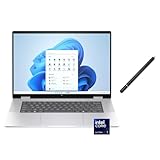
- 【RAM & Storage】This computer comes with 16GB RAM DDR5 | 1024GB SSD
- 【 Intel Core Ultra 7 155U Processor】It is a mid-range Meteor Lake chip that debuted in December 2023. This 1st Gen Core Ultra processor has come to replace 13th generation Core processors; it has 12 cores (2 + 8 + 2) and 14 threads at its disposal. Its Performance cores, of which there are 2, are HT-enabled and run at up to 4.8 GHz while its Efficient cores, of which there are 10 (8 main cores plus 2 extra ones found in the Low Power Island) run at up to 3.8 GHz.
- 【16 " (1920x1200) Touch-screen Display】Enjoy better color accuracy and wider viewing angles with the Widescreen Ultra Extended Graphics Array display and a high resolution of 1920 x 1200.
- 【Other features】Intel graphics,Front-Facing Camera,Backlit Keyboard,Windows 11 Home.
- 【Bundle with Capacitive Stylus with Magnetic Cap】Stylus pen is made of aluminum alloy, which is light weight and very comfortable to hold, and it does not need to connect Bluetooth and does not need to be charged. The cap is magnetic and can absorb in the end of stylus pens.
1. HP OmniBook Ultra Flip 14: best overall
The OmniBook Ultra Flip 14 is the best starting point for most people who want to draw on the laptop itself. It combines a 360-degree hinge, active-pen input, aluminum construction, and a high-resolution OLED display in a relatively compact design.
Its screen is the key advantage. Independent coverage describes the Ultra Flip as a strong middle ground for photo editing and creative work because of its high-resolution, wide-color OLED panel and convertible design. The display is also useful beyond drawing: palettes and toolbars remain sharp, while OLED contrast makes photographs and illustrations look vivid.
For Photoshop, Illustrator, InDesign, Clip Studio Paint, Krita, Affinity applications, and ordinary 2D illustration, integrated graphics are generally sufficient. The Ultra Flip is less suitable for Blender rendering, demanding Cinema 4D projects, CUDA-dependent effects, or large GPU-accelerated video timelines because it does not center on a discrete NVIDIA GPU.
The compromise is portability rather than capability. A 14-inch convertible provides less room for tool panels and timelines than a 16-inch model, and its glossy OLED surface can reflect windows and overhead lighting. Pen storage is also not as convenient as some artists would prefer. See independent HP laptop testing and TechRadar’s creative and photo-editing assessment for configuration-specific testing and commentary.
Quick wins for a faster PC:
Fix the driver behind crashes, sound loss and screen glitchesFind Drivers →Repair Windows errors before they cause bigger problemsFix Now →Buy it if: you want one premium device for sketching, illustration, photo editing, and general design, and you do not need workstation-level 3D graphics.
2. HP OmniBook X Flip 16 OLED: best large-screen drawing laptop
The OmniBook X Flip 16 OLED is the better choice when physical canvas area matters more than compactness. A 16-inch display gives illustrators more room for the artwork and interface, and it is more comfortable for photo editing or layout work at a desk.
HP lists multiple display choices for the 2026 X Flip 16, including:
- 2,880 × 1,800 OLED at up to 120Hz with 100% DCI-P3.
- 1,920 × 1,200 OLED with 100% DCI-P3.
- 1,920 × 1,200 IPS at 400 nits with 62.5% sRGB.
For professional illustration, photography, branding, or print-oriented design, choose one of the OLED configurations—or at minimum a panel explicitly rated for 100% sRGB. The 62.5% sRGB IPS version may be acceptable for learning, casual drawing, and general layout, but its restricted gamut makes it a poor choice for color-critical production. Creative Bloq’s tested configuration specifically identified the limited gamut as a major weakness.
Recommended Free Tools
The large screen is excellent on a desk but less comfortable to hold in tablet mode for long periods. A 16-inch convertible can be a drawing tablet in the functional sense without feeling like a small tablet in the ergonomic sense. The pen is listed as optional by HP on the relevant specifications page, so do not assume that a reviewed bundle or photograph represents every retail configuration. Check the exact X Flip 16 specifications before ordering.
Creative Bloq reported nearly 15 hours in its particular test configuration. That result should not be treated as a universal runtime: OLED brightness, Wi-Fi, software, and workload all affect battery life.
Buy it if: you want the largest practical direct-drawing canvas in HP’s mainstream convertible range and can accept extra weight.
3. HP OmniBook X Flip 14 OLED: best portable option
The OmniBook X Flip 14 OLED is a good fit for students, mobile illustrators, freelancers, and anyone who regularly works away from a desk. It is easier to carry and use in cramped spaces than a 16-inch model while still offering a convertible drawing mode.
HP lists both OLED and IPS versions. The 2K OLED option is rated at 100% DCI-P3, while at least one IPS option is rated at only 62.5% sRGB. Those are not interchangeable choices. For color-sensitive work, select the OLED or another configuration with clearly stated 100% sRGB or better coverage. The X Flip 14 specification page also lists pen support as optional for relevant models.
A 14-inch screen is adequate for sketching and illustration, but palettes, browser windows, Lightroom controls, and video timelines will feel more crowded. If you routinely work with large Photoshop files or keep several creative applications open, choose 32GB of memory if available. Sixteen gigabytes is a sensible minimum for mainstream 2D work.
Buy it if: portability matters more than maximum workspace and you verify both the OLED display and pen bundle.
Rank #2

- [High Speed RAM And Enormous Space] 16GB high-bandwidth RAM to smoothly run multiple applications and browser tabs all at once;1TB PCIe NVMe M.2 Solid State Drive allows to fast bootup and data transfer
- [Display] 16" FHD+ (1920x1200), multitouch-enabled, IPS, 300 nits
- [Processor] Intel Core Ultra 7 155U (up to 4.8 GHz, 12 MB L3 cache, 12 cores, 14 threads)
- [Tech Specs] 2 x USB Type-A, 1 x USB Type-C, 1x Thunderbolt 4 with USB Type-C, 1 x headphone/microphone combo jack, 1 x HDMI, Wi-Fi 6 + Bluetooth
- [Operating] Windows 11 Home - Beautiful, more consistent new design, Great window layout options, Improved performance features, New videogame selection and capabilities, Compatible with Android Apps
4. HP OmniBook X Flip 16 AMD: best-value large OLED candidate
The AMD version of the OmniBook X Flip 16 deserves consideration when its price is lower than the Intel model or when its configuration offers more memory and storage for the money. HP lists versions with a Ryzen AI 9 465 processor, up to 2TB of SSD storage, and OLED panels rated at 100% DCI-P3. An IPS alternative rated at 100% sRGB is also listed.
This is a strong configuration to seek for 2D illustration, design, photo editing, and school work: 32GB RAM, a 1TB or larger SSD, and the 2,880 × 1,800 OLED display. The pen is optional, so include the cost of a compatible stylus if the seller does not bundle one.
Do not assume the AMD model is automatically better than the Intel version. Compare the actual price, battery behavior, application support, ports, memory, and graphics requirements. For ordinary 2D applications, the display and RAM choice will usually matter more to the buying decision than the processor brand.
See HP’s OmniBook X Flip 16 AMD specifications for the available panel and configuration differences.
5. HP OmniBook 7 16 with RTX: best for GPU-heavy creative work
If your work includes Blender, Cinema 4D, complex After Effects compositions, DaVinci Resolve, 4K video, or GPU-accelerated plug-ins, step away from the thinnest Flip models. HP’s creative-work guidance identifies the OmniBook 7 16 with an NVIDIA GeForce RTX 4050 option for demanding video and 3D workloads. HP listings also show configurations with Core Ultra 7 processors, 32GB RAM, 1TB SSDs, a 16-inch WUXGA touch display, and an RTX 500 Ada laptop GPU with 4GB of dedicated memory.
The Tool Desk
Outbyte PC Repair FREEClear out junk files and repair common Windows errorsFree Scan →Outbyte Driver Updater FREEFix the driver behind crashes, sound loss and screen glitchesFind Drivers →A discrete GPU improves rendering and GPU-accelerated effects; it does not automatically make pen strokes feel better. A normal clamshell touchscreen may not fold into a comfortable drawing position, and active-pen support must be confirmed for the exact SKU. For many artists, an RTX laptop paired with an external Wacom, Huion, or XP-Pen display is a better professional setup than trying to draw on the built-in screen.
Expect more weight, fan noise, heat, and cost than with an ultrathin convertible. Those compromises are worthwhile when rendering time and GPU compatibility directly affect paid work.
HP’s relevant guidance is available in its OmniBook creative-work guide, while current touchscreen configurations can be found through its touchscreen laptop listings.
6. HP ZBook Studio: best workstation alternative
The ZBook Studio belongs in a separate workstation category. It is the better direction for professional 3D artists, CAD users, motion designers, engineers, and creators working with large scenes, simulations, rendering, or other workloads where stability and dedicated professional graphics matter.
Do these 3 things before closing this tab:
1Repair Windows errors before they cause bigger problems2Scan for outdated or missing drivers - takes under a minute3Clear out junk files and repair common Windows errorsHP documentation lists ZBook Studio configurations with NVIDIA RTX professional and GeForce graphics options intended to accelerate rendering, graphics, and compute workloads. That makes the line more appropriate than a consumer convertible when your income depends on demanding production software.
A ZBook Studio is excessive for most 2D drawing. It may be heavier, more expensive, and less convenient in tablet mode than an OmniBook Flip. Choose it for workstation requirements, not simply because “more GPU” sounds better.
See HP’s ZBook Studio documentation for its professional graphics positioning.
7. Older HP Spectre x360: worthwhile only as a carefully checked used buy
An older Spectre x360 can be a good clearance or refurbished purchase if it has the right screen, memory, storage, and included accessories. A listed Spectre x360 14 configuration includes Windows 11 Pro, a Core Ultra 7 processor, Intel Arc graphics, 16GB RAM, 2TB storage, and a 2.8K touch display. Some configurations also include the HP MPP 2.0 pen.
However, Spectre is now an older naming direction rather than HP’s current consumer flagship family. Availability, price, warranty, and condition vary substantially. Before buying, check:
- Battery health and remaining warranty.
- Whether the original pen is actually included.
- OLED wear or burn-in.
- Memory capacity, since it may be onboard and non-upgradeable.
- Wi-Fi, USB, and other port standards.
- The seller’s return policy.
Buying a discounted Spectre makes sense when the savings are substantial and the unit is in known condition. Do not pay near-current premium pricing for an older machine simply because the Spectre name remains familiar.
Rank #3

- FULL HD IPS DISPLAY - Enjoy vibrant, crystal-clear images with 178-degree wide-viewing angles
- AMD RYZEN 3 30 PROCESSOR - Everyday performance you can count on; Multitask, stream, game casually, and edit photos smoothly with responsive power and vibrant HDR visuals
- ENJOY UP TO 14 HOURS AND 15 MINUTES OF BATTERY LIFE - HP Fast Charge restores battery from 0 to 50% in approximately 45 minutes
- AMD RADEON 610M GRAPHICS - Experience smooth entertainment; Built for streaming and multitasking, enjoy realistic visuals and efficient performance for work and play
- STORAGE AND MEMORY - 512 GB PCIe NVMe M.2 SSD offers fast speed and efficient storage; and 8 GB LPDDR5 RAM memory boosts performance with higher bandwidth
What specifications matter for drawing?
Display: prioritize gamut over marketing labels
Look for 100% sRGB as a minimum and preferably 100% DCI-P3 for demanding illustration, photography, and design. A 2K-or-higher resolution is preferable on a 14- to 16-inch screen. Around 300 nits is usable indoors; 400 nits or more is more flexible in bright rooms.
OLED provides excellent contrast and can offer wide color coverage, but it is not automatically color-accurate. Check the stated gamut, calibration information, glossy reflections, and the exact panel. OLED can also use more battery at high brightness and may raise concerns about static interface elements over long ownership.
Crashes, No Sound, or Screen Glitches?
Random freezes, missing sound and display glitches usually trace back to one bad driver. Find and replace yours safely.Free scan · under a minutePC Slower Than It Used to Be?
A free scan shows the junk files, broken settings and background clutter dragging Windows down - then fixes them in one click.Free scan · Windows 10 & 11Pen technology: support is not the same as inclusion
Do not equate “touchscreen” with a drawing display. A suitable system needs an active digitizer, pressure sensitivity, palm rejection, and a hinge that works in a drawing position.
HP’s Rechargeable MPP 2.0 Tilt Pen uses Microsoft Pen Protocol 2.0 and supports Windows Ink on selected compatible HP devices. HP advertises up to 30 days of battery life under its stated usage condition, lists a one-year limited warranty, and gives the pen 4,096 pressure levels on a regional specification page. See HP’s pen specifications.
Before checkout, verify:
- Whether the listing says pen included or pen optional.
- The exact pen model, such as MPP 1.51 or MPP 2.0.
- That the laptop’s display supports active pen input.
- Whether the desired pen is sold separately.
- Whether the laptop provides a loop, magnetic attachment, or storage slot.
RAM: 16GB is the floor, 32GB is the safer buy
- 8GB: Avoid for serious current creative work.
- 16GB: Sensible minimum for students, 2D illustration, Photoshop, and Illustrator.
- 32GB: Better for large canvases, many-layer files, Lightroom catalogs, video, and long-term ownership.
- 64GB: Appropriate for large 3D scenes, demanding video, virtual machines, or unusually large projects.
Many OmniBook models use onboard memory. HP’s specifications list onboard memory options, so buy the capacity you need rather than expecting a future upgrade.
GPU: choose according to the software
Integrated graphics are generally enough for Photoshop, Illustrator, InDesign, Clip Studio Paint, Krita, Affinity apps, most 2D illustration, basic photo editing, and light video work.
Prefer a dedicated GPU for Blender, Cinema 4D, After Effects with GPU-heavy effects, DaVinci Resolve, large 4K projects, CUDA-dependent plug-ins, and complex real-time 3D scenes. An RTX GPU improves those workloads, but it does not turn a clamshell into a comfortable drawing tablet.
CPU, storage, ports, and ergonomics
A current Intel Core Ultra or AMD Ryzen AI processor is adequate for mainstream creative work when paired with sufficient RAM. Do not trade a wide-gamut display or 32GB of memory for a newer processor label unless your workload specifically benefits from it.
A 1TB SSD is a practical target for creative software, source files, catalogs, and scratch space. Check ports if you use an external monitor, pen display, SD cards, fast storage, or studio accessories. Fourteen-inch models are easier to carry; 16-inch models provide more workspace but become cumbersome as handheld tablets. A separate display may provide better posture and a more natural drawing surface for long sessions.
Intel and AMD versus Snapdragon ARM laptops
HP’s 2026 OmniBook range includes Snapdragon-based systems promoted for battery life and portability. They may be attractive for mobile creative users, but ARM compatibility needs to be part of the buying decision.
Some creative applications may run through emulation, while plug-ins, drivers, color-management tools, utilities, and pen-display software may have different support. If you rely on specialist Windows software, older plug-ins, unusual peripherals, or a professional color workflow, a conventional Intel or AMD Windows laptop is the safer choice unless you have confirmed compatibility with every essential component.
Snapdragon is therefore a portability and battery-life decision—not a guarantee of better drawing performance. Confirm native support for your applications and accessories before choosing one.
Which HP laptop should you buy?
- Beginner or student: OmniBook X Flip 14 OLED with 16GB RAM, or the X Flip 16 OLED if you value workspace more than portability.
- Professional 2D illustrator: OmniBook Ultra Flip 14 or X Flip 16 OLED with 32GB RAM and a bundled compatible pen.
- Graphic designer: Choose the best wide-gamut OLED or 100% sRGB configuration; prioritize color and memory over AI branding.
- Photographer: The Ultra Flip 14 or an X Flip OLED configuration is suitable for portable editing, but verify gamut and calibration needs.
- 3D artist: OmniBook 7 16 with RTX graphics or ZBook Studio, preferably with 32GB or more memory.
- Video editor: Start with the OmniBook 7 RTX models; move to a ZBook when projects, effects, or reliability requirements justify a workstation.
- Mobile creator: X Flip 14 OLED for broad Intel or AMD compatibility; consider Snapdragon only after checking software and driver support.
- Wacom, Huion, or XP-Pen user: A powerful standard HP laptop may be the better value and more ergonomic choice than a convertible.
When an external pen display is better
A standard HP laptop connected to a separate pen display can be superior for professional artists who draw for hours at a time. It provides a larger, more stable surface, better desk positioning, easier monitor height adjustment, and more choice among professional pen technologies.
It also separates the computer from the drawing hardware: you can replace or upgrade one without replacing both. The disadvantages are reduced portability, additional cables, desk space, and the cost of the display. Credible manufacturers to compare include Wacom, Huion, and XP-Pen.
Free tools Windows power users keep installed
One-click scans. No signup required.
HP drawing-laptop buying checklist
- Record the exact SKU, not just “OmniBook X Flip” or “Spectre x360.”
- Confirm the panel’s resolution, brightness, and color coverage.
- Avoid the 62.5% sRGB IPS configuration for color-critical work.
- Confirm active-pen support and whether the pen is included.
- Check the pen protocol and exact model.
- Choose at least 16GB RAM; select 32GB for demanding or long-term use.
- Check whether memory is onboard and non-upgradeable.
- Select integrated graphics for 2D work and an RTX or professional GPU for 3D, rendering, and heavy video.
- Check SSD capacity, ports, weight, hinge ergonomics, and screen reflections.
- For Snapdragon models, verify every application, plug-in, driver, and peripheral.
- Compare the current U.S. price, warranty, accidental-damage coverage, return policy, and refurbished condition.
Prices change quickly. For context, 2026 coverage observed an X Flip 16 configuration around $1,179.99 and an OmniBook Ultra 14 from about $1,899, with a reviewed Ultra configuration around $3,559–$3,599. These were U.S. price snapshots observed around August 16–18, 2026, not permanent prices or guarantees of current availability.
Quick Recap

Product prices and availability are accurate as of the date/time indicated and are subject to change. Any price and availability information displayed on Amazon at the time of purchase will apply.




