The Tool Desk
Recommended Free Tools
Outbyte PC Repair FREEClear out junk files and repair common Windows errorsFree Scan →Outbyte Driver Updater FREEScan for outdated or missing drivers - takes under a minuteDriver Scan →
ThatPainter is reader-supported. When you buy through links on our site, we may earn an affiliate commission. Learn More
Short answer: The GAOMON PD2200 is a computer-dependent 21.5-inch pen display, not a standalone tablet. Its large drawing area, adjustable stand, battery-free AP32 pen, and shortcut keys can make it a good discounted desk display, but its Full HD resolution, three-cable setup, and limited portability are significant trade-offs.
Choose it if screen area matters more to you than sharpness and portability. Consider a newer 2.5K display or standalone tablet if you want finer detail, simpler connectivity, or drawing without a computer.
GAOMON PD2200: quick verdict
- Best for: Desk-based artists who want a large workspace for illustration, painting, photo editing, or design.
- Not ideal for: Travelers, USB-C-only laptop users seeking a one-cable setup, color-critical professionals, or anyone expecting standalone operation.
- Main strengths: 21.5-inch screen, adjustable 15–85-degree stand, battery-free AP32 stylus, eight programmable keys, and tilt support.
- Main weaknesses: Full HD resolution on a large screen, HDMI/USB/power connections, bulky footprint, and support or accessory availability that buyers should check.
Check GAOMON’s current store listing and verify the latest PD2200 driver before buying.
PC Slower Than It Used to Be?
A free scan shows the junk files, broken settings and background clutter dragging Windows down - then fixes them in one click.Free scan · Windows 10 & 11Outdated Drivers Are Slowing You Down
One free scan finds every outdated or missing driver and matches the right update for your exact hardware.Free scan · exact hardware matchWhat is the GAOMON PD2200?
The PD2200 is a pen display: it connects to a computer, shows the computer’s image, and sends pen input back to the system. It has no built-in computer or drawing apps, so it cannot work independently like an iPad. GAOMON describes the computer-dependent design in its PD2200 overview.
#1 Best Overall
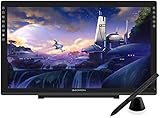
- Please kindly note that GAOMON PD2200 drawing tablet is not a standalone tablet, It must be connected to a laptop or computer to work.
- 【FOR ONLINE TEACHING & MEETING】You can use GAOMON PD2200 pen display tablet for online education and remote meeting. It works with most online meeting programs, like Zoom, and so on. 【FOR DIGITAL ART & CREATION】-- It's not only for beginner but also for professionalists in digital drawing, sketching, graphics design, 3D art work, animation, etc. 【FOR ANNOTATING AND SIGNATURE】--It is also broadly used in annotating and signing file in excel, word, pdf, ppt, etc.
- 【FULL GLASS STYLISH DESIGN】 It’s full glass design with 8 touch keys. No PVC frame on 3 sides.【HD FULL-LAMINATED SCREEN & 130% sRGB/92%NTSC】--Visually the parallax will be deduced to the lowest level. 【WITH AG-FILME PRE-APPLIED】--To protect the PD2200 drawing monitor during long shipping and to avoid bubble when applying film, we applied an anti-glare film in advance in our no dust factory. After you peel off the outside layer protective film, the real film remains on PD2200.
- 【8192 LEVELS PRESSURE & BATTERY-FREE PEN AP32】【TILT SUPPORT FUNCTION】--GAOMON PD2200 Drawing Display Tablet uses 8192 battery-free pen with tilt support function allow you to create your remarkable piece with superior control and stunning fluidity. [PEN HOLDER & PEN NIBS]-- 8 replacement nibs are put inside the pen holder. [8 TOUCH SHORTCUTS]--They are areavailable to customize in GAOMON driver.
- 【1000: 1 CONTRAST RATIO】--Enables more clear and vivid images effects. 【OTHER DISPLAY INFO】--Max Viewing Angle: 89°/89°(H)/89°/89°(V) (Typ.)(CR>10). Display Area: 476.64 x 268.11mm(18.8*10.6 inches). Resonse Time: 25MS. 【HOW TO UNSE OSD MENU】--Longe Press Menu Button for 6 seconds to active the OSD panel. You can adjust the color, brightness, etc here. 【HOW TO ADJUST COLOR】--Go to RGB-Color--Color Effect--Enter ''USER''--Then you can adjust the hue & saturation of RGBCYM here.
HDMI can provide an image without the full pen driver, but pressure sensitivity, shortcut customization, mapping, and calibration require the appropriate driver and software setup.
GAOMON PD2200 specifications
| Feature | Specification | Practical meaning |
|---|---|---|
| Screen | 21.5-inch IPS, 16:9 | Large drawing area with broad viewing angles; not very portable. |
| Resolution | 1920×1080 | Functional for general work, but less crisp than 2.5K displays. |
| Active area | 476.64×268.11 mm | Room for broad strokes and on-screen tool panels. |
| Brightness and contrast | 220 cd/m²; 1000:1 claimed | Suitable for ordinary indoor use; brightness is modest for bright rooms. |
| Color | 92% NTSC claimed; 16.7 million colors, 8-bit | Gamut coverage is not proof of factory color accuracy. |
| Response time | 14 ms | A drawing-oriented specification, not a gaming-focused display claim. |
| Pen | AP32, battery-free EMR | No charging or battery replacement; check compatibility before buying a replacement. |
| Pen input | 8,192 pressure levels; 5080 LPI; ±60-degree tilt; two buttons | Suitable specifications for common drawing workflows; real feel also depends on calibration, software, and pressure curve. |
| Report rate | 226 PPS in the official manual; at least 266 PPS in CNX Software’s review | Published figures conflict, so neither should be treated as definitive. |
| Controls | Eight programmable keys | Can provide shortcuts for undo, zoom, pan, or brush size. |
| Stand | Adjustable from 15–85 degrees | Allows a flatter drawing angle or a more upright position. |
| Connections | HDMI, USB-A, and DC power | Requires multiple cables and a compatible video output. |
| Published OS minimums | Windows 7 or later; macOS 10.12 or later | Historical minimums do not guarantee compatibility with every current release. |
| Size and weight | 522×316×91.5 mm; 3.66 kg with stand, as reported by CNX Software | Desk-oriented rather than easy to carry. |
Specifications are from the official PD2200 manual and CNX Software’s review. Some third-party coverage calls the screen fully laminated, but that feature is not established by the official documentation referenced here.
Display quality: size versus sharpness
The PD2200’s defining advantage is its physical workspace. A 21.5-inch canvas gives you room for a larger portion of an illustration, tool panels, and timelines, and may reduce how often you pan or zoom. That can help with painting, line art, photo retouching, diagramming, and design.
The trade-off is pixel density. Full HD across 21.5 inches is usable, but it looks less detailed than 2560×1440 on a smaller 16-inch display or a newer 22-inch 2.5K model. Fine interface text, delicate line work, and high-resolution references may look less crisp.
The 220 cd/m² brightness and anti-glare surface suit ordinary indoor work, though the surface treatment can affect perceived clarity. The 92% NTSC figure is a manufacturer gamut claim, not a guarantee of color accuracy. The Phonograph reported usable color after calibration, while noting that optimal calibration was more difficult than with some competing displays; read this as reviewer experience, not a laboratory guarantee. See The Phonograph’s review.
AP32 pen performance
The AP32 uses battery-free electromagnetic resonance, has two programmable side buttons, and supports 8,192 pressure levels and ±60-degree tilt. The pressure and tilt specifications suit ordinary illustration and painting, but do not by themselves establish pen feel. Activation force, pressure curve, tracking, corner accuracy, surface friction, and driver behavior matter in practice.
Rank #2
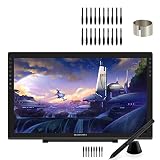
- 【GAOMON PD2200 PEN DISPLAY + 20 PEN NIBS】【FOR ONLINE EDUCATION & MEETING】You can use PD2200 pen monitor for online education and remote meeting. It works with most online meeting programs, like Zoom, and so on. 【FOR DIGITAL ART & CREATION】-- It's not only for amatuer but also for professionalists for digital drawing, sketching, graphics design, 3D art work, animation, etc. 【FOR ANNOTATING AND SIGNATURE】--It is also broadly used in annotating and signing files
- 【WITH AG-FILM PRE-APPLIED】--To protect the PD2200 drawing monitor during long shipping and to avoid bubbles, we applied an anti-glare film in advance in our no dust factory. After you peel off the outside layer protective film, the real film remains on PD2200. 【SCRATCHES ON PD2200 ATFER CERTAIN USE?】--The scratches must be on the film, not on PD2200.
- 【2000: 1 CONTRAST RATIO】--Enables more clear and vivid images effects. 【OTHER DISPLAY INFO】--Max Viewing Angle: 89°/89°(H)/89°/89°(V) (Typ.)(CR>10). Display Area: 476.64 x 268.11mm(18.8*10.6 inches). Resonse Time: 25MS. 【HOW TO UNLOCK OSD MENU KEYS】--Longe Press Menu key for 6 seconds to unlock and use. You can adjust the color, brightness, etc here. 【HOW TO ADJUST COLOR】--Go to RGB-Color--Color Effect--Enter ''USER''--Then you can adjust the hue & saturation of RGBCYM here.
- 【8192 LEVELS PRESSURE & PASSIVE PEN】【TILT SUPPORT FUNCTION】--GAOMON PD2200 Drawing Monitor uses 8192 battery-free pen with tilt support function allow you to create your remarkable piece with superior control and stunning fluidity. [PEN HOLDER & PEN NIBS]-- 8 replacement nibs are put inside the pen holder. [8 SHORTCUT TOUCH KEYS]--8 touch keys areavailable to customize in GAOMON driver.
- 【OS SUPPORT& PROGRAM COMPATIBILITY】--Work with laptops or desktops which run Windows 7/8/8.1 or above, Mac OS 10.12 or above; compatible with most of major drawing software such as Photoshop、SAI version 2、Illustrator、krita、firealpaca、gimp、SketchBook Pro、MediBang Paint Pro, etc. 【TIPS FOR MAC USERS】-- If using mac mojave 10.14 or newer version, remember to put GaomonTablet and TabletDriverAgent into the whitelist of Security & Privacy box.
Use the compatible AP32 stylus; other GAOMON pen models are not necessarily interchangeable. Independent reviewer observations about jitter and parallax apply to that reviewer’s sample, not every unit. The Phonograph’s review provides that testing context.
Quick wins for a faster PC:
Scan for outdated or missing drivers - takes under a minuteDriver Scan →Repair Windows errors before they cause bigger problemsFix Now →Design, stand, and ergonomics
The adjustable stand’s 15–85-degree range supports both a shallow drawing angle and a more upright monitor position. The large chassis and reported 3.66 kg weight suit a stable desk setup, but require room for the panel, stand, and cables.
The eight side-mounted keys can be assigned to undo, redo, zoom, pan, brush size, canvas rotation, or modifier functions. Their placement favors a conventional right-handed setup. A reviewer reported that left-handed use may require rotating the display and stand as well as changing software settings, so the exact setup may vary. See The Phonograph’s review.
Connectivity and setup
The PD2200 is not a one-cable USB-C display. Its standard connections are:
- HDMI: carries video from the computer.
- USB-A: carries pen and control data.
- DC power: powers the display.
A USB-C-only laptop needs an adapter or dock that supports video output; a basic charging or data adapter is not enough. Connecting only USB does not make the PD2200 a portable monitor. The Phonograph reported that included cables may be short for some desk arrangements, so plan cable routing before setup.
Drivers and operating-system support
On June 24, 2026, GAOMON’s download listing included PD2200 packages for Windows 16.0.0.219, macOS 16.2.43, and Linux 16.0.0.49. This shows packages were listed then; it does not guarantee flawless support for every current OS or creative application. Versions can change, so use GAOMON’s official download page and follow its current instructions.
Rank #3

- All-in-One Drawing Tablet: This standalone tablet requires no computer connection—start drawing right out of the box. Perfect for artists on the go, its sleek aluminum back provides a comfortable feel and makes the writing tablet an ideal choice for note-taking and capturing ideas.
- 10.95-inch Full HD Graphic Tablet: The combination of a 10.95-inch screen and FHD+ (1920*1200) resolution ensures a high pixel density of 207 PPI, delivering a sharp visual experience. With a 99% sRGB color gamut, every stroke of your artwork is precisely represented.
- Smooth 90Hz Refresh Rate: The digital drawing tablet features a 90Hz refresh rate, ensuring smooth visuals with no lag. This makes images more vivid, allowing you to immerse yourself in a seamless creation experience. The digital drawing pad also enhances your viewing experience, whether you're watching films or playing games.
- Full-Laminated Anti-Glare Screen: The digital art pad features a nano-etched, anti-fingerprint matte surface that significantly reduces glare and provides a natural paper-like texture for a comfortable drawing feel. The full-lamination technology minimizes parallax, enhancing stroke precision and clarity, while also helping to reduce eye strain during prolonged use.
- High-Precision H-Pencil: The drawing pen features Huion's years of experience in line-drawing algorithms, offering better accuracy and preventing line offset while drawing. With 4096 levels of pressure sensitivity and 60° tilt recognition, it brings you a writing experience that feels just like using a real pencil.
Windows setup
- Connect the display and confirm that HDMI produces an image.
- Download the current PD2200 Windows driver from GAOMON.
- Install it and restart if prompted.
- Open the GAOMON utility, confirm recognition, and map the pen to the correct monitor.
- Test pressure in a compatible application such as Krita or Clip Studio Paint.
Conflicting Wacom, Huion, XP-Pen, or older GAOMON drivers can interfere with pressure and mapping. If problems persist, remove unused drivers and restart before reinstalling the correct package.
macOS setup
Install the current PD2200 macOS package, approve required system permissions, and check display mapping in the driver. The published macOS 10.12 minimum is historical; confirm support for your specific release on GAOMON’s live download page.
Linux setup
Linux packages remain listed. CNX Software tested the PD2200 with Ubuntu 24.04 and Krita, reporting usable basic display and stylus functions and the need for the driver for pressure and customization. The reviewer installed a Debian package and rebooted; that is one tested workflow, not universal instructions for every distribution. Read the reported Ubuntu and Krita test. CNX Software disclosed that its review unit was supplied by GAOMON.
Outdated Drivers Are Slowing You Down
One free scan finds every outdated or missing driver and matches the right update for your exact hardware.Free scan · exact hardware matchWindows Errors? Fix Them Before They Spread
Repair common Windows errors and clear accumulated junk for a smoother, more stable PC - no reinstall needed.Free scan · no reinstallDrawing and application compatibility
CNX Software tested the PD2200 with Windows and Ubuntu and used Krita for pressure-sensitive drawing. The Phonograph reported testing with Photoshop, Illustrator, After Effects, Lightroom, Affinity and Corel applications, Clip Studio Paint, MediBang, Krita, ZBrush, Blender, Acrobat, OneNote, Word, and Excel. These are reported test environments, not guarantees for every current version. OS permissions, driver versions, input settings, and monitor arrangements can change results.
For color-critical work, use measured calibration rather than relying on the 92% NTSC claim alone. Test the exact operating system and applications you plan to use.
Common problems and fixes
No image
- Check that the power adapter is connected and the display is switched on.
- Confirm HDMI is connected to an active video output.
- Enable the external display in the computer’s display settings.
- Check that any USB-C adapter or dock supports video output.
- Try a known-good cable and supported display mode.
Image appears, but pressure does not work
- Confirm the USB data cable is connected, not only HDMI.
- Install the current PD2200 driver and restart.
- Check that the GAOMON utility recognizes the device.
- Reopen the drawing application after the driver initializes.
- Check the application’s tablet-input settings.
- Remove conflicting tablet drivers if the problem continues.
The cursor maps to the wrong monitor
In the GAOMON driver, select the PD2200 as the active display and check the operating system’s monitor arrangement. Reconfigure mapping if you changed display rotation or arrangement after setup.
Rank #4

- Large Active Drawing Space: UGEE M708 V3 graphic drawing tablet features 10 x 6 inch large active drawing space with papery texture surface, provides enormous and smooth drawing for your digital artwork creation, offers no-lag sketch and painting experience
- 16384 Passive Stylus Technology: A more affordable passive stylus technology offers 16384 levels of pressure sensitivity allows you to draw accurate lines of any weight and opacity according to the pressure you apply to the pen, sharper line with light pressure and thick line with hard pressure for artistry design or unique brush effect for photo retouching
- Compatible with Multiple System and Softwares: Powerful compatibility, tablet for drawing computer, perform well with Windows 11/10/8/7, Mac OS X 10.10 or later, Android 10.0 or later, mac OS 10.12 or later, Chrome OS 88 or later and Linux; Driver program works with creative software such as Photoshop, Illustrator, Macromedia Flash, Comic Studio, SAI, Infinite Stratos, 3D MAX, Autodesk MAYA, Pixologic ZBrush and more
- Ergonomically Designed Shortcuts: 8 customizable express keys on the side for short cuts like eraser, zoom in and out, scrolling and undo, provide a lot more for convenience and helps to improve the productivity and efficiency when creating with the drawing tablet
- Easy Connectivity for Beginners: The UGEE M708 V3 offers USB to USB-C connectivity, plus adapters for USB C, ensuring easy connection to various devices and allowing beginner artists to set up quickly and focus on their creativity without compatibility concerns; Whether using a laptop, desktop, chromebook, or tablet, the UGEE M708 V3 provides a seamless experience for those just starting their digital art journey
Jitter, offset, or inaccurate corners
Check driver calibration, rotation, and mapping first. Surface texture and parallax can affect perceived offset, and some edge or corner inaccuracy may be more noticeable than in the center. A reviewer reported low visible jitter and minimal parallax across most of the screen, but that observation is not a guarantee. Persistent severe problems across applications may indicate a cable, driver, or hardware fault.
What’s actually slowing this PC down?
Pick the symptom - the matching free tool is one click away.
GAOMON PD2200 versus alternatives
| Alternative | Why choose it | Trade-off |
|---|---|---|
| Smaller 16-inch 2.5K display | Sharper image, smaller footprint, easier transport. | Less physical canvas and room for palettes. |
| Newer 21.5- or 22-inch 2.5K display | Similar workspace with higher pixel density and potentially newer connections. | May cost more; Linux support varies by model. |
| Wacom Cintiq-class display | Established product ecosystem and accessories. | May cost more for similar screen area. |
| Screenless graphics tablet | Lower-cost and easier to transport. | Requires hand-eye coordination between tablet and separate screen. |
| Standalone tablet computer | Portable and runs apps independently. | Different software ecosystem and potentially higher total cost. |
A smaller 2.5K display such as the HUION Kamvas Pro 16 (2.5K) trades screen area for resolution. The key decision is whether you value physical canvas size or pixel density. Compare current models from HUION, XP-PEN, and Wacom.
Is the PD2200 good value in 2026?
Value depends on the current price. CNX Software reported historical prices of $399 on Amazon and $367 at GAOMON’s store in September 2024; these are not current prices.
At a substantial discount, the PD2200 may suit students, hobbyists, and home studios that prioritize a large workspace. At a price close to newer 2.5K models, its Full HD resolution is a harder compromise to justify. Before buying, check stock, warranty terms, regional support, and AP32 pen or nib availability. Driver listings observed in June 2026 are useful evidence of continued availability, not a promise of indefinite support.
Who should buy the GAOMON PD2200?
- Desk-based artists who want a large drawing surface.
- Users upgrading from a smaller pen display.
- Painters and illustrators who prefer workspace over maximum sharpness.
- Buyers who can accommodate HDMI, USB-A, and external power.
- Linux users willing to install and troubleshoot vendor drivers.
- Buyers who find it at a substantial discount and confirm warranty and accessory support.
Who should skip it?
- Traveling artists or people with limited desk space.
- USB-C-only laptop users seeking a simple one-cable setup.
- Artists who prioritize crisp text, detailed line art, or high-resolution references.
- Color-critical professionals who require independently verified accuracy.
- Anyone expecting wireless or standalone operation.
- Buyers requiring guaranteed long-term parts availability or enterprise-grade support.
Final verdict
The GAOMON PD2200’s case remains straightforward: a large, stable drawing workspace, battery-free pen, adjustable stand, and useful controls. It can be a sensible budget choice when screen area matters more than pixel density.
The Tool Desk
Outbyte Driver Updater FREEFix the driver behind crashes, sound loss and screen glitchesFind Drivers →Outbyte PC Repair FREERepair Windows errors before they cause bigger problemsFix Now →Its Full HD resolution, size, and HDMI/USB/power arrangement are meaningful compromises. Buy it when the price is well below comparable 2.5K displays and you accept a fixed-desk workflow. Choose a newer 2.5K display for sharper detail, or a standalone tablet for computer-free painting.
Best Value

- SPECIFICITY ---ArtPaint AP32 is compatible for GAOMON PD2200/S620/S630/M10KPRO/M106KPRO/M1220/M1230 Tablet ONLY. It is not compatible with Phone/ PC/ Pad/ Other Brand graphics tablets, etc.
- BATTERY-FREE STYLUS---improves ergonomics and reliability: Charging unnecessary. Without a battery, the stylus is lighter in weight and minimizes your grip effort, reduces stress to your hand and wrist, provides a more comfortable and natural feel to the hand.
- 8192 LEVELS OF PEN PRESSURE SENSITIVITY ---provides more accurate and responsive pen-cursor movement, makes your drawing line smooth and natural.
- PROGRAMMABLE BUTTON--- There are two customize express keys on the pen. They can make your work flow quicker and largely enhance work efficiency. ·The pen tip and pen buttons can work together to realize certain functions.
- PEN NIB & CLIP -- There are 8 Replacement nibs and a pen nib clip come with the pen for replacement. You can easily replace the pen nibs when they are worn out.
FAQ
Can the GAOMON PD2200 work without a computer?
No. It is a pen display that shows a connected computer’s output; it does not run drawing applications independently.
Does the PD2200 connect with one USB-C cable?
No. It uses HDMI for video, USB for pen and control data, and external DC power. A USB-C adapter or dock must support video output.
Is Full HD enough on a 21.5-inch drawing display?
It is functional for general drawing, but less crisp than 2.5K on a similarly sized or smaller display. Fine text and detailed line work are more likely to reveal the difference.
Which pen does the PD2200 use?
It uses the AP32 battery-free EMR stylus. Confirm compatibility before purchasing a replacement, since GAOMON pens are not necessarily interchangeable.
Does the PD2200 support Linux?
GAOMON listed a Linux driver package in June 2026, and CNX Software reported testing it with Ubuntu 24.04 and Krita. Check the current driver page and your distribution’s compatibility before buying.
Quick Recap

Product prices and availability are accurate as of the date/time indicated and are subject to change. Any price and availability information displayed on Amazon at the time of purchase will apply.




