Outdated Drivers Are Slowing You Down
Quick wins for a faster PC:
Clear out junk files and repair common Windows errorsFree Scan →Fix the driver behind crashes, sound loss and screen glitchesFind Drivers →Repair Windows errors before they cause bigger problemsFix Now →One free scan finds every outdated or missing driver and matches the right update for your exact hardware.
Scan My Drivers Free →Free scan · exact hardware match

ThatPainter is reader-supported. When you buy through links on our site, we may earn an affiliate commission. Learn More
There is no single best camera for recording art: choose a document camera for flat, computer-based demonstrations, a mirrorless hybrid for flexible studio footage, or a dedicated studio camera for live production. Decide what you need to frame and how you will record before choosing equipment. No art-desk head-to-head camera test is available in the research for this guide.
Quick comparison
| Camera path | Best suited to | Workflow | Key consideration |
|---|---|---|---|
| Document camera, such as the OKIOCAM S2 | Flat pages and overhead art demonstrations | USB connection to a computer | Check that the work fits the camera’s capture area; the maker’s page gives inconsistent area and sensor details. |
| Mirrorless hybrid, such as the Panasonic LUMIX S5IIX | Creators moving between overhead work, studio views, and other video | Camera-recorded or hybrid production with interchangeable lenses | Plan for a suitable lens, safe mounting, power, storage, and a workflow you can operate. |
| Dedicated studio camera, such as Blackmagic Studio Camera models | Live switching, camera control, or multi-camera production | Live-production connections and recording options vary by model | More production-oriented features may not help a solo artist making a fixed shot. |
1. Document camera for flat artwork demonstrations
A document camera is a practical option when the subject is a page or other flat work and the lesson runs through a computer. OKIOLABS describes the OKIOCAM S2 as both a USB document camera and a webcam, and specifically mentions modeling art techniques.
The manufacturer lists video modes of 1920×1440, 1920×1080, and 1280×720, with recording up to 30 fps. Its product page is inconsistent about the maximum recording area: marketing copy and the technical table give different dimensions. The page also conflicts on whether the sensor is 3MP or 5MP, so verify the details with the manufacturer rather than relying on either figure.
Before choosing this route, check that the page or artwork fits the framing you need and that the computer-based workflow suits your lesson. The product page lists a built-in microphone, but the available evidence does not assess its sound quality.
Rank #2

- Beginner-Friendly Mirrorless Power: The Canon EOS R100 offers an accessible entry into mirrorless photography with a 24.1MP APS-C CMOS sensor and DIGIC 8 image processor, delivering vibrant, detailed images and smooth video. Designed for everyday shooters and first-time DSLR users, this compact camera balances quality and ease-of-use, providing auto scene modes and simplified menu navigation for a seamless learning curve.
- Versatile RF-S 18-45mm Lens Included: This kit comes with the Canon RF-S 18-45mm f/4.5-6.3 IS STM lens, perfect for general-purpose shooting. From family portraits and daily snapshots to travel landscapes and vlogs, this zoom lens delivers sharp results and smooth autofocus. Built-in image stabilization helps reduce shake, making handheld photography more stable and enjoyable.
- Dual Pixel CMOS Autofocus for Sharp Results: Canon’s reliable Dual Pixel CMOS AF ensures fast and accurate focusing, especially when tracking people, faces, or stationary subjects. The system covers a wide portion of the frame and adjusts effortlessly between stills and video—ideal for capturing life’s moments as they happen, without missing a beat.
- Key Features: 24.2MP APS-C CMOS Sensor, DIGIC 8 Image Processor, 4K 24p Video with Crop, Full HD 60p, Dual Pixel CMOS AF with 143 AF Zones, 6.5 fps Electronic Shutter, 2.36m-Dot OLED EVF, 3" 1.04m-Dot LCD Screen, Wi-Fi and Bluetooth with SD Card Slot, RF-S 18-45mm f/4.5-6.3 IS STM Lens,
2. Mirrorless hybrid for flexible studio footage
An interchangeable-lens mirrorless camera is the flexible option when you want to switch between overhead artwork, a talking-head view, studio scenes, and other video. The Panasonic LUMIX S5IIX is identified in a 2026 art-camera guide as a video-oriented hybrid. That guide also discusses the Sony α6700, Panasonic GH7, and Nikon Z6III for different priorities; these are general review recommendations, not results from art-desk tests.
A hybrid camera may offer more choices, but that does not make it the best fit for every artist. A fixed overhead shot may not need advanced recording formats. Consider the lens, camera position, secure mount, lighting, power, storage, and audio as parts of the setup—not as problems a camera body solves by itself.
3. Dedicated studio camera for live production
Blackmagic Design describes its Studio Camera line as designed for live production. The Studio Camera 4K Plus G2 includes a Micro Four Thirds lens mount, HDMI and 12G-SDI connections, a 7-inch display, and USB-disk recording. The Pro G2 adds features including XLR audio and 10G Ethernet. The 6K Pro uses a larger sensor and EF mount and includes remotely controllable ND filters.
Rank #3

- ALL-DAY COMFORT WITHOUT NECK STRAIN — A wide, padded camera strap engineered for long shoots. The cotton-weave shoulder strap spreads weight evenly across neck and shoulders, ending the dig and slip you get from thin OEM webbing.
- FITS THE CAMERA YOU ALREADY OWN — Universal camera neck strap for DSLR, mirrorless, film and digital cameras across every major brand. Compatible with Canon, Nikon, Sony, Fujifilm, Kodak, Olympus, Minolta, Polaroid, Panasonic and more.
- WEAR IT NECK, SHOULDER OR CROSS BODY — Adjustable from a snug chest carry to a relaxed crossbody camera strap, the same strap fits petite frames and tall photographers. Quick release clips snap the camera on and off in seconds, no rethreading.
- REINFORCED LEATHER ENDS, BUILT HEAVY-DUTY — Premium leather ends and dense stitching hold full-size DSLR bodies with telephoto lenses and full-grain mirrorless rigs. The retro embroidered cotton weave stays soft, breathable and weather-resistant.
- PERSONALIZED PHOTOGRAPHER GIFT, BACKED FOR LIFE — A custom camera strap that arrives gift-ready, with vintage designs for women, men, kids and pros. Every Art Tribute camera strap is covered by our lifetime warranty — if it fails, we replace it.
These models may suit a studio that needs live switching, camera control, or multi-camera production. They are not automatically the right choice for a solo artist who only needs a locked-off process video. Match the connections and production features to the workflow you actually use.
Choose a setup around the work
- Identify the shot. Decide whether you are showing flat paper, moving between studio views, or producing a live multi-camera lesson.
- Check the artwork and framing. Measure the work and determine the working distance and view you need before selecting a camera or lens.
- Choose the recording workflow. Decide whether you want a USB computer demonstration, camera-recorded footage, or live-production connections.
- Plan the mount and lighting. Make sure the camera can be held safely in the desired position, and consider reflections when recording glossy or otherwise reflective media.
- Plan audio separately. For spoken lessons, decide how you will capture clear narration. The available sources do not compare the sound quality of the listed cameras or their microphones.
What the evidence does—and does not—show
The OKIOCAM and Blackmagic details above are manufacturer-stated product information. The mirrorless-camera recommendations come from secondary camera guides, not controlled comparisons for recording art from an overhead desk. No cameras, lights, mounts, or glare-control products were physically tested for this article, and the reviewed sources did not identify a relevant, attributable statistic to report.
What’s actually slowing this PC down?
Pick the symptom - the matching free tool is one click away.
FAQ
What is the best camera for recording drawing?
For flat-page drawing demonstrations that run through a computer, a document camera such as the OKIOCAM S2 is one option. Check the actual framing and work size before buying. Choose a mirrorless hybrid if you also need other studio views or more flexible video production.
Rank #4
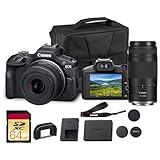
- Capture every perspective with the Canon EOS R100 mirrorless camera kit, featuring two versatile lenses — the RF-S 18-45mm f/4.5-6.3 IS STM for wide-angle to standard shots and the RF 75-300mm f/4-5.6 telephoto lens for long-distance subjects. This combination gives beginners and enthusiasts a complete setup for landscapes, portraits, travel, sports, and wildlife.
- High-Resolution Imaging with APS-C Sensor - Equipped with a 24.2MP APS-C CMOS sensor and DIGIC 8 image processor, the EOS R100 delivers crisp, detailed images with beautiful color reproduction. The large sensor allows for impressive background blur, even in low light situations, enhancing portraits and artistic shots.
- Canon’s renowned Dual Pixel CMOS AF ensures accurate and responsive focusing across the frame, perfect for moving subjects. Eye Detection AF keeps your portraits sharp by automatically tracking your subject’s eyes, even during candid or fast-paced situations. This intelligent system makes photography more intuitive, reducing the chance of missed focus and allowing photographers of all levels to capture moments with confidence and ease.
- Weighing less than traditional DSLR systems, the EOS R100 is compact and easy to carry, making it perfect for travel, events, and daily use. Its comfortable grip and intuitive controls allow new photographers to get started quickly while offering flexibility for growth. Combined with the interchangeable RF lens system, the camera supports creative expansion for users ready to explore more advanced photography and videography, all while staying lightweight and portable.
Should I use a document camera or a mirrorless camera for art videos?
A document camera is designed for showing flat work through a computer. A mirrorless hybrid is more flexible across different shots, but calls for a suitable lens and more planning around mounting, power, storage, and recording workflow.
When does a studio camera make sense for art lessons?
Consider one when your studio needs live switching, camera control, or a multi-camera workflow. For a single, fixed recording, those production connections may not be necessary.
Is a camera’s built-in microphone enough for art lessons?
The available product information does not establish the sound quality of the built-in microphones. If narration matters, plan and test audio for your specific recording setup instead of assuming the camera will deliver the sound you need.
Recommended Free Tools
Quick Recap

Product prices and availability are accurate as of the date/time indicated and are subject to change. Any price and availability information displayed on Amazon at the time of purchase will apply.




