Crashes, No Sound, or Screen Glitches?
Quick wins for a faster PC:
Clear out junk files and repair common Windows errorsFree Scan →Fix the driver behind crashes, sound loss and screen glitchesFind Drivers →Random freezes, missing sound and display glitches usually trace back to one bad driver. Find and replace yours safely.Free scan · under a minute
PC Slower Than It Used to Be?
A free scan shows the junk files, broken settings and background clutter dragging Windows down - then fixes them in one click.Free scan · Windows 10 & 11
ThatPainter is reader-supported. When you buy through links on our site, we may earn an affiliate commission. Learn More
Adobe Express is the most direct starting point for an editable tarpaulin design template. Its tarpaulin templates let you replace text, fonts, colors, layouts, graphics, icons, and images, then resize the finished design. Canva is a useful broader banner-design alternative, but the cited Canva material does not establish a dedicated tarpaulin template collection. Whichever editor you use, obtain the printer’s exact dimensions, bleed, margins, and file format before finalizing the artwork.
Which editable tarpaulin template should you use?
| Criterion | Adobe Express | Canva |
|---|---|---|
| Template focus | Dedicated tarpaulin templates and guidance | General banner templates; tarpaulin-specific availability is not established |
| Editable content | Text, fonts, colors, layout, graphics, icons, and images | Banner elements can be edited in the design editor |
| Custom dimensions | Resize the project and ask the printer about required custom sizes | Use the dimensions required by your print provider; generic banner settings may not match |
| Export information cited | Save the finished project and create a shareable template | Download as PDF, JPG, or PNG for printing or sharing |
| Print controls | Margin and bleed controls are available | Its 0.125-inch (3.175-mm) default bleed applies to certain Canva products; outside printers may require different settings |
Choose a template for the message and viewing distance, not just its decorative style. Adobe lists conferences, events, graduations, and advertising campaigns as possible uses. A blank canvas is preferable when a prebuilt layout forces awkward cropping or leaves too little room for required information.
What size should a tarpaulin be?
There is no universal tarpaulin size. Adobe gives 6 ft × 3 ft, 4 ft × 2 ft, and 8 ft × 4 ft as common examples, but those figures are not a substitute for the printer’s specification. The final dimensions depend on the display location, viewing distance, finishing method, and the equipment used by the print shop.
Confirm these measurements before designing
- Finished width and height, in the unit your printer requests.
- Whether the stated dimensions are the visible finished size or include hemming, pockets, eyelets, or other finishing.
- Required bleed and the printer’s safe margin for text, logos, and faces.
- Preferred color mode, resolution, and accepted file types.
Keep the printer’s written specifications with the project. If the shop changes a dimension later, resize the approved design rather than stretching an exported image without checking text and image quality.
How to edit a tarpaulin design template
- Get the print specification. Ask the actual printer for finished dimensions, bleed, safe area, resolution, color requirements, and the preferred export format. Adobe specifically advises asking the printer about custom sizes.
- Open the editor and choose a starting point. In Adobe Express, open the tarpaulin template area, select a suitable layout, or start from scratch. In Canva, search its banner templates and treat the result as a general banner starting point.
- Replace the message. Put the most important information first: event name, offer, date, location, or call to action. Remove sample copy completely, including hidden or tiny text layers.
- Set typography for distance. Use large, high-contrast type and a short message. Check the design at the scale and distance where people will actually read it; decorative fonts and long paragraphs quickly lose legibility on outdoor signage.
- Replace imagery and graphics. Use high-resolution images suitable for the large canvas. Inspect logos for unwanted backgrounds, thin lines, and low-resolution artifacts after enlarging them.
- Apply the approved dimensions. Resize the project to the printer’s width and height. Recheck line breaks, image crops, alignment, and the position of every important element after resizing.
- Check margins and bleed. Keep essential content inside the safe margin. Use Adobe Express margin and bleed controls when working there. If using Canva, do not assume its 0.125-inch (3.175-mm) default bleed applies to an outside print job; follow that provider’s instructions instead.
- Export and obtain confirmation. Download the file type the printer requested, then send the export to the shop for a preflight check before production. Keep an editable copy in case the printer requests a correction.
How to make a large tarpaulin easy to read
Build a clear information hierarchy
Give the headline the strongest visual weight, then supporting details, then contact or action information. One dominant message is easier to understand than several competing announcements. Align related details and leave deliberate empty space around the headline and logo.
#1 Best Overall
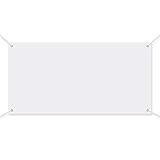
- DIY Handwriting: the blank banner is practical and nice DIY supply for you to write the words you want to express, can be written or drawn some special patterns, words, slogans, marks and DIY craft by yourself
- Stable material: large banners sign is made of quality polyester oxford cloth material, durable and not easy to break, can serve you for a long time
- Simple to use: the blank banner can be hung on wall, window, fence, long table, roof, school road and other places, just use your imagination to add color and painting on it, suitable for both indoor and outdoor decorations
- Big size: the large white banner measures approx. 1 x 1.8 m/ 3.3 x 6 ft, general size fits for most place; Designed with 4 round holes around 4 corners and is equipped with a 6-meter-long rope for easy hanging
- Package included: you will get 1 piece large blank banner and 1 piece 6-meter-long rope for easy assemble
Design for the viewing environment
A roadside banner, stage backdrop, storefront sign, and indoor event banner are viewed at different distances and angles. Prioritize contrast and simple shapes when viewers will be moving or far away. Check that important text is not placed near an edge, eyelet, fold, or area likely to be covered by finishing.
Inspect the actual export
Review the downloaded PDF, JPG, or PNG rather than relying only on the editor canvas. Look for missing fonts, substituted images, unexpected transparency, soft logos, accidental crop marks, and color changes. A file that looks correct in the editor can still fail a printer’s preflight if its dimensions or bleed are wrong.
Independent reader supportYour contribution helps us test, update, and keep practical guides available for everyone.Preparing the file for a printer
Send the printer one clearly named final file and identify the intended finished size in the message. Include the editor’s editable source only if the shop requests it. Ask the printer to confirm that the file passes its preflight before you approve production.
Quick Recap
Best Value

- Standard solid single steel fork
- Roller with high quality smooth ball bearings
- Non-stick and heat-resistant silicone roller
Rank #4
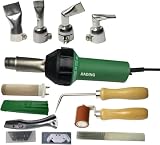
- [Specification]: Voltage: 110V; Frequency: 50/60Hz; Power: 1600W; Adjustable temperature: 20-600 degree continuously adjustable; Air flow: MAX 180L/min; Air pressure: 2600Pa; Noise: <65db; Weight: about1.35kg.
- [Advantage]: Equipped with hot protection tube and electronic heating protection system, more durable and reliable, portable design, widely used in chemical tanks, plumbing fittings, waterproof membrane and some repair welding in impermeable liner construction site.
- [Application]: Repairing tarpaulins and tents Sealing advertising banners; Processing PVC Vinyl flooring coverings and linoleum; Welding PVC TPO EPDM single ply roofing membranes;
- [Package include]: 1pcs 110V 1600W heat gun; 1pcs 40mm flat nozzle; 1pcs 20mm flat nozzle; 1pcs 90 degree flat nozzle; 1pcs 60 degree flat nozzle; 1pcs heat element with tube; 1pcs 40mm silicone roller; 10pcs blades; 1pcs dolphin knife with handle; 10pcs blades; 1pcs black brush; 1pcs seam tester.
- [Warranty]: One year warranty, not include the heat element. Please contact us for any problem!
Rank #3
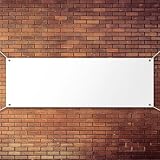
- DIY Handwriting: the blank banner is practical and nice DIY supply for you to write the words you want to express, can be written or drawn some special patterns, words, slogans, marks and DIY craft by yourself
- Stable material: large banners sign is made of quality polyester oxford cloth material, durable and not easy to break, can serve you for a long time
- Simple to use: the blank banner can be hung on wall, window, fence, long table, roof, school road and other places, just use your imagination to add color and painting on it, suitable for both indoor and outdoor decorations
- Big size: the large white banner measures approx. 0.6 x 1.8 m/ 2 x 6 ft, general size fits for most place; Designed with 4 round holes around 4 corners and is equipped with a 6-meter-long rope for easy hanging
- Package included: you will get 1 piece large blank banner and 1 piece 6-meter-long rope for easy assemble
Rank #2

- DIY Handwriting: the blank banner is practical and nice DIY supply for you to write the words you want to express, can be written or drawn some special patterns, words, slogans, marks and DIY craft by yourself
- Stable material: large banners sign is made of quality polyester oxford cloth material, durable and not easy to break, can serve you for a long time
- Simple to use: the blank banner can be hung on wall, window, fence, long table, roof, school road and other places, just use your imagination to add color and painting on it, suitable for both indoor and outdoor decorations
- Big size: the large white banner measures approx. 0.6 x 1.2 m/ 2 x 4 ft, general size fits for most place; Designed with 4 round holes around 4 corners and is equipped with a 6-meter-long rope for easy hanging
- Package included: you will get 1 piece large blank banner and 1 piece 6-meter-long rope for easy assemble
Final handoff checklist
- Finished width and height match the printer’s written specification.
- Bleed and safe margins follow that printer’s requirements.
- All text, dates, prices, names, phone numbers, and URLs have been proofread.
- Images and logos remain sharp at the final size.
- The export format, resolution, and color settings match the shop’s request.
- No sample text, unused layers, guides, or accidental borders remain.
- The printer has confirmed the file before production.
Common mistakes to avoid
- Assuming a standard size: Example sizes such as 6 ft × 3 ft do not replace a shop’s finished-size specification.
- Using a general banner preset without checking: Canva’s banner guidance is not proof that a particular preset is suitable for tarpaulin production.
- Putting content at the edge: Trimming and finishing can remove or obscure edge content; use the printer’s safe area.
- Relying on default bleed: Canva’s 0.125-inch setting applies to certain Canva products, while an outside provider may specify another value.
- Scaling at the last minute: Changing dimensions after export can distort type and imagery. Resize the editable project, then inspect and re-export.
- Designing like a flyer: Dense paragraphs and small details are difficult to read on a large banner, especially from a distance.

Product prices and availability are accurate as of the date/time indicated and are subject to change. Any price and availability information displayed on Amazon at the time of purchase will apply.




