Crashes, No Sound, or Screen Glitches?
What’s actually slowing this PC down?
Pick the symptom - the matching free tool is one click away.
Outbyte Driver Updater · freeRandom freezes, missing sound and display glitches usually trace back to one bad driver. Find and replace yours safely.
Find the Right Drivers →ThatPainter is reader-supported. When you buy through links on our site, we may earn an affiliate commission. Learn More
Appy Pie Design’s AI-powered Chat Editor lets you start with a prompt and refine a design through further instructions, including changes to colors, layouts, and design elements. That is user-directed customization of a design—not evidence that the service automatically personalizes creative for each viewer based on behavior or customer data.
Current product pages use the Pixazo name, while an official Appy Pie Design page still describes the older-branded service. Product features and plan details can change, so check the current pages and terms before choosing a workflow or using outputs commercially.
Appy Pie Design and Pixazo: identifying the product
The current Pixazo site presents a range of AI creative tools. An official Appy Pie Design page retains the Appy Pie Design name and describes the product within Appy Pie’s no-code ecosystem, including connections to Appy Pie Automate, Website Builder, and App Builder. The naming difference matters when looking for product information: current design materials may appear under Pixazo, while some official information remains under Appy Pie Design.
Recommended Free Tools
Pixazo describes tools for image creation and editing, video and animation, audio, photo cleanup and enhancement, social content, moodboards, and storyboards. Its stated workflow begins with text, an image, or a video, then uses AI to create or enhance content before users download or share it. These are vendor-described capabilities, not independently tested performance results.
#1 Best Overall

- [Wide Compatibility]-This stylus pen for touchscreen is for capacitive screen electronic product and is specially designed for Android device on the market.The iphone stylus pen is suit with suit with XiaoMi/Huawei/Vivo/Lenovo/Pixel/iPhone 6-15 ,Amazon Fire Series tablet and more other android devices. Some compatible device models- Galaxy Tab A9/A9+/S9/S23 FE/S24/S25/Z Fold5/Z Fold 6/A13 /A25/ (Note: This lenovo pen is not compatible with Microsoft devices,Apple iPad,Kindle devices,Windows,Laptop,S7+, tab s4,S10 and One note app. Please check your device model before placing an order.
- 【Smart Touch Switch & Power Save】-The touch screen pen stylus is easy to use: just double-tap the top of the android tablet capacitive stylus pen . There's no need for drivers or bluetooth settings. This iphone pen uses the USB-C charging port,just 35 minutes of charging will give you 8-10 hours of operation.Our digital pen has smart energy-saving feature, automatically turn to "sleep mode" after 5 minutes of inactivity and avoid unnecessary battery consumption.
- 【High Precise and Sensitive】-The pom tip of the stylist pen is wear-resistant,designed for professionals who need high precision and accuracy,is a great feature for anyone who uses a stylus pen android for designing work or drawing. They are very smooth and high responseon the screen, without lag or jumping.Luntak android stylus pen also a great gift for family and friends who love to create.
- 【Magnetic Absorption】-The magnetic feature is a great convenience for users who want to keep their samsung pen close at hand and prevent it from getting lost,more portable and more easier to organize.(Note: The magnetic function requires a built-in magnet on your tablet; otherwise, it cannot be attached. The magnetic surfaces of other tablets may not be a perfect fit.)
- 【What You Get】-Our tablet pens for touch screen set includes:1* stylist pens,3* Replaceable POM Tips,1* Type-C charging cable,1* User Manual.We support 1-year product warranty and 1-month free return and exchange policy for our pen with stylus tip. If you encounter any issues, please don't hesitate to contact us. Please note the apple pens does not support palm rejection, so avoid touching the screen with your hands.Does not support pressure sensitivity.
What “personalization” means here
For this product, the evidence supports tailoring a design through a user’s prompt and follow-up edits. It does not establish automated audience segmentation, behavioral targeting, or creative that changes for individual customers based on browsing or purchase data.
| Capability | What it means | What the reviewed material supports |
|---|---|---|
| Prompt-led customization | Describe a design direction and refine it through subsequent inputs. | The Appy Pie Design page describes an AI-powered Chat Editor for prompt-based refinement. |
| Design adjustments | Change colors, layouts, or design elements. | Described by Appy Pie Design as Chat Editor capabilities. |
| Multiple creative formats | Work with images, video, animation, audio, social content, and planning assets. | Described on Pixazo’s features page. |
| Behavior-based personalization | Automatically adapt a creative for a viewer using their behavior or customer data. | Not established by the reviewed product materials. |
Appy Pie’s product page says: “Our AI-powered Chat Editor feature supports seamless design customization in real time.” This is product marketing language, not an independent assessment of output quality or performance.
Rank #2

- Wide Compatibility for Multiple Devices: Works seamlessly with Samsung, iOS, Android, Chromebook, Smartphone, and other touchscreen devices. No drivers are needed- simply open and play, ensuring compatibility with a variety of tablets and smartphones. No Charging Required, Ready Anytime.
- High-Precision Touch for Smooth Writing & Drawing: Featuring advanced capacitive technology, this stylus pen offers high sensitivity and precision, delivering a smooth, real-pen experience perfect for writing, sketching, note-taking, and more.
- Ergonomic Design for Comfortable Grip: Crafted with a lightweight and durable body, the stylus is designed for long periods of comfortable use. Whether you’re creating, studying, or performing everyday tasks, it ensures a pleasant grip.
- Scratch-Resistant & Durable, Protects Your Screen: Equipped with a soft, high-quality Disc tip that ensures smooth touch without scratching the screen, keeping your device’s display in pristine condition while providing a seamless user experience.
- A great gift: Get 3 different colors of styluses at an unbeatable price instead of a high-priced pencil. You can share these stylus pens with your friends or family.
How to tailor a design with prompts and edits
- Define the design task. Identify the asset you need and its purpose, such as a social graphic, image, video, or storyboard.
- Describe the intended audience and visual direction. Include the relevant message, tone, colors, layout preferences, and other details you want reflected.
- Start with an input. Pixazo describes workflows that can begin with text, an image, or a video.
- Review the first result. Treat it as a draft; check whether it communicates the intended message and follows your visual direction.
- Give focused follow-up instructions. Ask for specific changes to colors, layouts, or design elements rather than relying on a vague request to make it better.
- Check the final output before sharing. Verify that text, brand details, and any claims are correct and that the result suits its intended use.
What the available material does not establish
The reviewed pages do not establish that the tool connects to customer records to segment audiences, automatically changes creative for each viewer, or selects winning variants through controlled performance testing. If you need those capabilities, confirm them directly in current product documentation before relying on the service for that purpose.
Pixazo’s homepage also demonstrates a multistep workflow that generates images, turns still images into clips, creates a soundtrack, and assembles video and audio. This is a vendor demonstration; it does not establish that every user will get the same result or that the workflow has been independently evaluated.
Rank #3
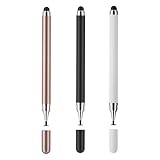
- 【Compatibility and Multi-Purpose】Stylus Pen for Touchscreen, suitable for touch screen devices (for Apple, iPad, Samsung, Lenovo, Xiaomi, nintendo switch 2, etc., and also compatible with major operating systems, such as: Google, Android, Microsoft, etc.)
- 【Lightweight and Portable】Our stylus pen is made of lightweight plastic. This stylus pen is 5.2 inches long, making it easy to hold yet portable. They react well and have no scratches on the display
- 【2-IN-1 Design】The Tablet pen has different tips at each end. One end is a disk tip, which is more precise and sensitive when taking notes and drawing. The other end is a durable silicone tip for surfing or scrolling through websites, which effectively protects the screen from fingerprints or smudges
- 【Battery-free】This capacitive stylus pen can be used anytime, anywhere without charging. You can simply pick up the stylus and start writing, drawing and playing, it's that simple
- 【Say goodbye to hand fatigue】The stylus pen for touchscreen is used to replace your fingers on a touchscreen, this will make the operation of the phone simpler and more effortless, reduces hand fatigue during long writing, sketching, or gaming sessions, also can avoid rubbing your fingers and leaving fingerprints on touchscreen devices
Pricing and commercial-use considerations
At the time of the research review, Pixazo’s pricing page listed a seven-day trial with 100 bonus credits, Pro Monthly at $15 per month, and Pro Yearly at $120 per year. It stated that trial outputs do not include commercial rights and may be showcased on the marketplace, while Pro subscribers have full commercial rights.
Prices, credit allowances, plan terms, and rights can change. Check the live pricing page and applicable terms before subscribing or using an output in advertising, client work, or another commercial context. Do not assume a trial output is cleared for commercial use.
Rank #4

- Stylus Pen for Touchscreen: No Bluetooth or charging needed—use instantly on any capacitive touch screen (iPad, iPhone, Android, Samsung). Dual rubber tips (5mm/6.6mm) ensure precise control for writing, drawing, or gaming. Lightweight aluminum body with vibrant colors.
- Precision & Comfort Redefined: High sensitivity rubber tip glides smoothly without lag or scratches. Ergonomic design reduces wrist strain for extended use. Compatible with tablets, phones, and Laptops.
- Dual-Tip Flexibility: Switch between 0.20” and 0.26” rubber nibs for detailed art or bold notes. Anti-scratch, fingerprint-resistant tip. Pretty bright metal colors inspire creativity.
- Effortless Multi-Device Compatibility: Works seamlessly on Apple, Samsung, Android, and more. No apps or setup—just pick up and write. Perfect for notes, games, or gifts—ready to spark ideas instantly. Replaceable tips included for long-term use.
- Creative Freedom, Anywhere: Lightweight aluminum stylus with natural grip. Includes 6 replaceable tips and 3 color stylus pens. Perfect for sharing with friends, family, or colleagues, this bundle ensures you’re always equipped to capture inspiration.
How to evaluate whether it fits your work
Before adopting the tool, test a representative task and compare the result against your requirements. Consider the degree of prompt and manual control, supported formats and editing tasks, consistency of colors and visual style across outputs, trial and paid-plan rights, credit limits and recurring cost, and the export or publishing workflow.
These are practical evaluation criteria, not evidence that Pixazo is better than a competing service. Assess them against your own workflow and verify current product terms.
Best Value

- The round head of the stylus is made of silicone, which is used for mobile phones and tablets.
- The stylus pen tip is made of hard plastic, which can only be used for resistive screens such as GPS and navigator.
- The round head and pointed head of the stylus are compatible with all the capacitive and resistive screens at present.
- SILICONE ROUND HEAD, FOR MODERN DEVICES: The soft, conductive silicone round head is designed specifically for all capacitive touch screens, including iPad, iPhone, Samsung Galaxy, Android tablets/smartphones, and other similar devices. Perfect for scrolling, tapping, and general navigation.
- PLASTIC TIP, FOR SPECIFIC RESISTIVE SCREENS ONLY (PLEASE NOTE): The fine plastic tip is ONLY compatible with older resistive touch screens, such as those found on some GPS devices, Nintendo DS/3DS, and certain POS machines. It will NOT work on capacitive screens like iPhones, iPads, or modern smartphones/tablets.
FAQ
How can AI tailor a design to my brand?
Give the tool a prompt that describes the design direction you want, then use follow-up instructions to refine elements such as colors and layout. Review each result to ensure it actually matches your brand; the reviewed materials do not establish guaranteed brand consistency.
Does Appy Pie Design automatically personalize designs for each customer?
The reviewed material supports user-directed design customization through prompts and edits. It does not establish automatic personalization based on an individual customer’s behavior, browsing history, or purchase data.
Is Appy Pie Design the same product as Pixazo?
Current design product pages use Pixazo branding, while an official Appy Pie Design page retains the older name and describes related design tools. Check the current product pages to identify the service and features available.
Do these 3 things before closing this tab:
1Repair Windows errors before they cause bigger problems2Scan for outdated or missing drivers - takes under a minute3Clear out junk files and repair common Windows errorsCan I use designs made during the trial commercially?
The pricing page reviewed for this article says trial outputs do not include commercial rights and may be showcased on the marketplace. Verify the live pricing page and terms before using any output commercially.
What does Pixazo cost?
At the research review, the pricing page listed Pro Monthly at $15 per month and Pro Yearly at $120 per year, along with a seven-day trial and 100 bonus credits. These details can change; confirm current prices and terms on the live pricing page before purchase.
Quick Recap

Product prices and availability are accurate as of the date/time indicated and are subject to change. Any price and availability information displayed on Amazon at the time of purchase will apply.




