What’s actually slowing this PC down?
Pick the symptom - the matching free tool is one click away.
ThatPainter is reader-supported. When you buy through links on our site, we may earn an affiliate commission. Learn More
Renderforest is the strongest all-around choice for finished kinetic-typography videos, intros and branded promos. Choose Jitter when timing, easing, Figma import or Lottie export matter more than templates. Canva is quickest for simple animated social graphics, while CapCut is built around TikTok, Reels, Shorts and animated captions. VEED and Kapwing are practical browser editors for subtitle-heavy footage, Animaker turns prompts into character explainers, FlexClip supplies fast preset effects, and OpusClip automatically animates captions on existing clips.
As an Amazon Associate I earn from qualifying purchases.
For painters and art creators, the right pick depends on the asset you are making: a gallery-announcement title card needs different controls from captions over a studio timelapse. The comparison below separates finished-video templates, design-system animation, social graphics, caption overlays and prompt-built explainers so you can choose without treating every generator as interchangeable.
Recommended Free Tools
Which animated text generator is best in 2026?
There is no single winner for every job. Renderforest leads when you want a polished video from a template; Jitter offers the most deliberate control over kinetic type; Canva minimizes setup for social posts; CapCut accelerates short-form caption work; VEED and Kapwing focus on browser-based subtitles and overlays; Animaker is aimed at explainer scenes; FlexClip favors presets; and OpusClip starts with existing footage and creates animated captions for multiple social formats.
Popular on Amazon

- 【All IN ONE 】Great painting tool kit with 4 Inch paint roller cover *6 , 9 Inch paint roller cover*6,4 Inch paint roller frame, 9 Inch paint roller frame,Handle Extension Roller *1 , 9 inch paint tray*3, 9 inch paint tray liner,1Inch paint brush , 2 Inch paint brush and stirring rod, 2.5 inch angel paint brush*1, 2 inch angel paint brush*1, 1.5 inch angel paint brush*1, 1inch paint brush*1, scraper,can openner.
- 【ADJUSTABLE EXTENSION POLE】The paint roller adjustable extension pole is made of aluminum alloy.It's lightweight and sturdy, and can be extended or retracted in length.It can be stretched from 23 in to 47 in to reach higher without a ladder.Whether you're painting floors, walls or higher walls, stretch our adjustable extension pole with ease.
- 【HIGH EFFICIENCY AND ADAPTABILITY】You'll get beautiful finishes and save valuable time and money.9" paint rollers help you get a smooth finish, 4" mini rollers are great for tight spaces.The angle paintbrush is perfect for cutting in walls and flat paint brushe is perfect for trim. The stirring rod helps paint to be more silky smooth and even. The scraper cleans old paint with ease. Can opener opens paint cans without much effort.
- 【SUPERIOR HIGH QUALITY】The steel paint roller frame is not easy to bend and deform. It supports the roller rolls firmly and efficiently. The paint roller is made of microfiber and leaves no lint. It absorbs a large amount of paint and applies it evenly. The paint roller brush is made of 100% synthetic bristles with a smooth surface. It is abrasion and corrosion resistant. The bristles are not easy to shed. The tray is quite sturdy and easy to clean.
- 【COST-EFFECTIVE】 This high quality set is for perfectionists and money savers. An all-in-one set meets all your painting needs.The paint kit is durable with water and oil based paints, glosses, stains, emulsions, and varnishes, and won't deform easily. This paint tray set is more than affordable and perfect for small or large projects
| Tool | Best use | Main strengths | Trade-offs |
|---|---|---|---|
| Renderforest | Kinetic-typography videos, intros and promos | Finished-video templates and fast production | Less freeform than advanced motion-design software |
| Jitter | Custom kinetic type and designed title cards | Timing, easing, Figma import, Lottie/GIF/video export | More design-focused than beginner template tools |
| Canva | Simple animated social graphics | Familiar templates and quick effects | Limited advanced motion control |
| CapCut | TikTok, Reels, Shorts and animated captions | Fast short-form editing, text effects and captions | Trend effects can become less brand-safe over time |
| VEED | Captions, subtitles, overlays and talking-head video | Dedicated browser text and caption workflow | Not primarily a kinetic-typography tool |
| Kapwing | Collaborative, text-heavy video editing | Animated text, custom fonts, subtitles and browser collaboration | More practical editing than motion-design control |
| Animaker | AI-built explainers and character videos | Prompt-to-scene workflow and animated characters | Less suited to precise typography timing |
| FlexClip | Preset-driven animated text and GIF-style effects | Typewriter, fade, zoom, jump and flip presets | Limited for polished brand motion systems |
| OpusClip | Automatically animated captions on repurposed clips | Motion-caption styles and social aspect-ratio exports | Best when source footage already exists |
Audience and price figures are snapshots from 2026 vendor and comparison pages. OpusClip’s page claims more than 12 million creators and businesses, VEED’s animated-text page shows more than 1 million creators, and those are self-published marketing figures rather than independent adoption measurements. Kapwing’s animated-text workflow advertises more than 100 text fonts. Regional checkout prices and free-tier limits can change.
1. Renderforest: who is it for?
Renderforest is the clearest fit for a finished kinetic-typography video, intro, promo or branded template project. Its workflow is template-led: choose a visual treatment, replace the text and media, then render a complete video rather than building every motion curve from scratch.
What it does well
- Ready-made kinetic typography scenes reduce the amount of animation design required.
- Intro and promo templates suit exhibition announcements, commission reels, course teasers and art-fair invitations.
- The same project style can be reused for a recognizable channel or studio identity.
Plans and limits
The 2026 comparison lists Renderforest Lite from $8 per month. Treat that as a publication-date starting price, not a guaranteed US checkout total. Template systems trade granular control for speed, so artists who need per-letter keyframes, unusual easing or a custom motion language may outgrow it.
Free tools Windows power users keep installed
One-click scans. No signup required.
2. Jitter: who is it for?
Jitter is the design-control choice for custom kinetic type and title cards. It emphasizes timing and easing decisions, imports designs from Figma, and exports animated work as video, GIF or Lottie.
Standout features
- Timing and easing controls let you shape entrances, exits and emphasis instead of accepting one preset.
- Figma import helps designers animate an existing typographic layout rather than rebuilding it.
- Video, GIF and Lottie output covers social posts, presentation assets and interface animation.
Plans and limits
The 2026 comparison puts Jitter Pro at about $18 per month. That figure is a dated estimate and may vary by billing cycle or region. Jitter is more design-focused than a beginner template editor, so its strengths matter most when you already have a visual system, grid or type treatment to preserve.
3. Canva: who is it for?
Canva is the fastest route to a simple animated social graphic. Its familiar template workflow and quick text effects work well for an artist announcing a new painting, sale, workshop or studio event without building a full motion project.
Also popular on Amazon

- Bates paint roller kit includes 19 essential pieces for home painting, prep, and cleanup projects.
- Made with durable materials, the set includes a plastic paint tray, 9-inch and 4-inch roller frames with matching roller covers, and a 6' x 9' plastic drop cloth.
- The kit also includes a sanding block, paint mixer, can opener, painter’s tape, 2-inch foam brush, 1-inch paint brush, 1-1/2-inch angle paint brush, and 2-inch angle paint brush.
- Three paint scrapers help with surface preparation, while the different roller sizes and brush styles make it easier to paint walls, corners, trim, and detail areas.
- Perfect for home interiors and DIY painting projects, this 19-piece set keeps essential wall painting supplies together in one convenient kit.
Best uses
- Animated square posts, vertical stories and short announcement cards.
- Quick variations of one message for different social aspect ratios.
- Simple title overlays when advanced easing and keyframes are not required.
Limits
Canva favors speed and accessibility over detailed motion control. If your design depends on carefully staggered letters, custom easing curves, path animation or a reusable motion system, Jitter or a dedicated motion-design application is a better fit. Export behavior, watermark rules and asset access depend on the account tier and the element used.
Windows Errors? Fix Them Before They Spread
Repair common Windows errors and clear accumulated junk for a smoother, more stable PC - no reinstall needed.Free scan · no reinstallOutdated Drivers Are Slowing You Down
One free scan finds every outdated or missing driver and matches the right update for your exact hardware.Free scan · exact hardware match4. CapCut: who is it for?
CapCut suits TikTok, Instagram Reels, YouTube Shorts and other fast short-form formats. It combines text effects, captions and rapid editing so an artist can turn a process clip into a vertical post with animated words on screen.
Standout features
- Short-form editing keeps captions, cuts and text effects in one workflow.
- Animated caption styles can emphasize spoken tips, materials or steps in a painting demonstration.
- Presets make it quick to produce several versions for social platforms.
Limits
Trend-driven effects can age quickly or conflict with a gallery, museum or commission brand. Use restrained typography and check every caption against the artwork before publishing. CapCut is optimized for social speed rather than the precise typographic timing and reusable design-system controls expected from Jitter.
5. VEED: who is it for?
VEED is a browser editor for captions, subtitles, overlays and talking-head footage. It is a practical choice when animated text supports a video rather than being the entire visual subject—for example, adding readable instructions over a studio timelapse.
What it does well
- Caption and subtitle workflows keep spoken words synchronized with footage.
- Text overlays can identify pigments, tools, dimensions or exhibition dates.
- Browser editing is convenient when a project moves between collaborators or computers.
Audience and limits
VEED’s animated-text page shows more than 1 million creators. That is a vendor-published audience figure, not an independent user count. VEED is not primarily a kinetic-typography tool, so choose it for subtitle-heavy editing and overlays rather than elaborate letter-by-letter title animation.
What’s actually slowing this PC down?
Pick the symptom - the matching free tool is one click away.
6. Kapwing: who is it for?
Kapwing is aimed at collaborative, text-heavy video editing in a browser. It combines animated text, subtitles, custom fonts and team-oriented editing, making it useful when several people review an art video or social campaign.
Also popular on Amazon

- 【RELIABLE QUALITY】This palette knife is sturdy and lightweight, blade made of stainless steel, it is resilience、flexible and anti-resistant; plastic handles with ergonomic design handles make it easy to grip; bending the metal rod firmly connects the blade and handle, it is durable.
- 【ELABORATE DESIGN】The ergonomically designed handle adds comfort and grip to every application, making painting easier and more natural. This painting knife set has 5 different shape design Spatula, various shapes blade convenient for you to draw a variety of painting strokes of different sizes.
- 【STURDY CONSTRUCTION】The Pallet Knives are curved stainless steel strips between the handles to connect the blades. It is beneficial to prevent fingers from touching the painting, which can prevent the blade from loosening and falling off.
- 【MULTIPURPOSE USD】These mixing knives can be widely applied in different drawing methods, such as spreading, scumbling, smoothing, smudging, mixing, pre-mixing paint and more, ideal scraper tool for handling your watercolor, oil painting, canvas painting, street art. Painting knives set is a good choice for professional artists, painting beginners, creative lovers, art students and art teachers.
- 【WHAT YOU WILL GET】This artist knife set includes 4 long-bladed spreaders, 2 angled spades, 2 rounded spreaders, and 2 angled trowel, 5 different size and 10 piece knives provide you with a variety of paintings.
Standout features
- Animated-text tools support titles, callouts and subtitles inside the same editor.
- The workflow advertises more than 100 text fonts, giving creators more typographic choice than a tiny preset library.
- Browser collaboration helps an artist, curator and social editor work on one project.
Plans and limits
The 2026 comparison lists Kapwing Pro at $16 per month. Consider that a dated publication snapshot. Kapwing is stronger as a practical editor than as a motion-design system, so it may not provide the same fine-grained easing or reusable animation logic as Jitter.
7. Animaker: who is it for?
Animaker is better suited to prompt-to-scene explainers with characters than to carefully timed kinetic typography. It can help an art educator, nonprofit or studio create a narrated introduction in which animated people and scenes carry the explanation.
Best uses
- Explainer videos that need characters, scenes and a clear sequence of ideas.
- Introductory lessons about techniques, materials or art history.
- Prompt-led production when building every scene manually would take too long.
Plans and limits
The 2026 comparison lists Animaker Basic at $10 per month. The price is a dated starting point and can vary by region or billing term. Animaker is less suitable when the main creative challenge is exact letter spacing, per-character timing or a tightly controlled title-card system.
8. FlexClip: who is it for?
FlexClip targets quick, preset-driven animated text and GIF-style effects. Its typewriter, fade, zoom, jump and flip presets are useful when you need a recognizable effect immediately and do not need to design a custom animation language.
Where it fits
- Simple announcement clips and looping GIF-style posts.
- Fast experiments with several text treatments before settling on a direction.
- Creators who prefer a small menu of understandable presets to a detailed timeline.
Limits
Preset variety does not equal a polished brand motion system. For a museum identity, portfolio opener or campaign that must feel consistent across many videos, you will likely need more control over easing, spacing and timing than FlexClip’s preset approach provides.
9. OpusClip: who is it for?
OpusClip is designed for creators who already have source footage and want automatically animated captions while repurposing it for social channels. It is particularly useful for turning a long studio discussion, livestream or tutorial into shorter clips with readable motion captions.
Also popular on Amazon
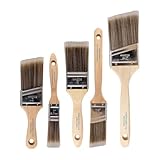
- COMPLETE 5-PIECE BRUSH SET FOR EVERY PAINTING TASK — Includes 1 Inch Flat, 1.5 Inch Angle, 2 Inch Flat, 2 Inch Angle Stubby, and 2.5 Inch Angle brush giving you every size professional painters use daily. Get all 5 for less than the price of a single brush from hardware store brands — professional grade performance at a fraction of the cost. Perfect for walls, trim, cabinets, doors, furniture, and detailed cutting-in work on any project.
- ZERO BRISTLE LOSS — GUARANTEED BY PRECISION ADHESIVE BONDING — Every bristle is locked in place with precision-set adhesive that keeps them in the brush — not in your paint job. The coated steel ferrule provides structural support while the adhesive bond ensures clean performance on every stroke. Premium SRT synthetic filaments load more paint and release it evenly for a smooth streak-free finish on walls, ceilings, and trim. Works with latex, oil-based paint, primer, sealer, and wood stain.
- INCLUDES THE ANGLE STUBBY MOST SETS LEAVE OUT — Professional painters know the 2 Inch Angle Stubby is the go-to brush for tight cabinet interiors, window sashes, inside corners, and detailed trim where standard angle brushes are too long. Combined with the 1.5 and 2.5 inch angle sash brushes you have precision cutting-in covered at every scale — baseboards, crown molding, door casings, and ceiling lines.
- FLAT BRUSHES FOR BROAD SMOOTH COVERAGE ON ANY SURFACE — The 1 and 2 inch flat brushes deliver even coverage on walls, furniture, shelving, doors, fences, decks, and wood surfaces. Ideal for applying primers, stains, varnishes, polyurethane, and specialty coatings. Solid wood handles provide all-day comfort and control for both professional contractors and weekend DIY homeowners tackling interior or exterior painting projects.
- TRUSTED BY PROFESSIONAL PAINTERS AND CONTRACTORS NATIONWIDE — Pro Grade delivers professional-grade results at a price that makes sense for crews who go through brushes on every job. Ideal for property managers, remodeling contractors, apartment turnover crews, maintenance teams, and commercial painting operations. Backed by thousands of verified reviews from working painters. Washable and reusable for multiple projects.
Standout features
- Automatic caption animation reduces the manual work of timing words to speech.
- Style controls let you apply a visual treatment to captions rather than accepting plain subtitles.
- Social aspect-ratio exports support vertical and other platform-ready versions.
Audience and limits
OpusClip claims more than 12 million creators and businesses on its site; that is a self-published marketing figure. Because the workflow begins with existing footage, it is not the best choice for creating a text-only title sequence from a blank canvas. Review generated captions and names carefully before publishing an art tutorial or interview.
The Tool Desk
Outbyte PC Repair FREEClear out junk files and repair common Windows errorsFree Scan →Outbyte Driver Updater FREEFix the driver behind crashes, sound loss and screen glitchesFind Drivers →How should you choose an animated text generator?
Start with the output, then work backward through motion control, text handling, export and cost. The right tool is the one that matches the asset you need to deliver, not the one with the longest feature list.
1. Decide what you are making
- Finished video: Renderforest is built around complete kinetic-typography templates.
- Designed title card: Jitter is the better fit when timing and easing are part of the design.
- Social graphic: Canva minimizes setup for simple animated posts.
- Caption overlay: CapCut, VEED, Kapwing or OpusClip make more sense when footage and speech are central.
- Character explainer: Animaker adds scenes and characters rather than focusing only on text.
- Preset effect or GIF: FlexClip supplies quick typewriter, fade, zoom, jump and flip treatments.
2. Match motion control to your skill level
Preset-only tools are faster but less distinctive. Timeline, easing, keyframe or path controls take more deliberate design work but help a studio keep the same rhythm across title cards, reels and lessons. If you are building a brand system, confirm that the tool can reproduce the same timing and spacing instead of merely offering many effects.
3. Check the text workflow
Look for the features your project actually needs: captions and subtitles for spoken video; custom fonts for an established identity; per-word or per-letter animation for kinetic type; and brand-kit support for repeatable colors and typography. A large font catalog is not a substitute for control over line breaks, contrast and reading speed.
4. Confirm export requirements
Before committing, check the available resolution, watermark policy, frame-rate options and whether the tool exports video, GIF or Lottie. Aspect-ratio presets matter when one painting clip must become a vertical Reel, a square feed post and a landscape YouTube video. Lottie is especially useful for lightweight interface or web animation, while GIF remains convenient for short loops.
5. Account for collaboration and speed
Browser collaboration and templates favor Canva, Kapwing, VEED and Renderforest. Design-system control favors Jitter. Automatic captioning favors OpusClip, while prompt-built scenes and characters favor Animaker. Choose the workflow that removes your largest bottleneck: design time, caption timing, review cycles or format conversion.
Also popular on Amazon

- SAY GOODBYE TO PAINTERS TAPE: Stop wasting hours on tedious prep work. This 12-inch paint guard lets you cut in directly along ceilings, trim, and baseboards, saving you time and frustration. Get professional results faster and skip the hassle of applying and removing tape.
- STRAIGHTER LINES WITH SUPERIOR CONTROL: Engineered with a rigid, straight stainless steel blade, this edger helps you create sharp, consistent paint lines. The high-quality metal guide resists flexing to help you achieve a professional-looking finish with far less bleed-through than painting freehand. For best results and the sharpest lines, use on smooth, non-textured surfaces.
- ERGONOMIC CONTROL FOR LESS FATIGUE: The lightweight yet durable ABS handle is designed to fit comfortably in your hand, reducing strain during long painting sessions. Its secure grip gives you steady, confident control, allowing you to focus on precision without hand cramps.
- VERSATILE FOR ANY PAINTING PROJECT: Whether you're painting around window frames, door casings, ceilings, or accent walls, this tool is your go-to solution. Its slim profile easily slides into tight spaces, making it the only cutting-in tool you'll need for your entire project.
- DURABLE & EASY TO CLEAN: Built to last for years of projects. The stainless steel blade resists rust and corrosion, while the sturdy ABS handle can handle job site wear and tear. When you're done, simply wipe the blade clean with a damp cloth, and it's ready for the next job.
6. Compare the actual cost
Published snapshots list Renderforest Lite from $8 per month, Animaker Basic at $10 per month, Kapwing Pro at $16 per month and Jitter Pro at about $18 per month. Compare billing period, export limits, watermark rules, premium assets and collaboration seats, because a low headline price can still be expensive if your project requires frequent renders or several editors. Regional checkout prices and free-plan limits should be confirmed on the vendor’s current pricing page.
Can animated text generators replace a learning-video platform?
No. Animated text is one ingredient in training, onboarding and compliance content. Those projects may also require avatars, narration, quizzes, learner tracking and SCORM delivery, which the tools above do not provide as a complete learning system. Use an animated-text generator for visual communication, then move the finished video into the learning platform that handles assessment and delivery.
How can painters make animated text readable over artwork?
Keep text inside a consistent safe area, use strong contrast against the most detailed part of the image and give each phrase enough screen time to be read without pausing. Place captions where they do not cover the focal subject, and use a restrained animation style when brush texture or color nuance is the point of the shot. Export a short private preview and inspect it on a phone as well as a larger display before posting; this is a readability check, not a substitute for choosing the correct generator.
Recommended Free Tools
What is the most practical workflow for an art video?
- Write the exact words first, including names of materials, artwork titles and dates.
- Choose the destination aspect ratio and decide whether the text is a title, caption, callout or subtitle.
- Select a tool whose motion controls match that role: template, design-focused, caption-focused or automatic.
- Apply one type family, two or three sizes and a consistent animation rhythm.
- Review spelling, timing, contrast and safe-area placement before exporting each platform version.
- Keep a clean text-free master when possible so you can create new captions or translations later.
Frequently Asked Questions
Can I export animated text as a Lottie file?
Jitter explicitly supports Lottie export alongside video and GIF. Lottie is useful for lightweight web or interface animation, whereas social platforms generally expect a rendered video file.
Which generator is best when my video already has spoken narration?
VEED, Kapwing, CapCut and OpusClip are the most natural fits because captions and subtitle timing are central to their workflows. OpusClip is oriented toward repurposing existing footage, while the other three give you more conventional browser or short-form editing control.
Are animated text tools suitable for SCORM courses?
They can create visual clips for a course, but they do not replace a learning-management system with quizzes, learner tracking and SCORM delivery. Export the video and place it inside a platform that supplies those instructional features.
How do I avoid captions covering the important part of a painting?
Reserve a predictable lower or upper safe area before editing, and keep the artwork’s focal region clear. Use contrast, a subtle background treatment or a solid caption panel instead of placing thin text directly over complex brushwork.
Quick wins for a faster PC:
Fix the driver behind crashes, sound loss and screen glitchesFind Drivers →Repair Windows errors before they cause bigger problemsFix Now →Scan for outdated or missing drivers - takes under a minuteDriver Scan →Quick Recap


