Do these 3 things before closing this tab:
1Clear out junk files and repair common Windows errors2Fix the driver behind crashes, sound loss and screen glitches3Repair Windows errors before they cause bigger problems
ThatPainter is reader-supported. When you buy through links on our site, we may earn an affiliate commission. Learn More
Canva is the best free slideshow maker for a finished photo-and-video montage with music. Google Slides is the better choice when several people must edit an editable deck in a browser. Adobe Express and Zoho Show are stronger for PowerPoint or PDF handoff, LibreOffice Impress is the best downloadable open-source option, and Prezi suits non-linear presentations. Microsoft PowerPoint for the web remains a practical browser choice if your audience expects native PowerPoint files.
Choose the output before choosing the app. An MP4 slideshow video, an editable presentation, and a presentation designed for live delivery are different deliverables. The free tier can also mean different things: some tools include no-cost editing but charge for premium media, while others limit templates, storage, or advanced features.
As an Amazon Associate I earn from qualifying purchases.
What’s actually slowing this PC down?
Pick the symptom - the matching free tool is one click away.
Which free slideshow maker is right for your project?
| Product | Best for | Primary output | Collaboration | Offline or device support | Free-tier considerations |
|---|---|---|---|---|---|
| Canva | Photo and video montages with music | High-resolution MP4; editable project | Sharing and collaborative editing | Browser and mobile apps | Slideshow creation and downloads are free; premium photos, music, and video can add cost |
| Google Slides | Teams editing one presentation | Editable slide deck | Real-time editing, comments, and sharing | Browser and mobile apps; offline mode can be enabled | Free editing with a Google account; not a dedicated MP4 montage tool |
| Adobe Express | Template-led decks with PowerPoint/PDF handoff | PowerPoint or PDF download | Cloud sharing and collaboration features | Browser and mobile apps | Free entry requires no credit card; some assets and features are plan-dependent |
| Zoho Show | Broad import/export compatibility | PPTX, PPSX, HTML, ODP, or PDF | Real-time editing and contextual comments | Browser, mobile, smart-TV broadcast, smartwatch or phone control | Zoho says it is completely free, with no ads; 100+ templates |
| LibreOffice Impress | Local desktop and open-source work | Editable presentation and common office formats | Primarily file-based handoff rather than browser-first co-editing | Downloadable desktop suite | Free and open source; cloud collaboration is not its main workflow |
| Prezi | Zooming, non-linear, audience-oriented presentations | Prezi presentation for desktop or mobile delivery | Real-time collaboration | Desktop and mobile apps | Free access and paid plans vary; advanced account features may require an upgrade |
| Microsoft PowerPoint for the web | People who must exchange native PowerPoint files | PowerPoint presentation | Browser sharing and co-authoring | Browser and mobile apps; desktop PowerPoint is separate | Web access is free with a Microsoft account; storage and advanced features depend on the account |
For a family montage, wedding recap, or social video, start with Canva. For a class, committee, or distributed team, start with Google Slides. If the recipient specifically requests a PPTX or PDF, Adobe Express or Zoho Show reduces conversion work. If you need a desktop application that remains usable without a browser connection, choose LibreOffice Impress.
Why does the final format matter more than the template?
An MP4 slideshow is a rendered video: viewers watch it from beginning to end, and your timing, transitions, soundtrack, and resolution are baked into the file. An editable slide deck keeps text, images, speaker notes, and object positions available for later changes. A live presentation adds presenter controls, display output, and audience interaction.
Popular on Amazon

- 【PLUG & PLAY】This presentation clicker supports page up/down, hyperlink navigation, volume control, power on/off, and full screen/black screen switching. No software or driver is required, just plug the USB receiver into your computer's USB port and you're ready to start the show (Requires one AAA battery, not included)
- 【BRIGHT RED POINTER LIGHT】This powerpoint clicker emits a bright red light that helps you clearly mark key parts of each slide so your audience can easily follow your main points. It remains clearly visible even in large conference rooms or lecture halls
- 【328FT LONG WIRELESS RANGE】This clicker for PowerPoint presentations delivers a control distance of up to 328 ft, allowing you to roam the entire hall and interact directly with your audience. Step away from the limits of a stationary podium to deliver a more dynamic presentation
- 【BROAD COMPATIBILITY】This wireless presenter remote works smoothly across different systems and software, compatible with Mac OS and Windows laptops. It supports software such as PowerPoint, Keynote, Google Slides, Excel, ACDSee, and Prezi
- 【PORTABLE SLIDE CLICKER】This presentation pointer includes a convenient clip that attaches to a notebook or pocket for easy carrying. It is a helpful tool for meetings, classrooms, training sessions, and presentations, and it is also suitable for sharing with colleagues and friends
Choose MP4 for a finished montage
Use MP4 when the recipient will watch rather than edit. Canva’s documented workflow lets you select a template, upload photos and videos, choose a soundtrack, arrange scenes with drag-and-drop controls, and download a high-resolution MP4. Check the label on every stock asset before export: free creation does not make every photo, song, or clip free.
Choose an editable deck for handoff
Google Slides, Adobe Express, Zoho Show, LibreOffice Impress, and PowerPoint for the web are better when someone else must revise wording, replace a photo, or present the file. Exporting to PDF preserves appearance but removes most editability; exporting to PPTX preserves a slide structure but can change fonts, animations, or media when opened in another application.
Quick wins for a faster PC:
Clear out junk files and repair common Windows errorsFree Scan →Scan for outdated or missing drivers - takes under a minuteDriver Scan →Repair Windows errors before they cause bigger problemsFix Now →Choose a presentation-first tool for live delivery
Prezi is designed around a spatial canvas and zooming movement instead of a strictly linear stack. Zoho Show can broadcast to smart TVs and documents control from a phone or smartwatch. Those capabilities matter when the audience is in a room rather than watching a finished video.
1. Canva: best for a finished photo slideshow with music
Canva is the clearest free choice for turning a folder of pictures and short clips into a watchable video. Its slideshow workflow combines templates, uploads, a soundtrack library, drag-and-drop editing, and high-resolution MP4 download. Canva also advertises more than 1 million professionally designed templates, covering personal events and work presentations.
What it does well
- Builds a sequence from photos, videos, text, transitions, and music without requiring a traditional timeline editor.
- Starts from an event or presentation template, then lets you replace media and adjust timing.
- Exports a high-resolution MP4 suitable for sharing as a finished montage.
- Supports browser-based creation and mobile workflows, so media can be added from a phone.
Free plan and limits
Canva states that creating a slideshow and downloading it are free, with no download-count limit and no watermark on a free export. The important boundary is asset licensing: premium photos, music, and video are marked separately from free media and can require payment. A project containing one premium element may not export under the same no-cost terms as a project made entirely from free assets.
Use Canva when
Choose it for a birthday, wedding, holiday, memorial, portfolio reel, or social-ready montage where the final file should play automatically. Choose another tool when several editors need a conventional, editable business deck or when every imported asset must remain in an open office format.
2. Google Slides: best for free real-time collaboration
Google Slides is a browser-based presentation editor built for teams. Google describes creating presentations with a team without installing software, while a 2026 comparison places it first for free editing and real-time collaboration.
Also popular on Amazon

- 【USB-A & USB-C Built-in Receiver – One for All Devices】No more dongles or adapter hunting. This presentation clicker features a receiver with both USB-A and USB-C connectors built right in. Whether you have a new Mac with Type C ports or an old PC with USB A, it works instantly – just plug and present. Perfect for presentation clicker usb c users.
- 【Plug & Play – No Software, No Setup】Simply plug the 2.4GHz receiver into your computer’s USB port and you're ready. This clicker for powerpoint presentations requires no driver or software installation. It works seamlessly with Mac OS, Windows, Linux, and supports PowerPoint, Keynote, Google Slides, and Prezi. Ideal as a computer clicker for presentations.
- 【Bright Red Light Pointer + Long Wireless Range】The bright red light pointer helps you highlight key content on any slide – visible even in large conference halls (pointer distance up to 100M). With a wireless control range of up to 100ft (30M) , this wireless presenter lets you walk freely and interact with your audience. A true slide advancer for dynamic talks.
- 【Full Function Control & Ergonomic Comfort】This powerpoint clicker gives you complete command: Page Up/Down, Full Screen / Black Screen, Volume Increase/Decrease, and Switch Windows. The ergonomic body with soft touch oil coating and contoured keys fits naturally in your hand – your show stays smooth even in a dark room. Also works as a pointer clicker for presentation.
- 【Low Power Consumption & Magnetic Receiver Storage】 Powered by 2x AAA batteries (not included), this presenter clicker wireless features intelligent low power consumption with auto sleep technology – 30+ days standby time on a single set of batteries. A magnetic slot at the bottom securely holds the receiver – never lose your USB A & USB C receiver again. Ideal for wireless presentation clicker users who value energy efficiency.
Standout features
- Multiple people can edit the same deck, leave comments, and share a link instead of emailing versions.
- Browser access makes it easy to move between computers; mobile apps support review and presenting.
- Version history helps identify who changed a slide and restore an earlier state.
- Slides can be presented live or shared as an editable file.
Free plan and limits
Basic editing and collaboration are available with a Google account. Google Slides is a presentation editor, not a dedicated photo-montage application: it does not center the workflow on soundtrack timing and one-click MP4 delivery. You can assemble image-based slides, but a finished music-backed video may require an additional export or recording step.
Use Google Slides when
It is the best default for a class project, remote review, board presentation, or any deck that will change repeatedly. Pick Canva instead when the deliverable is a polished video rather than a document several people will continue editing.
3. Adobe Express: best for polished templates and PowerPoint/PDF handoff
Adobe Express offers a free starting point with no credit card required and thousands of professionally designed templates. Its presentation workflow can import existing slides or PowerPoint files and download the result as Microsoft PowerPoint or PDF.
The Tool Desk
Outbyte PC Repair FREERepair Windows errors before they cause bigger problemsFix Now →Outbyte Driver Updater FREEScan for outdated or missing drivers - takes under a minuteDriver Scan →Standout features
- Template-led layouts help turn a rough outline into a visually consistent deck.
- Importing an existing slide deck is useful when you need a redesign rather than a blank canvas.
- PowerPoint and PDF downloads provide straightforward handoff to clients, teachers, or colleagues.
- Browser and mobile access support editing away from a desktop.
Free plan and limits
The entry point is free and does not require a credit card. Adobe’s free and paid catalogs are not identical, so check whether a chosen template, stock image, font, or effect is included before building the entire presentation around it. The documented free entry does not guarantee that every asset or advanced feature is free.
Use Adobe Express when
Choose it when appearance and a conventional PPTX or PDF handoff matter more than a complex timeline. For a soundtrack-driven photo video, Canva’s dedicated slideshow workflow is more direct.
4. Zoho Show: best for compatibility and export breadth
Zoho Show combines browser-based presentation editing with broad file support. It advertises more than 100 templates, real-time collaboration, contextual comments, PowerPoint compatibility, and export to PPTX, PPSX, HTML, ODP, and PDF.
Standout features
- Imports PPTX, PPT, ODP, PPSX, and PPS files, making it useful for moving an existing deck into a browser editor.
- Exports to PPTX, PPSX, HTML, ODP, and PDF when different recipients need different formats.
- Comments are attached to the relevant work, helping teams resolve slide-level changes.
- Presentations can be broadcast to smart TVs and controlled from a mobile phone or smartwatch.
Free plan and limits
Zoho says Show is completely free with no ads. Its 100-plus templates are available as a starting library, but imported presentations can still need cleanup when fonts, animations, or embedded media do not translate perfectly between applications. The product is optimized for decks and delivery, not for producing a music-synchronized MP4 montage.
Recommended Free Tools
Also popular on Amazon

- Presenter mode, built-in Class 2 red laser pointer for presentations, intuitive touch-keys for easy slideshow control. AAA batteries required (best with Polaroid AAA batteries)
- Bright red laser light - Easy to see against most backgrounds, works as a pointer clicker for presentation and clicker for powerpoint presentations
- Up to 50-foot wireless range for freedom to move around the room
- There's no software to install. Just plug the receiver into a USB port to begin. This power point clicker wireless solution makes presentations easy, and you can store the receiver in the presentation remote after use.
- 2.4GHz RF wireless technology, built-in docking bay stores receiver for easy pack up and portability; works well as a presenter clicker wireless or computer clicker for presentations.
Use Zoho Show when
Select it when your workflow crosses file formats or devices. It is especially useful if one person edits in a browser, another presents from a television, and the final handoff must include both an editable deck and a PDF.
5. LibreOffice Impress: best free open-source desktop option
LibreOffice is a free, open-source office suite, and Impress is its multimedia presentation component. It is the strongest fit for creators who want an installable desktop application and local files rather than a browser-first service.
Standout features
- Works as part of a downloadable office suite, so editing can continue without an internet connection.
- Supports multimedia presentation construction with text, images, diagrams, and media.
- Open-source licensing makes it suitable for users who prefer software they can install without a subscription.
- Local files are easy to archive, copy to removable storage, or hand to another editor.
Free plan and limits
There is no subscription charge for the suite. Impress does not center on simultaneous browser editing, cloud comments, or a stock-media marketplace, so a team may need a separate file-sharing process. Compatibility with a proprietary slide format can vary when advanced fonts, transitions, or embedded objects are moved between applications.
Use Impress when
Choose it for offline work, classrooms with unreliable connectivity, long-term archives, or organizations that require open-source software. Choose a browser editor when several people must edit at the same time.
6. Prezi: best for non-linear and interactive presentations
Prezi is built for presentations that move across a visual canvas rather than advancing through a simple stack of rectangular slides. Its product information highlights reusable presentation content, real-time collaboration, and presenting through desktop and mobile apps.
Standout features
- A zooming, spatial structure can show relationships between ideas before moving into detail.
- Reusable content reduces the work of rebuilding recurring sections for different audiences.
- Real-time collaboration supports shared authoring.
- Desktop and mobile presentation options help presenters move between devices.
Free plan and limits
Prezi offers free access alongside paid plans, but account capabilities vary by plan. Confirm current export, privacy, storage, and offline requirements before committing a finished project. Its canvas-based motion is a poor match for a conventional photo montage that should simply play as an MP4.
Use Prezi when
Pick it for a product story, workshop, lecture, or pitch where showing connections and changing the audience’s viewpoint is more valuable than a standard left-to-right slide sequence.
Also popular on Amazon
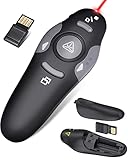
- 【Amazing Ergonomic】Wireless presentation clicker for PowerPoint presentations has a cool ergonomic design that makes you more comfortable when you use it to switch PPT, Keynote or Google Slides. The dark gray buttons and black body convey the designer's philosophy of simplicity. CLIKBUTM PPT clicker can used in different occasions such as teaching, office, conference, speech, etc.
- 【Compact Design】The USB dongle is stored in the slot inside the battery compartment of the remote powerpoint clicker with laser pointer. Easy to carry, remote presentation pointer's size: 109mm, Weight:38g (Battery included). Wireless presenter remote with laser pointer fits easily in your pocket or bag.
- 【How to Use】No drivers required. Just plug into the USB dongle, press the connect button on the back of the presentation remote, then start clicking. Supports systems: Windows 2003, XP, Vista, 7, 8, 10, Mac OS, Linux; supports softwares: Keynote, Google Slides, MS Word, Excel, PowerPoint, Website, PDF.
- 【Just Need 1 AAA Battery】No special button cell battery. Just one AAA Battery you can switch your PPT in classroom or office. One AAA battery can last about two months. Tip: you need to remove the film of the battery when start using power point remote clicker with laser out of the box.
- 【100FT Control Distance 】Slide clicker with laser pointer for presentations control distance: 98FT/30M, laser pointer light range: 328FT/100M. You can say goodbye to boring typical teacher pointers for classroom.We have the coolest computer clicker for presentations control that will rock your presentations and ensure your crowd is always engaged!
7. Microsoft PowerPoint for the web: best when the recipient expects PowerPoint
PowerPoint for the web provides browser-based presentation editing and sharing for people who need the familiar PowerPoint file format. It is a practical choice when a client, school, or workplace already uses Microsoft 365 and wants a deck that can continue in desktop PowerPoint.
PC Slower Than It Used to Be?
A free scan shows the junk files, broken settings and background clutter dragging Windows down - then fixes them in one click.Free scan · Windows 10 & 11Crashes, No Sound, or Screen Glitches?
Random freezes, missing sound and display glitches usually trace back to one bad driver. Find and replace yours safely.Free scan · under a minuteStandout features
- Native PowerPoint files reduce the conversion step required by a non-Microsoft editor.
- Browser sharing supports review and co-authoring with other account holders.
- Mobile apps provide a way to review or present away from a desktop.
- The file can move between the web editor and the desktop application when the account and license support those features.
Free plan and limits
Web access is available with a Microsoft account, while desktop applications, expanded storage, and some advanced capabilities depend on the account or Microsoft 365 plan. The web editor is designed for slide presentations rather than a music-synchronized photo-video workflow, and feature parity with desktop PowerPoint should not be assumed for every animation or add-in.
Use PowerPoint for the web when
Choose it when compatibility with an existing PowerPoint-based workplace outweighs template variety. If the recipient does not need an editable PPTX, exporting a video from a montage-focused tool is usually simpler.
Independent reader supportYour contribution helps us test, update, and keep practical guides available for everyone.How do I make a photo slideshow with music for free?
For a finished video, Canva’s documented workflow is the most direct route. Keep every source photo, clip, and song in a folder before you start, and decide the screen shape—landscape, portrait, or square—before selecting a template.
- Create a slideshow project. Open Canva and choose a slideshow or video presentation template in the format your audience uses.
- Import your media. Upload the photos and videos, then place them in the intended story order. Remove duplicates before adding transitions.
- Set timing. Give detail-heavy images longer on screen and shorten repetitive scenes. Preview after changing several timings so the soundtrack remains aligned.
- Add music. Select a track that is marked free for your account, or upload audio you have permission to use. A premium label can change the export cost.
- Add readable text. Use short captions, high contrast, and safe margins so titles remain visible on phones and televisions.
- Preview the complete sequence. Watch from the beginning, checking cropped faces, silent clips, abrupt volume changes, and transitions that obscure important details.
- Export. Download the high-resolution MP4 and play the file on the device that will be used for delivery. Keep the editable project and original media as a backup.
How do I choose between free slideshow makers?
Start with the required file
If the brief says “video,” prioritize MP4 export and soundtrack controls. If it says “PowerPoint,” prioritize PPTX import and export. If it says “editable online presentation,” prioritize browser sharing, comments, and revision history.
Free tools Windows power users keep installed
One-click scans. No signup required.
Check collaboration needs
Google Slides and Zoho Show are built around simultaneous browser editing. Adobe Express supports collaborative cloud work around template-led designs. LibreOffice Impress is better for a single editor or file-based handoff, while Prezi is suited to teams building a shared non-linear narrative.
Check compatibility before designing
Ask what the recipient will open. Zoho Show documents the broadest combination of PPTX, PPT, ODP, PPSX, PPS, HTML, and PDF paths in this group. Adobe Express documents PowerPoint and PDF downloads. LibreOffice can open and save common office formats, but complex proprietary effects may not survive a round trip perfectly.
Also popular on Amazon

- 【PLUG & PLAY】 The clicker pointer for presentations is easy to use, just plug the usb receiver and it is ready to go, no need to download any software. (The USB fits into the bottom of the clicker. )
- 【PRESENTATION CLICKER FEATURE】Presentation remote supports various functions:Page Forward/ Backward, Volume Control, Hyperlink, Switch Windows, Full/Black Screen.It is an efficient presentation tool for daily presentations
- 【BRIGHT RED POINTER & 100FT LONG WIRELESS RANGE】 Powerpoint presentation clicker with bright red light that is easy to see against most backgrounds ((Not Recommended for LCD/LED/TV Screens);Wireless range of powerpoint presenter up to 100 foot, free to move around even in a large room
- 【WITH SUPERIOR DETAILS】 ①One-piece magnetic usb storage, not easy to lose the usb ②Soft and rubber buttons ③Compact design & Space save and comfortable grip ④ Bumped-buttons design for easy slideshow control.⑤Operated by 1xAAA battery(Not included), with energy-saving auto-sleep function, one battery can be used for weeks
Plan for offline delivery
A downloadable desktop application is safer when internet access at the venue is uncertain. LibreOffice Impress is the clear offline-first choice. Browser tools can still work for delivery if you export a local PDF, PPTX, or MP4 beforehand and copy it to a laptop or USB drive.
Audit free assets and account limits
“Free” describes the product tier, not necessarily every element inside a project. Canva and Adobe Express distinguish free media from premium assets. Other services may impose account, storage, export, or advanced-feature limits that change over time. Open the plan or asset label before you build a presentation that depends on one specific item.
Do free slideshow makers add a watermark?
Canva states that free slideshow downloads have no watermark, provided the project uses eligible free content. A watermark policy is not universal across products or assets, so inspect the export preview and the current plan terms for the tool you select. Premium stock media can trigger a payment requirement even when the editor itself is free.
What should I bring to a live presentation?
Carry the exported file as well as the editable source. A USB drive can move an MP4, PPTX, PDF, or ODP between computers; an HDMI cable or adapter can connect the presentation device to a larger display. For tools that support device control, Zoho Show documents phone or smartwatch control and Prezi supports presenting across desktop and mobile apps. A small presentation clicker is useful when you need to advance slides without standing beside the computer.
Frequently Asked Questions
Can I turn Google Slides into an MP4 slideshow for free?
Google Slides is designed for editable presentations, not one-click music-backed MP4 creation. You can present or share the deck, but a finished video generally requires a separate recording or video-editing step.
Which free slideshow maker works without an internet connection?
LibreOffice Impress is the clearest offline-first option because it is a downloadable desktop application. Browser tools can still be used offline only after the necessary files and export have been prepared, so do not rely on an untested venue connection.
Do these 3 things before closing this tab:
1Scan for outdated or missing drivers - takes under a minute2Repair Windows errors before they cause bigger problems3Fix the driver behind crashes, sound loss and screen glitchesCan I export a free slideshow to both PowerPoint and PDF?
Adobe Express documents download as Microsoft PowerPoint or PDF, while Zoho Show documents PPTX, PPSX, HTML, ODP, and PDF exports. Exporting both formats is useful when one recipient needs to edit and another only needs a fixed copy.
How many photos should a slideshow include?
There is no universal number: use enough images to tell the story without repeating nearly identical frames. Set the duration from the soundtrack and the audience’s viewing context, then remove any image that adds no new information.
What is the safest way to avoid surprise charges in a free slideshow?
Keep a project limited to assets explicitly marked free, especially stock music, photos, and video. Before export, review the asset labels and confirm that the selected output format is included in your account’s current plan.
Quick Recap


