Crashes, No Sound, or Screen Glitches?
Outbyte Driver Updater · freeRandom freezes, missing sound and display glitches usually trace back to one bad driver. Find and replace yours safely.
Find the Right Drivers →ThatPainter is reader-supported. When you buy through links on our site, we may earn an affiliate commission. Learn More
Renderforest is the best specialist intro maker for polished logo reveals, Canva is the easiest choice for beginner channel branding, Adobe Express is the strongest browser option when watermark-free exports matter, and CapCut is the best fit for Shorts-first and gaming workflows. Choose InVideo AI when the opener should be generated as part of a larger video, VEED or Kapwing when captions and repurposing are central, and Filmora when the intro belongs inside a complete desktop editing timeline.
For most YouTube videos, keep a recurring opener to about 3–5 seconds. Canva and Renderforest describe roughly 10 seconds as a general or upper target, but a longer sequence earns its place only when it adds context, introduces a recurring show, or advances the story. For Shorts, use a 0–2-second identity cue—or skip a separate intro entirely—so the first frame gets to the subject immediately.
As an Amazon Associate I earn from qualifying purchases.
What’s actually slowing this PC down?
Pick the symptom - the matching free tool is one click away.
Quick comparison
| Rank | Software | Best for | Platforms or workflow | Free/export position | Main limitation |
|---|---|---|---|---|---|
| 1 | Renderforest | Logo reveals and polished channel openers | Browser editor | Build and preview in the browser; export terms depend on the selected plan | Template-led control; resolution, watermark and rights vary by plan |
| 2 | Canva | Beginner branding across intros, thumbnails and banners | Web, iOS and Android | Free intro maker; downloads are watermark-free when premium media is not used | Motion control is lighter than a dedicated motion-graphics editor |
| 3 | Adobe Express | Lightweight browser design with Adobe assets | Browser-based workflow | Adobe states that Express does not add watermarks to videos | Not intended for complex cinematic compositing |
| 4 | CapCut | Shorts, mobile creators, gaming and trend-led edits | Mobile, desktop and web | Free and paid features vary by region and plan | Less suited to restrained, long-lived corporate identity systems |
| 5 | InVideo AI | Prompt-generated intros inside larger videos | AI-first video workflow | Credit-based access; allowance and output limits depend on plan | Less exact control over logo geometry and repeatable reveals |
| 6 | VEED | Intros combined with captions, trimming and conversion | Browser editor | Export allowance and watermark rules depend on plan | Utility-led rather than a dedicated logo-animation marketplace |
| 7 | Kapwing | Teams that extract clips, resize and repurpose | Collaborative browser workflow | Plan limits apply to exports and collaboration | Brand animation is secondary to editing and repurposing |
| 8 | Filmora | Creators who need the intro inside a full desktop timeline | Desktop video editor | Free-versus-paid export terms depend on the edition | More software than you need for a one-off logo reveal |
What a YouTube intro needs in 2026
An intro has one job: identify the channel or series without delaying the reason a viewer clicked. A painting tutorial might open on the finished brushstroke, then use a short mark, title or logo before moving into the first technique. A gaming channel can use a fast sting before the match, while a review channel may need only a readable name and a consistent sound cue.
- Readable identity: the channel name or logo must remain legible on a phone, not just on a large monitor.
- Fast arrival at the subject: routine openers should normally stay within 3–5 seconds.
- Flexible framing: export a 16:9 version for standard YouTube and a vertical-safe version for Shorts when both formats matter.
- Sound-independent design: the visual should still identify the channel when autoplay is muted.
- Rights that match publication: check music, stock footage, fonts, logos, commercial use, resolution and watermark rules before publishing.
1. Renderforest: best for polished logo reveals
What it does
Renderforest is the strongest choice when the intro itself is the deliverable: a logo reveal, branded opener, gaming intro or short title sequence. Its official tool combines a browser editor with a curated intro-template catalog. You upload a logo, customize text, choose from the sound library, preview the result and export without building a timeline from scratch. Renderforest describes the workflow as producing “broadcast-quality intros” without requiring design experience.
Popular on Amazon

- 【All IN ONE 】Great painting tool kit with 4 Inch paint roller cover *6 , 9 Inch paint roller cover*6,4 Inch paint roller frame, 9 Inch paint roller frame,Handle Extension Roller *1 , 9 inch paint tray*3, 9 inch paint tray liner,1Inch paint brush , 2 Inch paint brush and stirring rod, 2.5 inch angel paint brush*1, 2 inch angel paint brush*1, 1.5 inch angel paint brush*1, 1inch paint brush*1, scraper,can openner.
- 【ADJUSTABLE EXTENSION POLE】The paint roller adjustable extension pole is made of aluminum alloy.It's lightweight and sturdy, and can be extended or retracted in length.It can be stretched from 23 in to 47 in to reach higher without a ladder.Whether you're painting floors, walls or higher walls, stretch our adjustable extension pole with ease.
- 【HIGH EFFICIENCY AND ADAPTABILITY】You'll get beautiful finishes and save valuable time and money.9" paint rollers help you get a smooth finish, 4" mini rollers are great for tight spaces.The angle paintbrush is perfect for cutting in walls and flat paint brushe is perfect for trim. The stirring rod helps paint to be more silky smooth and even. The scraper cleans old paint with ease. Can opener opens paint cans without much effort.
- 【SUPERIOR HIGH QUALITY】The steel paint roller frame is not easy to bend and deform. It supports the roller rolls firmly and efficiently. The paint roller is made of microfiber and leaves no lint. It absorbs a large amount of paint and applies it evenly. The paint roller brush is made of 100% synthetic bristles with a smooth surface. It is abrasion and corrosion resistant. The bristles are not easy to shed. The tray is quite sturdy and easy to clean.
- 【COST-EFFECTIVE】 This high quality set is for perfectionists and money savers. An all-in-one set meets all your painting needs.The paint kit is durable with water and oil based paints, glosses, stains, emulsions, and varnishes, and won't deform easily. This paint tray set is more than affordable and perfect for small or large projects
Platforms and access
The workflow is browser-based, which makes it practical when you move between a home computer, a studio machine and a laptop. The template catalog is the central interface rather than a conventional frame-by-frame editor.
Free and paid use
You can design and preview an opener in the browser. Export resolution, watermark treatment, commercial-use rights and subscription limits depend on the plan you select, so inspect those conditions immediately before a public or monetized upload. Paid access is most valuable when you need clean exports, higher resolution, premium templates, licensed audio or repeated production for a series.
The Tool Desk
Outbyte Driver Updater FREEFix the driver behind crashes, sound loss and screen glitchesFind Drivers →Outbyte PC Repair FREEClear out junk files and repair common Windows errorsFree Scan →Limits and best fit
Template polish is the advantage, but it also defines the boundary. You get less underlying control than with a full motion-graphics or desktop timeline application. Choose Renderforest for a repeatable logo reveal; choose Filmora when the opener must be edited against a longer sequence of clips.
2. Canva: best beginner intro maker
What it does
Canva is the easiest starting point when your intro must match thumbnails, channel banners, logos and social graphics. Its drag-and-drop editor offers ready-made templates, animated motion graphics, stock footage and audio, with real-time collaboration. Canva lists more than 1 million professionally designed templates and says creators do not need professional video-editing or motion-design experience to make an intro.
Platforms and access
Canva runs on the web, iOS and Android. A painter can draft an intro on a phone after filming, then refine typography or timing on the web version without changing tools.
Free and paid use
The intro maker is free. Downloads have no watermark when you use free media; premium stock footage, audio or design elements can change what is available in a free export. Paid access is useful for premium media, broader brand controls and a repeatable visual system across a channel team.
Limits and best fit
Canva is excellent for animated text, logo placement and consistent colors, but its motion controls are lighter than those in a dedicated motion-graphics editor. Templates also need customization: replace stock wording, adjust timing and use your own mark so a painting channel does not look interchangeable with every other template user.
3. Adobe Express: best for watermark-free browser exports
What it does
Adobe Express is a lightweight browser option built around Adobe-style design assets, stock media and Brand Kit support. It is useful for a channel that wants a consistent logo, colors and type treatment without opening a full desktop compositor. The service also supports social publishing and cross-app integration.
Platforms and access
The core workflow is browser-based, making it convenient for creating a short opener alongside other social video assets. Brand Kit support helps keep the same identity in an intro, thumbnail and announcement graphic.
Also popular on Amazon

- Bates paint roller kit includes 19 essential pieces for home painting, prep, and cleanup projects.
- Made with durable materials, the set includes a plastic paint tray, 9-inch and 4-inch roller frames with matching roller covers, and a 6' x 9' plastic drop cloth.
- The kit also includes a sanding block, paint mixer, can opener, painter’s tape, 2-inch foam brush, 1-inch paint brush, 1-1/2-inch angle paint brush, and 2-inch angle paint brush.
- Three paint scrapers help with surface preparation, while the different roller sizes and brush styles make it easier to paint walls, corners, trim, and detail areas.
- Perfect for home interiors and DIY painting projects, this 19-piece set keeps essential wall painting supplies together in one convenient kit.
Free and paid use
Adobe’s comparison information states that Express does not add watermarks to videos. Paid options are most relevant when you need expanded stock media, brand assets or broader publishing and collaboration features; check the current plan and export terms for your region before committing.
Windows Errors? Fix Them Before They Spread
Repair common Windows errors and clear accumulated junk for a smoother, more stable PC - no reinstall needed.Free scan · no reinstallCrashes, No Sound, or Screen Glitches?
Random freezes, missing sound and display glitches usually trace back to one bad driver. Find and replace yours safely.Free scan · under a minuteLimits and best fit
Express is a strong fit for clean, graphic openers and a weak fit for cinematic compositing, elaborate 3D logo work or intricate keyframe animation. If the intro is a simple title card with an animated brushstroke, it can be enough; if it is a complex scene, use a timeline-oriented editor.
4. CapCut: best for Shorts, mobile and gaming workflows
What it does
CapCut combines template editing with animated text, captions, music, speed controls, stickers and effects. That makes it especially effective for gaming, lifestyle and trend-driven channels where the intro is part of a fast edit rather than a standalone brand film.
Platforms and access
CapCut supports mobile, desktop and web workflows. You can make a vertical identity cue on a phone, then use the desktop or web version when a longer gaming montage needs more room.
Free and paid use
Feature availability, export options and plan limits can vary by region. Before adopting a recurring template, check whether the effects, music and resolution you rely on are included in your plan and whether the export carries any restrictions.
Quick wins for a faster PC:
Fix the driver behind crashes, sound loss and screen glitchesFind Drivers →Clear out junk files and repair common Windows errorsFree Scan →Scan for outdated or missing drivers - takes under a minuteDriver Scan →Limits and best fit
CapCut is less appropriate for restrained corporate branding or a carefully controlled identity system that must remain unchanged for years. Its strength is speed and trend-aware editing. For a gaming channel, keep the opener short, preserve the first gameplay frame and use effects that remain recognizable after the trend passes.
5. InVideo AI: best when the intro is part of an AI-generated video
What it does
InVideo AI fits faceless and AI-first channels where a prompt can produce a larger sequence containing a script, visuals, voice, music or stock footage. The intro can be generated as one component of that sequence instead of being designed separately.
Platforms and access
The defining workflow is prompt-driven video generation rather than a traditional logo-animation timeline. It is most useful when the opener, narration and supporting visuals need to be created together.
Also popular on Amazon

- 【RELIABLE QUALITY】This palette knife is sturdy and lightweight, blade made of stainless steel, it is resilience、flexible and anti-resistant; plastic handles with ergonomic design handles make it easy to grip; bending the metal rod firmly connects the blade and handle, it is durable.
- 【ELABORATE DESIGN】The ergonomically designed handle adds comfort and grip to every application, making painting easier and more natural. This painting knife set has 5 different shape design Spatula, various shapes blade convenient for you to draw a variety of painting strokes of different sizes.
- 【STURDY CONSTRUCTION】The Pallet Knives are curved stainless steel strips between the handles to connect the blades. It is beneficial to prevent fingers from touching the painting, which can prevent the blade from loosening and falling off.
- 【MULTIPURPOSE USD】These mixing knives can be widely applied in different drawing methods, such as spreading, scumbling, smoothing, smudging, mixing, pre-mixing paint and more, ideal scraper tool for handling your watercolor, oil painting, canvas painting, street art. Painting knives set is a good choice for professional artists, painting beginners, creative lovers, art students and art teachers.
- 【WHAT YOU WILL GET】This artist knife set includes 4 long-bladed spreaders, 2 angled spades, 2 rounded spreaders, and 2 angled trowel, 5 different size and 10 piece knives provide you with a variety of paintings.
Free and paid use
Access is credit-based. Review the current free-credit allowance, generation limits and paid tiers before building a recurring series, because repeated revisions can consume credits and generated output can have different limits from a simple title card.
Limits and best fit
InVideo AI is less suitable when exact logo geometry, a fixed reveal path or pixel-level repeatability is the priority. Use a deterministic template editor for a signature logo animation; use InVideo AI when speed and a complete generated sequence matter more than exact motion control.
6. VEED: best for intros inside a caption and repurposing workflow
What it does
VEED is practical when an intro is only one step in a browser workflow that also includes captions, subtitles, trimming, conversion and repurposing. A creator can add a short title sting, caption the main video and prepare alternate social versions without moving between several utilities.
Platforms and access
VEED is browser-led, which suits creators who work from different computers or hand projects to an editor. Its value is workflow consolidation rather than a large specialist logo-reveal marketplace.
Free and paid use
Export allowances, watermark rules, storage and collaboration features depend on the selected plan. Check those limits before a public upload, particularly if you need many versions of the same intro for widescreen, square and vertical posts.
Do these 3 things before closing this tab:
1Repair Windows errors before they cause bigger problems2Fix the driver behind crashes, sound loss and screen glitches3Clear out junk files and repair common Windows errorsLimits and best fit
VEED is a utility-led choice. It is a better match for a tutorial, review or painting lesson that needs captions and multiple cutdowns than for a cinematic opener built around detailed logo animation.
7. Kapwing: best for collaborative social versions
What it does
Kapwing is designed for teams that extract clips, resize videos and collaborate on social versions. An intro can be stored as part of a repeatable project, then adapted for a full YouTube upload, a vertical Short and smaller social cutdowns.
Platforms and access
The workflow is collaborative and browser-based. That is useful when a channel owner, editor and social producer need to work on the same branded assets without passing large project files between machines.
Also popular on Amazon
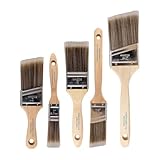
- COMPLETE 5-PIECE BRUSH SET FOR EVERY PAINTING TASK — Includes 1 Inch Flat, 1.5 Inch Angle, 2 Inch Flat, 2 Inch Angle Stubby, and 2.5 Inch Angle brush giving you every size professional painters use daily. Get all 5 for less than the price of a single brush from hardware store brands — professional grade performance at a fraction of the cost. Perfect for walls, trim, cabinets, doors, furniture, and detailed cutting-in work on any project.
- ZERO BRISTLE LOSS — GUARANTEED BY PRECISION ADHESIVE BONDING — Every bristle is locked in place with precision-set adhesive that keeps them in the brush — not in your paint job. The coated steel ferrule provides structural support while the adhesive bond ensures clean performance on every stroke. Premium SRT synthetic filaments load more paint and release it evenly for a smooth streak-free finish on walls, ceilings, and trim. Works with latex, oil-based paint, primer, sealer, and wood stain.
- INCLUDES THE ANGLE STUBBY MOST SETS LEAVE OUT — Professional painters know the 2 Inch Angle Stubby is the go-to brush for tight cabinet interiors, window sashes, inside corners, and detailed trim where standard angle brushes are too long. Combined with the 1.5 and 2.5 inch angle sash brushes you have precision cutting-in covered at every scale — baseboards, crown molding, door casings, and ceiling lines.
- FLAT BRUSHES FOR BROAD SMOOTH COVERAGE ON ANY SURFACE — The 1 and 2 inch flat brushes deliver even coverage on walls, furniture, shelving, doors, fences, decks, and wood surfaces. Ideal for applying primers, stains, varnishes, polyurethane, and specialty coatings. Solid wood handles provide all-day comfort and control for both professional contractors and weekend DIY homeowners tackling interior or exterior painting projects.
- TRUSTED BY PROFESSIONAL PAINTERS AND CONTRACTORS NATIONWIDE — Pro Grade delivers professional-grade results at a price that makes sense for crews who go through brushes on every job. Ideal for property managers, remodeling contractors, apartment turnover crews, maintenance teams, and commercial painting operations. Backed by thousands of verified reviews from working painters. Washable and reusable for multiple projects.
Free and paid use
Plan limits apply to exports and collaboration. Confirm the current allowance for resolution, storage, team seats and watermark treatment before you standardize a shared intro project.
Free tools Windows power users keep installed
One-click scans. No signup required.
Limits and best fit
Kapwing’s core advantage is repurposing, not elaborate logo animation. Choose it when the same opener must survive several aspect ratios and a team review process. Choose Renderforest or a desktop editor when motion design is the central requirement.
8. Filmora: best when the intro belongs inside a full desktop timeline
What it does
Filmora is the sensible choice when the intro must be edited directly into a complete desktop project containing gameplay, voice-over, music, B-roll or a long painting demonstration. It avoids the handoff between a standalone intro maker and the editor used for the rest of the video.
Platforms and access
Its defining format is a full desktop timeline rather than a browser template catalog. That gives you room to align the opener with a cold open, synchronize a sound cue and trim the transition into the first scene.
Free and paid use
Free-versus-paid export terms depend on the edition. Check the current watermark, resolution, media-license and subscription conditions before publishing a monetized channel package.
Recommended Free Tools
Limits and best fit
Filmora is more software than you need for a single logo reveal. Its advantage appears when the intro must be revised with the episode, moved after a cold open or maintained inside a larger project that already contains the rest of the edit.
Independent reader supportYour contribution helps us test, update, and keep practical guides available for everyone.How to choose the right intro maker
Choose by the job, not by the longest feature list
| Your priority | Best starting point | Why |
|---|---|---|
| Polished logo reveal | Renderforest | Specialist templates, logo upload, text, sound and preview/export workflow |
| Beginner channel branding | Canva | Drag-and-drop editing across web, iOS and Android |
| Watermark-free browser design | Adobe Express | Adobe states that Express does not add watermarks to videos |
| Shorts or mobile gaming | CapCut | Vertical-friendly effects, captions, speed controls and mobile access |
| Prompt-generated video | InVideo AI | Intro can be generated with script, visuals, voice and music |
| Captions and cutdowns | VEED | Trimming, subtitles, conversion and repurposing in one browser workflow |
| Team resizing and collaboration | Kapwing | Clip extraction, alternate dimensions and shared projects |
| Full episode timeline | Filmora | Place the intro directly beside gameplay, narration and B-roll |
Decide whether you need a template or a timeline
A template marketplace is faster when the opener is a self-contained reveal. A timeline editor is better when the first seconds change from episode to episode or must be synchronized to a cold open. AI generation is a third path: it reduces manual assembly but gives you less deterministic control over a recurring logo motion.
Check export and rights before designing around a feature
- Confirm whether the free export includes a watermark.
- Check maximum resolution and whether vertical and widescreen exports are both available.
- Read the music and stock-media license for monetized videos, client work and paid sponsorships.
- Check whether a template, font or effect remains available after a subscription ends.
- For teams, confirm brand-kit, storage, seats and collaboration limits.
A practical intro workflow for a painting or art channel
- Start with the video’s promise. Open on the finished painting, the unusual color decision or the problem the tutorial solves. Do not make the viewer wait through branding before seeing evidence of the subject.
- Build a short identity cue. Use the channel name, logo or brush mark, one motion idea and one sound cue. Target 3–5 seconds for a regular upload and 0–2 seconds for a Short.
- Design for silent playback. Make the name readable without relying on music. Avoid thin type, low-contrast paint textures and fast movement that disappears on a phone.
- Create both aspect ratios. Keep the logo and title inside a central safe area so the same design can be adapted to 16:9 and vertical video without cropping the identity.
- Preview at the final frame size. Check the smallest text on a phone-sized preview and verify that the logo is still clear at the end of the animation.
- Verify publication rights. Confirm music, stock footage, fonts, commercial use, watermark and resolution before uploading the first monetized episode.
- Save a clean master. Keep a version without episode-specific wording so the intro can be reused without rebuilding the animation.
Common mistakes that make intros hurt retention
- Starting with a long logo animation: viewers clicked for the lesson, review or match, not a ten-second title card.
- Using a template unchanged: stock wording and default colors make a channel look generic.
- Relying on sound alone: muted autoplay removes the identity cue.
- Ignoring vertical crops: a logo at the far edge of a widescreen frame can disappear in a Short.
- Choosing music without checking rights: a track that is acceptable in a personal draft may not be cleared for monetized publication.
- Locking yourself into an effect: a trend-driven transition can date a channel faster than a simple, readable mark.
Frequently Asked Questions
Should a YouTube intro come before or after a cold open?
For instructional, review and documentary-style videos, show the most compelling moment first, then place a very short identity cue. A standalone intro can come first when the channel format is a recurring show whose title provides useful context.
Also popular on Amazon

- SAY GOODBYE TO PAINTERS TAPE: Stop wasting hours on tedious prep work. This 12-inch paint guard lets you cut in directly along ceilings, trim, and baseboards, saving you time and frustration. Get professional results faster and skip the hassle of applying and removing tape.
- STRAIGHTER LINES WITH SUPERIOR CONTROL: Engineered with a rigid, straight stainless steel blade, this edger helps you create sharp, consistent paint lines. The high-quality metal guide resists flexing to help you achieve a professional-looking finish with far less bleed-through than painting freehand. For best results and the sharpest lines, use on smooth, non-textured surfaces.
- ERGONOMIC CONTROL FOR LESS FATIGUE: The lightweight yet durable ABS handle is designed to fit comfortably in your hand, reducing strain during long painting sessions. Its secure grip gives you steady, confident control, allowing you to focus on precision without hand cramps.
- VERSATILE FOR ANY PAINTING PROJECT: Whether you're painting around window frames, door casings, ceilings, or accent walls, this tool is your go-to solution. Its slim profile easily slides into tight spaces, making it the only cutting-in tool you'll need for your entire project.
- DURABLE & EASY TO CLEAN: Built to last for years of projects. The stainless steel blade resists rust and corrosion, while the sturdy ABS handle can handle job site wear and tear. When you're done, simply wipe the blade clean with a damp cloth, and it's ready for the next job.
Can one intro work for both regular videos and Shorts?
Use the same identity system, not necessarily the same file. Prepare a widescreen master and a vertical-safe adaptation, and shorten the Short version so it does not delay the first useful frame.
Is a free intro maker safe for a monetized channel?
Free access does not automatically grant every commercial right. Check the license for music, stock media, fonts and templates, and confirm whether the export watermark or resolution restrictions apply to your publication plan.
How can I keep a logo readable over painting footage?
Give the mark a high-contrast background or outline, keep it inside the central safe area and hold the final frame long enough to read on a phone. Test the visual with the audio muted.
When is AI generation a poor choice for an intro?
AI generation is a weak fit when every episode must use exactly the same logo geometry, timing and typography. A deterministic template or timeline is easier to lock and reuse; AI is more useful when the opener changes with a larger generated sequence.
Frequently Asked Questions
Should a YouTube intro come before or after a cold open?
For instructional, review and documentary-style videos, show the most compelling moment first, then place a very short identity cue. Put a standalone intro first only when its title provides useful context for a recurring show.
Can one intro work for both regular videos and Shorts?
Use the same identity system but prepare separate widescreen and vertical-safe files. Keep the Short version especially brief so it does not delay the first useful frame.
Is a free intro maker safe for a monetized channel?
Not automatically. Check commercial rights for music, stock media, fonts and templates, along with watermark and resolution restrictions.
How can I keep a logo readable over painting footage?
Use contrast or an outline, keep the mark in a central safe area, hold the final frame long enough to read on a phone, and check it with audio muted.
When is AI generation a poor choice for an intro?
It is a weak fit when every episode needs identical logo geometry, timing and typography. A deterministic template or timeline is easier to lock and reuse.
Quick wins for a faster PC:
Scan for outdated or missing drivers - takes under a minuteDriver Scan →Repair Windows errors before they cause bigger problemsFix Now →Quick Recap


