Outdated Drivers Are Slowing You Down
Quick wins for a faster PC:
Scan for outdated or missing drivers - takes under a minuteDriver Scan →Clear out junk files and repair common Windows errorsFree Scan →Fix the driver behind crashes, sound loss and screen glitchesFind Drivers →One free scan finds every outdated or missing driver and matches the right update for your exact hardware.Free scan · exact hardware match
PC Slower Than It Used to Be?
A free scan shows the junk files, broken settings and background clutter dragging Windows down - then fixes them in one click.Free scan · Windows 10 & 11
ThatPainter is reader-supported. When you buy through links on our site, we may earn an affiliate commission. Learn More
Adobe Lightroom is the best all-round photo editor for iPhone in 2026. Its free tier covers core adjustments, presets, organization, Quick Actions, background blur, batch edits and video, while the premium tier adds masking, Lens Blur, Generative Remove and cloud storage across devices. For a completely free manual editor, choose Snapseed. Photomator and Darkroom fit Apple Photos and iCloud workflows; VSCO is the easiest route to consistent film-style color; and specialist apps handle portraits, object removal, social graphics or layered composites better than a general editor.
This guide compares the leading choices for photographers, artists photographing finished work, and anyone who wants more control than the built-in Photos app. Prices and feature availability can change by country, storefront and date, so treat the figures below as the dated observations they are rather than universal prices.
As an Amazon Associate I earn from qualifying purchases.
At a glance: the best iPhone photo editors
| App | Best for | Free tier or trial | RAW/ProRAW and local edits | Library or cloud workflow | AI, presets or templates | Price information available for 2026 |
|---|---|---|---|---|---|---|
| Adobe Lightroom Mobile | Overall choice, serious editing and RAW | Free core editing, presets and organization | RAW/ProRAW workflow; premium masking and Lens Blur | Adobe cloud storage and cross-device work on premium | Quick Actions, Adaptive Presets, Generative Remove, background blur | Free with in-app purchases; premium price varies by storefront |
| Snapseed | Free-first manual editing | Free | Selective adjustments, healing and curves; exact current RAW behavior should be checked | Primarily a local editing workflow | Manual tools rather than a subscription template library | No charge reported; current listing and update status can change |
| Darkroom | Fast Apple Photos and iCloud editing | Free/premium boundary varies | Focused adjustments and batch workflow | Apple Photos and iCloud oriented | Editing tools and batch processing | Storefront and date determine current price |
| Photomator | Apple-native RAW editing | Trial/free boundary depends on current listing | More than 750 camera RAW formats; AI masking and non-destructive edits | iCloud sync across Mac, iPhone and iPad | AI-assisted masking and repair tools | Observed US prices: $34.99/year, $7.99/month or $119.99 lifetime |
| VSCO | Film looks and a consistent feed | Free starter tools with paid membership features | Preset-led editing; less deep masking and pixel control | Social/feed-centered workflow | Film-inspired presets and community tools | Observed Plus price from $7.99/month or $29.99/year; plans vary |
| Picsart | AI effects, templates and social content | Free tier with paid features | General photo editing rather than a dedicated RAW workflow | Cloud/social creation workflow | AI tools, templates and collages | Current subscription price varies by country and plan |
| Facetune | Portraits and selfies | Free access with paid tools or limits | Portrait retouching takes priority over RAW catalog work | Single-image and social workflow | Face and skin retouching tools | Current in-app pricing varies |
| TouchRetouch | Removing unwanted objects | Free/trial terms depend on the current listing | Removal specialist rather than a complete RAW editor | Local, image-by-image workflow | Object and blemish removal | Current price depends on storefront |
| Adobe Photoshop Mobile | Layers, composites and generative fill | Free core access with premium features | Layer-based compositing rather than a catalog-first RAW workflow | Adobe account and cross-device options vary by plan | Layers and generative fill | Free with in-app purchases; plan pricing varies |
| Afterlight | Textures, grain and light leaks | Free/premium split varies | Creative finishing rather than advanced local masking | Simple mobile workflow | Textures, grain and light-leak effects | Current price varies by storefront |
The table separates a general editor from a specialist. A painter documenting a canvas may need accurate tonal recovery and RAW support; a portrait creator may value skin tools; and a social publisher may care more about templates and a repeatable look than about catalog metadata.
1. Adobe Lightroom Mobile: best overall and for RAW
Lightroom is the strongest default recommendation because it combines a useful free editor with a path to professional controls. The iPhone App Store listing describes Quick Actions, Adaptive Presets, background blur, Generative Remove, batch editing and video editing. Adobe’s mobile documentation places core editing, presets and organization in the free app, with premium adding Masking, Lens Blur, Generative Remove and cloud storage across devices.
Popular on Amazon

- 【All IN ONE 】Great painting tool kit with 4 Inch paint roller cover *6 , 9 Inch paint roller cover*6,4 Inch paint roller frame, 9 Inch paint roller frame,Handle Extension Roller *1 , 9 inch paint tray*3, 9 inch paint tray liner,1Inch paint brush , 2 Inch paint brush and stirring rod, 2.5 inch angel paint brush*1, 2 inch angel paint brush*1, 1.5 inch angel paint brush*1, 1inch paint brush*1, scraper,can openner.
- 【ADJUSTABLE EXTENSION POLE】The paint roller adjustable extension pole is made of aluminum alloy.It's lightweight and sturdy, and can be extended or retracted in length.It can be stretched from 23 in to 47 in to reach higher without a ladder.Whether you're painting floors, walls or higher walls, stretch our adjustable extension pole with ease.
- 【HIGH EFFICIENCY AND ADAPTABILITY】You'll get beautiful finishes and save valuable time and money.9" paint rollers help you get a smooth finish, 4" mini rollers are great for tight spaces.The angle paintbrush is perfect for cutting in walls and flat paint brushe is perfect for trim. The stirring rod helps paint to be more silky smooth and even. The scraper cleans old paint with ease. Can opener opens paint cans without much effort.
- 【SUPERIOR HIGH QUALITY】The steel paint roller frame is not easy to bend and deform. It supports the roller rolls firmly and efficiently. The paint roller is made of microfiber and leaves no lint. It absorbs a large amount of paint and applies it evenly. The paint roller brush is made of 100% synthetic bristles with a smooth surface. It is abrasion and corrosion resistant. The bristles are not easy to shed. The tray is quite sturdy and easy to clean.
- 【COST-EFFECTIVE】 This high quality set is for perfectionists and money savers. An all-in-one set meets all your painting needs.The paint kit is durable with water and oil based paints, glosses, stains, emulsions, and varnishes, and won't deform easily. This paint tray set is more than affordable and perfect for small or large projects
What it does well
- RAW and ProRAW work with detailed tonal and color adjustments.
- Masking isolates a subject, sky or background for local changes; premium also includes Lens Blur.
- Generative Remove addresses distracting objects, while batch editing applies a look to multiple images.
- Presets and Adaptive Presets speed up a repeatable style without preventing manual refinement.
- Video editing is available alongside still-photo tools.
Platforms, price and limits
The app runs on iPhone and is part of Adobe’s broader device workflow. The free tier includes the core editor, presets and organization. Premium features require an in-app purchase or an eligible Adobe plan, and the exact price is storefront-specific. Adobe’s App Store listing showed 339,000 ratings with a 4.8-star average in 2026; that is an App Store metric, not an independent quality test.
Free tools Windows power users keep installed
One-click scans. No signup required.
Choose Lightroom when you expect to continue on a desktop or tablet, edit large RAW batches, or need masks and removal tools. Its subscription model is less attractive if you only want occasional filters and do not need cloud storage.
2. Snapseed: best free-first manual editor
Snapseed remains the clearest recommendation for someone who wants a capable editor without a recurring payment. The app is described as free and includes selective adjustments, healing, curves and a broad manual toolset.
What it does well
- Selective adjustments let you brighten, darken or change color in a chosen area.
- Healing removes small distractions and blemishes.
- Curves provide direct control over contrast and color channels.
- A manual workflow avoids the subscription prompts common in larger suites.
Availability and limits
Check the current App Store listing and update status before installing: comparison coverage flags availability and support cadence as changeable. Exact RAW behavior should likewise be confirmed for the current build and your iPhone model. Snapseed is best for editing individual images locally; it does not provide Lightroom’s documented premium masking, Adobe cloud catalog or integrated cross-device subscription workflow.
3. Darkroom: best for an Apple Photos and iCloud workflow
Darkroom is designed around the Apple photo library. It suits people who want to open an image from Photos, make a fast correction, and keep the result close to the existing iCloud organization instead of moving everything into a separate catalog.
Standout features
- Direct Apple Photos integration keeps the workflow familiar.
- Batch editing helps apply a consistent correction to a group of images.
- The interface emphasizes speed and focused editing rather than a broad social-content suite.
Price and limits
The free-versus-premium boundary and price vary by storefront and date. Review the current iPhone listing for the features included in the version you download. Darkroom is a strong fit for Apple-library speed, but photographers seeking Adobe-style cloud storage across non-Apple devices or extensive generative tools should look elsewhere.
Also popular on Amazon

- Bates paint roller kit includes 19 essential pieces for home painting, prep, and cleanup projects.
- Made with durable materials, the set includes a plastic paint tray, 9-inch and 4-inch roller frames with matching roller covers, and a 6' x 9' plastic drop cloth.
- The kit also includes a sanding block, paint mixer, can opener, painter’s tape, 2-inch foam brush, 1-inch paint brush, 1-1/2-inch angle paint brush, and 2-inch angle paint brush.
- Three paint scrapers help with surface preparation, while the different roller sizes and brush styles make it easier to paint walls, corners, trim, and detail areas.
- Perfect for home interiors and DIY painting projects, this 19-piece set keeps essential wall painting supplies together in one convenient kit.
4. Photomator: best Apple-native RAW alternative
Photomator is the most technically ambitious Apple-focused alternative in this group. Digital Camera World reports support for more than 750 camera RAW formats, AI-assisted masking, non-destructive edits and iCloud syncing across Mac, iPhone and iPad. That combination makes it appealing to photographers who want desktop-quality files while staying in Apple’s ecosystem.
Standout features
- Support for more than 750 camera RAW formats, including a wide range of camera files.
- Non-destructive editing preserves the original while storing adjustments.
- AI-assisted masking targets subjects or regions without painting every selection manually.
- iCloud sync keeps projects available across Mac, iPhone and iPad.
Observed US prices and limits
A Digital Camera World review observed US pricing of $34.99 per year, $7.99 per month or $119.99 for a lifetime purchase. Those figures are dated observations; check the current App Store listing and your country before buying. Photomator is a better match for RAW photographers and Apple-library users than for someone primarily seeking social templates or a film community.
5. VSCO: best for film looks and a consistent feed
VSCO’s strength is a coherent visual language. Its film-inspired presets let you give a set of travel photos, portraits or paintings a related color and grain treatment, which is useful when the final destination is a social feed.
Standout features
- Preset-led editing makes a repeatable film look quick to apply.
- A feed and community orientation supports creators who publish regularly.
- Creative finishing is prioritized over complex layer compositing.
Price and limits
Zapier reported an observed Plus price from $7.99 per month or $29.99 per year, while other 2026 coverage reports different plans and prices. Treat those as dated storefront observations and check the membership screen in your region. VSCO is less suitable when you need deep masking, pixel-level retouching, extensive RAW catalog management or precise object removal.
6. Picsart: best for AI effects, templates and social content
Picsart is the specialist choice for high-volume social graphics rather than a traditional photographer’s catalog. Its toolset centers on AI effects, templates and collages, allowing one image to become a poster, story asset or composite without moving to a desktop design app.
What it does well
- AI tools create stylized variations and effects.
- Templates accelerate posts, thumbnails and other social formats.
- Collage tools combine multiple photos into a single composition.
Price and limits
Picsart offers a free tier with paid features, but current subscription prices depend on the plan and country. It is not the first choice for a controlled RAW workflow, extensive local tonal work or an Apple Photos-centered archive.
Also popular on Amazon

- 【RELIABLE QUALITY】This palette knife is sturdy and lightweight, blade made of stainless steel, it is resilience、flexible and anti-resistant; plastic handles with ergonomic design handles make it easy to grip; bending the metal rod firmly connects the blade and handle, it is durable.
- 【ELABORATE DESIGN】The ergonomically designed handle adds comfort and grip to every application, making painting easier and more natural. This painting knife set has 5 different shape design Spatula, various shapes blade convenient for you to draw a variety of painting strokes of different sizes.
- 【STURDY CONSTRUCTION】The Pallet Knives are curved stainless steel strips between the handles to connect the blades. It is beneficial to prevent fingers from touching the painting, which can prevent the blade from loosening and falling off.
- 【MULTIPURPOSE USD】These mixing knives can be widely applied in different drawing methods, such as spreading, scumbling, smoothing, smudging, mixing, pre-mixing paint and more, ideal scraper tool for handling your watercolor, oil painting, canvas painting, street art. Painting knives set is a good choice for professional artists, painting beginners, creative lovers, art students and art teachers.
- 【WHAT YOU WILL GET】This artist knife set includes 4 long-bladed spreaders, 2 angled spades, 2 rounded spreaders, and 2 angled trowel, 5 different size and 10 piece knives provide you with a variety of paintings.
7. Facetune: best for portraits and selfies
Facetune focuses on face and skin retouching. Choose it when the central job is polishing a portrait, profile image or selfie rather than balancing a large set of camera files.
Quick wins for a faster PC:
Clear out junk files and repair common Windows errorsFree Scan →Scan for outdated or missing drivers - takes under a minuteDriver Scan →Standout features
- Portrait retouching tools target skin and facial details.
- The workflow is optimized for a single finished image and quick social sharing.
- It fills the gap between a general editor and a full desktop retouching application.
Price and limits
Free access and paid tools or limits vary with the current App Store listing. Facetune is not a replacement for Lightroom or Photomator when you need RAW organization, non-destructive catalog work, batch editing or detailed landscape masking.
8. TouchRetouch: best for removing unwanted objects
TouchRetouch is a focused cleanup tool. It is useful for deleting a stray sign, wire, blemish or person from an otherwise finished photograph without buying a complete editing suite for that one task.
Standout features
- Object-removal tools target distractions and unwanted elements.
- Blemish cleanup handles small marks in portraits or scans.
- A specialist interface keeps the job simpler than a full compositing application.
Price and limits
Free or trial terms depend on the current listing, and the storefront determines the price. TouchRetouch should be paired with a tonal editor when you also need RAW development, masks, curves, presets or batch work.
9. Adobe Photoshop Mobile: best for layers and generative fill
Photoshop Mobile is the choice for composites. Layers let you combine images and graphics non-destructively, while generative fill can extend or replace parts of a composition. It is more appropriate for a poster, collage or conceptual artwork than for quickly correcting a camera roll.
What’s actually slowing this PC down?
Pick the symptom - the matching free tool is one click away.
Standout features
- Layer-based editing supports multi-image composites and controlled stacking.
- Generative fill expands or changes selected areas for creative compositions.
- Adobe’s account ecosystem can support work that moves between devices, depending on the plan.
Price and limits
The app provides free core access with premium features; current in-app pricing varies. Photoshop Mobile is not a catalog-first RAW manager, so photographers who mainly need exposure, color, culling and batch synchronization will find Lightroom more efficient.
Also popular on Amazon
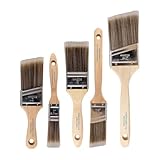
- COMPLETE 5-PIECE BRUSH SET FOR EVERY PAINTING TASK — Includes 1 Inch Flat, 1.5 Inch Angle, 2 Inch Flat, 2 Inch Angle Stubby, and 2.5 Inch Angle brush giving you every size professional painters use daily. Get all 5 for less than the price of a single brush from hardware store brands — professional grade performance at a fraction of the cost. Perfect for walls, trim, cabinets, doors, furniture, and detailed cutting-in work on any project.
- ZERO BRISTLE LOSS — GUARANTEED BY PRECISION ADHESIVE BONDING — Every bristle is locked in place with precision-set adhesive that keeps them in the brush — not in your paint job. The coated steel ferrule provides structural support while the adhesive bond ensures clean performance on every stroke. Premium SRT synthetic filaments load more paint and release it evenly for a smooth streak-free finish on walls, ceilings, and trim. Works with latex, oil-based paint, primer, sealer, and wood stain.
- INCLUDES THE ANGLE STUBBY MOST SETS LEAVE OUT — Professional painters know the 2 Inch Angle Stubby is the go-to brush for tight cabinet interiors, window sashes, inside corners, and detailed trim where standard angle brushes are too long. Combined with the 1.5 and 2.5 inch angle sash brushes you have precision cutting-in covered at every scale — baseboards, crown molding, door casings, and ceiling lines.
- FLAT BRUSHES FOR BROAD SMOOTH COVERAGE ON ANY SURFACE — The 1 and 2 inch flat brushes deliver even coverage on walls, furniture, shelving, doors, fences, decks, and wood surfaces. Ideal for applying primers, stains, varnishes, polyurethane, and specialty coatings. Solid wood handles provide all-day comfort and control for both professional contractors and weekend DIY homeowners tackling interior or exterior painting projects.
- TRUSTED BY PROFESSIONAL PAINTERS AND CONTRACTORS NATIONWIDE — Pro Grade delivers professional-grade results at a price that makes sense for crews who go through brushes on every job. Ideal for property managers, remodeling contractors, apartment turnover crews, maintenance teams, and commercial painting operations. Backed by thousands of verified reviews from working painters. Washable and reusable for multiple projects.
10. Afterlight: best for textures, grain and light leaks
Afterlight is a creative finishing app for adding atmosphere after the main correction is complete. Textures, grain and light leaks can give a digital image a deliberately analog character, making it useful for editorial artwork, travel sets and social posts.
Standout features
- Texture overlays add surface character.
- Grain creates a film-like finish.
- Light-leak effects provide controlled stylization.
Price and limits
The free-versus-premium split and current price vary by storefront. Afterlight works best as a specialist companion, not as the primary app for RAW cataloging, advanced masks, object removal or multi-layer composites.
How to choose the right iPhone photo editor
Start with your files
For camera RAW or Apple ProRAW, begin with Lightroom or Photomator. Lightroom adds a cross-device Adobe workflow and premium masks; Photomator keeps the emphasis on Apple devices, iCloud and non-destructive editing. If you mostly shoot JPEG or HEIF and make occasional corrections, Snapseed or Darkroom may be enough.
Decide where your library should live
Choose Darkroom or Photomator when Apple Photos and iCloud are central to your routine. Choose Lightroom when you want Adobe cloud storage and the option to continue on other devices. VSCO and Picsart are better when publishing and community features matter more than a traditional archive.
Match the tool to the edit
- Exposure, color and RAW: Lightroom or Photomator.
- Free manual corrections: Snapseed.
- Fast Apple-library batches: Darkroom.
- Film presets: VSCO.
- AI templates and collages: Picsart.
- Faces and selfies: Facetune.
- One distracting object: TouchRetouch.
- Layers and generative composites: Photoshop Mobile.
- Grain, texture and light leaks: Afterlight.
Check the payment model before committing
Start with a free tier when your needs are uncertain. Pay when you need sustained RAW volume, cross-device synchronization, client retouching or extensive generative AI. A subscription can be justified by those recurring needs; a lifetime option, where offered, makes more sense for a stable Apple-only workflow. App Store prices are country-specific and change over time, so confirm the amount shown on your account before purchase.
Keep quality under control
Use masks or selective adjustments for skies, faces and painted surfaces instead of applying a strong global filter. Preserve a non-destructive original when the app supports it, export at the required pixel dimensions, and inspect fine edges after object removal or generative edits. For artwork documentation, compare the edited image with the physical painting under neutral light so that a preset does not change the colors you need to represent accurately.
Also popular on Amazon

- SAY GOODBYE TO PAINTERS TAPE: Stop wasting hours on tedious prep work. This 12-inch paint guard lets you cut in directly along ceilings, trim, and baseboards, saving you time and frustration. Get professional results faster and skip the hassle of applying and removing tape.
- STRAIGHTER LINES WITH SUPERIOR CONTROL: Engineered with a rigid, straight stainless steel blade, this edger helps you create sharp, consistent paint lines. The high-quality metal guide resists flexing to help you achieve a professional-looking finish with far less bleed-through than painting freehand. For best results and the sharpest lines, use on smooth, non-textured surfaces.
- ERGONOMIC CONTROL FOR LESS FATIGUE: The lightweight yet durable ABS handle is designed to fit comfortably in your hand, reducing strain during long painting sessions. Its secure grip gives you steady, confident control, allowing you to focus on precision without hand cramps.
- VERSATILE FOR ANY PAINTING PROJECT: Whether you're painting around window frames, door casings, ceilings, or accent walls, this tool is your go-to solution. Its slim profile easily slides into tight spaces, making it the only cutting-in tool you'll need for your entire project.
- DURABLE & EASY TO CLEAN: Built to last for years of projects. The stainless steel blade resists rust and corrosion, while the sturdy ABS handle can handle job site wear and tear. When you're done, simply wipe the blade clean with a damp cloth, and it's ready for the next job.
Frequently Asked Questions
What is the best free photo editing app for iPhone?
Snapseed is the strongest free-first choice in the cited 2026 comparisons because it provides selective adjustments, healing, curves and a broad manual toolset without a reported subscription charge. Lightroom’s free tier is also substantial if you want presets, organization and a route to premium RAW and masking tools. Check Snapseed’s current App Store availability and update status before installing.
Recommended Free Tools
Which photo editing app do professionals use on iPhone?
Lightroom is the most complete professional-oriented option here for RAW or ProRAW, serious tonal and color control, masking, presets, batch work and a workflow that can continue on other devices. Photomator is the stronger Apple-native alternative when iCloud, non-destructive edits and broad camera RAW support are the priority.
Are paid iPhone photo editing apps worth it?
They are worth considering when you regularly edit RAW files, need cross-device storage, retouch clients, process batches or rely on generative tools. Occasional JPEG edits can usually be handled by Snapseed or a free tier. Compare the recurring subscription with the value of a lifetime option where one is offered, and check your local App Store price.
Can you edit RAW photos on an iPhone?
Yes. Lightroom supports a serious RAW and ProRAW workflow, and Photomator reports support for more than 750 camera RAW formats. Exact compatibility depends on the camera file and the current app version, so confirm your format before moving a whole shoot.
What is the best app for portraits and selfies?
Facetune is the specialist pick for face and skin retouching. Lightroom is better when the portrait also needs RAW development, masking, batch consistency or a broader archive; TouchRetouch is better for removing a specific blemish or background distraction.
Do these 3 things before closing this tab:
1Clear out junk files and repair common Windows errors2Fix the driver behind crashes, sound loss and screen glitches3Repair Windows errors before they cause bigger problemsWhich app is best for a film look?
VSCO is the clearest choice for film-inspired presets and a consistent feed. Afterlight is useful when you want to add grain, textures or light leaks after the main color correction.
Which app works best with Apple Photos and iCloud?
Darkroom is built around a fast Apple Photos workflow, while Photomator offers iCloud syncing across Mac, iPhone and iPad. Lightroom is the better fit when you want Adobe cloud storage and editing continuity beyond Apple’s library.
Quick Recap


