PC Slower Than It Used to Be?
Do these 3 things before closing this tab:
1Clear out junk files and repair common Windows errors2Fix the driver behind crashes, sound loss and screen glitches3Repair Windows errors before they cause bigger problemsA free scan shows the junk files, broken settings and background clutter dragging Windows down - then fixes them in one click.
Run a Free PC Scan →Free scan · Windows 10 & 11
ThatPainter is reader-supported. When you buy through links on our site, we may earn an affiliate commission. Learn More
For most Brother embroidery problems, start by stopping the machine, clearing tangled thread, and rethreading both paths according to your model’s manual. Then check the needle, bobbin, hooping and stabilizer before changing tension. Stop and seek authorized service if the needle strikes the plate or presser foot, the machine makes an abnormal noise, or a hook or other part appears damaged.
What should you check first?
- Stop safely. Stop sewing before pulling out a jam. Remove loose or tangled thread from the needle, presser-foot, bobbin and hook areas. If the needle has hit metal or the machine is making an abnormal noise, do not keep sewing to test it.
- Rethread both paths. Unthread and rethread the upper thread and bobbin according to the instructions for your exact model. Check for knots, tangles, incorrect spool-cap placement, thread that has slipped out of the needle-bar guide, or excessive tension. Brother identifies these as possible causes of upper-thread breaks.
- Check the needle and consumables. Brother recommends a 75/11 home sewing machine needle for embroidery. Replace a bent, dull, damaged or adhesive-contaminated needle; confirm the bobbin is the type specified for your model and that it is wound evenly.
- Check the embroidery setup. Attach stabilizer and hoop the fabric firmly so it is taut. Poor preparation or missing stabilizer can contribute to thread breaks and poor stitch formation.
- Only then investigate tension or design. Follow the model-specific embroidery-tension instructions rather than borrowing a setting from another Brother machine. On professional models, very fine density, overlapping stitches, zero-pitch or extremely short stitches, and specialty thread can also contribute to problems; use the model’s guidance to edit the design or reduce speed when appropriate.
Why does the upper thread keep breaking?
Start with the upper path: rethread it fully and check that the thread is seated in the guides, has not slipped out of the needle-bar guide, and is not knotted or tangled. Confirm the spool cap is positioned correctly. Then check for a damaged needle, an incompatible or poorly wound bobbin, excessive tension, or fabric that is not stabilized and hooped firmly.
#1 Best Overall

- MASTER EVERY STITCH: Compatible with all home sewing machines, SCHMETZ Embroidery Home Sewing Needles are expertly crafted to handle rayon, polyester, and other specialty threads, delivering smooth and consistent stitching
- PRECISION MEETS PROTECTION: The needles feature a widened groove and enlarged eye that reduce friction and prevent damage to delicate threads, allowing for frictionless embroidery with cleaner and more precise results
- DESIGNED FOR DECORATIVE DETAILS: Designed to minimize thread shredding and skipped stitches, SCHMETZ Embroidery Needles offer a reliable solution for decorative stitching, ensuring a seamless and enjoyable embroidery process
- PROFESSIONAL PERFORMANCE: Perfect for intricate sewing tasks, SCHMETZ Embroidery Needles’ precision and durability deliver superior results and add a professional touch to every project
- ESSENTIAL SEWING SUPPLIES: This pack of size 75/11 Embroidery Needles features a precision-engineered design that expertly manages specialty threads, reduces tangles, and ensures a flawless finish every time
If the thread continues to break after those checks, inspect accessible areas for lint and look for damage to the presser foot, needle plate, bobbin case or hook. A scratched or burred part can catch thread; do not attempt to file or reshape it yourself.
Why does the needle break?
Install a new 75/11 embroidery needle unless your model’s instructions specify otherwise. Insert it fully until it reaches the needle stopper, orient its flat side as the manual directs, and tighten the clamp securely. Brother warns that a needle not fully inserted or securely clamped can break and cause injury.
Rank #2
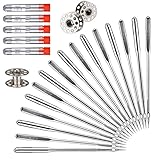
- PREMIUM QUALITY MATERIAL: Made of top quality high-strength steel, sharp smooth, sturdy and durable, not easy to bend, and long service life.
- VALUE PACK & PERFECT SIZE:This set come with five sizes: 65/9, 75/11, 90/14, 100/16, 110/18, 10 needles per size, total 50 needles. Also includes 5 storage tubes (free) and 3 bobbins (free).
- PERFECT COMPATIBILITY: They are compatible with most household sewing machines or old sewing machines, such as Singer, Brother, Janome, Varmax, etc. Notice! Not suitable for industrial large sewing machines.
- ENJOY THE FUN OF DIY: Perfect for thin fabrics such as yarn(size: 65/9), medium-thin fabrics such as shirts, satin (size: 75/11), ordinary fabrics such as windbreakers(size: 90/14), thick fabrics such as jeans(size: 100/16), thicker fabrics such as thick coats(size: 110/18) .
- INTIMATE GIFT: The set is an amazing gift for your relatives, friends, families, mother and wife.
Also check that the thread path and bobbin are correct and that the design is not placing excessive demands on the needle. If the needle contacts the plate or presser foot, stop immediately. Continued sewing risks further damage; needle strikes or abnormal alignment need inspection by an authorized Brother dealer or service center.
How do you troubleshoot bobbin or lower-thread trouble?
Use the bobbin type specified for your machine; Brother cautions that an incorrect bobbin will not work properly. Wind it evenly, install it in the orientation shown in the manual, and check that the thread leaves the bobbin case smoothly. With the machine stopped, remove lint and loose thread from the hook area. A damaged bobbin case or hook, or recurring trouble after correct setup and cleaning, calls for service rather than improvised adjustment.
The Tool Desk
Outbyte PC Repair FREEClear out junk files and repair common Windows errorsFree Scan →Outbyte Driver Updater FREEScan for outdated or missing drivers - takes under a minuteDriver Scan →Rank #3

- ★ The size of sew machine needle is 75/11. Perfect for sew thin fabrics. Such as chiffon, fine cloth, thin cotton, warp knitted fabric, shirt cloth, plain cloth, artificial cotton
- ★ 11 sewing needle is made of durable stainless steel. Each one straight and rust free (bright and shiny)
- ★ These embroidery needles fit all "household" models of Brother, Janome, Singer, Bernina, Viking, Elna, Kenmore, Baby Lock, Simplicity, Necchi, White and many others
- ★ The shank (top part) of needles have one flat side and one rounded side, light ball point, enlarge eye and widened groove protect fragile threads and guard against excess friction
- ★ Come with 10 Packs of sew needles. Each pack included 5 pcs needles. Total 50 Pcs
How do you prevent puckering and unstable stitching?
Attach embroidery stabilizer to the fabric and hoop both firmly so the fabric is taut. Stabilizer supports the fabric while the design is stitched; hooping that is too loose can allow movement and contribute to distorted or unstable stitches. Choose stabilizer appropriate to the fabric and follow the machine and stabilizer instructions. If distortion persists despite sound hooping and stabilization, consult model-specific service guidance.
Should you adjust the embroidery tension?
Use tension adjustment only after checking threading, needle, bobbin, fabric preparation and design conditions. Brother’s tension procedure is model-specific, so use the FAQ or manual for your machine and do not copy a numeric setting from another model. If you are unsure which adjustment applies to embroidery on your machine, leave the setting unchanged until you confirm the correct procedure.
Rank #4

- ★ The size of sew machine needle is 75/11. Perfect for sew thin fabrics. Such as chiffon, fine cloth, thin cotton, warp knitted fabric, shirt cloth, plain cloth, artificial cotton
- ★ 11 sewing needle is made of durable stainless steel. Each one straight and rust free (bright and shiny)
- ★ These embroidery needles fit all "household" models of Brother, Janome, Singer, Bernina, Viking, Elna, Kenmore, Baby Lock, Simplicity, Necchi, White and many others
- ★ The shank (top part) of needles have one flat side and one rounded side, light ball point, enlarge eye and widened groove protect fragile threads and guard against excess friction
- ★ Come with 5 Packs of sew needles. Each pack included 10 pcs needles. Total 50 Pcs (75/11)
Can lint cause recurring thread breaks?
Yes. Brother says dust or lint in thread guides or the tension unit along the upper-thread paths may cause thread to break during embroidery. Periodically clean thread guides and thread paths with the supplied brush, following your model’s maintenance instructions. Do not disassemble a tension unit unless the manual for your model instructs you how: incorrect reassembly can prevent proper operation.
Independent reader supportYour contribution helps us test, update, and keep practical guides available for everyone.What should you do about an error, USB or touch-panel message?
Record the exact wording of the message and consult the Brother FAQ or manual for the model shown on the machine. These messages are not interchangeable across models. For example, the PE535 support index has dedicated entries for error messages, USB and touch-panel issues, but those entries should not be treated as instructions for a different model. If the message persists or points to a safety-device or mechanical fault, contact Brother support.
Quick wins for a faster PC:
Scan for outdated or missing drivers - takes under a minuteDriver Scan →Clear out junk files and repair common Windows errorsFree Scan →Best Value

- Premium Gold Titanium for Superior Performance: Crafted with a titanium nitride coating, SCHMETZ Gold Embroidery Needles last longer, easily penetrate fabric, and resist adhesives and wear, delivering smooth, skip-free stitching on every project
- Engineered for Precision & Performance: Perfect for intricate embroidery, free-motion designs, and metallic or fragile specialty threads, these needles feature an enlarged eye and medium ballpoint to prevent fraying, breaking, and skipping
- Easily Glides Through Fabrics: From delicate to densely woven materials, these embroidery needles smoothly pierce medium to heavy fabrics without bending, breaking, or damaging fibers, delivering clean, professional-quality stitches every time
- Universal Use for All Household Machines: Compatible with all major home embroidery and sewing machine brands, including Baby Lock, Bernina, Brother, Janome, Singer, Pfaff and more
- Perfect for Dense, Woven, & Specialty Fabrics: Designed for embroidery on a variety of including thick or coarse materials like denim, these needles resist bending, giving you superior durability for every stitch and style
When should you contact Brother service?
Stop using the machine and contact an authorized Brother dealer or service center if the needle contacts the plate or presser foot, the needle alignment appears abnormal, or the needle plate, presser foot, bobbin case or hook has scratches or burrs. Broken automatic needle threading also warrants service. Persistent thread breaks after correct threading, needle replacement, bobbin setup and cleaning are another reason to seek model-specific inspection rather than repeatedly changing settings.
Quick Recap
Quick symptom guide
| Symptom | First checks | Escalate when |
|---|---|---|
| Upper thread breaks | Rethread; remove tangles; check tension, needle, bobbin and stabilizer. | Breakage persists or a foot, plate, bobbin case or hook is damaged. |
| Needle breaks | Install a new, fully seated 75/11 embroidery needle; check thread, bobbin and design. | The needle strikes the plate or foot, or alignment is abnormal. |
| Bobbin or lower-thread trouble | Use the model-correct bobbin, wind it evenly, install it correctly and clean the hook area. | The bobbin case or hook is damaged. |
| Puckering or unstable stitches | Rehoop the fabric tautly and attach suitable stabilizer. | Distortion continues after setup is corrected. |
| Error, USB or touch-panel message | Record the exact message and consult the FAQ or manual for the machine’s model. | The message persists or indicates a safety-device or mechanical fault. |
| Recurring breaks with lint in the thread path | Clean thread guides with the supplied brush and follow the model’s maintenance instructions. | Operation remains abnormal or the tension unit needs work beyond the manual’s instructions. |

Product prices and availability are accurate as of the date/time indicated and are subject to change. Any price and availability information displayed on Amazon at the time of purchase will apply.




