Crashes, No Sound, or Screen Glitches?
The Tool Desk
Outbyte PC Repair FREEClear out junk files and repair common Windows errorsFree Scan →Outbyte Driver Updater FREEFix the driver behind crashes, sound loss and screen glitchesFind Drivers →Random freezes, missing sound and display glitches usually trace back to one bad driver. Find and replace yours safely.Free scan · under a minute
Windows Errors? Fix Them Before They Spread
Repair common Windows errors and clear accumulated junk for a smoother, more stable PC - no reinstall needed.Free scan · no reinstall
ThatPainter is reader-supported. When you buy through links on our site, we may earn an affiliate commission. Learn More
Canon announced two creator-first cameras on March 26, 2025: the fixed-lens PowerShot V1 and the interchangeable-lens EOS R50 V. They target similar audiences—vloggers, YouTubers, livestreamers and beginner filmmakers—but solve different problems.
The PowerShot V1 is the simpler all-in-one option: it combines a fast wide-angle zoom, built-in three-stop ND filter, optical stabilization and a cooling fan in one compact body. The EOS R50 V is the expandable option: its larger APS-C sensor and RF mount allow creators to change lenses, control perspective and build a more capable video system over time.
What’s actually slowing this PC down?
Pick the symptom - the matching free tool is one click away.
As an Amazon Associate I earn from qualifying purchases.
In practical terms, the V1 minimizes setup friction; the R50 V minimizes long-term system limitations. Neither is universally better.
Canon’s announcement positioned both cameras within its expanding EOS and PowerShot V Series, rather than presenting them as replacements for conventional photography cameras or Cinema EOS models.
#1 Best Overall
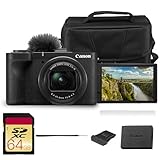
- Bundle Items Included: Canon PowerShot V1 Digital Camera, Canon LP-E17 Lithium-Ion Battery Pack, Windscreen, WS-DC12 Wrist Strap, ER-SC2 Shoe Cover, Bag, 64GB Memory Card
- Large 1.4″ 22.3 MP Sensor with Advanced Autofocus - Capture breathtaking stills and smooth video thanks to the V1’s impressive 1.4-inch, 22.3 MP CMOS sensor—significantly larger than standard 1″ sensors—delivering richer dynamic range, low-light performance, and depth.
- Equipped with a built-in zoom lens, the PowerShot V1 allows you to frame everything from wide scenic landscapes to tight close-ups with ease. The optical design maintains clarity across the zoom range, giving photographers the freedom to capture distant subjects or intimate moments without sacrificing image quality.
- Unlimited 4K Video & Pro Video Features - Shoot uncropped 4K at 30 fps and 4K at 60 fps (with 1.4× crop), supported by Canon Log 3 and 10-bit color depth for cinematic visuals. A built-in cooling fan enables extended recording without thermal shutdown—perfect for livestreams, tutorials, or interviews.
- Designed with portability in mind, the PowerShot V1 features a lightweight, compact body that fits comfortably in a bag or jacket pocket. Its intuitive control layout makes it easy to adjust settings quickly, allowing beginners and experienced users alike to capture stunning images wherever inspiration strikes.
What Canon announced
Canon introduced the PowerShot V1 and EOS R50 V simultaneously, with an original U.S. launch target of April 2025. The launch suggested prices were $899.99 for the PowerShot V1, $649.99 for the EOS R50 V body, and $849.99 for the EOS R50 V bundled with the RF-S14-30mm F4-6.3 IS STM PZ lens.
Those are 2025 launch prices, not current 2026 street prices. Pricing, promotions, bundles and stock can change, so buyers should check the relevant Canon PowerShot V1 page and EOS R50 V specifications page before purchasing.
The simultaneous release matters because Canon was not simply refreshing a general-purpose EOS camera. It offered two distinct creator workflows at once: a fixed-lens camera for immediate, low-friction shooting and a video-oriented mirrorless body for creators who expect to add lenses and accessories.
Why this is a meaningful shift for Canon
“Canon goes all in on vlogging” is an editorial description, not Canon’s literal claim. It is nevertheless a reasonable way to describe the emphasis of these products. Both cameras include controls and hardware aimed at creators, including vertical-shooting features, livestreaming tools, Canon Log 3, 10-bit recording options and designs intended to support video recording for extended periods.
That does not mean Canon is abandoning still photography or replacing its Cinema EOS line. It means the company is expanding a dedicated creator-camera category for people who want more control and better ergonomics than a phone, without immediately moving to a large professional video setup.
Do these 3 things before closing this tab:
1Scan for outdated or missing drivers - takes under a minute2Clear out junk files and repair common Windows errors3Fix the driver behind crashes, sound loss and screen glitchesPowerShot V1: the all-in-one vlogging camera
The PowerShot V1 is designed around convenience. Its lens, stabilization, ND filter and cooling system are built into the camera, so a creator can start shooting without choosing a lens or assembling a rig.
- Lens: built-in 16–50mm-equivalent zoom for stills, or approximately 17–52mm full-frame equivalent for video.
- Aperture: f/2.8–4.5.
- Sensor: 1.4-type CMOS, with 22.3 megapixels for stills and 18.7 megapixels used for video.
- Video: uncropped, oversampled 4K up to 30p; cropped 4K up to 60p.
- Crop: approximately 1.4x in the V1’s 4K60 mode.
- Color and bit depth: Canon Log 3 and 10-bit recording.
- Stabilization: optical image stabilization plus movie stabilization.
- Connections: microphone input and headphone output.
- Display: vari-angle screen.
- Other hardware: hot shoe, built-in three-stop ND filter and cooling fan.
- Weight: approximately 426g including a card.
The built-in lens is one of the V1’s most important advantages. Its wide end is useful when the camera is held at arm’s length, while the f/2.8 maximum aperture gives it a practical advantage over the R50 V’s relatively slow kit lens in dimmer conditions.
The built-in ND filter changes outdoor shooting
A three-stop ND filter reduces the amount of light entering the lens without forcing the creator to change shutter speed or aperture. That is useful outdoors when maintaining a natural-looking shutter speed, especially during video recording in bright sunlight.
With the V1, the filter is always available inside the camera. An R50 V user may need to buy and carry an external ND filter, depending on the lens and shooting conditions.
The cooling fan is useful, but “unlimited” needs qualification
Canon describes the V1’s cooling system as enabling unlimited continuous 4K60P shooting. That should not be read as a guarantee under every condition. Canon also warns that recording time can be affected by ambient temperatures above 23°C/73°F, wireless LAN use, USB power and other settings.
The practical takeaway is that the fan is a major advantage for long-form recording, livestreams and extended indoor sessions. It is not permission to ignore heat, power, card performance or the camera’s operating limits.
How portable is the V1?
The V1 is compact compared with an interchangeable-lens camera, and its lens retracts into the body. It may fit in a jacket pocket, but it is not genuinely jeans-pocket-sized. The fixed-lens design also means there is no need to carry a separate lens, which can make the complete travel setup smaller than the R50 V even if the camera bodies themselves are similar in weight.
EOS R50 V: a creator-focused mirrorless system
The EOS R50 V uses an APS-C sensor and Canon’s RF mount. It is therefore less self-contained than the V1, but it can grow with the creator’s needs. A wide lens can support self-recording, a fast prime can produce more background blur, and a telephoto or macro lens can be added for interviews, products or B-roll.
Rank #2

- Hybrid Camera for Photo & Video – The Canon PowerShot V1 is designed for versatile content creation, combining high-quality photography and 4K video recording in one compact device. Perfect for vlogging, live streaming, and everyday photography.
- 4K Ultra HD Video & High-Resolution Photos – Record stunning 4K videos with smooth frame rates and capture crisp, detailed photos thanks to the advanced imaging sensor and image processor.
- Built-in Ultra-Wide-Angle Zoom Lens – Features a versatile lens ideal for group shots, landscapes, travel photography, and vlogging with wide-angle flexibility and zoom capability.
- Compact, Lightweight & Travel-Ready – Sleek, portable design makes it easy to carry everywhere. Ideal for creators on the move, travel vloggers, and social media content producers.
- User-Friendly Controls & Intelligent Features – Intuitive buttons and menu system, multiple shooting modes, and image stabilization make it easy for beginners and professionals to shoot like a pro.
- Sensor and processor: APS-C sensor with DIGIC X.
- Mount: Canon RF mount, compatible with RF and RF-S lenses.
- Adapter support: EF and EF-S lenses can be used with Canon’s EF-EOS R adapter; EF-M lenses are not compatible.
- Video: 4K UHD oversampled from 6K up to approximately 29.97p.
- High-frame-rate 4K: cropped 4K at 50/59.94p.
- Color and bit depth: Canon Log 3 and 10-bit 4:2:2 recording options.
- Audio: built-in stereo microphone, 3.5mm microphone input and 3.5mm headphone output.
- Creator controls: front-facing movie-record button and livestream button.
- Vertical work: vertical-video recording and a vertical tripod socket.
- Livestreaming: UVC/UAC, HDMI, Camera Connect and Live Switcher Mobile workflows.
- Weight: approximately 370g with battery and card; 323g body only.
The R50 V’s larger APS-C sensor should offer more flexibility for depth of field and low-light work when paired with a suitable lens. But the sensor-size advantage should not be exaggerated. In practical web video, lighting, lens choice, exposure and stabilization can matter as much as the format. TechRadar’s testing found the two cameras broadly similar in image quality while highlighting the V1’s faster, wider integrated lens and ND filter.
What the R50 V leaves out
The R50 V has no electronic viewfinder, no built-in flash and one SD card slot. Those omissions are understandable on a video-first body, but they matter to buyers who also want a conventional stills camera.
The body-only price also understates the real cost of entry. The camera cannot be used until a lens is attached, and many creators will also need a microphone, memory card, tripod and possibly an ND filter.
The RF-S14-30mm power-zoom kit lens
Canon launched the R50 V with the RF-S14-30mm F4-6.3 IS STM PZ, its first RF-S lens with a built-in power zoom. Smooth electronic zooming is useful for controlled reframing, talking-head videos and compact tripod setups. Its wide end is also appropriate for self-recording.
The trade-off is its relatively slow f/4–6.3 aperture. It will not gather as much light as the V1’s f/2.8–4.5 built-in lens, and it offers less potential for background separation. A creator who later buys faster RF lenses can overcome that limitation, but the additional cost and weight are part of the R50 V decision.
PowerShot V1 vs EOS R50 V
| Category | PowerShot V1 | EOS R50 V |
|---|---|---|
| Design | Fixed-lens compact | Interchangeable-lens mirrorless |
| Sensor | 1.4-type; 22.3MP stills and 18.7MP video | APS-C |
| Lens | Built-in 16–50mm still equivalent; roughly 17–52mm for video | RF mount; lens required |
| 4K30 | Uncropped and oversampled | Oversampled from 6K |
| 4K60 | Cropped by approximately 1.4x | Cropped |
| ND filter | Built-in three-stop ND | External solution generally required |
| Stabilization | Optical IS and movie stabilization | Depends more heavily on lens and movie stabilization |
| Audio | Microphone and headphone connections | Microphone and headphone connections |
| Long recording | Cooling fan; Canon advertises unlimited 4K60 under stated conditions | Video-oriented body, but without the V1’s integrated fan design |
| Weight | Approximately 426g with card | Approximately 370g with battery and card, body only 323g |
| Expandability | None beyond accessories | RF/RF-S lens system, plus adapted EF/EF-S lenses |
| Best fit | Fast setup, travel and self-shooting | Lens-based production and future growth |
Which camera should you buy?
Choose the PowerShot V1 for walking vlogs and travel
The V1 is the stronger choice when you regularly hold the camera yourself, move between indoor and outdoor locations, and want the fewest decisions before recording. Its wide built-in lens, integrated ND filter and compact all-in-one design remove several common obstacles.
It is especially attractive for travel creators who do not want to carry multiple lenses or stop to fit filters. The optical stabilization helps, but it is not equivalent to the mechanically stabilized gimbal on a DJI Osmo Pocket 3.
Choose the R50 V for a growing YouTube setup
The R50 V makes more sense for a creator who expects to move from simple vlogs into interviews, product reviews, portraits, controlled B-roll or studio work. The RF mount gives the system a future, and the APS-C sensor provides more control when paired with an appropriate lens.
Quick wins for a faster PC:
Scan for outdated or missing drivers - takes under a minuteDriver Scan →Clear out junk files and repair common Windows errorsFree Scan →It is also better suited to a semi-permanent setup where lens changes, an external microphone and a tripod are acceptable trade-offs for flexibility.
For livestreaming, compare the whole workflow
Both cameras support livestreaming, but the R50 V advertises four connection paths: UVC/UAC, HDMI, Camera Connect and Live Switcher Mobile. Its dedicated livestream button and headphone output may appeal to creators who monitor and manage a more deliberate production.
The V1 remains attractive when the priority is a simple, self-contained livestream camera with a built-in lens and cooling fan. In either case, a stable power source, reliable network connection and suitable audio matter more than the camera badge alone.
For interviews and multiple focal lengths, choose the R50 V
Interviews often benefit from changing perspective without moving the camera. The R50 V can use different wide, standard and telephoto lenses, while the V1 is limited to its built-in zoom. The R50 V is the clear long-term choice if lens selection is central to the work.
For stills-first buyers, look elsewhere
Neither model is ideal if still photography is the main reason for buying. Both lack an electronic viewfinder and built-in flash, and the R50 V sacrifices some stills-oriented features of the standard EOS R50 in favor of creator controls. A standard EOS R50 or a used EOS R10 may be a better direction for buyers who want a more conventional hybrid camera.
Rank #3

- Compact Powerhouse: Canon PowerShot V10 vlogging camera features a sleek, pocket-sized design; perfect for on-the-go creativity; enjoy the ultimate, compact digital camera in portability and ease of use
- Versatile Vlogging Camera: Incredible low-light capabilities with a 15.2-megapixel 1-inch back-illuminated CMOS sensor; features a retractable front-facing screen, built-in subject detection, micro-HDMI output port, external mic auxiliary port and USB-C charging
- Adaptable Built-In Stand: Comes with an innovative stand that folds in both the front or back; content creator camera with a flexible stand allows for versatile shooting angles and hands-free operation in a variety of settings
- Wide-Angle Brilliance: PowerShot V10 digital video camera is equipped with a fixed 19mm wide-angle lens (35mm equivalent) — perfect for expansive landscapes, tight interiors and everything in between
- Image Stabilization: With recent updates (version 1.2.0 or later), the PowerShot V10 4K camera has three image stabilization modes while shooting videos — IS Off, IS On and IS Enhanced
Important compromises before you buy
Both cameras crop 4K60
4K60 does not preserve the same field of view as 4K30. The V1’s 4K60 mode has an approximately 1.4x crop, while Canon identifies the R50 V’s 4K50/60 option as a crop mode. This matters most for handheld self-recording: a lens that feels wide enough at 4K30 may become uncomfortably tight at 4K60.
Neither camera replaces a gimbal
The V1’s optical stabilization can help reduce movement, but it should not be confused with gimbal-level stabilization. If smooth walking footage is the top priority, the DJI Osmo Pocket 3 deserves consideration because it combines a small body with a mechanical gimbal.
Plan for audio outdoors
Both cameras provide a microphone input, and the R50 V also has a headphone output for monitoring. But built-in microphones can struggle with wind. Outdoor vloggers should budget for an external microphone and wind protection rather than assuming that the camera alone is a complete professional audio solution.
Recommended Free Tools
Canon Log 3 requires a workflow
Canon Log 3 and 10-bit recording can provide more grading latitude, but they are not automatic image-quality upgrades. Log footage benefits from careful exposure and post-processing. Beginners or creators who need fast turnaround may prefer Canon 709 or a standard picture profile.
Single-card recording limits redundancy
Each camera has one SD card slot. That is acceptable for many solo creators, but it provides no in-camera second-card backup. For paid work or irreplaceable travel footage, creators should plan a separate backup routine.
Compare the complete setup cost
The meaningful comparison is not a $899.99 V1 against a $649.99 R50 V body. The R50 V body needs a lens before it can record. A fair comparison includes the R50 V kit lens or another lens, plus a card, microphone, tripod and—when shooting outdoors—possibly an ND filter.
- V1 setup: camera, SD card, tripod or grip, microphone if needed, and spare battery or USB power for long sessions.
- R50 V setup: camera, lens, SD card, tripod or grip, microphone if needed, and potentially an external ND filter or additional lens.
Canon’s Vlogging Creator Kit page has displayed historical pricing while also stating that the kit was no longer available. Treat that page as an availability warning, not as a current offer: Canon’s kit listing.
Free tools Windows power users keep installed
One-click scans. No signup required.
Alternatives by workflow
DJI Osmo Pocket 3: best for stabilization and minimal size
The Osmo Pocket 3 is a compelling alternative for creators who prioritize smooth walking footage, very small size and a phone-like point-and-shoot workflow. TechRadar identified its one-inch sensor, gimbal stabilization and compact design as major advantages.
It is not a substitute for the R50 V’s interchangeable-lens system, conventional camera ergonomics or Canon RF compatibility. Choose it when stabilization and portability matter more than lens flexibility.
Sony ZV-1 II: another fixed-lens compact
The Sony ZV-1 II is a direct fixed-lens creator-camera alternative. It may suit buyers who want Sony’s compact ecosystem and do not need Canon’s RF-mount upgrade path or the V1’s cooling-oriented design. Compare current pricing and specifications rather than assuming the launch-era position remains unchanged.
A smartphone: still the easiest starting point
A modern phone remains the simplest option for casual social video, especially when computational processing, instant sharing and pocket portability matter more than lens control or camera ergonomics. The V1 becomes more compelling when a creator wants physical controls, optical zoom, an integrated ND filter, camera-style audio connections and longer-form recording.
Verdict
The PowerShot V1 is the better camera for getting the shot with the least friction. It is the natural choice for travel vloggers, walking creators and anyone who wants a fast wide-angle lens, built-in ND filter and long-recording design without carrying lenses.
The EOS R50 V is the better camera for building a video system. It offers an APS-C sensor, RF-mount flexibility, more options for controlling perspective and background blur, and creator-focused livestreaming and monitoring features.
Canon’s main achievement is not that one camera defeats the other. It is that the company now offers two distinct creator-first paths: the V1 for convenience and the R50 V for expansion. Choose based on how you work—not simply on sensor size, body-only price or the presence of a 4K60 mode.
Quick Recap

Product prices and availability are accurate as of the date/time indicated and are subject to change. Any price and availability information displayed on Amazon at the time of purchase will apply.
Free tools Windows power users keep installed
One-click scans. No signup required.




