Recommended Free Tools
ThatPainter is reader-supported. When you buy through links on our site, we may earn an affiliate commission. Learn More
The eufyMake E1 is a desktop UV printer that prints full-color graphics directly onto objects and adds raised, tactile texture up to a listed 5 mm. It is not a conventional 3D printer: it does not create free-standing objects. The $1,699 figure was a historical Kickstarter early-bird price from the 2025 campaign, not a guaranteed current retail price.
The eufyMake E1 is a desktop UV printer that puts full-color graphics directly onto objects and can build raised, tactile artwork up to a listed 5 mm high. It is not a conventional filament or resin 3D printer: it does not create free-standing objects. Instead, it combines inkjet-style color printing with UV-cured white and gloss layers to produce relief-like brushstrokes, logos, lettering, and textured illustrations on a separate sheet or object.
The $1,699 figure in the original headline was a Kickstarter early-bird pledge, not the printer’s permanent retail price. That campaign launched in April 2025 and has ended. Later observed listings placed the E1 higher—roughly $2,299 to $2,499 on parts of the official eufyMake store and $2,199.99 for a listed configuration at B&H—while bundles, promotions, geography, shipping, and stock can change the final price. Check the current eufyMake E1 UV Printer listing before treating any price as current.
#1 Best Overall
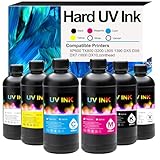
- [UV ink for Hard Materials] UV Ink Compatible with UV printer, Ep XP600 TX800 i3200 L805 1390 DX5 DX6 DX7 i1600 DX10 printhead – for Wood Acrylic,Plastic,Stone Material
- [UV printer refill ink] Compatible with all UV printers using the EPN i3200 1390 DX4 DX5 DX6 DX7 DX10 TX800 XP600 L805 printheads (⚠️Not compatible with EPN L805 printer),Compatible with eufymake E1 and ACHI UV printers etc. If you are not sure whether your printer is compatible, you can contact us at any time.
- [Versatile Material Application] UV ink can be directly printed on hard materials such as wood, chrome paper, PC, ABS, acrylic, plastic, leather, rubber, film, disks, glass, ceramics, metal, stone, etc. The patterns printed with our ink are bright in color and do not fade
- [UV Led ink set Packing list] 6 bottle 500ML UV Hard ink, Cyan (C), Magenta (M), Yellow (Y), Black (K), White (W), and Varnish (V)
- [UV DTF printer ink] This is Not an OEM product, all Aulay ink are made in an ISO 9001 and ISO 14001 certified facility
What makes the E1 different?
Most home printers are designed to put a flat image on paper. Most 3D printers build an object layer by layer from filament or liquid resin. The E1 occupies a narrower middle ground: it prints a two-dimensional design onto a real object or sheet, then adds physical height and surface texture to parts of that design.
That distinction matters for painters and illustrators. A digital painting can become a tactile panel with raised highlights. A reproduced brushstroke can be felt rather than merely seen. A logo can have a dimensional finish, and a small art object can combine color, gloss, and relief without being modeled as a complete 3D sculpture.
Think of it as a compact, specialty customization machine for direct-to-object UV printing—not as a general-purpose 3D printer. It can print ordinary flat color, but its premium feature is the ability to add texture.
How the eufyMake E1 creates raised artwork
- Prepare the artwork. The E1’s Amass3D workflow is designed to turn an image into a textured print. Its advertised tools include AI-assisted texture generation, background removal, style transfer, automatic positioning, and other image-preparation functions.
- Position the workpiece. The standard workflow uses a flatbed. Dual lasers and a snapshot camera help measure the object’s position, height, and contours, while automatic height adjustment helps set the print distance.
- Lay down UV ink. The printer uses six individual UV-ink cartridges, commonly described as CMYK plus white and gloss. Exact cartridge descriptions vary by listing, with some references distinguishing flexible white ink for flexible materials.
- Cure the layers. Ultraviolet light cures the ink during the print process. The white and gloss channels are particularly important to the E1’s raised-texture workflow, rather than being incidental accessories to ordinary color printing.
- Inspect and finish. The final result depends on the material, its preparation, the coverage area, the selected print mode, and the amount of texture. A surface that looks excellent on coated acrylic may need different preparation—or may be unsuitable altogether—on an untested material.
The machine also supports a different process called UV DTF, but that is not the same as printing directly onto an object. UV DTF creates a printed transfer that can be laminated and applied elsewhere. The E1’s standard flatbed mode is the direct-printing workflow; rotary, roll-to-film, and UV DTF equipment belong to the broader optional ecosystem.
What’s actually slowing this PC down?
Pick the symptom - the matching free tool is one click away.
Key specifications
| Specification | What is listed | Why it matters |
|---|---|---|
| Maximum print area | 330 × 420 mm, approximately 13 × 16.5 inches | Large enough for many signs, art panels, coasters, cases, and small merchandise pieces, but not a full-size production bed. |
| Maximum raised texture | Up to 5 mm, approximately 0.2 inches | Suitable for tactile highlights and relief-like graphics; it does not mean the machine prints a complete 5 mm-thick object. |
| Ink system | Six UV-based cartridges, commonly CMYK, white, and gloss | White and gloss support the E1’s distinctive texture and finish workflows. They are also important recurring consumables. |
| Print resolution | Up to 1,440 dpi in retailer specifications | A headline resolution figure does not by itself predict texture quality, adhesion, speed, or cost. |
| Bed and positioning | Flatbed printing, automatic height adjustment, camera-assisted positioning | Useful when placing artwork on objects with changing contours. |
| Connectivity | Wi-Fi and app-based control | The printer is designed to be operated through a connected software workflow rather than as a simple offline desktop printer. |
| Approximate size and weight | 590 × 250 × 407 mm; about 20 kg or 44 lb | Plan a permanent, stable location. This is compact compared with industrial equipment, but it is not a lightweight craft appliance. |
| Maximum listed substrate load | About 1.5 kg or 3.3 lb | Check the object’s weight and geometry before attempting a large or irregular workpiece. |
Specifications and included items can vary by region and bundle. A standard setup has been described as including the printer, ink and cleaning-cartridge kit, mini and standard flatbeds, adhesive mats, an air filter, sample substrates, protective glasses, and power accessories. Confirm the actual contents of the package you are buying; an optional module or a displayed accessory is not necessarily included in the base price. The manufacturer’s published specification page is a useful place to compare the listing details for your region: eufyMake’s E1 specifications.
What can it print on?
Official descriptions mention wood, metal, acrylic, ceramic, glass, plastic, leather, canvas, and more. The eufyMake store promotes compatibility with more than 300 materials, but that is a manufacturer claim, not a promise that every material will print equally well without testing, cleaning, coating, or adhesion preparation.
Rank #2

- 【UV ink for Hard Materials】UV Ink Compatible with Ep XP600 TX800 i3200 L805 1390 DX5 DX6 DX7 i1600 DX10 printhead – for Wood Acrylic,Plastic,Stone Material
- 【UV printer refill ink】Compatible with all UV printers using the EPN i3200 1390 DX4 DX5 DX6 DX7 DX10 TX800 XP600 L805 printheads (⚠️Not compatible with EPN L805 printer), If you are not sure whether your printer is compatible, you can contact us at any time.
- 【Versatile Material Application】UV LED ink can be directly printed on hard materials such as wood, chrome paper, PC, ABS, acrylic, plastic, leather, rubber, film, disks, glass, ceramics, metal, stone, etc. The patterns printed with our ink are bright in color and do not fade
- 【Package】1 bottle 500ML UV Hard ink White (W)
- 【UV LED Printer Ink】This is Not an OEM product, all Aulay ink are made in an ISO 9001 and ISO 14001 certified facility
Independent testing is more useful for setting expectations. Tom’s Hardware reported successful work on paper, wood, metal, acrylic, most plastic, leather, and fabric. It also found that a 2 mm textured print on an ASA side plate experienced only limited chipping after repeated use. That is encouraging for durable-looking custom goods, but it should not be interpreted as a universal durability rating for every substrate, ink mode, or use environment.
Promising uses for painters and makers
- Raised reproductions of digital paintings or scanned artwork
- Tactile brushstroke effects on small art panels
- Textured illustrations, dimensional lettering, and logos
- Wall art, signs, plaques, and decorative panels
- Ceramic magnets and coasters
- Phone cases, card-sized goods, and promotional items
- Personalized gifts and craft-fair products
- Short-run branded merchandise
- Tabletop-game components and maker projects
- Customized drinkware, including tumbler workflows when the appropriate hardware and blanks are used
For a painter, the strongest case is not simply printing a picture faster. It is adding a second sensory layer: a highlight that catches light, a raised line that follows a drawing, or a relief-like patch that makes a reproduction feel more like an object than a flat print.
The Tool Desk
Outbyte Driver Updater FREEScan for outdated or missing drivers - takes under a minuteDriver Scan →Outbyte PC Repair FREERepair Windows errors before they cause bigger problemsFix Now →Real-world speed, ink use, and durability
The E1 can produce attractive results, but large areas of heavy texture expose its limits. In Tom’s Hardware’s testing, a large textured artwork used approximately 46.27 mL of ink and took nearly seven hours to print. That is the kind of result that changes the business calculation: a single premium piece may be worthwhile, while a large batch of heavily textured items may be slow and expensive.
The test of a 2 mm textured ASA panel showed limited chipping after repeated use, suggesting that the cured surface can be reasonably robust when the material and process are well matched. It does not remove the need to test adhesion and handling on the exact product you plan to sell. A tumbler, flexible case, uncoated wood panel, and ceramic blank will not necessarily behave the same way.
The practical conclusion is straightforward: the E1 is better suited to one-off artwork, prototypes, premium personalization, craft-fair products, and short runs than to high-volume production. Tom’s Hardware described it as a capable creative tool but not a replacement for a production print shop. Read the independent E1 performance review for the testing context, rather than relying only on marketing samples.
The ownership cost is more than the printer
The Kickstarter price attracted attention because it made this unusual process look accessible to individual makers. The campaign reportedly raised $46,762,258 from 17,822 backers against a $500,000 goal, and campaign coverage described it as the most funded crowdfunding campaign at the time of publication. Those figures show strong interest; they do not establish the E1’s long-term operating cost or production capacity. The campaign’s early-bird price was a reward tier, not a permanent retail MSRP. The original Kickstarter campaign page provides the historical context.
Outdated Drivers Are Slowing You Down
One free scan finds every outdated or missing driver and matches the right update for your exact hardware.Free scan · exact hardware matchWindows Errors? Fix Them Before They Spread
Repair common Windows errors and clear accumulated junk for a smoother, more stable PC - no reinstall needed.Free scan · no reinstallRank #3

- 【High-Quality Prints】Delivers vivid, high-definition output with rich color and crisp detail. Fast-drying and UV-curable formula prevents smudging and ensures consistent performance for high-volume printing.
- 【Printer and Printhead Compatibility】 Compatible with a wide range of UV DTF printers and printheads, including XP600, TX800, i3200, L805, 1390, DX5, DX6, DX7, i1600, and DX10. Contact us if you need help confirming compatibility.
- 【Packaging & Ink Colors】This set includes six 500ml bottles of premium UV DTF ink: Cyan (C), Magenta (M), Yellow (Y), Black (K), White (W), and Varnish (V). Designed for UV Direct to Film (UV DTF) printing, suitable for A and B film with cold-release application.
- 【Versatile Material Application】Perfect for printing on a wide range of materials, including stickers, glass, metal, plastic, acrylic, ceramic, wood, and more. Its versatility allows you to create vibrant, durable prints on various surfaces.
- 【Reliable Support】For any questions, contact us via email, we guarantee a response within 24 hours to ensure your satisfaction.
Budget for the following recurring or conditional costs:
- CMYK, white, and gloss UV ink cartridges
- Cleaning cartridges and routine cleaning or priming
- Adhesive mats and replacement flatbed accessories
- Air filters and maintenance kits
- Print-head station replacement parts if needed
- Substrate blanks and surface-preparation products
- Failed prints, test swatches, and setup material
- Optional rotary, roll-to-film, or UV DTF equipment
White and gloss deserve special attention. They are central to raised texture, and heavily textured artwork can consume them faster than a simple CMYK image consumes color ink. The official store’s replacement UV ink cartridges and cleaning supplies are model-specific ownership items, not generic ink that can be substituted casually.
There is no honest universal cost-per-print figure. Ink usage changes with image coverage, texture height, the number of passes, print mode, substrate, and how often the machine is cleaned. A useful estimate for a particular product is:
True unit cost = substrate + measured ink use + maintenance allowance + failed-print allowance + labor and processing time.
eufyMake’s examples for ceramic magnets and tumblers can help illustrate the structure of a calculation, but they are marketing estimates rather than independently audited margins. Use your own measured ink consumption and local supply prices before setting a selling price.
Accessories expand the workflow—but also the budget
The E1 is a flatbed printer in its standard configuration. The official product catalog also lists a rotary attachment, roll-to-film attachment, UV DTF laminating machine, mini and standard flatbeds, adhesive mats, filters, maintenance products, and substrate blanks. These options can make the system more versatile, but they should be purchased for a defined workflow rather than as a collection of future possibilities.
Rank #4

- Package includes: 6 Bottles - 1 x UV DTF White Ink, 1 x UV DTF Black Ink, 1 x UV DTF Cyan Ink, 1 x UV DTF Magenta Ink, 1 x UV DTF Yellow Ink, 1 x UV DTF Varnish Ink replacement for UV DTF Ink Bottle.
- UV DTF Ink Refill Work with: Replacement for XP600 TX800 i3200 i1600 L805 1390 DX4 DX5 DX6 DX7 DX10 Printer.
- High Capacity for UV DTF Ink Bottles: With a bottle of up to 500ML per UV DTF ink. It features a high capacity, an extended service life, and a broad range of applications.
- Application Materials: Including but not limited to wood, chrome paper, PC (Polycarbonate), PET (Polyethylene Terephthalate), PVC (Polyvinyl Chloride), ABS (Acrylonitrile Butadiene Styrene), acrylic, plastic, leather, rubber, film, disks, glass, ceramic, metal, photo paper, and stone materials.
- Exceptional Productivity: Enhance your printer’s performance with our high-quality UV DTF Ink. UV DTF Ink is widely used in various industries, such as packaging, labeling, signage, automotive, electronics, and promotional products.
For example, choose an E1 rotary attachment only if cylindrical products are central to your work. A tumbler project may also require an appropriate blank and a process that matches the object’s coating and circumference. A UV DTF laminator is relevant when you need transfer-film work; it does not turn every flatbed print into a direct cylindrical print. Check model compatibility, package contents, and regional availability before ordering.
For a painting studio, the most immediately useful accessories are likely to be extra adhesive mats, maintenance supplies, filters, test substrates, and a controlled selection of blanks. Start with small samples of the surfaces you actually intend to sell rather than trusting a broad material list.
Recommended Free Tools
Ventilation and safe placement
The E1 has an enclosure, fan, and filter, and its ink is marketed with low-emission certification. That does not make ventilation optional. WIRED recommends placing the machine in a secluded, well-ventilated area, keeping children and pets away during printing, and avoiding inhalation of process emissions. Follow the manufacturer’s operating and safety directions, use the included protective glasses as directed, and do not place the printer beside a bed, dining table, or other area where people spend prolonged time if the room cannot be adequately ventilated.
Its approximately 20 kg weight also argues for a stable work surface with enough room for the printer, workpieces, cleaning supplies, and airflow around the enclosure. The WIRED review and safety discussion are worth reading before treating the E1 as an ordinary home inkjet.
Independent reader supportYour contribution helps us test, update, and keep practical guides available for everyone.Should you buy the E1?
| The E1 makes sense if you… | Look elsewhere or reconsider if you… |
|---|---|
| Want raised, tactile graphics on flat goods or objects | Need fully formed 3D objects; use a conventional filament or resin 3D-printer workflow instead |
| Make one-off art, premium gifts, prototypes, or short runs | Need fast, low-cost, high-volume production |
| Can test materials and accept model-specific ink and maintenance costs | Expect inexpensive, universal consumables or zero maintenance |
| Have a ventilated, dedicated place for the machine | Need a printer that can run in an occupied, poorly ventilated room |
| Value surface texture as part of the product | Only need ordinary flat color printing and cannot justify the specialty hardware |
| Plan to print mostly on manageable flat objects | Need cylindrical or transfer-film production without budgeting for the relevant accessories |
The E1 is most compelling when texture is the product, not merely a specification on the box. A painter selling a tactile limited edition, a maker developing custom art goods, or a small brand producing premium personalized pieces can make a credible case for it. Someone seeking a general 3D printer, a low-cost photo printer, or an industrial production machine should not.
Buying checklist
- Verify the actual price and bundle. Treat $1,699 as historical Kickstarter pricing. Compare the current regional listing, shipping, taxes, warranty terms, and included accessories.
- Confirm supply availability. Check the price and stock of E1-compatible color, white, gloss, and cleaning cartridges before buying the printer.
- Measure the workspace. Allow for the roughly 590 × 250 × 407 mm machine, its 20 kg weight, ventilation, access to the bed, and storage for ink and cleaning supplies.
- Choose the process before the accessory. Flat artwork needs the standard flatbed; cylindrical goods, roll-to-film work, and UV DTF transfers may require separate hardware.
- Test the exact materials. Buy or prepare small samples of the wood, ceramic, acrylic, metal, plastic, leather, canvas, or other surface you intend to use.
- Measure a real job. Record print time, ink consumption, failed tests, cleaning frequency, and finishing labor before promising customers a delivery schedule or margin.
- Plan for maintenance and ventilation. The printer’s enclosure and filter are helpful components, not a substitute for sensible room setup and manufacturer guidance.
Verdict
The eufyMake E1 brings an unusual capability to a comparatively compact format: it can turn a printed graphic into a tactile surface with raised color and texture. That makes it genuinely interesting for painters, illustrators, personalization businesses, and makers who want relief-like effects without producing a fully modeled 3D object.
Do these 3 things before closing this tab:
1Fix the driver behind crashes, sound loss and screen glitches2Repair Windows errors before they cause bigger problems3Scan for outdated or missing drivers - takes under a minuteBest Value

- 【Extreme Durability & Scratch Resistance】Waterproof and abrasion-resistant, this UV DTF ink creates a hard cured layer. Perfect for mugs, tumblers, and phone cases to withstand daily handling and washing without fading.
- 【Optimized for UV DTF A/B Film】 High-adhesion resin bonds securely with PET films for peel-free transfers. Works perfectly on glass, metal, ceramics, and wood. Supports Varnish for a premium 3D gloss finish.
- 【UV printer refill ink】Compatible with all UV printers using the EPN i3200 1390 DX4 DX5 DX6 DX7 DX10 TX800 XP600 L805 printheads (⚠️Not compatible with EPN L805 printer), If you are not sure whether your printer is compatible, you can contact us at any time.
- 【Flexible for Curved Surfaces】Elastic formula prevents cracking on irregular shapes. Ideal for bottles, tumblers, and helmets, ensuring a seamless and professional finish on complex geometries.
- 【Vivid Colors & High Opacity】High-density CMYK and optimized White ink deliver superior saturation. Ensures clean layering and strong coverage for vibrant, commercial-grade designs.
Its limitations are equally important. The $1,699 Kickstarter price is history, heavy texture can take hours and consume tens of milliliters of ink, proprietary supplies and maintenance add ongoing cost, and the machine needs a deliberate, ventilated workspace. The E1 is best understood as a specialized desktop UV customization tool—potentially excellent for premium creative work, but not a replacement for a conventional 3D printer, laser cutter, transfer printer, or industrial UV flatbed.
Frequently Asked Questions
Is the eufyMake E1 a 3D printer?
No. The E1 is a UV inkjet printer that prints onto a separate sheet or object. It can add raised graphics up to a listed 5 mm, but it does not build free-standing objects like a filament or resin 3D printer.
Does the E1 still cost $1,699?
No. The $1,699 figure was a Kickstarter early-bird pledge during the 2025 campaign. The campaign has ended, and later retail listings were higher and varied by region, bundle, and promotion.
What is the E1 best used for?
It can print ordinary flat color, but its defining feature is raised, tactile texture created with UV-cured ink layers. The strongest use cases include tactile artwork, relief-like illustrations, dimensional logos, signs, gifts, and premium personalized goods.
Quick wins for a faster PC:
Repair Windows errors before they cause bigger problemsFix Now →Fix the driver behind crashes, sound loss and screen glitchesFind Drivers →How expensive and slow is textured printing?
Independent testing found that a large textured artwork used about 46.27 mL of ink and took nearly seven hours. Actual time and consumption vary with coverage, texture height, print mode, and material.
What materials can the E1 print on?
The manufacturer and retailers list wood, metal, acrylic, ceramic, glass, plastic, leather, canvas, and other materials. Independent testing confirmed useful results on several surfaces, but every production material should be tested because adhesion and durability vary.
Can the E1 run anywhere in a home?
The printer includes an enclosure, fan, and filter, but it should still be placed in a well-ventilated, secluded area. Keep children and pets away during operation and follow the manufacturer’s safety instructions rather than treating the enclosure as a substitute for ventilation.
The Bottom Line
Bottom line: The eufyMake E1 is worth considering if you specifically want full-color, raised artwork on real objects and can afford the ink, maintenance, time, and workspace. The $1,699 price was a Kickstarter early-bird offer; evaluate the current retail bundle and the cost of producing your own test pieces before buying.
Quick Recap

Product prices and availability are accurate as of the date/time indicated and are subject to change. Any price and availability information displayed on Amazon at the time of purchase will apply.




