Recommended Free Tools
PC Slower Than It Used to Be?
Free scan · Windows 10 & 11
Outdated Drivers Are Slowing You Down
Free scan · exact hardware match
Windows Errors? Fix Them Before They Spread
Free scan · no reinstall
ThatPainter is reader-supported. When you buy through links on our site, we may earn an affiliate commission. Learn More
To find a conventional digital complementary color, convert the HEX value to HSL, rotate its hue by 180°, and convert it back to HEX. Using this HSL color-wheel method, #3498DB becomes approximately #DB7734.
This is one defined method—not a universal rule for every color tool. RGB inversion, HSV, traditional paint wheels, and perceptual spaces such as OKLCH can produce different results.
The Tool Desk
Outbyte Driver Updater FREEFix the driver behind crashes, sound loss and screen glitchesFind Drivers →Outbyte PC Repair FREERepair Windows errors before they cause bigger problemsFix Now →What is a complementary color?
A complementary color sits opposite a source color on a color wheel. Common approximations include blue and orange, red and cyan, yellow and purple, and green and magenta. The exact result depends on the color model and the source color’s precise hue.
#1 Best Overall
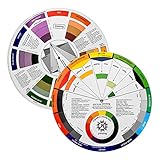
- Helps organise colours to make choices and combinations easier;Defines common terms and helps the artist to understand colour uses and interactions.
- Designed for all artists, including: Painters, crafters, interior, graphic, garden, and landscape designers;Perfect gift for creative people!
- Two-sided rotating wheel shows colour relationships;230mm diameter,2 packs Convenient and portable.
- UV coated to minimise fading and protect from moisture.Paper cover makes it;Paper evelope cover makes it difficult to break during transportation.
- Good for beginners to identify any of the colors easily and recognize the middle of the color simply.
For ordinary web and digital design, this article uses HSL hue rotation: preserve saturation and lightness, then move the hue 180 degrees.
What a HEX code contains
A six-digit CSS HEX color uses the format #RRGGBB. Each pair is a hexadecimal value from 00 to FF, representing a red, green, or blue channel from 0 to 255.
#3498DB
Red   = 0x34 = 52
Green = 0x98 = 152
Blue  = 0xDB = 219
CSS also supports three-digit shorthand. #39D expands to #3399DD, because each digit is duplicated. Eight-digit notation, such as #3498DB80, adds an alpha channel in the final two digits. See MDN’s CSS color-value documentation for the notation and supported formats.
Windows Errors? Fix Them Before They Spread
Repair common Windows errors and clear accumulated junk for a smoother, more stable PC - no reinstall needed.Free scan · no reinstallCrashes, No Sound, or Screen Glitches?
Random freezes, missing sound and display glitches usually trace back to one bad driver. Find and replace yours safely.Free scan · under a minuteThe quickest way to find a complement
- Enter the HEX color in a color-wheel tool.
- Select the Complementary harmony.
- Copy the resulting HEX value.
- Test the pair in the actual design context, especially if one color will be used for text.
Adobe Color’s color wheel can generate complementary, analogous, triadic, monochromatic, and other palette relationships. It is useful when you want to explore a complete palette visually, but its result reflects the tool’s color-wheel implementation and adjustments. It is not the only mathematically valid definition of a complement.
Calculate a complementary HEX color manually
The reproducible path is:
HEX → RGB → HSL → hue + 180° → RGB → HEX
Rank #2
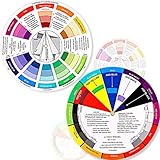
- Package include: 2 creative color wheel, 5.5 inch in diameter, the artist wheel helps show which colors are complimentary, and how they go (or don't go) together, suitable for learning how to color; Two identical color wheels, with different designs on the front and back
- Color mixing guide: the color wheel shows color, from basic principles and color mixing results on the front side; Spin around the paint wheel, then you will find the color mixture results in the windows, to learn the color theory in a fun way
- Color leaning tool: the backside of the color artist wheel that visually illustrates relationships between colors and demonstrates the results features a grayscale, and triad colors tints and tones, definitions of color terms, and illustrations of color, such as complementary colors, and triad colors
- Easy to use: this color mix guide consists of 3 layers, made of reliable cardboard with smooth surface and smooth rotation; And the size is moderate, easy to operate and carry
- Wide application: the relationship wheel is suitable to use when painting, quilting, interior design, having creative craft projects, and home decorating; Suitable for artists, teachers, kids, painters, designers, and tattoo learners
Worked example: #3498DB
1. Convert HEX to RGB
Split the color into pairs:
34 98 DBThose values are:
R = 52
G = 152
B = 219
2. Convert RGB to HSL
RGB(52, 152, 219) is approximately HSL(204°, 70%, 53%). A color calculator or library may retain decimal precision internally.
3. Rotate the hue
204° + 180° = 384°
384° - 360° = 24°
The complementary HSL color is approximately HSL(24°, 70%, 53%).
Free tools Windows power users keep installed
One-click scans. No signup required.
4. Convert back to RGB and HEX
HSL(24°, 70%, 53%) ≈ RGB(219, 119, 52)
219 = DB
119 = 77
52  = 34
The result is:
#3498DB → #DB7734The HSL formula
For a source color represented as HSL(H, S, L):
H' = (H + 180) mod 360
S' = S
L' = L
This formula specifically describes an HSL-based complement. It does not mean that every tool using the word “complementary” must return the same HEX value.
The underlying CSS approach is documented in the CSS Color Module Level 5 specification, which includes relative HSL expressions using h + 180.
JavaScript: calculate a complementary HEX color
This function accepts three- or six-digit HEX input, preserves the HSL saturation and lightness, and returns the HSL hue-rotated result.
Rank #3
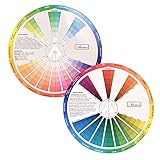
- This package include one Creative Color Mixing Board with one regular Color Wheel (9.25 inch).
- Easy-to-use tool that visually illustrates relationships between colors and demonstrates the results Features a grayscale, tints and tones, definitions of color terms, and illustrations of color.
- Color Wheel helps show which colors are complimentary, and how they go (or don't go) together.
- Some people know instinctively, and others need a visual tool to help them choose.
- Two sided wheel with indicators for complementary, split complementary and triad color schemes, how to tint and shade, primary, secondary and tertiary references, and more.
function hexToComplementary(hex) {
  hex = hex.replace(/^#/, "");

  if (hex.length === 3) {
    hex = hex.split("").map(char => char + char).join("");
  }

  if (!/^[0-9a-fA-F]{6}$/.test(hex)) {
    throw new Error("Use a valid 3- or 6-digit HEX color.");
  }

  const r = parseInt(hex.slice(0, 2), 16) / 255;
  const g = parseInt(hex.slice(2, 4), 16) / 255;
  const b = parseInt(hex.slice(4, 6), 16) / 255;

  const max = Math.max(r, g, b);
  const min = Math.min(r, g, b);
  const delta = max - min;
  const l = (max + min) / 2;

  let h = 0;
  let s = 0;

  if (delta !== 0) {
    s = delta / (1 - Math.abs(2 * l - 1));

    if (max === r) {
      h = 60 * (((g - b) / delta) % 6);
    } else if (max === g) {
      h = 60 * (((b - r) / delta) + 2);
    } else {
      h = 60 * (((r - g) / delta) + 4);
    }

    if (h < 0) h += 360;
  }

  h = (h + 180) % 360;

  const chroma = (1 - Math.abs(2 * l - 1)) * s;
  const x = chroma * (1 - Math.abs((h / 60) % 2 - 1));
  const m = l - chroma / 2;

  let rp, gp, bp;

  if (h < 60) [rp, gp, bp] = [chroma, x, 0];
  else if (h < 120) [rp, gp, bp] = [x, chroma, 0];
  else if (h < 180) [rp, gp, bp] = [0, chroma, x];
  else if (h < 240) [rp, gp, bp] = [0, x, chroma];
  else if (h < 300) [rp, gp, bp] = [x, 0, chroma];
  else [rp, gp, bp] = [chroma, 0, x];

  const toHex = value =>
    Math.round((value + m) * 255)
      .toString(16)
      .padStart(2, "0")
      .toUpperCase();

  return `#${toHex(rp)}${toHex(gp)}${toHex(bp)}`;
}

console.log(hexToComplementary("#3498DB"));
// #DB7734
The function validates input, expands #RGB, handles grayscale colors, and rounds only when converting the final RGB channels to HEX. It does not accept an alpha channel; that should be handled separately.
What’s actually slowing this PC down?
Pick the symptom - the matching free tool is one click away.
CSS: calculate it with a relative color
Modern CSS can derive a complementary hue from a custom property:
:root {
  --base-color: #3498db;
  --complementary-color: hsl(
    from var(--base-color)
    calc(h + 180)
    s
    l
  );
}
Use a static fallback when your target browsers or project tooling do not support relative color syntax:
:root {
  --base-color: #3498db;
  --complementary-color: #db7734;
}
Check the intended browser matrix using MDN’s CSS color-function documentation. Support for newer relative-color and advanced color functions varies by browser and version.
HSL complement versus RGB inversion
A different shortcut reverses every RGB channel:
R' = 255 - R
G' = 255 - G
B' = 255 - B
For #3498DB:
255 - 52  = 203 = CB
255 - 152 = 103 = 67
255 - 219 = 36  = 24

RGB inverse:    #CB6724
HSL complement: #DB7734
#CB6724 is an RGB inverse, not the default color-wheel complement. RGB inversion is appropriate for a negative effect, technical channel reversal, or a requirement that explicitly says “invert the color.” HSL hue rotation is usually the clearer choice for a complementary design palette.
Rank #4

- Comprehensive Color Theory Guide: This color wheel clearly organizes hues, tints, shades, and tones in a visually intuitive layout, making it easy to understand color relationships and harmonies. It includes essential color theory terms and definitions, helping users expand their knowledge while providing a practical reference for creating balanced and appealing color schemes in various projects. Tips: Instructions printed on the exterior of the product
- Enhanced Learning and Creativity Support: Designed with a detailed English-language interface, the wheel effectively illustrates color mixing results and interactions. It supports both intuitive and technical color selection, allowing artists to quickly identify complementary, split-complementary, and analogous colors. This tool helps reduce guesswork and improves accuracy in color matching
- Durable and User-Oriented Design: Made from lightweight yet durable paper material, the color wheel is resistant to frequent use and easy to clean. Its compact and portable design offers convenience for artists and instructors on the go. The clear markings and smooth spinning mechanism ensure effortless operation during creative sessions
- Suitable for Multiple Disciplines and Users: Ideal for painters, quilters, makeup artists, art students, and teachers, this color wheel is a versatile tool across various fields. It supports activities such as watercolor painting, fabric dyeing, cosmetic blending, and classroom instruction, making it an essential accessory for anyone working with color
- Package Contents and Size Details: Both wheels are designed with the same accurate color layout and sturdy construction, offering flexibility for different working environments and user preferences
Choosing HSL, HSV, or OKLCH
| Method | Use it when | Important qualification |
|---|---|---|
| HSL | You want the conventional digital color-wheel complement. | It is convenient for hue rotation but is not perceptually uniform. |
| HSV/HSB | Your existing workflow uses Photoshop-style hue, saturation, and brightness controls. | Its brightness definition differs from HSL lightness, so results can differ. |
| OKLCH or LCH | You need more perceptually predictable lightness or chroma adjustments. | It may be preferable for advanced design systems, but requires a different conversion and gamut strategy. |
| RGB inversion | You need a visual negative or channel inversion. | Do not label it a standard color-wheel complement without explaining the distinction. |
CSS and modern browsers document several color spaces and interpolation methods, including sRGB, Lab, OKLab, LCH, and OKLCH-related functions. See MDN’s color-mix documentation and CSS color values.
Independent reader supportYour contribution helps us test, update, and keep practical guides available for everyone.Special cases
Three-digit HEX
Expand #3AD to #33AADD before converting. The shorthand means duplicated channel digits, not a six-digit value with leading zeroes.
Eight-digit HEX and transparency
In #RRGGBBAA, the final pair is alpha. For example, #3498DB80 is the RGB color #3498DB with approximately 50% alpha. Rotate only the RGB portion and preserve the alpha:
#3498DB80 → #DB773480This assumes the color is not first composited against a background.
Outdated Drivers Are Slowing You Down
One free scan finds every outdated or missing driver and matches the right update for your exact hardware.Free scan · exact hardware matchPC Slower Than It Used to Be?
A free scan shows the junk files, broken settings and background clutter dragging Windows down - then fixes them in one click.Free scan · Windows 10 & 11Black, white, and gray
Achromatic colors have zero saturation, so their hue has no visual meaning. Preserving saturation and lightness therefore leaves them unchanged:
Best Value

- Master Color Theory Visually - This dual-sided artist color wheel makes understanding color theory effortless. The front is a dynamic spinning color wheel for instant color mixing results, while the back explains advanced relationships like complementary colors, serving as your ultimate color harmony wheel and artist mixing guide.
- Interactive Dual-Sided Learning - Simply spin the interactive color wheel to see color combinations come to life in the window. Flip it over to discover sophisticated color combinations and triad schemes, providing endless inspiration for your paintings, designs, and creative projects.
- Complete Set for Every Need (3 Sizes) - Get unmatched value with three durable color wheels in large and pocket color wheel sizes. This versatile set is perfect for the studio, classroom, or on-the-go, ensuring you always have the right paint mixing guide or color matching wheel at hand.
- Professional-Grade & Built to Last - Crafted from high-gloss, coated paper, our professional color wheel features a smooth 360-degree rotation that won't catch or tear. The laminated surface resists water and paint stains, making it a durable blending guide for everyday use.
- Your Universal Creative Companion - More than a paint color wheel, it's an essential tool for artists, makeup artists, tattoo designers, interior decorators, and teachers. This color wheel art teaching tool simplifies color theory for beginners and provides a quick reference for professionals in any field.
#000000 → #000000
#FFFFFF → #FFFFFF
#808080 → #808080
Rounding differences
Two tools may differ by one channel value—for example, #DB7734 versus #DC7734—because they round at different stages, use floor instead of nearest-integer rounding, retain different precision, or use another color model. Compare the stated method before treating a small difference as an error.
sRGB, print, and wide-gamut color
In normal CSS usage, HEX represents sRGB channel values. It does not retain information about paint pigments, lighting, print profiles, camera capture, or a wide-gamut source. A web complement may therefore need adjustment when reproduced in paint, print, HDR, or a color-managed design application. For web accessibility and color context, see MDN’s discussion of colors and luminance.
Check accessibility separately
A complementary relationship does not guarantee usable contrast. Two colors can be opposite in hue yet have similar luminance, making text difficult to read. Test the actual foreground/background pairing rather than judging the color wheel alone.
Do these 3 things before closing this tab:
1Scan for outdated or missing drivers - takes under a minute2Clear out junk files and repair common Windows errors3Fix the driver behind crashes, sound loss and screen glitches- For WCAG 2.2 Level AA, normal-sized text generally needs a contrast ratio of at least 4.5:1.
- Large text generally needs at least 3:1 at Level AA.
- Level AAA generally requires 7:1 for normal-sized text and 4.5:1 for large text.
- Some non-text user-interface components and graphical objects have separate requirements, commonly including a 3:1 threshold.
The applicable requirement depends on text size, weight, element type, and conformance level. Check the pair with an accessibility checker and test it in its real UI context. The WCAG 2.2 specification and WebAIM’s contrast guide provide further detail.
Also avoid relying on red/green or any hue pair alone to communicate meaning. Users with color-vision deficiencies may not perceive the intended opposition. Use labels, icons, patterns, or other cues in addition to color.
Practical design guidance
A complement often works best as a controlled accent: a button highlight, icon, border, illustration detail, or small callout. The same pair may be uncomfortable or inaccessible when used as large saturated fields, body text and background, adjacent high-intensity areas, or text over an image or gradient.
For one reproducible HEX result, use the HSL formula or the JavaScript function. For visual palette exploration, use a color-wheel tool. For perceptual lightness and chroma control, consider OKLCH—but document the color space so other designers and developers can reproduce the result.
Quick Recap

Product prices and availability are accurate as of the date/time indicated and are subject to change. Any price and availability information displayed on Amazon at the time of purchase will apply.




