What’s actually slowing this PC down?
Pick the symptom - the matching free tool is one click away.
ThatPainter is reader-supported. When you buy through links on our site, we may earn an affiliate commission. Learn More
As an Amazon Associate I earn from qualifying purchases.
In 2014, the open-source web experiment Depthy found another use for Google Camera’s Lens Blur photos: it used their depth data to create an image that appeared to shift as viewers moved around it. The result was an interactive parallax illusion, not a complete 3D scene. Depthy’s original site remains online, but it now displays a browser-support warning, so its present-day usability is uncertain.
Free tools Windows power users keep installed
One-click scans. No signup required.
What Depthy did with a Lens Blur photo
Google Camera’s Lens Blur mode was designed to create a shallow-depth-of-field look: a subject stayed relatively sharp while the background appeared blurred. But the photo also carried depth information. In 2014, FoneArena reported that this map was stored inside an ordinary JPEG, alongside the visible image.
#1 Best Overall
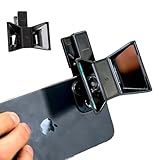
- TURN YOUR DEVICE INTO A 3D MASTERPIECE MACHINE: Clip on the OPIC Spatial Phone lens to instantly transform your smartphone, tablet, or laptop into a powerful 3D content creation tool—no additional camera required. Its adjustable clip and spacer system ensure a perfect fit every time.
- ELEVATE YOUR CREATIVE GAME: Capture stunning stereoscopic 3D photos and videos with the OPIC Spatial adapter, which enhances your phone camera lens to create visuals that leap off the screen. Powered by OPIC’s patented software, your content is optimized for crystal-clear Virtual Reality viewing, giving you a professional edge.
- SEAMLESS 3D LIVESTREAMING TO THE WORLD: Host real-time 3D livestreams to VR headset, Meta Quest 3, Apply Vision Pro users across the globe. With OPIC Spatial Phone lenses, you don’t just capture memories—you invite others to experience them with you.
- FUTURE-PROOF PATENTED DESIGN FOR ANY DEVICE: Upgrading your phone? No problem! The OPIC Spatial, a cutting-edge cell phone camera lens, features a versatile clip that adjusts smoothly to fit your new device, ensuring your investment stands the test of time.
- EASY TO USE, NO TECH EXPERTISE NEEDED: Designed with simplicity in mind, OPIC Spatial, a phone camera zoom lens clips on in seconds and works effortlessly with the OPIC 3D app to optimize your footage.
That extra data gave Depthy a way to treat parts of the picture as nearer or farther away. Instead of showing every pixel as part of one flat plane, the browser could move image regions by different amounts. The foreground shifted more than the background, creating the impression of looking around within the photograph.
FoneArena described Depthy’s rendering as running in a WebGL container. Droid Life’s April 22, 2014, report introduced the project as an open-source work in progress for Google Camera Lens Blur photos. Droid Life’s original coverage and FoneArena’s explanation of the depth effect document the launch-era features.
How the parallax illusion worked
Parallax is the apparent change in an object’s position when the viewpoint shifts. Depthy used the Lens Blur depth map to move closer and farther image areas differently as the viewer panned. That relative motion suggested a change in viewpoint, a little like the layered wallpaper effect familiar from early mobile interfaces.
Rank #2
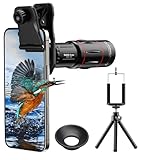
- 【Upgraded 18X Telephoto Lens】: This 18X telephoto lens features an adjustable focal length, allowing you to effortlessly capture crisp and clear images of distant subjects by simply twisting the focus ring. Whether you're an outdoor enthusiast or a passionate photographer, this lens is a game-changer, enabling you to see and capture the world in stunning detail.
- 【BAK4 Prisms & FMC Lens】: Equipped with high-quality BAK4 prisms and FMC (Full Multi-Coated) glass, this lens delivers exceptional image quality, vibrant colors, and minimal distortion. Whether you're shooting in challenging lighting conditions or capturing intricate details, the telephoto lens for iphone ensures stunning results. Say goodbye to glare, and hello to sharp, vivid photos that truly bring your scenes to life.
- 【Polymer Material & Portable】: This 18X telephoto phone lens for Android is crafted from durable polymer material and high-quality optical glass, ensuring both strength and clarity. With an ergonomic design and lens weighing only 120g, it's compact and easy to carry. The included storage bag makes it convenient to slip into your pocket or backpack without taking up space, so you can enjoy telephoto shooting anytime, anywhere.
- 【2 Models & With Tripod】: The telephoto Lens features 2 modes, cell phone shooting and naked-eye observation. With the eyecup attached, it becomes a monocular telescope for clear distant viewing. The included aluminum alloy tripod supports hands-free use, ensuring stable photos and videos without blur.
- 【Widely Compatible & Multipurpose】: Universal detachable clamps make installation and removal easy. The lens is designed with a maximum clip opening width of 0.98in (2.48cm) and a distance of 1.38in (3.5cm) from the clip top to the lens center, fitting most smartphones, including iPhone, Samsung Galaxy and Note, Google Pixel, Huawei, OnePlus, and more. Perfect for camping, sports events, moon watching, bird watching, fishing, hiking, golf, concerts, and travel. IMPORTANT NOTE: This lens fixture supports cell phones ≤ 0.98in thick (including phone case).
The depth map was not a full model of the scene. It could indicate where visible regions sat in relation to one another, but it did not contain complete geometry for every surface hidden behind an object. When a shifted image exposed a region that the original camera had not photographed, any fill or reconstruction was an inference, not recovered detail from a second viewpoint. “3D-like” or “2.5D” is therefore more accurate than true 3D photography.
What effects Depthy offered
Parallax viewing
The headline feature let viewers pan around the depth-aware image to create a sense of movement through the scene.
Blur, Hypnotize, and Dramatize
FoneArena listed these three additional effects. They manipulated the depth information in different ways, showing that the map could be used for more than the background blur for which Lens Blur had created it.
Rank #3

- Top cell phone lens attachment for mobile photographers: 11 various cell phone lenses help you take better photos in different situation, a great way to shoot creatively with your phone, make your smartphone act more like a traditional camera.
- Made of high-class glass: High quality optical glass helps prevent ghosting and flares from reflections, result in minimum vignetting and distortion around the edges of your shots
- Comprehensive 11-in-1 lens kit: This camera lens kits includes literally anything you need for image, the universal detachable clamp with soft rubber pads lets you attach to your device in seconds, and allows you to easily swap between lenses.
- Portable and detachable universal lens clip design: Compatible with almost any smartphone including (but no limited to) iPhone 14, 13, 12, 12 Pro, 11, Xs, X, 8, 7, 6s, 6 plus, Samsung galaxy / note, iPads, Android Tablets, Huawei, HTC, LG G6 G5, Motorola, Sony, and many others. The lens works on both front-facing and rear-facing cameras
- Rest Assured Purchase: We want you to be 100% confident when you purchase the cell phone camera lens kit, if the product doesn’t look or work as advertised, please contact us, our hassle-free policy makes your purchase no risk.
Features advertised on the current site
The Depthy website currently advertises parallax display, animated GIF creation, depth-map extraction, and tools for creating projects. Those are claims on the landing page, not confirmation that each feature still works: the page also reports that the browser used to access it is unsupported.
The Tool Desk
Outbyte PC Repair FREEClear out junk files and repair common Windows errorsFree Scan →Outbyte Driver Updater FREEFix the driver behind crashes, sound loss and screen glitchesFind Drivers →The original workflow—and what to expect today
- Capture a Lens Blur photo. The historical workflow depended on an image made with Google Camera’s Lens Blur mode, rather than an arbitrary phone photograph. The coverage concerns the KitKat-era Android app in 2014; it does not establish that current Google Camera versions offer the same capture workflow.
- Keep the original JPEG. Depthy needed the embedded depth information. A regular JPEG without the expected data might appear as a flat image or lack usable depth effects. Re-saving or sharing an image through another app can risk stripping metadata, so preserve the original file.
- Load the image in Depthy. Contemporary coverage described uploading or loading a photo, while FoneArena said processing occurred in the browser on the device. “Load the image in the browser” is the safest description; the wording does not establish a single transfer method.
- Explore the movement and effects. If the interface recognizes the depth map, try the parallax view and available effects. Export only if the current interface actually offers it.
The current site’s browser warning means these steps are historical guidance, not a promise of a working 2026 workflow. If you choose to experiment, use a non-sensitive test image in a current browser with JavaScript and WebGL enabled; trying a desktop Chromium-based browser may help, but is not guaranteed to resolve legacy-code or compatibility issues.
Why some images look convincing—and others do not
Depth-aware warping is most persuasive when a photograph has a clearly separated subject, a recognizable background, and distinct distance layers. It is more likely to look weak or uncanny when edges are ambiguous or the scene contains fine detail and overlapping forms.
Rank #4

- Get Closer To Everyday Distant Moments: Bring distant sports events, birds, boats and travel landmarks closer when your phone camera cannot reach. The 28X optical telephoto lens is designed for stable outdoor subjects approximately 49–262 ft / 15–80 m away, making everyday long-distance observation and smartphone photography more accessible.
- Wider, More Natural Telephoto View: Compared with many higher-power phone telescopes, the 28X design provides a wider field of view and makes distant subjects easier to find and frame. It is a practical choice for beginners who prefer a more natural telephoto view instead of an extremely narrow image.
- Smaller Edge Darkening—Phone Models May Vary: Designed to reduce edge darkening on many smartphones. Because camera position and sensor size vary, some newer multi-camera phones may still show slight dark edges at 1X. Center the lens over the main camera and apply a small amount of phone zoom when needed.
- Manual Focus For Clearer Distant Detail: Rotate the focus ring slowly until your subject appears sharp. At 28X magnification, even small hand movements become visible, so brace your arms or use a tripod for clearer photos and video. For moving subjects, set your position and focus before the moment begins.Tripod is recommended and sold separately.
- Universal Clip For Popular Smartphones: Works with many iPhone, Samsung Galaxy, Google Pixel and Android main cameras. Remove thick phone cases, identify the main 1X camera, center the lens carefully and disable automatic macro or lens switching when possible. The aluminum body also works as a compact handheld monocular for travel and outdoor observation.
- Hair, foliage, wires, fences, and transparent or reflective objects can be hard to separate cleanly from the background.
- Motion blur, low light, repeated textures, or a misplaced focus plane can undermine the depth estimate.
- When foreground subjects cover large parts of the background, shifting them can expose gaps or require invented fill.
These are general consequences of moving a depth-labeled photograph, not measured Depthy test results. Halos, stretching, gaps, or unnatural movement are signs that the depth map cannot describe the scene as completely as a true multi-view capture or 3D model could.
Independent reader supportYour contribution helps us test, update, and keep practical guides available for everyone.Privacy, saving, and compatibility caveats
FoneArena reported in 2014 that Depthy processed images locally in the browser and did not upload or store them remotely. That is a historical description, not a current privacy guarantee or an independent audit of the code now served at the site. Avoid loading sensitive photographs unless you can verify how the current implementation handles them.
Droid Life reported that the launch-era version offered no way to save the created work. The current site’s GIF claim may reflect a later version, but its actual export behavior could not be established from the landing page. Treat the historical limitation and current advertised capability as claims about different points in the project’s life.
Best Value

- TAKE YOUR MOBILE PHOTOGRAPHY TO THE NEXT LEVEL: The iOgrapher phone camera lens is the perfect accessory for anyone who loves to take amazing photos with their iPhone or other smartphone! With our wide phone lens, you can capture stunning landscapes and panoramas with ease.
- GET UP CLOSE AND PERSONAL: Our macro lens for iPhone and other smartphones allows you to get up close and personal with your subject, so you can capture even the tiniest details with incredible clarity. Whether you're photographing a flower or a bug, our macro lens will help you create amazing images!
- WIDE ANGLE LENS FOR iPHONE AND BEYOND: Our wide angle lens for iPhone and other smartphones is perfect for taking group photos, selfies, and even vlogging. With our lens, you can capture more of the scene in your photos and videos, so you can tell a better story and share your experiences with your friends and family!
- HIGH-QUALITY DESIGN: Made from high-quality materials, our macro camera for iPhone and other smartphones is built to last and can withstand frequent use without breaking or wearing down. With our lens for iPhone and other smartphones, you'll be able to take amazing photos for years to come, no matter what device you're using!
- EASY TO USE: Our phone lens is designed for simplicity and ease of use, so you can focus on capturing the perfect shot instead of fussing with complicated equipment. Plus, it's small and portable, so you can take it with you wherever you go, whether you're shooting with an iPhone or any other smartphone!
Why the experiment mattered
Depthy illustrated a broader computational-photography idea: data captured to support one visual effect can enable others. Google Camera’s Lens Blur depth map was meant to help simulate shallow focus, but Depthy reused it for parallax, animation, and depth-map extraction. It was a small demonstration of the shift from treating phone photos as flat images to treating them as images accompanied by spatial clues.
As a historical experiment, Depthy is a useful example of that shift. As a tool to rely on today, it is less certain: the site is online, but its browser warning and unverified export and privacy behavior mean that successful use should not be assumed.
Quick Recap

Product prices and availability are accurate as of the date/time indicated and are subject to change. Any price and availability information displayed on Amazon at the time of purchase will apply.
Quick wins for a faster PC:
Repair Windows errors before they cause bigger problemsFix Now →Scan for outdated or missing drivers - takes under a minuteDriver Scan →Clear out junk files and repair common Windows errorsFree Scan →



