Quick wins for a faster PC:
The Tool Desk
Outbyte PC Repair FREERepair Windows errors before they cause bigger problemsFix Now →Outbyte Driver Updater FREEFix the driver behind crashes, sound loss and screen glitchesFind Drivers →Repair Windows errors before they cause bigger problemsFix Now →Scan for outdated or missing drivers - takes under a minuteDriver Scan →Clear out junk files and repair common Windows errorsFree Scan →
ThatPainter is reader-supported. When you buy through links on our site, we may earn an affiliate commission. Learn More
To print a T-shirt at home, choose a transfer made for your design, garment, and press, then follow that material’s exact temperature, time, pressure, and peel instructions. There is no universal T-shirt setting: the right combination depends on the transfer material, shirt, and heat press.
Choose the right kind of transfer
For lettering and simple shapes, cut heat-transfer vinyl (HTV), also called iron-on, is a common starting point. Cut the design from the material, remove the excess with a weeding tool, position it on the shirt, and press it according to the material maker’s instructions.
For full-color artwork, printable iron-on may be an option. Cricut’s printable iron-on instructions specify an inkjet printer; Cricut warns that using a laser printer may damage the material or printer. Printable iron-on has its own pressing and garment-care directions, so do not assume it works like cut HTV. See Cricut’s printable iron-on instructions.
Free tools Windows power users keep installed
One-click scans. No signup required.
Gather supplies for your method
- A heat press with a working area that suits your design.
- A transfer compatible with your shirt and press: cut HTV or printable iron-on.
- A blank T-shirt suited to the chosen transfer.
- A firm, flat, heat-safe pressing surface or suitable mat.
- A weeding tool for cut designs.
- A protective sheet, if the transfer’s instructions call for one. Check compatibility rather than assuming one sheet works for every transfer.
- An inkjet printer if you are using Cricut printable iron-on.
A Cricut EasyPress is one example of a press documented for heat-transfer projects; it is not required for every method. Compare any press you are considering by working area, time and temperature controls, pressure method, safety features, and compatibility with your intended transfers and garments. The available manufacturer guidance does not establish a neutral winner among presses.
#1 Best Overall

- 【Auto Heat Press & Free Hands】- HTVRONT auto heat press machine aims to take away the struggles of a regular heat press. After loading your project onto the shirt press machine, all you have to do is gently push the ironing board inside and press the "R" button to start. The heatpress will automatically press down and auto-adjusts to your project's thickness up to 1", and it auto releases once the timer goes down. Super easy to use and no more burned projects when you're away awhile
- 【Heat-up Fast & Evenly】- Our heat press 15x15 could reach a common-use temp of 320℉ /160℃ within 4 mins, twice faster as regular ones. And you will save nearly 130s when heating up to 410℉/210℃ compared with other auto heat press. Combined with NTC thermistor technology and a dual-tube heating engine, this t shirt pressing machine distributes heat evenly and holds the temperature well. HTVRONT large heat press allows you always have a clean and professional transfer
- 【Making More in Less Time】- If you're looking to level up your heat press game, scale up your production, start your own side hustle and even sell your crafts, the auto heat press is perfect for you! This tee shirt press machine has multiple practical modes: 4 fast modes, 2 custom modes and an auto mode, which make heat transfers quicker and simpler than ever! You'll be all set to customise clothing, accessories, décor, gifts and so much more, all with a professional-quality finish
- 【Safety Use & Auto-Off】- Safety is one of the biggest concerns with HTVRONT auto heat press. The ironing board is separated from heating plate, making it safer to use around your kids and pets. The drawer slide design ensures your hands are kept away from the hot plate. AND slide out heat press will automatically shut up if you don’t use it after 15 minutes. No worries you are going to burn the house down
- 【Wide Application & Great Service】- Not only is HTVRONT auto heat press great for t-shirts, totes, and apparel, it's also compatible with other materials like wood signs, and ceramic coasters up to 1" in thickness. Being FCC certificated, our vinyl heat press reaches required safety standard in the USA. Any problems with this heat press for sublimation,just contact us and we're always here for you with 24/7 support.
Prepare the shirt and pressing area
Prepare an HTV blank
For Cricut HTV projects, its guidance is to prewash the apparel blank without fabric softener, then make sure it is clean and dry. Preheat the transfer area for the time specified in the applicable project guide. Cricut says this helps reduce wrinkles, residual chemicals, and moisture. These instructions are specific to its guidance: for example, Cricut gives different preparation directions for Infusible Ink and says not to prewash those blanks. Check the instructions for your actual transfer type. Cricut’s blank-preparation guidance.
Set up for full contact
Use a firm, flat, heat-safe surface and smooth the shirt so the press can contact the entire design. Move seams, zippers, buttons, and other raised features out from under the pressing area where possible. A soft or uneven surface, or a raised feature beneath the design, can interfere with contact and contribute to poor adhesion. Follow the press maker’s safety instructions, and return a Cricut EasyPress to its safety base when it is not in use. Cricut’s heat-transfer troubleshooting guidance and EasyPress instructions.
Rank #2
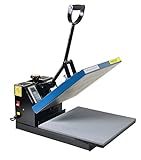
- Brand new 15-by-15-inch heat press sheet included
- Voltage: 110 volts; Power: 1800 watts
- Temperature Range: 0-699 degrees F; Time Range:0-999 s
- Electronic time and heat control; precise time set-up
- Silicon-gel base board; Pressure adjustable. Teflon coating on the heat platen as been added
Look up settings for the exact project
Do not rely on a generic temperature and time labeled “for T-shirts.” Cricut’s Heat Guide asks you to select the transfer material and base material, then provides project-specific temperature, time, pressure, and steps. Other manufacturers’ transfers may have different requirements. Look up the current directions for your exact transfer, shirt, and press before you start. Cricut Heat Guide.
Recommended Free Tools
Heat, pressure, and time work together. Cricut says HTV needs even heat and some pressure; its EasyPress FAQ recommends a waist-high table for applying the recommended pressure. Follow the instructions for your own press rather than treating one device’s pressure guidance as a rule for all machines. Cricut EasyPress FAQ.
Rank #3
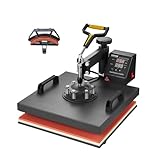
- 🔥 2 in 1 Heat Press: The two large heating pads, 15x15 inch flat platen and 6x3 inch curved cap platen, adopts silica-gel and sponge. Both deliver a quicker heating speed and a better transfer effect. A soft heating liner is applied for accommodating various kinds of materials. It can also reduce unpleasant smells during operation
- 🔥 Precise Temp Control: This heat press is equipped with a precise control panel, helping you accurately regulate the temperature and time. After finishing heating, the machine will automatically sound an alarm to remind you to take out the items
- 🔥 Teflon Insulation Coating: Revolutionary Teflon material reduces the surface temperature making it feel pleasant on the skin. Hence, it's less prone to cause a scratch. This kind of coating also lessens the risk of adhesion between clothes and platen, ensuring an excellent transfer result
- 🔥 360° Swing Away Design: This swing-away heat press machine can smoothly rotate 360 degrees. Outfitted non-slip rubber grip also offers you a comfortable user experience. Simply adjusting the mats tightly to fit the materials, offers great heating effects
- 🔥 Easy to Use: VEVOR 2-in-1 sublimation machine is perfect for making gifts for friends and family. You can create T-shirts, pillows, bags, phone cases, caps, hats, etc. Quickly transfer colorful pictures and characters onto textiles such as cotton, cloth, HTV, ceramics, glasses, fabrics, flax, fiber, nylon, etc.
Press the design and check the result
- Position the design as directed by the transfer maker. Confirm any orientation, carrier, or liner requirements before pressing.
- Set the press according to the exact material-and-garment instructions. Use any protective layer only if those instructions specify one and confirm it is compatible.
- Apply the press for the full recommended time, with the specified pressure and coverage. Follow the transfer’s directions for whether to peel the liner hot, warm, or cool.
- Inspect the design after peeling as directed. If an edge lifts, stop and check the settings, full contact, even support, and whether you applied the complete recommended time.
If those checks do not resolve a Cricut iron-on adhesion problem, Cricut says an additional 10–15 seconds may be tried. Treat that as Cricut troubleshooting advice, not a substitute for selecting the correct project settings or a general rule for other materials.
Prevent press marks and heat damage
Heat-sensitive fabric can be damaged by heat, and excessive pressure over raised garment features can leave marks. Keep bulky seams and closures outside the pressing area where possible. Do not use Teflon sheets or Teflon pressing pillows with Cricut Infusible Ink or sublimation projects; use only protective materials compatible with the transfer you are applying. See Cricut’s troubleshooting guidance.
Rank #4

- 【Pressure Customization】HTVRONT Auto Heat Press 2 can effectively avoid the situation of insufficient pressure. You can adjust the appropriate pressure according to your different heat press needs, and easily adjust the pressure of the heat press machine up to 80 kg(170lb), perfect for DTF projects, no longer need to worry about insufficient pressure
- 【Higher Heat Press Height & Widely Used】HTVRONT 15x15 heat press has increased the height for heat pressing. Now, you're ready to go with larger, more varied projects with heights up to 4.5 cm(1.77in). This will mean that you can use our heat press machines not just for heat pressing shirts and simple heat pressing projects, but you can also use it for heat press heavy items such as your hoodies!
- 【Heat Up Fast & Evenly】Our heat press machine for t shirts combined with NTC thermistor technology and a dual-tube heating engine, which can heat up quickly, saving you up to 30% of waiting time. In addition, our heat press 15x15 distribute the heat evenly, maintaining consistent heating area, ensuring that you have a clean and professional transfer. Heat Press will heat up to 410°F within 5 minutes and 30 seconds, you can wait for the machine to heat up successfully before heat press
- 【Automatic Heat Press & Hands Free】After setting up the heat press parameters, you only need to press "R" button, HTVRONT heat press will automatically press your design, the machine will buzz when the timer is over to remind you that the press is finished and release the material automatically. In this way, you can work on something else while it’s pressing, greatly improving your work efficiency
- 【Angle-Adjustable Screen & Auto-Off Feature】HTVRONT commits to every ergonomic detail for crafters. The screen angle provides 7 levels within the range of 0-75°and supports manual adjustment, making creation more comfortable. Moreover, HTVRONT sublimation heat press takes users' safety with full concern. Our shirt heat press will auto shut up if no operation after 15 minutes. No worries about overheating
Care for the finished shirt
Care instructions vary by transfer. For Cricut Printable Iron-On, wait 48 hours before washing; wash inside out in cold water, hang to dry, and do not bleach. If ironing the shirt, iron the back rather than the decoration. Use these directions for that Cricut product, not as universal care rules for all HTV or printable transfers. Cricut Printable Iron-On instructions.
Quick Recap

Product prices and availability are accurate as of the date/time indicated and are subject to change. Any price and availability information displayed on Amazon at the time of purchase will apply.




