Crashes, No Sound, or Screen Glitches?
The Tool Desk
Outbyte PC Repair FREERepair Windows errors before they cause bigger problemsFix Now →Outbyte Driver Updater FREEFix the driver behind crashes, sound loss and screen glitchesFind Drivers →Random freezes, missing sound and display glitches usually trace back to one bad driver. Find and replace yours safely.Free scan · under a minute
Windows Errors? Fix Them Before They Spread
Repair common Windows errors and clear accumulated junk for a smoother, more stable PC - no reinstall needed.Free scan · no reinstall
ThatPainter is reader-supported. When you buy through links on our site, we may earn an affiliate commission. Learn More
Most fountain-pen nibs do not need replacing just because they are old. Replace one when it is bent, cracked, sprung, missing tipping material, persistently defective after cleaning and diagnosis, beyond economical repair, or when you intentionally want a different writing width. Scratchiness and skipping alone are not proof that a nib is worn out.
Use this order: clean, test, inspect, check the warranty, confirm compatibility, then choose repair or replacement.
Do these 3 things before closing this tab:
1Clear out junk files and repair common Windows errors2Fix the driver behind crashes, sound loss and screen glitches3Repair Windows errors before they cause bigger problemsAs an Amazon Associate I earn from qualifying purchases.
What is actually being replaced?
“Nib” can mean several different parts:
- Nib: the visible metal writing point.
- Tipping material: the hard material attached to the writing point of many fountain-pen nibs.
- Feed: the component beneath the nib that regulates ink and air.
- Nib unit: a matched nib, feed, and threaded housing.
- Front section: on some pens, the entire grip or front end may be the replaceable part.
Some manufacturers sell loose nibs, while others sell complete nib units or no replacement nibs at all. Confirm what your model accepts before ordering.
Seven signs that replacement may be warranted
1. The nib is bent
A drop can bend the nib downward, sideways, or away from the feed. Stop writing and inspect it under magnification. A slightly misaligned nib may be tunable, but a visibly deformed one should not be repeatedly forced back into shape.
#1 Best Overall

- Easy to replace the nib by twisting it out and back. Please remove the cartridge or converter before twising the nib out.
- Set of 3 Hongdian Fountain Pen Nibs Gold Trim (Fine, Extra Fine and Bent Nib) for Black Forest 1850, 1851, 1861, M2, M1, 1843, 6013, 517D, 517S, 525, 1843 and 920 Series
- Package: 3 nibs with black section ( 1 x EF nib 0.38mm, 1 x F nib 0.5mm, 1 x Bent Nib 0.7-1.2mm)
- PS: Please remove the converter before twist the nib section out. If you can not screw the nib section out, please send us a message for assistance!
2. The nib is cracked or split
A crack in the metal, especially around the breather hole or slit, is structural damage. Replacement is usually safer than continued adjustment.
3. The tines are permanently sprung
Excessive pressure or flexing can leave the tines permanently spread. A sprung nib can sometimes be repaired, but severe damage is best assessed by a professional. Desiderata lists a sprung nib among situations where replacement may be appropriate (manufacturer guidance).
4. Tipping material is missing or badly worn
Look for a chipped writing point, an obvious flat spot, or missing tipping material. Gradual wear can change the line width and feedback, but it is difficult to distinguish from alignment or paper effects without magnification. A nib with damaged tipping may need professional rebuilding or replacement.
5. It remains scratchy after proper diagnosis
Persistent scratchiness after cleaning, testing with suitable ink and paper, and checking tine alignment may justify replacement. If the nib is valuable or difficult to source, professional tuning should come first.
6. It repeatedly skips because of an unrepairable tip problem
A nib that feels smooth but skips on light strokes may have baby’s bottom: an over-rounded or over-polished tip that fails to make reliable contact with the paper. This is a tip-shape problem, not ordinary age-related wear. A skilled nib technician may correct it, but abrasive work can permanently change the nib.
Recommended Free Tools
Rank #2
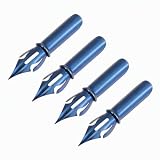
- Dip Pen Size: 1.46 x 0.24 inch/37 x 6mm (LxW); Package: 4 Packs fountain pen nibs
- Material: Crafted from premium steel, this fountain pen nib offers exceptional hardness and wear resistance, ensuring it remains sharp and distortion-free even after extensive use. Its steel composition provides excellent flexibility to adapt to varying pressure
- Huge Ink Storage & Smooth Writing: Advanced pointed nib with optimized capillary structure for high ink storage. Delivers consistent, smooth ink flow without skipping or blotting. Enjoy longer continuous writing per dip for effortless calligraphy and daily scripting
- Wide Application: From writing notes, taking study records, painting creatively, practicing calligraphy to sketching comics, one tip does it all, inspiring diverse creativity
- Usage Tips: Before first use, gently scrub the flex nib with toothpaste to remove the protective oil film. After each use, clean with water, dry thoroughly, and store in a dry place
7. Replacement is more practical than repair
For an inexpensive pen with an available compatible nib, replacement may cost less and involve less risk than specialized repair. For a vintage, gold, rare, sentimental, or specialty nib, the opposite is often true.
Problems that do not necessarily mean a worn-out nib
| Symptom | More likely causes | First action | Replace immediately? |
|---|---|---|---|
| Scratchy in one direction | Misaligned tine or writing angle | Inspect with a loupe | Usually no |
| Skips at the beginning of letters | Baby’s bottom, dry feed, or tight tines | Clean and inspect | Usually no |
| Writes too wet | Wide tine gap, feed, or ink issue | Check alignment and ink | Usually no |
| Suddenly becomes dry | Dried ink, clogged feed, or unsuitable ink | Flush and re-ink | No |
| Skips only on certain paper | Paper and ink interaction | Test smooth fountain-pen paper | No |
| Bent after a drop | Structural damage | Stop using and inspect | Often |
| Missing tipping | Physical damage | Seek professional repair or replacement | Often |
Goulet’s troubleshooting guidance emphasizes cleaning, flow, paper, ink, and tine alignment before aggressive adjustment (scratchiness and alignment guide; skipping and hard-starts guide).
How to diagnose the problem before replacing anything
1. Clean and re-ink the pen
- Empty the pen.
- Flush it with clean water as the manufacturer recommends.
- Remove visible debris using safe, non-abrasive methods.
- Fill it with a known-compatible fountain-pen ink.
- Test it on smooth paper.
Parker recommends cleaning between refills, while Faber-Castell gives more frequent cleaning guidance for inks that deposit more quickly. These are brand-specific recommendations, not a universal replacement or cleaning timetable (Parker care guidance; Faber-Castell FAQ).
Be especially cautious with pigment, iron-gall, shimmer, and highly saturated inks. They are not automatically harmful, but they may require more careful cleaning and storage.
Free tools Windows power users keep installed
One-click scans. No signup required.
2. Run a controlled writing test
Use light pressure and a normal writing angle. Record whether the pen:
Rank #3
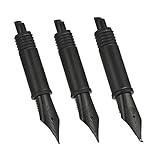
- Easy to replace the nib by twisting it out and back. Please remove the cartridge or converter before twising the nib out.
- These nibs are not standard size, they are only compatible with Hongdian forest fountain pen 1850, 1851, 1861, M2, M1, 1843, 6013, 517D, 517S, 525, 1843 and 920 Series
- Package: 3 nibs with black section ( 1 x EF nib 0.38mm, 1 x F nib 0.5mm, 1 x Bent Nib 0.7-1.2mm)
- PS: Please remove the converter before twist the nib section out. If you can not screw the nib section out, please send us a message, we will send you the replacement part to fix this.
- Scratches in every direction or only on one diagonal or upstroke.
- Skips only at starts.
- Writes too wet or too dry.
- “Railroads” under pressure.
- Writes normally after several strokes.
- Works on one paper but not another.
A nib that writes correctly with another ink or on another paper probably does not need replacing.
3. Inspect it with a 10× loupe
Under bright light, view the nib from several angles:
- Front: are both tines level?
- Writing surface: is one tine higher or farther forward?
- Side: is the nib bent or lifted from the feed?
- Tip: is the tipping symmetrical?
- Slit: is it reasonably even and free of debris?
- Feed: is the nib centered over it?
Visual asymmetry does not automatically require correction. If the pen writes reliably and comfortably, unnecessary adjustment can do more harm than good.
PC Slower Than It Used to Be?
A free scan shows the junk files, broken settings and background clutter dragging Windows down - then fixes them in one click.Free scan · Windows 10 & 11Crashes, No Sound, or Screen Glitches?
Random freezes, missing sound and display glitches usually trace back to one bad driver. Find and replace yours safely.Free scan · under a minuteWhen to tune, repair, or replace
Minor tuning
A slight tine misalignment can sometimes be corrected, but this is not a good first project on a valuable or brand-new nib. Do not press directly on the tip with force, use household files or nail files, or begin with abrasive polishing. Abrasive work removes tipping material and can widen the line or worsen skipping.
Professional nib work
Use a nibmeister or manufacturer service for gold, vintage, rare, flexible, music, architect, or sentimental nibs; cracks and sprung tines; damaged tipping; baby’s bottom; grinding or reshaping; and proprietary feeds or unusual nib systems. Specialized repair may preserve a nib that would be difficult or expensive to replace.
Rank #4

- Easy to replace the nib part by twisting it out and back. Please ensure the cartridge or converter is removed before twising the nib section out.
- If you are jinhao fountain pens user, these 3 nib parts meet your daily replacement needs.
- These #6 nib section parts are compatible with Jinhao 100, 9036, 9065, 9016 and 9013
- Package: 3 x Jinhao 100 replacement nibs ( EF, F and M Size ).
- If you are not satisfied with your purchase, let us know and we will make things right for you.
Gold does not automatically mean smoother or longer-lasting. Feel depends on geometry, tipping, stiffness, ink, paper, and tuning. Gold nibs can also be damaged, and replacement is generally more expensive.
Replacing the nib or nib unit
Replacement makes sense when the damage is structural, the defect persists, the part is readily available, or you want a different width or style. Confirm whether you need a loose nib, a complete nib unit, or a front section.
Replacing the entire pen
Consider a new pen when the nib is proprietary and unavailable, the feed or section is also damaged, the replacement costs close to a new pen, or the manufacturer only supports replacing the complete front section. A donor pen may be the practical route for some models.
Independent reader supportYour contribution helps us test, update, and keep practical guides available for everyone.Check the warranty before touching a new nib
If the pen is recently purchased, contact the retailer or manufacturer before bending, polishing, or modifying the nib. Keep proof of purchase, photograph the nib, and include a writing sample. Adjustment can complicate a return or warranty claim.
Policies vary by brand, region, and purchase channel. Examples listed by manufacturers include Parker’s stated free nib exchange within 28 days when eligibility requirements are met, Faber-Castell’s nib-width replacement within three months under stated conditions, and LAMY’s U.S. exchange program listing a $40 fee plus shipping and insurance. Check the current terms before relying on any price or deadline (Parker support; Faber-Castell support; LAMY repairs). Pilot’s warranty information distinguishes manufacturing defects from normal wear, accidents, misuse, and modifications (Pilot warranty information).
Best Value
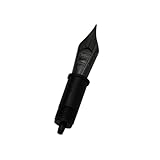
- MANUFACTURER: JoWo, Made in Germany
- FEATURES: Flexibility with ease, rich color saturation on the page, durability
- MATERIAL: Made from durable stainless steel
- AVAILABLE NIB POINTS: EF (Extra Fine) 0.65mm, F (Fine) 0.70mm, M (medium) 0.85mm, B (Broad) 1.0mm, Stub 1.1mm
Compatibility: brand examples
LAMY
LAMY offers interchangeable nib families for many Safari, AL-star, Vista, Studio, Aion, CP1, and related pens. Its guide covers Z50, Z52, Z53, Z55, Z56, and Z58 families. However, “any LAMY nib fits any LAMY pen” is incorrect: the LAMY 2000 is a notable exception for some replacement nibs. Check the exact family before ordering (LAMY nib guide).
Quick wins for a faster PC:
Scan for outdated or missing drivers - takes under a minuteDriver Scan →Clear out junk files and repair common Windows errorsFree Scan →TWSBI
TWSBI lists replacement nib sets for the Diamond 580, Mini, Vac Mini, Vac700, and Vac700R families. Listed prices were approximately $22.99 to $26.99 when checked in August 2026 and may change (TWSBI accessories). The ECO is a major exception: do not assume a standalone replacement nib unit is available; contact TWSBI or investigate a compatible donor pen instead (TWSBI replacement guidance).
Pilot
Pilot’s Metropolitan, Kakuno, Prera, and Explorer use related proprietary steel-nib formats. The nibs can be swapped among some of these models, but individual replacement nibs are generally not sold through ordinary channels, so obtaining one may require another pen as a donor. Verify the exact model and current availability (Pilot steel-nib guidance).
Kaweco
Kaweco’s threaded families are model-specific. The 060 nib is used across many Sport, Liliput, Student, DIA2, Special, and Original 060 models; the Supra and Original 250 use the larger 250 nib, while 190 nibs are intended for piston-series pens. Prices shown by Kaweco in August 2026 began at €12.95 for 060 nibs, €14.95 for 190 nibs, and €26.95 for 250 nibs, but prices can change (Kaweco nib compatibility).
How to replace a user-replaceable nib safely
There is no universal removal method. Some nibs pull off, some nib units screw out, and some are not intended for user removal. For a model designed for replacement:
- Empty and clean the pen.
- Work over a tray or folded towel so small parts cannot roll away.
- Read the manufacturer’s model-specific instructions.
- Remove only the part designed to be removed; do not twist a friction-fit nib or feed unless instructed.
- Install the replacement straight and evenly.
- Check that the nib is centered over the feed.
- Test with light pressure and a suitable ink.
Stop if the feed becomes loose, the nib distorts, the unit does not seat correctly, or ink flow becomes abnormal. A replacement nib can be scratchy too, and it will not fix a clogged feed, unsuitable ink, rough paper, or a damaged section.
Quick Recap
Final decision checklist
- Is the nib bent, cracked, sprung, or missing tipping?
- Have you cleaned the pen thoroughly?
- Have you tested a known-compatible ink and smooth paper?
- Have you used magnification to check the tines, tip, slit, and feed alignment?
- Is the pen still covered by a return or warranty policy?
- Are you buying the correct nib, nib unit, or front section for the exact model?
- Would professional service be safer or cheaper?

Product prices and availability are accurate as of the date/time indicated and are subject to change. Any price and availability information displayed on Amazon at the time of purchase will apply.




