Do these 3 things before closing this tab:
Crashes, No Sound, or Screen Glitches?
Random freezes, missing sound and display glitches usually trace back to one bad driver. Find and replace yours safely.Free scan · under a minutePC Slower Than It Used to Be?
A free scan shows the junk files, broken settings and background clutter dragging Windows down - then fixes them in one click.Free scan · Windows 10 & 111Repair Windows errors before they cause bigger problems2Fix the driver behind crashes, sound loss and screen glitches3Clear out junk files and repair common Windows errors
ThatPainter is reader-supported. When you buy through links on our site, we may earn an affiliate commission. Learn More
If your lock-screen picture disappears after restarting, Windows Spotlight may be rotating images, the sign-in-screen background setting may be off, or a policy or Windows update may be overriding your choice. This guide covers Windows 10 and Windows 11. Start by checking what changes: the screen shown after Win + L, the background behind the sign-in prompt after boot, or the desktop wallpaper. Those are not the same symptom, and the distinction points to the right fix.
What is actually resetting?
Before changing settings, note exactly when and where the wrong image appears. The lock screen is the screen Windows shows before you sign in; the sign-in screen is where you enter your PIN or password. The desktop wallpaper is a separate personalization setting. A picture that appears after you press Win + L but not after boot may be a sign-in-screen issue rather than a failure to save the lock-screen picture.
As an Amazon Associate I earn from qualifying purchases.
| What you see | Likely direction |
|---|---|
| A different image appears over time or after the PC connects to the internet | Windows Spotlight is selected; changing images are expected behavior. |
| Your picture appears after Win + L, but not after a restart | Check the sign-in-screen background option, then investigate a boot/sign-in rendering issue or recent update. |
| A company or school image appears | A policy or device-management setting may be enforcing it. |
| The image becomes a blue/default screen after an update | Check Spotlight mode and personalization state; a cache problem is possible. |
| The background is black or missing | Check the selected file, sign-in-screen option, Windows build, and system state. |
| Your selection changes back immediately | Look for policy, synchronization, or customization software that may be rewriting the setting. |
| Only one account has the problem | A per-user setting or profile issue is more likely than a machine-wide cause. |
Try to remember whether the issue began after Windows Update, a feature update, installing a personalization utility, changing accounts, or moving the image file. That timing is useful evidence; it is not, by itself, proof of a particular cause.
How do I stop Windows Spotlight from changing the picture?
If you want one fixed image, select Picture instead of Windows spotlight. Spotlight is designed to change lock-screen imagery and may also show suggestions, tips, or other content; its rotation is not the same as Windows forgetting a custom image. Microsoft documents Spotlight and separate desktop-background and lock-screen choices in its Windows Spotlight guidance.
Popular on Amazon

- Great Value Paint Brush Set: Soucolor 20 acrylic paint brushes come in 10 different sizes, making them ideal for fine detailing, model painting, rock painting, nail art, face painting, DIY crafts, and general art projects. The varied brush sizes give you better control for both delicate lines and broader color coverage, while the soft bristles deliver smooth, consistent results on acrylic, oil, watercolor, canvas, wood, ceramic, and more.
- Awesome Set of Paint brushes: Professional paint brushes can cover all of your needs. The multi-purposed brushes are ideal for Watercolor, Oil, Gouache, enamel, Acrylic Painting, Body, Nail, Face Painting, Miniature, Model, Wood, Glass, Cup, Ceramic, Fine work, Art class, Craft Art Painting, DIY Art Crafts etc.
- Soft and long-lasting: The bristles are soft and strong, with nickel metal ferrules and blue wooden handles. After cleaning, the bristles will become soft and fluffy again and will not fall off.
- Easy to clean: it’s very convenient to Wash well in soap and water. Retain shape after drying. the brushes hold up very well. Nice selection to beginners and professionals. Keep them clean and they last a long time.
- Perfect for All Painters & Occasions: Suitable for art beginners, hobbyists and professional artists. Great for art class, home creation, travel painting and DIY handmade projects. A practical art gift for students, teachers, family and craft lovers.
- Press Win + I to open Settings.
- Go to Personalization > Lock screen.
- Under Personalize your lock screen, choose Picture.
- Select Browse photos and choose the image you want.
- If the option is shown, turn on Show the lock screen background picture on the sign-in screen.
- Restart and check the result.
Labels can vary a little by Windows version or display language. If the path looks different, search Settings for lock screen. Microsoft’s lock-screen personalization instructions describe the available controls.
If you actually want Spotlight’s changing images, leave it selected. Switching to Picture and back is a reasonable way to reselect a mode, but deleting Spotlight data is unnecessary when the rotation is working as intended.
Recommended Free Tools
Why does the picture work with Win + L but not after reboot?
A manual lock and the boot-to-sign-in sequence can show different results. When Win + L displays your picture but a restart does not, first enable the sign-in-screen background option described above; if that does not help, compare restart and shutdown behavior and check for an update-related issue.
- Set the lock-screen mode to Picture and choose a local image.
- Turn on Show the lock screen background picture on the sign-in screen, if available.
- Press Win + L and confirm the picture is right there.
- Choose Restart from the Start menu and check the screen before signing in.
- Test Shut down and power on separately. Record whether the failure occurs after restart, shutdown, sleep/wake, or switching accounts.
A shutdown is not always an identical comparison to a restart, because startup behavior can vary with the device’s configuration. Do not conclude that the image file is faulty simply because it works during a manual lock but not during boot.
Microsoft Q&A includes reports of this pattern after Windows 11 upgrades, including cases where a selected background appears on a manual lock but not at sign-in. Those reports are useful for recognizing the symptom, but they do not establish a confirmed system-wide bug or one fix for every PC. See the Windows 11 24H2 sign-in-screen discussion.
Could the image file or its location be the problem?
Yes. To rule out an unavailable file or an unusual format, use a simple JPEG or PNG stored in a normal local folder. A cloud-only file, removable drive, network share, or folder that gets renamed or synchronized may be unavailable at the moment Windows needs it.
Do these 3 things before closing this tab:
1Clear out junk files and repair common Windows errors2Scan for outdated or missing drivers - takes under a minute3Repair Windows errors before they cause bigger problemsAlso popular on Amazon
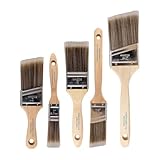
- COMPLETE 5-PIECE BRUSH SET FOR EVERY PAINTING TASK — Includes 1 Inch Flat, 1.5 Inch Angle, 2 Inch Flat, 2 Inch Angle Stubby, and 2.5 Inch Angle brush giving you every size professional painters use daily. Get all 5 for less than the price of a single brush from hardware store brands — professional grade performance at a fraction of the cost. Perfect for walls, trim, cabinets, doors, furniture, and detailed cutting-in work on any project.
- ZERO BRISTLE LOSS — GUARANTEED BY PRECISION ADHESIVE BONDING — Every bristle is locked in place with precision-set adhesive that keeps them in the brush — not in your paint job. The coated steel ferrule provides structural support while the adhesive bond ensures clean performance on every stroke. Premium SRT synthetic filaments load more paint and release it evenly for a smooth streak-free finish on walls, ceilings, and trim. Works with latex, oil-based paint, primer, sealer, and wood stain.
- INCLUDES THE ANGLE STUBBY MOST SETS LEAVE OUT — Professional painters know the 2 Inch Angle Stubby is the go-to brush for tight cabinet interiors, window sashes, inside corners, and detailed trim where standard angle brushes are too long. Combined with the 1.5 and 2.5 inch angle sash brushes you have precision cutting-in covered at every scale — baseboards, crown molding, door casings, and ceiling lines.
- FLAT BRUSHES FOR BROAD SMOOTH COVERAGE ON ANY SURFACE — The 1 and 2 inch flat brushes deliver even coverage on walls, furniture, shelving, doors, fences, decks, and wood surfaces. Ideal for applying primers, stains, varnishes, polyurethane, and specialty coatings. Solid wood handles provide all-day comfort and control for both professional contractors and weekend DIY homeowners tackling interior or exterior painting projects.
- TRUSTED BY PROFESSIONAL PAINTERS AND CONTRACTORS NATIONWIDE — Pro Grade delivers professional-grade results at a price that makes sense for crews who go through brushes on every job. Ideal for property managers, remodeling contractors, apartment turnover crews, maintenance teams, and commercial painting operations. Backed by thousands of verified reviews from working painters. Washable and reusable for multiple projects.
- Create a folder such as
PicturesLock Screenand place a copy of the image there. - Choose that copy through Settings rather than relying on a temporary preview.
- Do not move, rename, overwrite, or remove it while diagnosing the issue.
- Try a built-in Windows image. If that stays selected but your own image does not, investigate the file or location before resetting Windows components.
Windows may display a cached copy of a lock-screen image, so replacing the original file does not necessarily change what is currently shown. Microsoft’s engineering blog explains this caching behavior in its discussion of lock-screen image changes. Re-select the image in Settings after moving or editing it.
Could a work or school policy be overriding my choice?
Yes. Group Policy, device management, or a manufacturer’s customization utility can enforce a lock-screen image or restrict Spotlight. On a work- or school-managed PC, ask the administrator before changing settings; management may simply apply the approved configuration again.
On a personal PC, think about whether you installed privacy, security, wallpaper, or “tweak” software around the time the behavior started. Check its settings before trying repeated cache resets: if a utility is rewriting the selection, clearing a cache will not address the cause.
On Windows editions that include Local Group Policy Editor, press Win + R, enter gpedit.msc, and inspect:
Computer Configuration
  > Administrative Templates
    > Control Panel
      > Personalization
Look for policies such as Force a specific default lock screen and logon image or Do not display the lock screen. On a personal device, these are normally Not Configured unless you intentionally set them. Windows Home may not include Local Group Policy Editor. An organization can also manage settings through other tools, and policies may be reapplied automatically.
Microsoft documents Group Policy and management controls for Spotlight and lock-screen configuration in its Spotlight policy documentation. Avoid jumping to registry edits: a machine-wide value or policy can override your personal choice, require administrator access, or conflict with management. A registry example is discussed in this Microsoft Tech Community thread, but it should not be treated as a universal fix. Do not run broad registry-cleanup commands to solve a wallpaper symptom.
Also popular on Amazon
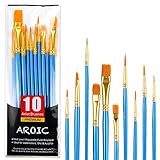
- 【All sizes of art brushes】: The 10 sizes of multi-functional brushes have various shapes, making the mixing color easier, which is very suitable for artists, students, teenagers, children and painters at all levels. Wonderful Present ideas for friends and family who like painting!
- 【general brush set】: Professional paint brush can meet all your needs. Multifunctional brush is very suitable for watercolor, oil, gouache, acrylic painting, body, nail, face painting, miniature, model, ceramics, arts and crafts painting, etc.
- 【high quality process】: It is designed with anti falling bristles, anti-rust nickel ferrule and solid wood handle. You can use the brush to focus on the painting and always be creative.
- 【easy to maintain】: After using the brush, it is very convenient to clean the brush with warm soapy water and reshape the tip of the brush. Air dry the brush and place it on top of the top for long use.
- 【100% satisfaction guarantee - buy now】1 packs of set brushes, you can also get friendly customer service, any questions feel free to contact us, within 24 hours to help you! There is no risk in buying our paint brush kit.
How do I check whether a Windows update is involved?
Record your Windows version and update history before changing anything invasive. Windows 11 users have reported lock-screen and Spotlight failures on 24H2 and 25H2, including reboot-related symptoms, but the available reports do not prove that all systems on those versions share a Microsoft-confirmed bug.
- Press Win + R, enter
winver, and note the Windows edition, version, and OS build. - Open Settings > Windows Update > Update history.
- Note whether the problem began after a feature update or a specific cumulative update.
- Check current Windows release-health information and install pending updates before trying a risky workaround.
Microsoft’s Spotlight documentation notes default-wallpaper behavior changes associated with KB5046633, released October 22, 2024, in one documented scenario, and KB5048652, released December 10, 2024, in another. These details do not mean every Windows PC received the same behavior change; the applicable configuration matters. The page was updated on February 20, 2026. User reports of later Windows 11 25H2 problems are also available in Microsoft Q&A and an April 2026 discussion. Treat community reports as evidence that a symptom has occurred, not as official confirmation of a universal defect.
Should I repair Windows system files?
Consider system-file repair later, especially if the wallpaper issue appeared alongside other Windows problems such as missing Settings options, broken built-in apps, or sign-in rendering errors. DISM and SFC are general Windows integrity tools, not lock-screen-specific repairs, and they are not guaranteed to fix a version regression.
Open Windows Terminal or Command Prompt as an administrator, run these commands in order, and wait for each to finish:
DISM.exe /Online /Cleanup-Image /RestoreHealth
sfc /scannow
Restart afterward and test the lock screen again. If neither command reports a problem, that does not rule out a policy conflict or a Windows build-specific issue.
When should I reset the Spotlight cache?
Reset Spotlight only if Spotlight is the mode you want and it is malfunctioning—for example, it stays on a blue/default image, fails to rotate or download content, or keeps switching modes unexpectedly. It is not the first fix for someone who wants one fixed picture, and cache deletion is not a guaranteed cure.
Free tools Windows power users keep installed
One-click scans. No signup required.
Also popular on Amazon

- 【KIDS PAINT BRUSHES SET】Anezus paint brushes for kids come with 10 pcs paint brushes of 5pcs round paintbrushes and 5 flat paint brushes with colorful handles, good for the young artist to explore their creativity in painting and crafting
- 【HIGH QUALITY PAINT BRUSHES FOR KIDS】These toddler paint brushes made of soft hog bristle, bright colored handles and rust proof ferrules. The bristles are firmly fixed in the kids paint brushes and no shedding. Each children paint brush measure 6 1/4 inches (16cm) in length and ferrules 1/2"(1.3cm) diameter, large enough for the little hand to grip and control
- 【WIDE APPLICATIONS】With combination of round and flat craft paint brushes for kids, work great with washable paint, tempera paint and acrylic paint. Great for arts and craft, rock, leather, gesso and ceramic, or body, nail and face art painting.
- 【EASY TO CLEAN 】After using paint brushes for acrylic, oil or watercolor painting, it’s very convenient to clean them with warm soapy water and reshape the paint brush tips. Keep these craft paint brushes clean and they last a long time.
- 【GREAT GIFT IDEA】Perfect for students, teens, kids, children and painters of all levels. Wonderful gift idea for girls, boys and kids who love painting! These all-purpose paint brushes for kids are ideal for kids' school projects, birthday parties, painting parties, art parties, back to school supplies, classroom decoration and more.
Use this lower-risk sequence first: switch to Picture, restart, sign out and back in, install pending Windows updates, and switch back to Spotlight only if you want it. If Spotlight still fails, a cache reset is an advanced option. Community procedures commonly refer to this per-user location:
%LOCALAPPDATA%PackagesMicrosoft.Windows.ContentDeliveryManager_cw5n1h2txyewyLocalStateAssetsSome guides also refer to the adjacent Settings folder. The exact contents and procedure can vary, so treat community advice as a troubleshooting lead rather than a guaranteed Microsoft-supported repair. One collection of such procedures is available at ElevenForum.
If you choose to proceed, close Settings and back up the relevant folder first. Delete only the contents of the relevant Spotlight cache—not the entire Packages directory—then restart and give Spotlight time to download content again. If you are unsure which files a guide means, stop rather than deleting broader Windows app data.
How can I tell whether my Windows user profile is involved?
Compare the behavior with a temporary account. If a picture works in the new account, the problem may be limited to per-user personalization or profile data; if it fails in both accounts, a machine-wide policy, system component, or Windows build issue becomes more plausible. Neither result proves a cause on its own.
- Open Settings > Accounts > Other users.
- Add a temporary account, then sign in to it.
- Choose a local lock-screen picture and enable the sign-in-screen background option if it appears.
- Restart and compare the result with your usual account.
Do not assume that a local account is unsupported or that switching account type is the cure. Reports about account-specific behavior are anecdotal and can conflict. The test is useful because it separates a problem that follows one user profile from one that appears across accounts.
What should I do if none of these fixes works?
Stop changing the registry or repeatedly deleting caches if the symptom persists across accounts, follows every restart, or began with a particular Windows update. Record the build from winver, the update history, whether Win + L works, and whether restart and shutdown behave differently. Those details make it easier for an administrator or support technician to identify a policy conflict or update-specific problem.
Also popular on Amazon

- 【162-Piece Bulk Set | Dual Brush System】Maximize versatility with 81 flat brushes (0.59 inch edge for bold strokes) and 81 round brushes (0.39 inch tips for details) – 3X more tools than standard kits! Pre-sorted in labeled compartments for instant access during painting sessions. Ideal for art classrooms, mural projects, and multi-artist households.
- 【Pro-Grade Durability | Zero Shedding Guarantee】 "Engineered with triple-crimped nylon bristles (43% higher resilience vs. standard) and aerospace aluminum ferrules tested for 10,000+ flex cycles. Lab-verified 0.01% shedding rate even with heavy impasto techniques – outperforms flimsy bristles in budget brushes."
- 【Multi-Scenario Readiness | Event & Daily Use】 Optimized for: Thanksgiving/Christmas face designs classroom projects ceramic decorating fabric printing and model painting; Lightweight plastic handles each reduce hand fatigue during prolonged sessions
- 【Effortless Maintenance | Long-Term Durability】 Clean with warm soapy water in 10 seconds; Reshape tips and air-dry vertically to preserve bristle integrity,After use, air-dry brushes thoroughly and store upright in the provided case to preserve bristle shape. The premium nylon filaments naturally regain their original form after each stroke. For cleaning, simply rinse in warm soapy water and gently reshape bristles with fingertips."
- 【Multiple Application】These acrylic paint brushes can be applied for most occasions,such as:watercolor,oil, gouache paint,face paint, acrylic paint, suitable for Thanks Giving Day, Christimas, Halloween face and body painting, canvas painting, fabric, rock, miniature, model, ceramics, arts and crafts painting, etc.
For a managed device, contact the organization’s IT administrator; they may need to change the enforced policy. For a personal PC, check current Windows release-health guidance and use Microsoft support if the issue continues. If Windows offers a supported recovery or update rollback option for a recent update, consider it only after reviewing the implications and backing up important files. Re-selecting the picture after an update may work as a temporary workaround, but it does not establish that the underlying issue is fixed.
Keep fixes in proportion to the evidence: change the Spotlight mode for an intentional rotation, enable the sign-in-screen option for a boot-only mismatch, investigate management when settings revert, and reserve cache or system repairs for symptoms that justify them.
Frequently Asked Questions
Does changing my lock-screen picture also change my desktop wallpaper?
No. Windows exposes desktop background and lock-screen personalization separately, so changing one does not necessarily change the other. Check the Background page if the desktop itself is resetting.
Why does the image appear only after I choose an account?
Windows can show a pre-sign-in screen before the credential prompt or account selection, and multi-user devices may display a system-level image at that stage. A per-user selection may not control every screen shown before that user signs in.
Can I use a slideshow instead of one lock-screen picture?
Windows offers a Slideshow choice on supported configurations, in addition to Picture and Spotlight. If troubleshooting a reset, first test a single local image so that a changing slideshow cannot be mistaken for an unwanted reset.
Will resetting Spotlight remove my personal photos?
The cache location described in this guide is for Spotlight content, not your Pictures library, but back it up and delete only the relevant cache contents. Never remove the broader Windows Packages directory as part of this cleanup.
Quick wins for a faster PC:
Fix the driver behind crashes, sound loss and screen glitchesFind Drivers →Clear out junk files and repair common Windows errorsFree Scan →Quick Recap


