Recommended Free Tools
Crashes, No Sound, or Screen Glitches?
Free scan · under a minute
Windows Errors? Fix Them Before They Spread
Free scan · no reinstall
Outdated Drivers Are Slowing You Down
Free scan · exact hardware match
ThatPainter is reader-supported. When you buy through links on our site, we may earn an affiliate commission. Learn More
The most interesting makerspaces in America are not necessarily the biggest or best-equipped. They stand out because of what they make possible for their communities: access to tools, practical learning, creative collaboration, and a place to turn ideas into real projects. Examples such as Fab Hub Kendall in Cambridge and Fab Lab Tulsa show how different those community roles can be.
As an Amazon Associate I earn from qualifying purchases.
Crashes, No Sound, or Screen Glitches?
Random freezes, missing sound and display glitches usually trace back to one bad driver. Find and replace yours safely.Free scan · under a minutePC Slower Than It Used to Be?
A free scan shows the junk files, broken settings and background clutter dragging Windows down - then fixes them in one click.Free scan · Windows 10 & 11What makes a makerspace interesting?
A tool list is only part of the story. Make: Editors’ 2014 feature selected 34 U.S. shops, from repurposed industrial sites to libraries with newer fabrication tools, with community fit and inspiration at the center of its approach. That list is a historical snapshot, not a current directory or a ranked assessment of today’s spaces. Make:’s original feature
A useful way to judge a makerspace is to ask what it contributes locally, who can use it, and what people can learn or make there. The most compelling spaces often pair equipment with training, mentoring, peer learning, or partnerships with schools and neighborhood organizations. They may also have a distinctive setting or story: a library resource, campus-community partnership, or workshop in a reused industrial building.
#1 Best Overall

- 46-Piece 3D Printer Tool Kit: Covers print removal, nozzle cleaning and model finishing with scrapers, precision files, tweezers, a hobby knife, flush cutters, cleaning needles, brushes, a wrench and a EVA case.
- 3D Printer Scraper Set for Print Removal: Use the wide metal scraper for medium or larger models and the compact plastic scraper with replaceable blades for small parts and detailed edges.
- 3D Printer Cleaning Kit for Nozzle Care: Fine cleaning needles, two cleaning brushes, tweezers and a multi-size wrench help clear residue and support routine maintenance on 3D printers.
- Finishing Tools for Cleaner Models: Flush cutters remove supports and filament ends, while the deburring tool, hobby knife and five precision files refine holes, seams, corners and rough edges on miniatures, prototypes and functional parts.
- Portable Hard-Shell Case: Elastic straps, a mesh pocket and fitted compartments keep 3D printer accessories organized for a home workshop, makerspace or repair bench. Sharp tools.
- Community role: Whom does the space serve, and what local need or interest does it meet?
- Access: Is it open to the public, membership-based, class-based, school-linked, or a mix?
- Making: Which disciplines and projects does it support?
- Learning: Are classes, equipment training, mentoring, or peer support available?
- Place: Does its setting or institutional connection shape what it offers?
Two makerspaces with different community contexts
These examples illustrate the range of makerspace models; they are not a definitive ranking. Check each organization’s current access rules and schedule before making a visit.
Fab Hub Kendall — Cambridge, Massachusetts
The Fab Foundation describes Fab Hub Kendall as its headquarters and flagship Fab Lab in Kendall Square, opened in summer 2026. Its listed capabilities include laser cutters, large CNC machines, precision CNC milling, 3D printers, digital sewing, electronics design, and production tools. The Foundation says the site offers free public-access hours for after-school activities, community-benefit projects, and local collaborations; consult the Fab Hub Kendall page for current schedule and access requirements before visiting.
Free tools Windows power users keep installed
One-click scans. No signup required.
Rank #2

- All-in-One 61-Piece 3D Printer Tool Kit Includes essential 3D printer accessories for print removal, support cleanup, edge trimming, surface finishing, nozzle care, and routine maintenance in one organized set.
- Organized in a Durable Hard Case The custom hard case keeps your 3D printing tools neatly arranged, protected, and easy to carry for your printer station, workshop, or makerspace.
- Made for Print Removal and Post-Processing Includes scrapers, deburring tool, craft knife, hand drill, needle files, tweezers, pliers, and wire cutter to help remove prints, clean supports, trim edges, and refine printed parts.
- Includes Nozzle Cleaning and Maintenance Tools Comes with nozzle cleaning needles, 2 cleaning brushes, PTFE tube cutter, hex keys, extra nozzles, and an open-end wrench for nozzle care, small adjustments, and routine maintenance.
- Practical for Beginners and Experienced Makers A useful 3D printer cleaning and finishing kit for hobbyists, makers, and professionals who want reliable tools for cleanup, finishing, and maintenance in one hard case.
Fab Lab Tulsa — Tulsa, Oklahoma
Fab Lab Tulsa describes itself as a nonprofit focused on education, workforce, community, and business programming, with community access to advanced manufacturing and digital fabrication resources. Its timeline traces the organizing effort to fall 2008 and the first facility opening to 2011. In April 2022, a 14,000-square-foot facility was rededicated as the Hardesty Hub for Makers; the organization became an affiliate of the University of Tulsa on January 1, 2024.
The organization lists its address as 501 S. Lewis Ave. and its hours as Tuesday–Thursday, 10 a.m.–7 p.m., and Friday–Saturday, 10 a.m.–5 p.m. Hours and visitor arrangements may change, so confirm details with Fab Lab Tulsa before traveling.
Rank #3
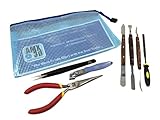
- CREATE EXCITEMENT - These 7 3D print cleaning tools will create new excitement and satisfaction with your 3D printer
- EASY CLEANING: Students - Patrons - Members will love how these 3D print clean-up tools finish 3D prints so they look like the pro prints on the 3D Printer Box!
- EASY CHECK-OUT - CHECK-IN: The durable translucent pouch enables quick, easy verification that all the contents are included on check-out and returned on check-in!
- HIGHEST QUALITY: Each of our 3D Print clean-up kit tools are made to AMX3d specifications for strength, durability and long life.
- AMX3D 3D Printer Tools: The best prints start with the best tools! AMX3d provides 3D printer tools and 3D printer accessories of the highest quality. If there are any problems with your 3D Print Cleaning Kit just let us know!
What can you make in a Fab Lab?
Fab Labs bring digital fabrication and related design tools into a shared setting. Depending on the individual space, that can mean prototyping with a 3D printer, cutting or engraving with a laser, machining parts on CNC equipment, designing electronics, or working with textiles and other materials. No single equipment list applies to every lab, so check the facility’s own capabilities and rules before planning a project.
MIT News dates the first Fab Lab to 2002, when MIT’s Center for Bits and Atoms developed a community-scale version of its digital fabrication environment with Boston community activist Mel King. The account describes tools including 3D printing and scanning, laser cutting, precision and large-format machining, molding and casting, surface-mount electronics, and design software. It also presents Fab Labs as places to play, create, learn, mentor, and invent—not just equipment rooms. MIT News’ account of Fab Labs
Rank #4
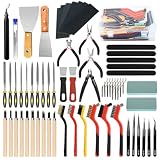
- 【96 Pcs 3D Printer Tool Kit】96 essential tools in one organized storage case: 21 deburring blades, 20 nozzle cleaning needles (0.2-0.4mm), 10 hardened needle files (flat, round, half-round, triangular, square, and more), 7 wet/dry sandpapers, 7 sanding pads, 4 professional pliers (micro flush-cut, chain-nose, end cutting, needle nose), 6 tweezers, 10 wood carving tools, 8 cleaning brushes, 2 removal scrapers, and more. Everything you need for 3D print post-processing, sanding, and finishing in a single portable box — no more jumping between toolboxes.
- 【Complete Nozzle Cleaning & Maintenance Station】Prevent clogs and under-extrusion with 20 high-precision cleaning needles spanning 0.2mm to 0.4mm — compatible with all standard 1.75mm nozzles. Includes 3 brush types (brass, stainless steel, nylon) plus 2 scoops for thorough hotend cleaning. Keep your printer running smoothly whether you print PLA, ABS, PETG, TPU, or resin. Ideal for routine maintenance on all FDM and resin 3D printers.
- 【Professional-Grade Post-Processing Tools】Go beyond basic support removal. The 360° swivel-head deburring tool with 21 HSS blades effortlessly removes sharp edges, elephant foot, and support scars on PLA, PETG, and ABS prints. 10 hardened needle files in multiple profiles let you refine tight corners, internal channels, and fine details with surgical precision — double the filing options of standard kits. 7 wet/dry sandpapers take your prints from rough to showroom-smooth. Unlike starter kits that stop at trimming, we give you the full deburring, sanding, and polishing finishing workflow.
- 【Built for Safety & Portability】Carving knives and trimming blades include protective caps and replaceable blades for safe storage. All 4 pliers feature non-slip TPR ergonomic handles for comfortable extended use. The transparent, compartmentalized storage case lets you find any tool in seconds — everything has its place. Compact at 8.66 x 6.89 x 2.4 inches, it travels easily from your home workshop to makerspace, classroom, or client site. The ideal 3D print deburring kit that keeps your tools organized — never lose a small tool again.
- 【Works with All FDM & SLA Printers — and Beyond】Compatible with prints from all popular FDM and SLA 3D printers. But the versatility doesn't stop at 3D printing — this kit also excels at model making, miniature painting prep, circuit board repair, wood carving (10 specialized tools included), jewelry finishing, and DIY crafts. Whether you're a beginner building your first toolkit or a seasoned maker upgrading your bench, this 96-piece 3D printer tool set is the economical, practical choice that grows with your skills. Makes a perfect gift for 3D printing enthusiasts.
There is no single makerspace model
“Makerspace” does not guarantee a particular host, membership arrangement, or set of activities. A space may belong to a library, school, university, nonprofit, or independent community organization; some focus on public access, while others serve a defined group or rely on classes and scheduled programs. A historical Maker Ed survey of 51 sites illustrates the variety of labels: 53% called themselves makerspaces, while respondents also used terms such as drop-in space, teen/youth center, innovation lab, design lab, hackerspace, Fab Lab, idea lab, and science lab. Those results describe that survey sample, not current national prevalence. Maker Ed’s research brief
Fab Labs also appear in varied settings. MIT News describes U.S. examples ranging from community colleges to Main Street, with open access, training, and school partnerships among the ways labs connect to their communities. The Fab Foundation currently displays figures of “2,700+ Fab Labs Worldwide” and “165 Countries”; those are the organization’s stated figures, not an independently reconciled census. A Fab Lab Tulsa page citing the Foundation in 2025 gives a different figure—over 2,300 MIT-chartered labs in more than 120 countries. Because the sources differ in date and wording, the figures should not be combined into a single estimate. Fab Foundation Fab Lab Tulsa
Best Value

- Premium Black & Gold Edition: Stand out from ordinary tool kits with a sleek black and titanium gold design. Professionally coordinated tools deliver a premium appearance while providing reliable performance for every 3D printing project
- Complete 40-Piece 3D Printing Workflow Kit: From nozzle cleaning and model removal to trimming, deburring, and finishing, this complete 40-piece kit supports every stage of the 3D printing process
- Premium Materials for Long-Term Use: Featuring titanium gold coated components, stainless steel tweezers and scraper, chrome-vanadium steel pliers, brass engraving knife, and durable carborundum files for dependable performance
- Precision Tools for Better Print Quality: Remove clogs, trim supports, smooth rough edges, and refine details with professional tools designed specifically for 3D printing maintenance and post-processing
- Organized Storage & Easy Portability: The included anti-scratch storage case keeps every tool organized, protected, and ready for use at home, in classrooms, makerspaces, or workshops
How to find a space that fits your project
- Start with the project. Identify the process you need—such as sewing, electronics work, woodworking, laser cutting, or CNC machining—rather than searching only for a general-purpose makerspace.
- Check who can use it. Confirm whether the space accepts visitors, requires membership or enrollment, or offers public hours only for particular activities.
- Ask about training and supervision. Equipment may require an orientation, class, reservation, or staff approval. Verify prerequisites before bringing a project or materials.
- Confirm current availability. Check hours, tool access, fees, and booking rules directly with the organization. A directory listing or older article may not reflect current operations.
- Look beyond the machines. Consider whether the space offers instruction, peer support, or a community connection that would help you complete the project.
A community-curated directory can help generate candidates, but its listings alone do not establish that a space is still operating or that its equipment and public access are current. The original Make: slideshow’s individual location names are not exposed on its accessible page, so they should not be guessed or treated as verified recommendations.
Quick Recap

Product prices and availability are accurate as of the date/time indicated and are subject to change. Any price and availability information displayed on Amazon at the time of purchase will apply.




