Quick wins for a faster PC:
Free tools Windows power users keep installed
One-click scans. No signup required.
Fix the driver behind crashes, sound loss and screen glitchesFind Drivers →Clear out junk files and repair common Windows errorsFree Scan →Scan for outdated or missing drivers - takes under a minuteDriver Scan →
ThatPainter is reader-supported. When you buy through links on our site, we may earn an affiliate commission. Learn More
If you need to print a craft pattern at a precise physical size across several sheets, compare alternatives by whether they actually tile pages and control print scale—not simply by whether they edit images. PosteRazor is a closer fit for raster-image poster tiling; vector editors such as Inkscape, Illustrator, CorelDRAW, and Affinity Designer may suit drawing and editing, but the available comparisons do not establish that they automatically print craft patterns at a chosen size. The old “20 Best” and “in 2023” framing is not a verified current ranking, so the options below are grouped by task rather than presented as a top-20 list.
What Rapid Resizer does—and what a replacement needs to match
Rapid Resizer is a browser-based design and print workflow for enlarging or reducing a design to a chosen physical size, then printing it as joined pages. Its maker describes uses that include scroll-saw woodworking, carving, wood burning, stained glass, textile art, painting, posters, signs, scrapbooking, and vinyl cutting. It also offers a design library, picture and letter stencil makers, and a Designer for creating or combining designs. Rapid Resizer’s product page and getting-started instructions describe loading a design, selecting one from the library, or creating one with its tools, entering measurements, and printing full size.
The vendor says Rapid Resizer works on phones, tablets, and desktops without installation, and automatically tiles the output across pages that fit together. Those are product claims, not independent performance findings. Its current page advertises “800+ built-in designs” and “200+ built-in fonts”; both counts are vendor-published and were checked on the page in 2026. Rapid Resizer
Before switching, identify which parts of that workflow matter to you: exact physical scale, automatic multi-page tiling, stencil or pattern tools, a built-in library, vector editing, device support, or price. A graphics editor may help create the design without replacing the print-and-assemble step.
#1 Best Overall

- 4.5 IN (11.4 CM) CUTTING MACHINE: Cricut Joy 2 is the next generation of our ultra-compact cutting machine — perfect for quick, everyday projects like custom cards, simple decals & labels. Plus, it works with your home inkjet printer to help you create full-color stickers.
- COMPATIBILITY: Cricut Joy 2 works with 75+ materials, including popular materials like vinyl, iron-on, printable materials & cardstock, plus this machine writes, draws, foils, scores & cuts intricate designs with precision.
- BUNDLE & SAVE: Make a wide variety of projects right out of the box and save even more! The Essential Bundle includes must-have tools and materials like Smart Vinyl, Smart Iron-On, Value Cardstock, Insert Card Sets, and Printable Vinyl. It's enough supplies to create up to 35 projects. Bundle also includes 25 additional premium-quality images with purchase, plus 1 font.
- ULTRA-COMPACT & PORTABLE: Cricut Joy 2 weighs just over 2 lbs (0.91 kg), making it the ideal machine for crafting — and storing — in any space. It has a 4.5 in (11.4 cm) cutting width, so it's perfect for smaller everyday projects.
- FULL-COLOR POSSIBILITIES: Print your design with your home inkjet printer, then your Cricut cutting machine automatically recognizes & precision-cuts around inkjet-printed images to create full-color stickers, decals, apparel & more.
Closest fit for printing an image across multiple pages
PosteRazor: raster-image poster tiling
PosteRazor is worth considering when your main task is dividing a raster image into pieces for printing and assembling as a poster. Its project documentation describes that operation and a configurable overlap setting, useful when joining printed sections. PosteRazor project documentation
This is a narrower match than Rapid Resizer: the cited documentation establishes raster-image tiling for poster assembly, not a craft design library, stencil maker, or full design suite. If you are enlarging a painting reference or other flat image, check the resulting page layout and overlap before printing; do not assume it supplies craft-specific tools.
Rank #2

- 12 IN (30.5 CM) CUTTING MACHINE: Cricut Explore 5 is the newest generation of our Cricut Explore machines — perfect for making a variety of projects like custom decals, personalized apparel, full-color stickers, cards, and so much more. You can even make in multiples! 30% more compact than previous models, Cricut Explore 5 features an aesthetic new look and simplified interface for a more intuitive experience – all with the same dependable 12 in (30.5 cm) cutting performance. Available in a brand-new Taupe color.
- COMPATIBILITY: Precision-cuts 100+ popular materials, including vinyl, iron-on, cardstock & printable materials, plus this machine writes, draws, foils, scores & cuts intricate designs with precision. Works with six tools, including Deep Cutting Tool (sold separately) for working with thicker materials like foam & rubber. Plus, it features a new hassle-free snap-in pen holder.
- BUNDLE & SAVE: Make a wide variety of projects right out of the box and save even more! The Essential Bundle includes must-have tools and materials like Smart Vinyl, Smart Iron-On, Value Cardstock, Insert Card Sets, and Printable Vinyl. *Materials and accessories value based on comparable Cricut products sold separately. Bundle also includes 25 additional premium-quality images with purchase, plus 1 font.
- FULL-COLOR POSSIBILITIES: Print your design with your home inkjet printer, then your Cricut cutting machine automatically recognizes & precision-cuts around inkjet-printed images to create full-color stickers, decals, apparel & more.
- NO DESIGN EXPERIENCE REQUIRED: Use your mobile or desktop device and connect through Bluetooth to Design Space, our free, easy-to-use app that helps you turn your ideas into something one of a kind. With step-by-step design flows, customizable templates, AI-image generation, and a huge content library, it makes personalization feel effortless. Our free out-of-the box content library includes 3,000+ images, 100+ fonts, and 1,000+ projects to help get you started. Additional content can always be purchased a la carte, or go all in with a Cricut Access Subscription to unlock our ever-growing library for a small reoccurring monthly or annual fee.
Vector editors for creating or editing designs
G2’s alternatives directory lists several vector and graphics products alongside Rapid Resizer. A directory listing is a discovery aid, not proof of print tiling or physical-scale control. Confirm current documentation for your operating system, file formats, and print workflow before treating any of these as a direct substitute. G2 alternatives listing
What’s actually slowing this PC down?
Pick the symptom - the matching free tool is one click away.
| Tool | Why it may fit | What the cited information does not establish |
|---|---|---|
| Inkscape | Free, open-source vector editor; G2 identifies GNU/Linux, Windows, and macOS availability. | Automatic craft-pattern tiling at a chosen physical size. G2 alternatives listing |
| Adobe Illustrator | Vector graphics and editing option listed by G2. | Current price, or parity with Rapid Resizer’s tiled craft-print workflow. G2 alternatives listing |
| CorelDRAW | Vector graphics and editing option listed by G2. | Current price, or automatic multi-page printing at a specified scale. G2 alternatives listing |
| Affinity Designer | Vector graphics and editing option listed by G2. | Current price, or whether it handles the physical-size tiling you need. G2 alternatives listing |
These editors are most relevant if your priority is drawing or modifying vector artwork. For a pattern intended to span home-printer pages, verify whether the product can set the final physical dimensions and tile the output; otherwise you may need a separate printing utility.
Rank #3

- Phomemo M08F Tattoo Printer Kit- Specifically built for tattoo applications. Phomemo Bluetooth tattoo stencil printer features a lightweight, wireless design, weighing in at only 2 pounds -only 63% the size of traditional tattoo transfer machine. Its built-in rechargeable and large battery ensures you are free from constant charging cables, providing unparalleled convenience and ease-of-use for tattoo artists on-the-go
- Strong Compatibility - With its compatibility with various devices such as smartphones, tablets, laptops, and desktop computers. Phomemo M08F thermal tattoo printer supports multiple operating systems such as Android, iOS, Windows, macOS, and ChromeOS, making design and printing more convenient than ever for both tattoo enthusiasts and beginners. ( How to Connect Your Phone to the App? 1.Turn on your phone's Bluetooth. 2.Open the Phomemo App. 3.Tap the printer icon in the upper left corner. 4.Find your printer and connect. )
- Free & Smart App Included: Phomemo App supports basic editing, stencil generator, large image cutting, stencil preview, anti-wrinkle mode and tattoo design library. Optional premium features offer enhanced AI-assisted features and access to a larger tattoo artwork library.
- High-Quality & Inkless Printing - Phomemo M08F wireless tattoo stencils printer uses advanced thermal technology to print clear and precise patterns and lines. You won't have to deal with ink-related blockages or cleaning problems, ensuring an efficient and hassle-free process for professional tattoo artists & beginners. This allows you to focus on creating high-quality temporary or permanent tattoos for your clients
- Rechargeable - The M08F cordless Bluetooth tattoo printer with a large capacity 1200mAh battery. With just one full charge, you can print up to 220 pages of light-colored images or text, making it perfect for multiple tattoo printing sessions. As an added bonus, M08F stencil printer for tattooing include 10 sheets of tattoo transfer paper to help you get started
Other adjacent tools to investigate
G2 also lists Sketch, Recraft, Adobe Capture, and Vector Magic. The listing alone does not establish that any of them can enlarge a craft pattern to a chosen size and tile it for printing. Check each vendor’s current feature documentation against your specific task before choosing one. G2 alternatives listing
How to choose for a painting or craft-print workflow
- Define the output. If you need a raster image split into poster sections, investigate PosteRazor. If you need to draw or edit vector artwork, assess a vector editor.
- Check scale control. Confirm that the tool accepts a target physical width or height and preserves the intended proportions. A general graphics editor label does not confirm this workflow.
- Check page tiling. Look for automatic multi-page output, page layout preview, and overlap controls if you need to join sheets. Verify the option in current product documentation.
- Check the craft-specific features. If you depend on stencil creation, pattern libraries, or combining designs, confirm those features exist; PosteRazor’s documented role is more limited.
- Test the print before committing materials. Print a small section or a scale check, measure it, and inspect alignment before printing a large pattern. This is a practical precaution, not a claim that any listed tool has been tested here.
Reviews and pricing information
G2 displays user reviews dated 2023 and 2024. Reviewers variously praise craft or pattern workflows, ease of use, and resizing, while others describe a learning curve, missing editing features, or cost. These are individual opinions and do not establish typical results or a reliable head-to-head comparison. G2’s page does not currently provide pricing details, so historical or assumed subscription prices should not be treated as current. G2 Rapid Resizer reviews
Quick Recap
Best Value
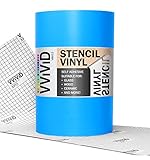
- Low-tack adhesive backing is easy to place and remove. Applies easily to any smooth, non-porous surface such as art board, finished wood, glass, tile and metal.
- Non-porous vinyl is ideally suited for use with water-based artistic mediums.
- Gridded backing paper allows for more precise cutting, trimming and application.
- Matte, translucent finish allows for maximum precision during installation and use. Great for multiple layers.
- Perfectly suited for stencil, lettering, signage and exhibition decoration, especially with multi-colored designs.
Rank #4

- Easy to Use :This 6-inch manual die cutting machine features a user-friendly design that lets you dive straight into your scrapbooking projects. Perfect for both beginners and seasoned crafters looking to speed up their creative workflow.
- Cute shape and color with handle design:the 6in die cutting machine has a wonderful color looking and can be well stored in your room, also it's very cost-effective and all inner construction is made of carbon steel, have longer using life than most other machines.
- Perfect size:Measuring 12.2" x 12.2" x 6.7", this machine features a 6-inch wide opening that easily accommodates A5-sized paper. It's compatible with most standard die cuts and embossing folders available on the market, giving you the freedom to explore endless creative possibilities with your existing craft supplies.
- Budget-Friendly & Portable:The price of the 6in die cutting machine is reasonable for starter when comparing the electric ones , also can use outside ,no worries about electric.
- Achieve professional die cutting and embossing results every time with our straightforward plate stacking method: Embossing: 1× 13mm plate + 2× 3mm PC plates + embossing folder (with paper inside) Die Cutting: 1× 13mm plate + 1× 5mm PC plate + paper + die cut + 1× 3mm PC plate Simple, repeatable, and designed for consistent, crisp results.

Product prices and availability are accurate as of the date/time indicated and are subject to change. Any price and availability information displayed on Amazon at the time of purchase will apply.




