Quick wins for a faster PC:
Clear out junk files and repair common Windows errorsFree Scan →Scan for outdated or missing drivers - takes under a minuteDriver Scan →
ThatPainter is reader-supported. When you buy through links on our site, we may earn an affiliate commission. Learn More
RGB is for light-emitting media such as monitors, phones, cameras, scanners, websites, and video. CMYK is used for many ink-on-paper process-printing workflows. The important qualification is that neither label is complete by itself: an RGB color space (such as sRGB or Display P3), a CMYK output profile, the paper, inks, printer, and viewing conditions determine the result. Follow the printer’s specification rather than converting every file to a generic CMYK mode.
RGB and CMYK at a glance
| Characteristic | RGB | CMYK |
|---|---|---|
| Full name | Red, green, blue | Cyan, magenta, yellow, key (black) |
| Physical principle | Additive colored light | Subtractive ink or pigment on a reflective substrate |
| Typical medium | Displays, cameras, scanners, web, video and digital imaging | Process printing on paper and other substrates |
| Channels | Three | Four process channels |
| Black | No emitted light; conventionally 0/0/0 | A dedicated black (K) ink, plus possible controlled mixtures for large dark areas |
| White | Combined light; conventionally 255/255/255 in 8-bit encoding | Usually the unprinted paper or substrate |
| Main risk | Some vivid colors cannot be reproduced by a particular print condition | Early conversion can discard useful RGB color information and still does not guarantee a color without a profile |
These are color models, not file formats. A model describes how components relate; a color space or ICC profile gives the numbers a defined color meaning. Adobe explains this distinction and the role of profiles in managed workflows at its color-management documentation.
As an Amazon Associate I earn from qualifying purchases.
Recommended Free Tools
How RGB creates color
RGB starts with darkness and adds red, green and blue light. In a conventional 8-bit encoding, each channel ranges from 0 to 255, but that numerical convention is not the definition of RGB.
- RGB(0, 0, 0) represents black in a conventional display encoding.
- RGB(255, 255, 255) represents white in that encoding.
- Red plus green produces yellow; red plus blue produces magenta; green plus blue produces cyan.
Actual color depends on the RGB space’s primaries, white point, transfer function, display calibration and viewing environment. The W3C CSS Color specification describes these properties rather than treating every RGB triplet as universally identical: CSS Color Module Level 4.
#1 Best Overall

- SPECIFICATIONS: Monitor calibration colorimeter with Easy 1 2 3 software workflow, USB C connection, compact body approx. 34mm tall x 37mm diameter, adjustable counterweight for screen placement, supports up to 2 displays, brightness target selection including Native or Photo with before and after check.
- EASY SETUP: Guided 1 2 3 workflow makes calibration fast and approachable, helping photographers and creators achieve more accurate color without complicated settings, so you can edit with confidence and trust what you see on screen.
- COLOR ACCURACY: Corrects common monitor color shifts to deliver truer tones and more reliable contrast, improving consistency across editing sessions and helping your images look closer to final output on other screens and devices.
- DUAL DISPLAY SUPPORT: Calibrates up to 2 monitors for matching color across a multi screen workspace, ideal for photo editing, video work, and creative setups where consistent viewing on both displays matters.
- BEFORE AFTER CHECK: Built in comparison view lets you instantly see the difference after calibration, making it easy to confirm improved accuracy and maintain consistent results by repeating the process on a regular schedule.
Common RGB spaces
- sRGB: The broadly supported default for web and general digital content. See the W3C reference at W3C sRGB.
- Adobe RGB (1998): A wider-gamut working space used in some photography and print-oriented workflows; it is not automatically better than sRGB.
- Display P3: A wider-gamut display space used by many newer screens and digital-content systems. Delivery software and devices must support it for its extra colors to survive.
Keep the profile embedded. An untagged file can be interpreted differently by different applications.
How CMYK creates color
CMYK starts with white paper. Cyan, magenta and yellow inks absorb portions of white light; the wavelengths that remain and reflect toward the viewer are perceived as color. Real inks are imperfect, so a separate black ink improves shadows, neutral tones, contrast and small type.
Do these 3 things before closing this tab:
1Fix the driver behind crashes, sound loss and screen glitches2Clear out junk files and repair common Windows errors3Scan for outdated or missing drivers - takes under a minuteWhy black is “K”
“K” distinguishes the black plate from “B,” already used for blue in RGB. A dedicated black channel also gives cleaner small text and lets a printer control black generation and total ink coverage. Those settings vary by profile, paper and press.
Rank #2

- SPECIFICATIONS; Includes Calibrite Display Plus HL colorimeter measuring up to 10,000 nits plus ColorChecker Passport Video 2 for capture reference, designed for monitor calibration, white balance setup, exposure control, camera matching, and consistent color workflow.
- CAPTURE ACCURACY; Passport Video 2 helps set correct white point, verify exposure, and match cameras on set, delivering reliable reference for consistent footage and stills in changing or mixed lighting conditions.
- HIGH LUMINANCE CALIBRATION; Display Plus HL profiles mini-LED, OLED, and Apple XDR panels with extreme brightness capability, ensuring accurate color representation for professional photo editing and video grading workflows.
- EDITING CONFIDENCE; Built for creators who demand trustworthy color management, this kit reduces trial-and-error corrections, improves workflow efficiency, and supports accurate results from capture through final delivery.
- PRO CREATOR WORKFLOW; Ideal for videographers and photographers who require consistent color standards across multiple cameras, monitors, and software platforms, helping maintain professional results from on-set capture through final post-production.
A value such as 100% cyan, 0% magenta, 0% yellow and 0% black has no single guaranteed appearance across every press. Adobe’s print color-management guidance notes that output profiles account for paper, ink and device conditions.
Additive versus subtractive: the useful mental model
Imagine RGB as colored spotlights aimed at a dark stage: more light moves toward white. Imagine CMYK as transparent inks laid on white paper: each layer removes parts of the light reflected from the sheet. This distinction explains the broad behavior, but it does not predict an exact converted color. Spectral ink behavior, halftoning, paper reflectance, calibration and illumination all matter.
Gamut: why a screen color may not print
Gamut is the range of colors a particular device or color space can reproduce. Human vision exceeds the gamut of ordinary displays and printers, and displays and presses have different boundaries. Many common RGB spaces contain vivid greens, cyans, blues or reds outside a given CMYK press-and-paper condition; newsprint is generally more restrictive than quality coated stock.
Windows Errors? Fix Them Before They Spread
Repair common Windows errors and clear accumulated junk for a smoother, more stable PC - no reinstall needed.Free scan · no reinstallCrashes, No Sound, or Screen Glitches?
Random freezes, missing sound and display glitches usually trace back to one bad driver. Find and replace yours safely.Free scan · under a minuteRank #3

- SPECIFICATIONS; Includes Calibrite Display 123 colorimeter for monitor calibration plus ColorChecker Passport Video 2 for video and photo capture control, designed for exposure reference, white balance setup, and consistent color workflow from capture through edit.
- CAPTURE CONTROL; Passport Video 2 helps set accurate white point, verify exposure, and match multiple cameras on set, giving filmmakers and hybrid shooters a reliable reference for consistent footage in changing or mixed lighting conditions.
- MONITOR CALIBRATION; Display 123 provides an easy monitor profiling workflow so photographers and creators can trust on-screen color when editing, grading, designing, or delivering work that must remain consistent across displays.
- CREATIVE CONFIDENCE; Built for content creators who want dependable color management, this kit reduces trial-and-error corrections, improves workflow efficiency, and supports accurate results for both still photography and professional video production.
- PRO CREATOR WORKFLOW; Ideal for videographers and photographers who require consistent color standards across multiple cameras, monitors, and software platforms, helping maintain professional results from on-set capture through final post-production.
“RGB has a wider gamut than CMYK” is useful shorthand, not a universal mathematical rule. RGB and CMYK each name families of spaces and devices. Adobe discusses these device-dependent gamuts and profiles at color management.
Displays emit light, so they can make a neon green or electric blue look luminous. Ink relies on reflected room light and is limited by pigment, paper absorbency, ink coverage and press calibration. During conversion, an out-of-gamut color may become duller, shift in hue or lightness, or be compressed with neighboring colors. That is usually a limitation of the destination condition, not a software fault.
Color model, color space and profile: the terms that prevent mistakes
- Model: The component relationship, such as RGB or CMYK.
- Color space: A model plus defined primaries, white point and other coordinates, such as sRGB or Display P3.
- ICC profile: Data describing how a device or output condition reproduces color, allowing a color-management system to translate between spaces.
For print, the profile may identify a press standard, country or industry condition, coated or uncoated stock, ink set, total-area-coverage limit and black-generation behavior. Examples include ISO, SWOP and Japan Color conditions. “CMYK” without that context is incomplete.
Rank #4
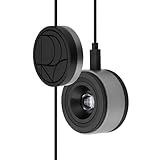
- 3-in-1 multiple function with Colorimeter, Display OSD control and ASUS Dial features
- Integrated colorimeter, both with Hardware and Software Calibration via ASUS exclusive software tool to keep long-term color accuracy and consistency
- Measuring up to 10000 nits for precise HDR calibration, seamlessly compatible with LED, OLED, Mini-LED, and more
- 5-way navigator and shortcut key provide intuitive Display OSD control accessible within the reach of your hand
- Integrate ASUS Dial provide customize shortcuts for easy, precise control of your creator software
Which should you use?
Choose RGB when
- The final destination is a website, app, social platform, video, digital sign or screen presentation.
- The source is a camera or scanner.
- You are editing photographs, gradients or artwork that may have several future destinations.
- Your printer or service explicitly accepts RGB and performs a profiled conversion on its equipment.
Choose CMYK when
- A printer specifies an exact CMYK profile for a known press and substrate.
- You must inspect separations, overprint, total ink coverage or black generation.
- The design depends on predictable process-color plates and approved CMYK values.
A practical decision rule
- Identify the destination: screen, home printer, inkjet, digital press, offset press, textile or specialty output.
- Ask for the required file format, profile, PDF/X standard, bleed, resolution, ink limit and proofing instructions.
- Keep an editable, tagged master, usually RGB for photographs and artwork when the final condition is not fixed.
- Create a destination-specific copy using the supplied profile.
- Soft-proof, inspect critical colors and obtain a physical proof for color-critical work.
Preparing RGB artwork for print
- Preserve the source: Save the original tagged RGB file before any conversion.
- Get the printer’s profile: Do not substitute a generic CMYK profile when the service provides one.
- Convert, do not merely assign: “Assign profile” changes how existing numbers are interpreted. “Convert to profile” recalculates values to preserve appearance as closely as the destination permits.
- Soft-proof: Simulate the destination profile, choose a rendering intent, and inspect out-of-gamut warnings. A soft proof is an approximation limited by monitor calibration and room lighting, as Adobe explains in its color-management documentation.
- Inspect production details: Check skin tones, brand colors, gradients, transparency, overprint, separations, total ink coverage and small black text.
- Proof physically: For expensive or color-critical work, compare a contract or service-provider proof under appropriate lighting.
- Export carefully: Preserve the requested profile and verify the final PDF rather than judging only the source document.
Avoid repeated RGB → CMYK → RGB → CMYK conversions. Keep one master and make controlled derivatives for each output.
Rendering intents and out-of-gamut colors
Color-management software maps a source profile through a profile connection space into the destination profile. The result depends on the rendering intent and the profiles’ implementation.
| Intent | Typical purpose |
|---|---|
| Perceptual | Compresses color relationships to fit the destination; often useful for photographs containing many out-of-gamut colors. |
| Relative colorimetric | Preserves in-gamut colors relative to the destination white and maps out-of-gamut colors; useful when accurate in-gamut reproduction matters. |
| Absolute colorimetric | Can preserve the source white’s appearance and is commonly relevant to proofing simulations. |
| Saturation | Prioritizes vividness over colorimetric accuracy for some charts and presentation graphics. |
No intent is best for every image. Test the setting with the actual destination profile; W3C discusses rendering intents and device-dependent CMYK conversion at CSS Color Module Level 5.
Best Value

- QUICK & EASY COLOR CALIBRATOR: Whether you're editing photos, designing graphics, or producing content, SpyderExpress helps you view colors with precision and confidence; Ideal for creators who want accurate, lifelike colour in both digital and print
- READY FOR THE LATEST DISPLAYS: The only calibrator of its kind to currently support the latest Liquid Retina XDR displays, including the MacBook M4 mini-LED screen, alongside everyday monitors; Upgrade the software for OLED and advanced mini-LED support
- 3x FASTER THAN TYPICAL ENTRY-LEVEL TOOLS: Get edit-ready color in just 90 seconds - see skin tones, shadows, and highlights as they’re meant to be, with consistent, trustworthy results
- GROW YOUR TOOLKIT WITH SOFTWARE UPGRADES: Unlock advanced features like ambient light adjustment, multi-display profiling, and DevicePreview - shows how your work will appear across different devices; No new hardware needed, upgrade when you're ready
- REAL COLOUR, REAL EASY: Download the software, plug in the device, and follow the 3 simple steps. Save profiles, calibrate up to 3-connected displays per workstation, and recalibrate before editing to ensure your screen always shows true-to-life color
Black text, rich black and registration
- Small text and fine rules: A single 100% K channel is generally safer because tiny registration errors cannot create colored edges. Follow the printer’s specification.
- Large dark areas: A controlled rich-black mixture can look denser, but the recipe and total ink limit depend on paper, press and profile. There is no universal formula.
- RGB black: A screen value of RGB(0,0,0) may convert to a multi-ink build unless the profile or software preserves black.
Inspect overprint and separations in the final production file. Adobe’s print guide covers black preservation and output controls: Adobe InDesign Print Guide.
Logos, spot colors and expanded-gamut printing
Process CMYK cannot reproduce every brand color. A spot color uses a separately prepared ink and can reach colors outside four-color process gamut, including some vivid, fluorescent or metallic colors. It is not simply “better CMYK”: it may add an ink station or plate, cost more and look different on different papers. See Adobe’s explanation of spot and process colors.
Recommended Free Tools
For consistent branding, maintain approved RGB, CMYK, spot-color and monochrome versions, with documented tolerances and proofs. Expanded-gamut systems such as CMYK plus orange, green and violet are an alternative to ordinary four-color process; ISO/TS 21328:2022 covers CMYKOGV characterization at ISO.
Is CMYK always required for printing?
No. Many digital printers and inkjets accept RGB and perform an internal conversion; some use light cyan, light magenta, gray, orange, green, violet or other colorants. Commercial jobs may require a PDF/X file and a specified profile rather than a generic CMYK document. Textile, dye-sublimation, specialty and multicolor workflows also differ. ISO 19302:2018 addresses conformity across CMYK, spot, non-CMYK and multicolor processes: ISO 19302. The printer’s documented specification is authoritative.
Troubleshooting common color mismatches
| Symptom | Likely cause | Action |
|---|---|---|
| Print looks duller than the screen | Out-of-gamut RGB colors, reflective paper or an unmanaged conversion | Use the supplied profile, soft-proof, adjust the source or consider a spot/expanded-gamut ink. |
| PDF changed color | Profile was stripped, assigned incorrectly or converted during export | Embed the profile, check export color-conversion settings and inspect the final PDF. |
| Two CMYK files do not match | Different profiles, papers, inks, calibration or viewing conditions | Compare profile metadata and proof under the same production condition. |
| Black text has colored edges | Multi-ink black or registration movement | Use the printer-approved single-K treatment for small type. |
| Printer asks for RGB | The service has a calibrated device profile and prefers to manage conversion | Send a tagged RGB file exactly as requested; do not convert to a random CMYK profile. |
Final checklist
- What is the final medium and physical substrate?
- Which exact RGB or CMYK profile does the recipient require?
- Will the printer convert RGB, or must you supply separations?
- Are spot, fluorescent, metallic or expanded-gamut inks needed?
- Have you soft-proofed and checked out-of-gamut areas?
- Are black text, rich blacks, overprint, transparency and total ink coverage correct?
- Have you retained a tagged, editable master and produced a physical proof where risk justifies it?
The Bottom Line
Use a tagged RGB space for screens, cameras and most editing; use the printer’s specified CMYK or other output profile for process print. Color management—not the word “CMYK” alone—determines whether the result matches your expectations.
Quick Recap

Product prices and availability are accurate as of the date/time indicated and are subject to change. Any price and availability information displayed on Amazon at the time of purchase will apply.




