Do these 3 things before closing this tab:
1Scan for outdated or missing drivers - takes under a minute2Repair Windows errors before they cause bigger problems3Fix the driver behind crashes, sound loss and screen glitches
ThatPainter is reader-supported. When you buy through links on our site, we may earn an affiliate commission. Learn More
There is no single best fabric printer. The right machine depends on the fabric you use, garment color, design volume, and whether you want to print directly onto finished apparel or make transfers. For most small-to-mid-size apparel businesses, the Epson SureColor F1070 is the strongest all-around choice because it supports both direct-to-garment (DTG) and direct-to-film (DTFilm) workflows. For polyester apparel and coated products, however, a sublimation printer such as the Epson SureColor F170 or Sawgrass SG1000 is usually the better fit.
This guide separates the technologies first, then compares five leading options by use case, cost, materials, maintenance, and production needs.
Quick comparison
The products below are not interchangeable. DTG, DTF/DTFilm, sublimation, and roll-to-roll textile printing solve different problems.
| Rank | Printer | Technology | Best for | Price signal | Main limitation |
|---|---|---|---|---|---|
| 1 | Epson SureColor F1070 | DTG/DTFilm | Small-to-mid-size apparel shops | U.S. MSRP observed at $4,995 for Standard Edition | Needs pretreatment, curing, and a heat press for film transfers |
| 2 | Epson SureColor F2270 | DTG/DTFilm | Growing businesses | U.S. MSRP observed at $12,995 | High capital cost |
| 3 | Brother GTXpro B | DTG/DTF platform | Higher-volume shops prioritizing support | Quote required | Dealer configuration affects total cost |
| 4 | Sawgrass SG1000 | Dye sublimation | Larger-format polyester and coated products | Bundle observed at $1,799.95 | Not suitable for cotton or dark garments |
| 5 | Epson SureColor F170 | Dye sublimation | Beginners and small sublimation businesses | Check current manufacturer pricing | Limited to sublimation-compatible materials |
Prices are U.S. manufacturer-listed MSRPs or bundle prices observed in the August 16, 2026 research snapshot. Promotions, tax, shipping, service, installation, and package contents can change the final cost.
#1 Best Overall

- Print in Vibrant Color Print banners, home decor, and more in brilliant color With two print settings, choose either rich color printing (vibrant) or eco mode (light), depending on your design.
- Artspira Integration: The inventive Artspira App has many designs in the app, including photo frames, banners, quilt blocks in a convenient 5” x 3” size, labels, fabric patterns, and bags/purses designs and lets you edit text elements, swap out images, and change the backgrounds of the templates.
- Work your way with wireless connectivity: Love designing crafts on your laptop. Use the built-in wireless connectivity on the PrintModa and enjoy using your favorite design software on your computer. Once you are finished creating, print directly to PrintModa with access to paper tray one for paper and paper tray two for the fabric roll.
- Fast Printing Speeds: While a big box crafting store may take days to get custom fabric orders, it will take PrintModa minutes to create. So, crafters will love the ability to create custom fabric prints in a short amount of time.
- Fabric Printer for all kinds of Creations: From built-in templates to personal designs such as banners and home decor, PrintModa prints in vibrant color.
Choose the printing method before choosing the printer
| If you want to… | Usually start with… | Why |
|---|---|---|
| Print full-color designs on white or light polyester shirts | Dye sublimation | The dye becomes part of the polyester fibers, but the process has no white ink. |
| Print on cotton, including dark garments | DTG or DTF/DTFilm | Pigment-based workflows can use white ink as an underbase. |
| Print on many garment colors and materials | DTF/DTFilm | The transfer can be applied to a broader range of garments than sublimation. |
| Produce a soft, breathable print on cotton | DTG | Ink is deposited directly into the prepared garment rather than on a separate film. |
| Make athletic wear, flags, or all-over polyester designs | Dye sublimation | It is particularly well suited to polyester textiles. |
| Decorate occasional shirts without maintaining a printer | Outsourced DTF transfers | You avoid white-ink maintenance and printer downtime. |
| Print hundreds or thousands of garments daily | Production DTG, industrial DTF, or roll-to-roll sublimation | Desktop machines may become the bottleneck. |
DTG: direct-to-garment printing
DTG printers print directly onto a finished garment. They are a strong match for cotton and cotton-rich apparel, especially when a business sells detailed, full-color designs in small or medium quantities.
Dark garments generally require pretreatment and white ink. The garment must also be cured after printing. That creates a potentially soft print feel, but it also makes preparation, curing, blank quality, and maintenance important parts of the result.
DTF and DTFilm: print a transfer, then press it
DTF printing places the image on transfer film. The film is coated with adhesive powder, cured, and applied to the garment with a heat press. Epson uses the term DTFilm for its hybrid workflow.
DTF is more versatile than sublimation across garment colors and materials, but it is not simply “printing a shirt.” It adds film handling, powder, curing, transfer storage, pressing, and additional opportunities for adhesion or curing problems.
Epson describes its hybrid F-Series printers as supporting both direct garment and film-transfer production, with DTFilm enabling transfers to a wider range of materials and item shapes. See Epson’s DTG and DTFilm information.
Dye sublimation: best for polyester and coated products
Sublimation printers print dye onto transfer paper. Heat converts the dye into gas, which bonds with polyester fibers or a suitable polymer coating.
The result can be vibrant and durable on the right substrate, but sublimation does not produce opaque white. It therefore works best on white or light-colored polyester. It is not a general-purpose method for ordinary cotton shirts or dark cotton garments. Epson gives the same material warning in its sublimation guidance, while Sawgrass positions its systems for polyester apparel and coated hard goods.
Free tools Windows power users keep installed
One-click scans. No signup required.
Direct-to-fabric and roll-to-roll printing
A DTG printer usually decorates finished garments. A roll-to-roll textile printer prints fabric yardage for apparel, décor, signage, or industrial production. If you need to print uncut fabric rolls rather than T-shirts, investigate production-class or industrial textile equipment instead of the desktop and garment machines below. Epson’s production-class sublimation range is aimed at larger textile applications.
The five best fabric printers by use case
1. Epson SureColor F1070: best overall hybrid for smaller apparel shops
Technology: DTG and DTFilm.
The F1070 is the most balanced choice for a small apparel business that wants to work with cotton but also wants a transfer workflow for different garment types. It uses Epson UltraChrome DG2 ink, a PrecisionCore MicroTFP printhead, and nozzle-verification technology.
Rank #2

- Confidence - Epson authorized partner. Original Epson Manufactured product delivered in Epson’s factory-sealed packaging with Epson documentation and Epson’s full manufacturer warranty.
- Genuine Epson Ink Included - Comes with a full set of OEM Epson sublimation inks, certified ECO PASSPORT by OEKO-TEX for safe use on textiles, apparel, mugs, mousepads, and more.
- Astounding Print Quality - Epson's Surecolor F170 Sublimation printer boasts the PrecisionCore printhead which offers Precision Droplet Control for the most outstanding image clarity on the market. Included in the printer bundle: full set of Epson sublimation ink, user guide, AC power cable, Sublimation Starter Kit, JPPlus 8.5" x 11" sublimation paper, JPPlus 8.5" x 14" sublimation paper, and one roll brown thermal tape.
- Versatile Media Support - Includes a 150-sheet auto-feed tray for added efficiency. Epson SureColor sublimation printers house the paper in a dust resistant closed tray for the cleanest possible prints with less paper prep for professional sublimation transfers.
- Compact Reliable Solution - Space-saving design with user-friendly setup for MacOS & Windows. Please note that connection to mobile devices is not supported with this printer. Includes ink bottles with auto-stop technology for clean, mess-free refills. Perfect for hobbyists, crafters, and small business owners.
Epson listed the U.S. F1070 Standard Edition at a $4,995 MSRP in the August 2026 snapshot. The Business Edition was shown at $8,245 and included additional inks and consumables. The Standard Edition product page also showed availability requiring rechecking, so confirm stock before ordering.
Buy it if: you need one compact system for mixed DTG and DTFilm work, have recurring apparel demand, and can support pretreatment and curing.
What’s actually slowing this PC down?
Pick the symptom - the matching free tool is one click away.
Avoid it if: you make only occasional white polyester products. A purpose-built sublimation printer is simpler and less expensive for that job.
Important trade-offs: the printer price is not the complete setup. DTFilm still requires a heat press, while DTG requires pretreatment, curing, cleaning, and regular white-ink management. Epson specifies Epson-brand ink compatibility and warns that third-party supplies may not function properly or continuously. See the F1070 product page and F1070 documentation.
2. Epson SureColor F2270: best hybrid step-up
Technology: DTG and DTFilm.
The F2270 is the higher-capability hybrid option for an established shop that wants direct printing and transfer production without buying separate printers. Its listed features include a cartridge-free bulk ink-pack system, automatic garment-thickness optimization, a PrecisionCore MicroTFP printhead, and UltraChrome DG2 ink.
Epson listed the Standard Edition at a U.S. MSRP of $12,995 in the research snapshot.
Buy it if: you already have consistent demand and need a more capable hybrid workflow with automated setup features.
Avoid it if: you are still testing whether customers will buy your products. The higher capital cost does not remove the need for a heat press, pretreatment, curing, consumables, and service.
Do not treat any manufacturer speed claim as finished-shirt throughput. Confirm the image size, print mode, white-ink settings, loading time, pretreatment, curing, and maintenance assumptions. See the F2270 product information.
Rank #3

- 【Reliable Printing with LiteHead Technology】Powered by Procolored LiteHead Technology, the K13 Lite is designed for stable performance with easier maintenance. Automatic cleaning helps reduce clogging and ink drying, while the White Ink Circulation System runs regularly to prevent sedimentation and maintain smooth, consistent printing results.
- 【Smart & Simplified Operation】The K13 Lite makes DTF printing easier with one-touch ink pumping and an intuitive visual touchscreen interface. Three customizable pixel-style themes provide a personalized user experience, while the streamlined control system helps simplify daily printing operations.
- 【Professional Color Accuracy & Detailed Prints】Achieve vibrant and accurate transfers with G7-certified color accuracy, optimized color curves, and Procolored Studio Lite software. The system automatically detects RGB and CMYK image formats and applies calibrated color profiles to help reproduce designs from screen to fabric with consistent color quality.
- 【Versatile Printing for Back-to-School & Everyday Projects】 With a 13" A3 printing area, the K13 Lite supports flexible DTF applications across cotton, polyester, denim, canvas, and other fabric materials. Create custom apparel, school T-shirts, team apparel, tote bags, personalized accessories, and transfer designs with vibrant colors and detailed patterns.
- 【Advanced Printhead Protection System】The Infrared Printhead SafeGuard System monitors the printing area in real time and detects film warping and foreign particles as small as 2 mm. This intelligent protection helps reduce potential printhead damage, improve reliability, and extend the lifespan of the printing system.
3. Brother GTXpro B: best for higher-volume supported production
Technology: DTG/DTF platform.
Brother positions the GTXpro B for longer runs and higher-volume print shops. The GTX platform includes the GTXpro, GTXpro B, and GTX600, with the GTX600 aimed at mass-production facilities.
Quick wins for a faster PC:
Scan for outdated or missing drivers - takes under a minuteDriver Scan →Clear out junk files and repair common Windows errorsFree Scan →Fix the driver behind crashes, sound loss and screen glitchesFind Drivers →Brother advertises automated maintenance, technical support, custom software, and a two-year limited warranty with one year of bumper-to-bumper coverage for its GTX platform. The official site does not provide a universal public MSRP, so the correct comparison is a dealer quote that identifies the printer, installation, software, platens, training, service, warranty, and accessories.
Buy it if: professional support and service infrastructure matter more than the lowest entry price.
Avoid it if: you have low or uncertain volume and do not want a quote-driven purchase.
Ask the dealer whether the proposed package is DTG-only, includes DTF capability, or requires separate equipment. Start with Brother DTG.
Recommended Free Tools
4. Sawgrass SG1000: best larger-format sublimation printer
Technology: dye sublimation.
The SG1000 is a good choice for white or light polyester apparel, sportswear, promotional products, and coated hard goods. Sawgrass listed an SG1000 bundle at $1,799.95 and an SG500 bundle at $699.95 in the August 2026 snapshot.
Buy it if: your product line is genuinely based on polyester or coated substrates and you want a larger-format sublimation system.
Avoid it if: your customers mainly want cotton shirts, dark garments, or fabrics without a suitable polymer surface. Printer size cannot overcome sublimation’s material limitations.
You will still need a compatible heat press. Sawgrass’s break-even examples depend on assumptions about blanks, production cost, and selling price; they are illustrations rather than profit forecasts. See Sawgrass’s product range.
Rank #4
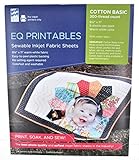
- Print sharp, photo-quality images from your computer onto these soft (never rubbery!) fabric sheets
- You become a fabric designer as you scan in photos, flowers, love letters, or whatever.
- EQ Printables (6 SHEETS) 8 1/2" x 11" Inkjet Fabric sheets
5. Epson SureColor F170: best starter sublimation printer
Technology: desktop dye sublimation.
The F170 is a purpose-built option for makers and small businesses producing polyester apparel, mugs, signs, and other coated products. Epson specifically recommends white or light-colored polyester and warns that sublimation is not suitable for cotton or dark fabrics.
Buy it if: you are starting a small sublimation business, want a compact system, and do not need DTG or DTF capability.
Avoid it if: your business depends on dark cotton shirts or varied garment materials. You will also need a heat press, and the desktop format may become restrictive as print width and order volume increase.
See Epson’s maker sublimation guide and dye-sublimation printer information.
The Tool Desk
Outbyte Driver Updater FREEFix the driver behind crashes, sound loss and screen glitchesFind Drivers →Outbyte PC Repair FREERepair Windows errors before they cause bigger problemsFix Now →What to compare before buying
1. Fabric composition and garment color
Start with the products you will actually sell:
- Cotton: generally points toward DTG or DTF.
- Polyester: may suit sublimation, DTG, or DTF depending on color and finish.
- Dark garments: usually require white ink in a DTG or DTF workflow.
- Blends: test carefully; the result depends on the technology, fiber ratio, garment construction, and color.
- Fabric rolls: require textile production equipment rather than an ordinary garment printer.
Epson’s F1070 documentation specifies cotton-blend fabrics from 50% to 100% cotton and polyester-blend fabrics from 50% to 100% polyester, while noting that polyester shirts and white-ink cotton work may require pretreatment. “Technically compatible” should not be confused with consistently commercial results on every blank.
2. White ink and color capability
White ink is essential for strong results on dark garments in DTG and DTF workflows. Sublimation cannot create an opaque white layer; the base material supplies the light areas. Additional color channels or high-density black can be useful, but they do not automatically mean lower operating costs or better results on every fabric.
3. Print area and platens
Compare the included platen, maximum print area, optional sleeve and youth platens, oversized options, and how quickly platens can be changed.
The F1070 documentation lists maximum supported material thickness of approximately 25–27 mm depending on platen configuration. The F2270 documentation lists a maximum garment thickness of 1.06 inches, with the exact limit depending on the platen. See the F1070 manual and F2270 manual.
The Tool Desk
Outbyte Driver Updater FREEScan for outdated or missing drivers - takes under a minuteDriver Scan →Outbyte PC Repair FREERepair Windows errors before they cause bigger problemsFix Now →4. Real throughput, not headline speed
Ask whether quoted speed includes loading, unloading, pretreatment, drying, pressing, curing, cleaning, quality control, and reprints. Also ask for the image size, print mode, white-ink mode, and expected operator intervention. A printer-only speed figure is not the same as finished garments per hour.
Best Value

- Koala 100% Printable Cotton Canvas Sheets, unlike ordinary “coated paper”, is a kind of real printable fabric. At 17 mil thick, tear-resistant, but still breathable, stretched and easy to trim.
- Matte white finish, enables resolution inkjet printing, no bleeding or smearing, fast dry. Featured a vintage texture like real oil painting, perfect for 1:1 artwork reproduction.
- New idea of sewing! Print out your designs with Koala printable canvas, you can sew them onto DIY projects, such as clothing labels, dollhouse crafts, softcover journals, diamond paintings, handmade patchwork blankets and etc.
- Capture your favorite memory and keep it! Ideal for meaningful photos, artworks, commercial photography, decorative murals, backdrops, festival gifts and other ideas. The creative possibilities are endless!
- TIPS: Only compatible with INKJET PRINTERS and regular ink, ensure your printer can feed heavy-weight paper. Only the WHITER side can be printed.
5. Maintenance and downtime
White ink is one of the largest ownership concerns. Ask about:
- Daily nozzle checks and cleaning.
- White-ink circulation and settling.
- What happens when the printer sits unused.
- Ink expiration and waste.
- Printhead replacement cost and availability.
- Head strikes caused by uneven garments.
- Local service versus depot or shipping service.
- Required maintenance records and consumables.
DTG can be a poor fit for intermittent use if the operator is unwilling to follow the maintenance schedule. DTF avoids printing directly on every garment but adds powder, curing, film handling, and fume-management considerations.
6. Support, warranty, and consumables
Compare phone support, training, dealer coverage, on-site service, warranty exclusions, and required consumables. Epson says its garment printers include limited warranty coverage, U.S.-based phone support, and on-site support, with optional extended on-site plans. Brother advertises technical support and warranty coverage for its GTX platform.
Windows Errors? Fix Them Before They Spread
Repair common Windows errors and clear accumulated junk for a smoother, more stable PC - no reinstall needed.Free scan · no reinstallCrashes, No Sound, or Screen Glitches?
Random freezes, missing sound and display glitches usually trace back to one bad driver. Find and replace yours safely.Free scan · under a minuteDo not assume inexpensive third-party ink is a safe way to reduce costs. Epson’s product information specifies Epson-brand ink compatibility and warns that third-party supplies may affect operation or continuity of use.
The complete system costs more than the printer
Depending on the technology, your setup may also require:
- Heat press.
- Pretreatment sprayer or machine for DTG.
- Curing oven or shaker/dryer for DTF.
- RIP or design software.
- Film, adhesive powder, transfer paper, or sublimation paper.
- Ventilation and a suitable workspace.
- Cleaning supplies and replacement parts.
- Compatible garment blanks.
- Packaging and shipping materials.
- Service plans, installation, and training.
Use this worksheet before comparing printer MSRPs:
Printer and installation
+ Heat press / curing equipment
+ Ink
+ Film or transfer paper
+ Powder or pretreatment
+ Garment blank
+ Packaging
+ Labor
+ Failed-print allowance
+ Service and maintenance
= Real per-unit cost
The F1070 illustrates why package contents matter: Epson listed the Standard Edition at $4,995 and the Business Edition at $8,245, with the latter including additional inks and consumables. Compare what is included rather than comparing model names alone.
Best choice by scenario
| Buyer | Recommended route | Reason |
|---|---|---|
| Occasional white polyester products | Epson F170 or Sawgrass SG500 | Lower-cost sublimation entry point. |
| Mixed cotton and polyester apparel | Epson F1070 | One system supports DTG and DTFilm. |
| Dark garments and varied materials | DTF/DTFilm | White ink and transfers provide broader flexibility. |
| Cotton-heavy business prioritizing direct print feel | DTG, such as the F1070, F2270, or Brother GTXpro B | Direct printing avoids a separate transfer for each design. |
| Established shop with sustained demand | Epson F2270 or Brother GTXpro B | Greater capability and professional support. |
| Polyester sportswear or all-over textile work | Sublimation, moving toward production-class equipment as volume grows | Better chemistry and workflow fit than DTG. |
| Unsure of demand | Outsourced DTF transfers | Tests demand without white-ink maintenance and capital expense. |
When outsourcing is the smarter purchase
Buying a printer makes more sense when recurring order volume can absorb maintenance, consumable waste, downtime, failed prints, and capital costs. If demand is occasional or uncertain, compare the printer against outsourced DTF transfers, local contract printing, print-on-demand fulfillment, or a heat-press-only setup.
Quick wins for a faster PC:
Fix the driver behind crashes, sound loss and screen glitchesFind Drivers →Clear out junk files and repair common Windows errorsFree Scan →Scan for outdated or missing drivers - takes under a minuteDriver Scan →Outsourcing is especially attractive when you want the flexibility of DTF without storing film and powder, maintaining white ink, or troubleshooting a printhead. You can still own a heat press and apply transfers in-house.
Final verdict
For most small-to-mid-size businesses decorating finished apparel, the Epson SureColor F1070 is the strongest overall recommendation because its DTG/DTFilm combination covers cotton, dark garments, and transfer applications in one compact platform.
Choose the Epson F2270 when established demand justifies a higher-capability hybrid system. Choose the Brother GTXpro B when professional support and higher-volume operation are priorities and you are prepared to obtain a detailed dealer quote.
For polyester apparel, sportswear, and coated products, choose sublimation instead: the Epson F170 is the sensible starter route, while the Sawgrass SG1000 is the larger-format option. Neither replaces DTG or DTF for cotton or dark garments.
Free tools Windows power users keep installed
One-click scans. No signup required.
Quick Recap

Product prices and availability are accurate as of the date/time indicated and are subject to change. Any price and availability information displayed on Amazon at the time of purchase will apply.




